

How to take photos continuously on the POCO F6 Pro?
You can use the Timed burst mode on the POCO F6 Pro to take photos continuously. The Timed burst is a photography mode where the camera takes multiple shots in quick succession at set intervals. This allows you to capture a series of images over a period of time, useful for capturing dynamic movements or ensuring precise timing in photography, such as in sports or action shots.
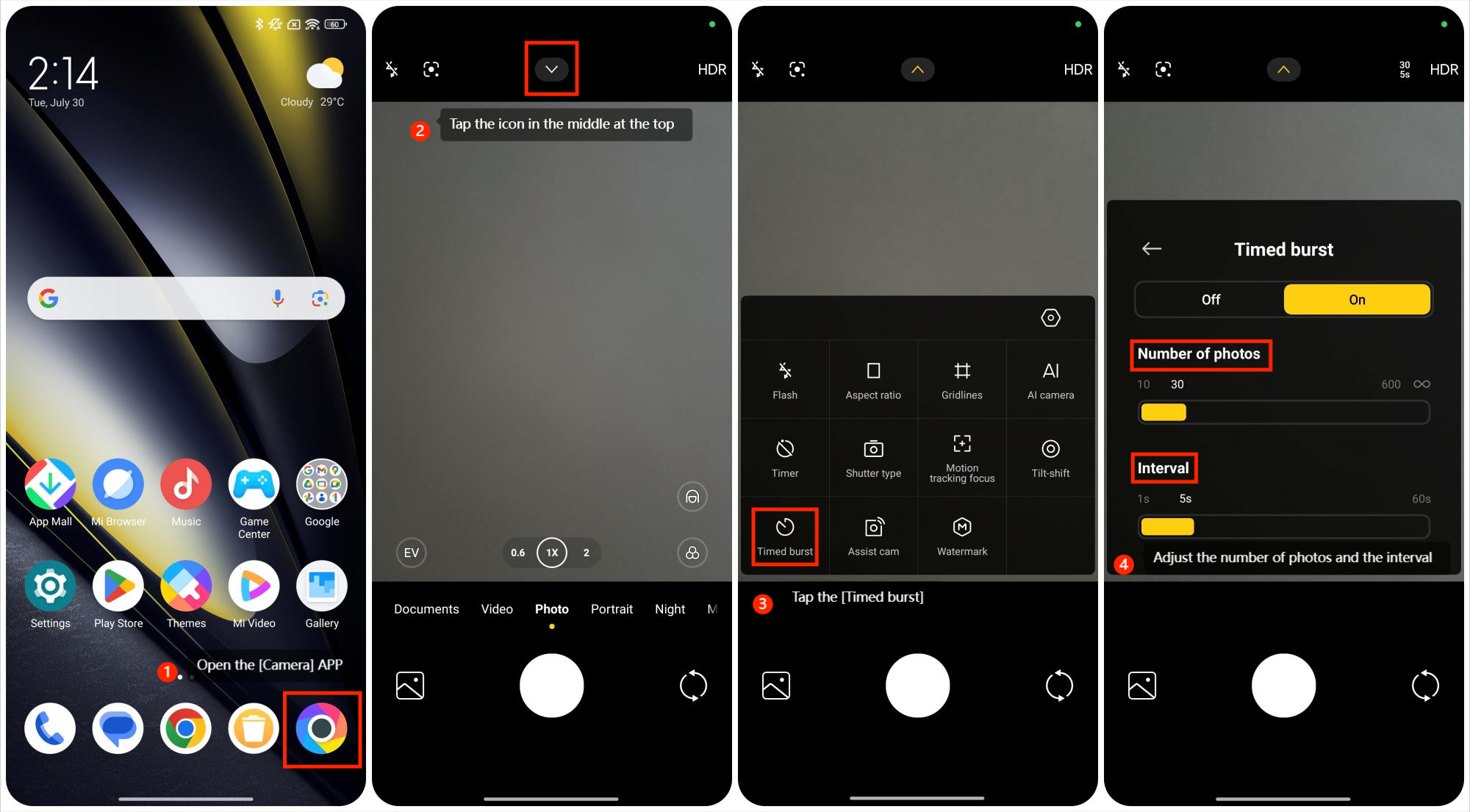
To turn on the Timed burst mode, please refer to the following steps:
1. Open the [Camera] APP;
2. Tap the icon in the middle at the top;
3. Tap the [Timed burst] to turn on/off it;
4. Once activated, you can capture a number of photos ranging from 10 to 600, with the option to go up to unlimited. Additionally, you can adjust the interval between shots from 1 second to 60 seconds.
To turn on the Timed burst mode, please refer to the following steps:
1. Open the [Camera] APP;
2. Tap the icon in the middle at the top;
3. Tap the [Timed burst] to turn on/off it;
4. Once activated, you can capture a number of photos ranging from 10 to 600, with the option to go up to unlimited. Additionally, you can adjust the interval between shots from 1 second to 60 seconds.
Does it help?
Yes
No