

How to select the language of the Xiaomi TV A 50 2025?
The Xiaomi TV A 50 2025 allows you to select and change the system display language according to your preferences. In the selected language, you can choose different
interface languages to display all TV menus, settings, application interfaces, etc. The TV will recommend content in the corresponding language according to the selected
language, including movies, TV series, applications, etc., to ensure you get content that aligns with your language habits. Meanwhile, Google Assistant will also interact
with the selected language. You can issue voice commands in your native language, which is more intuitive and convenient.
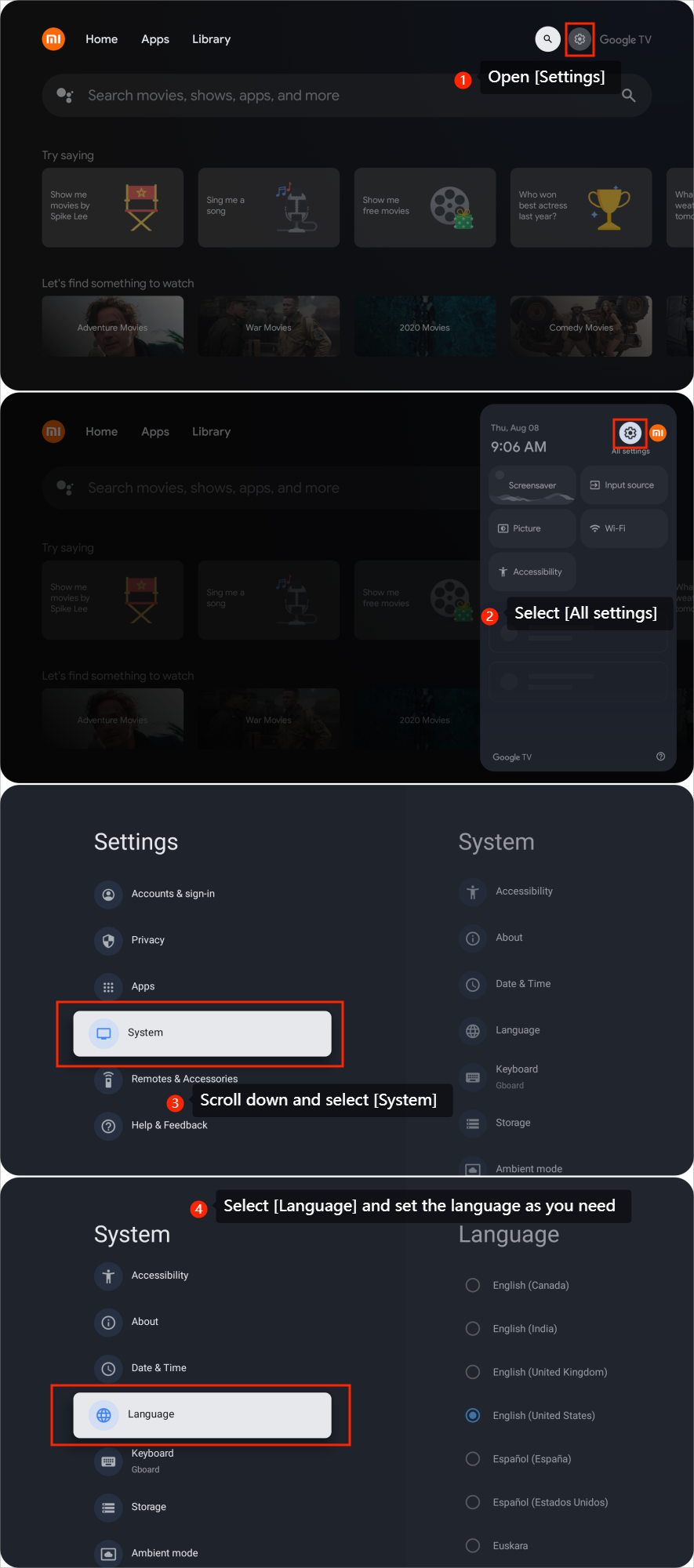
To select the language, you can refer to the following steps:
1. Open [Settings];
2. Select [All settings];
3. Scroll down and select [System];
4. Select [Language] and set the language as you need.
To select the language, you can refer to the following steps:
1. Open [Settings];
2. Select [All settings];
3. Scroll down and select [System];
4. Select [Language] and set the language as you need.
Does it help?
Yes
No