

How to use the Assist cam on the POCO F6 Pro?
Assist cam on the POCO F6 Pro is a mode that connects two devices to the same Wi-Fi network or hotspot and opens Assist cam to be able to take photos with one device from the other one.
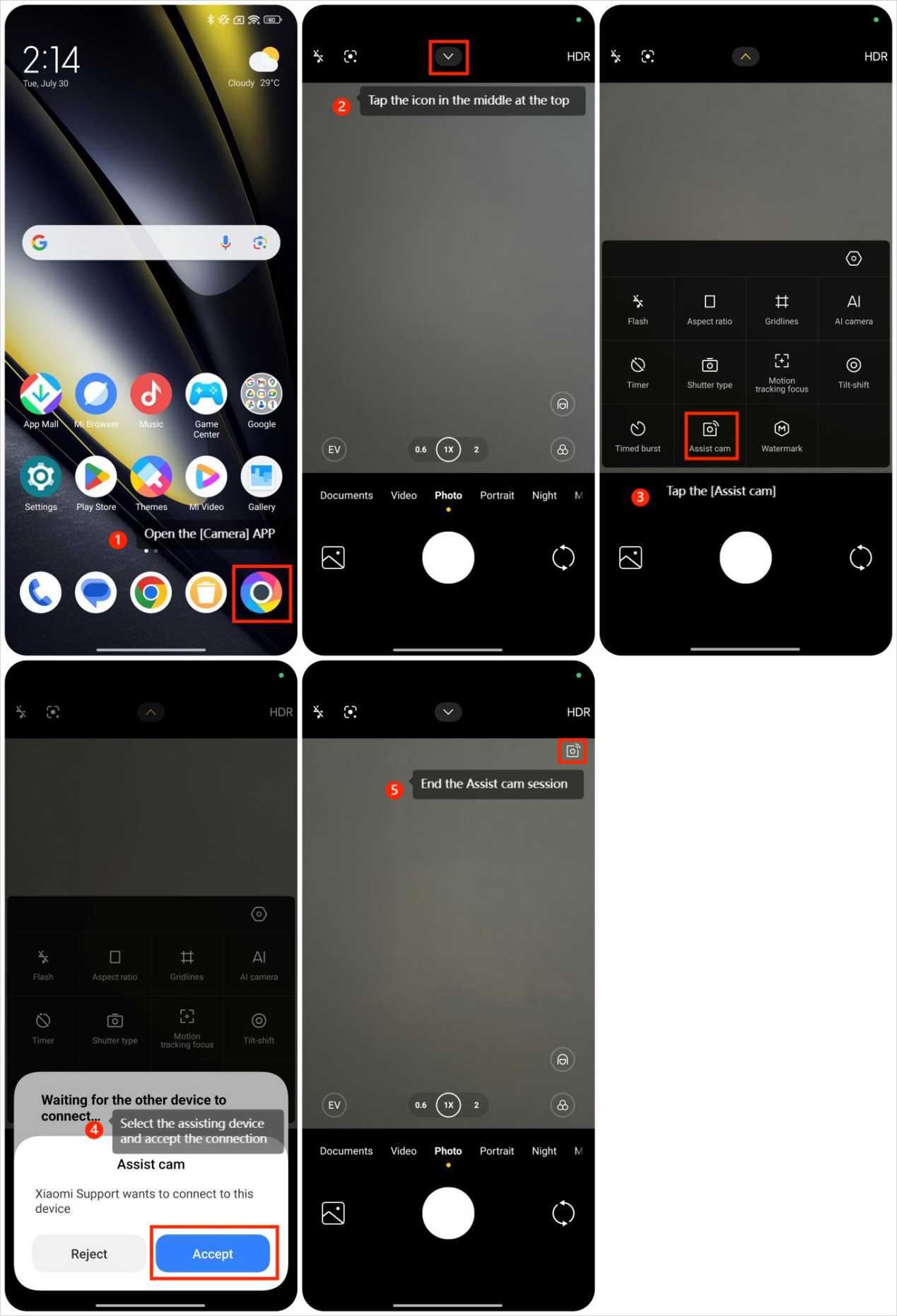
To turn on the Assist cam mode, you can refer to the following steps:
1. Open the [Camera] APP;
2. Tap the icon in the middle at the top;
3. Tap the [Assist cam] to search for another device which you want to pair;
4. Select the assisting device and accept the connection and then you can fully enjoy this feature;
5. If you don't want to use this feature, you can tap the icon at the upper right corner of the camera screen to end the Assist cam session.
To turn on the Assist cam mode, you can refer to the following steps:
1. Open the [Camera] APP;
2. Tap the icon in the middle at the top;
3. Tap the [Assist cam] to search for another device which you want to pair;
4. Select the assisting device and accept the connection and then you can fully enjoy this feature;
5. If you don't want to use this feature, you can tap the icon at the upper right corner of the camera screen to end the Assist cam session.
Does it help?
Yes
No