

How to adjust the frame rate on the camera of the POCO F6 Pro automatically?
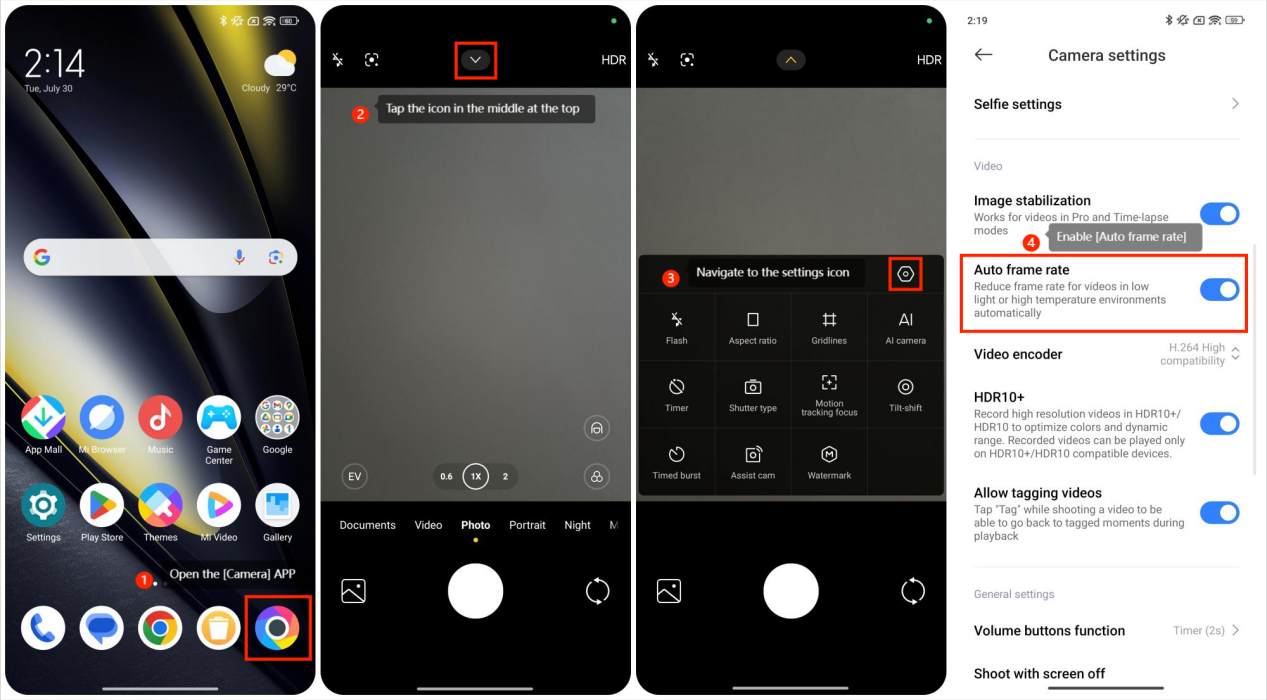
To turn on the Auto frame rate mode, please refer to the following steps:
1. Open the [Camera] APP;
2. Tap the icon in the middle at the top;
3. Navigate to the settings icon;
4. Enable [Auto frame rate] to use this feature.
1. Open the [Camera] APP;
2. Tap the icon in the middle at the top;
3. Navigate to the settings icon;
4. Enable [Auto frame rate] to use this feature.
On the POCO F6 Pro’s camera, the frame rate adjustment is handled automatically based on the shooting mode and lighting conditions. The camera of the phone adjusts the frame rate automatically based on various factors such as available light, motion in the scene, and the selected shooting mode. This ensures optimal video quality, providing smoother footage in well-lit environments and better performance in low-light conditions. The automatic adjustment helps maintain a balance between image clarity and fluidity, offering you a hassle-free recording experience.
Does it help?
Yes
No