

How to turn on the Selfie settings of the camera on the POCO F6 Pro?
The Selfie settings refer to the various options and adjustments available in a POCO F6 Pro's camera specifically designed to enhance selfie (self-portrait) photography.
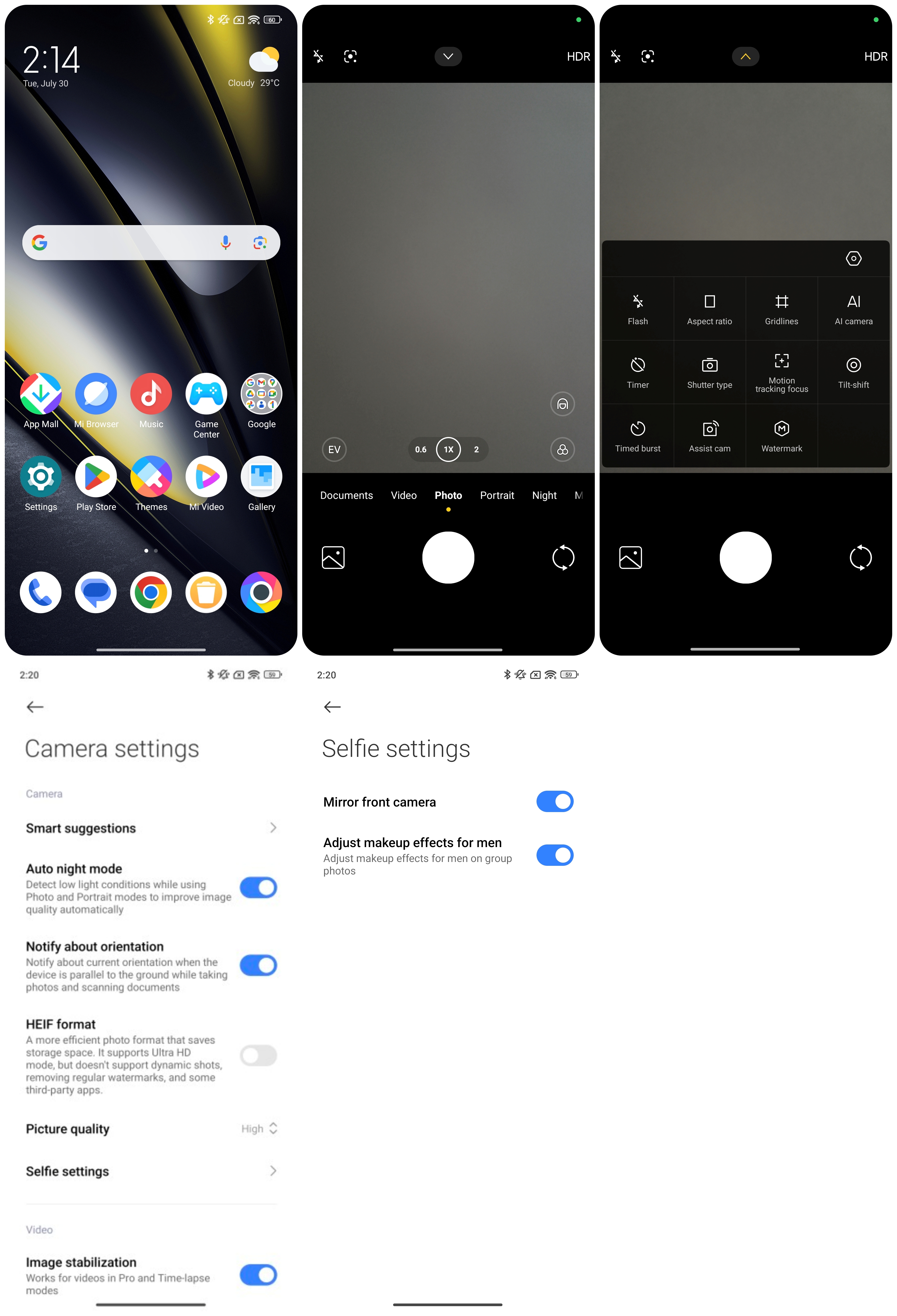
To turn on the selfie settings on the camera, please follow these steps:
1. Locate the [Camera] APP on your phone. You can find it on the home screen;
2. Tap the icon in the middle at the top of the screen;
3. Navigate to the settings icon;
4. Go into the [Selfie settings];
5. Choose the mode you want, such as [Mirror front camera] and [Adjust makeup effects for men].
Once you have adjusted the settings to your liking, be sure to save or apply the changes following the instructions provided by the Camera APP.
To turn on the selfie settings on the camera, please follow these steps:
1. Locate the [Camera] APP on your phone. You can find it on the home screen;
2. Tap the icon in the middle at the top of the screen;
3. Navigate to the settings icon;
4. Go into the [Selfie settings];
5. Choose the mode you want, such as [Mirror front camera] and [Adjust makeup effects for men].
Once you have adjusted the settings to your liking, be sure to save or apply the changes following the instructions provided by the Camera APP.
Does it help?
Yes
No