

How to use AI Bokeh on the POCO F6?
The AI Bokeh function in the camera of the POCO F6 utilizes artificial intelligence to create a professional-looking bokeh effect in your photos. This effect blurs the background while keeping the subject in sharp focus, mimicking the depth-of-field effect achieved with high-end cameras and lenses.
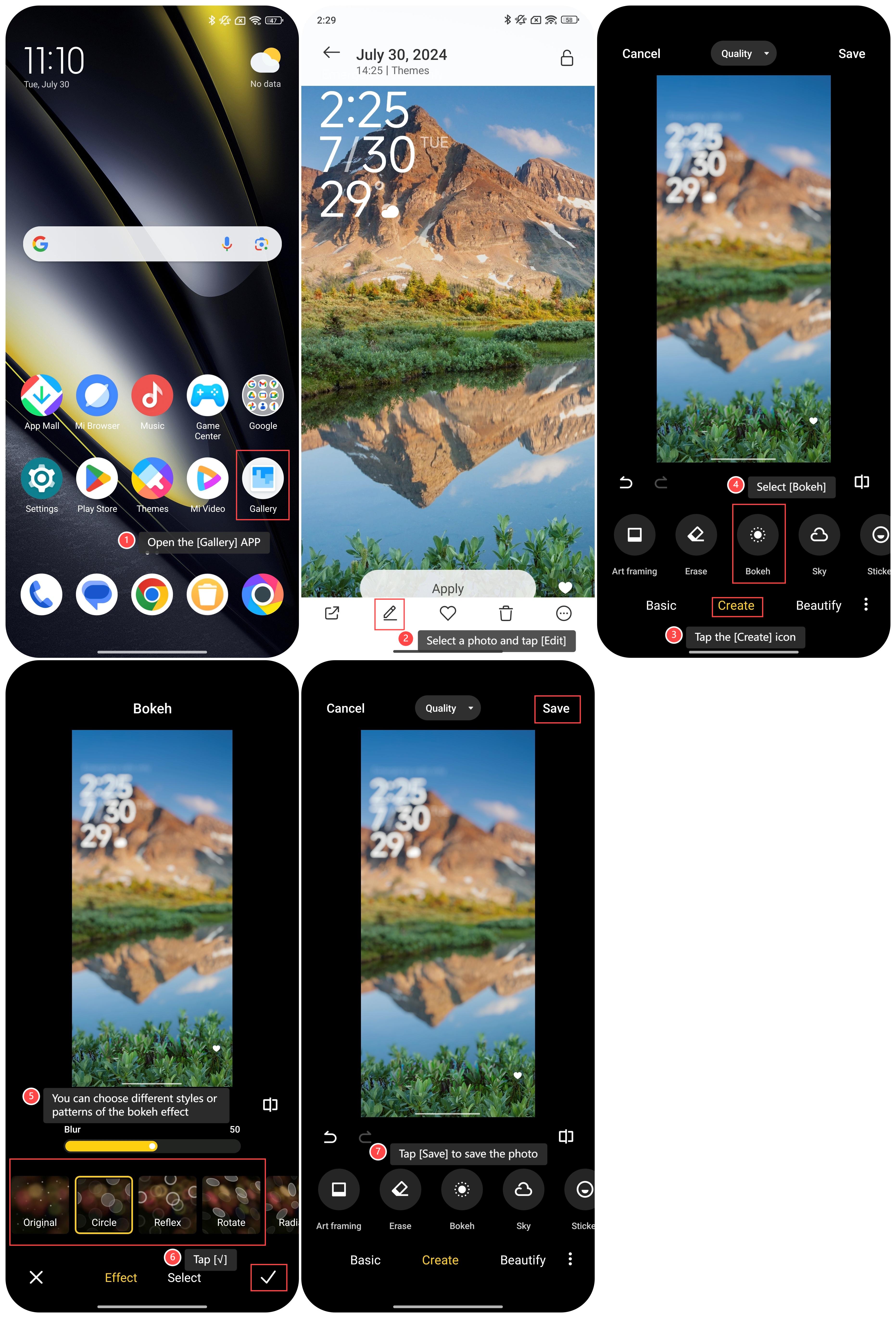
To use AI Bokeh on your phone, please refer to the following steps:
1. Open the [Gallery] APP;
2. Select a photo and tap [Edit];
3. Tap the [Create] icon;
4. Select [Bokeh];
5. You can choose different styles or patterns of the bokeh effect from the options: [Circle], [Reflex], [Rotate], [Radiate], [Octagon] and so on;
6. Tap [√];
7. Tap [Save] to save the photo.
Note:
1. Circle: It produces a classic bokeh effect with rounded, smooth circles as the background blur. This is the most common and traditional bokeh shape;
2. Reflex: The Reflex option creates a bokeh effect with multi-pointed or star-shaped patterns. It is useful for adding a creative or artistic flair to your images;
3. Rotate: It allows you to rotate the bokeh pattern or shape in the background blur. This feature lets you adjust the orientation of the blur to achieve different artistic effects.
To use AI Bokeh on your phone, please refer to the following steps:
1. Open the [Gallery] APP;
2. Select a photo and tap [Edit];
3. Tap the [Create] icon;
4. Select [Bokeh];
5. You can choose different styles or patterns of the bokeh effect from the options: [Circle], [Reflex], [Rotate], [Radiate], [Octagon] and so on;
6. Tap [√];
7. Tap [Save] to save the photo.
Note:
1. Circle: It produces a classic bokeh effect with rounded, smooth circles as the background blur. This is the most common and traditional bokeh shape;
2. Reflex: The Reflex option creates a bokeh effect with multi-pointed or star-shaped patterns. It is useful for adding a creative or artistic flair to your images;
3. Rotate: It allows you to rotate the bokeh pattern or shape in the background blur. This feature lets you adjust the orientation of the blur to achieve different artistic effects.
Does it help?
Yes
No