

How to connect the Xiaomi Wireless Mouse 3 with other devices via the 2.4 GHz channel?
The steps for connecting via the 2.4 GHz channel are listed below:
1. Slide down the Battery compartment cover to remove it as illustrated;
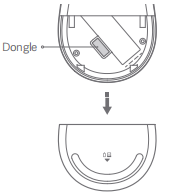
2. Take out the dongle and plug it into a USB port on the computer;
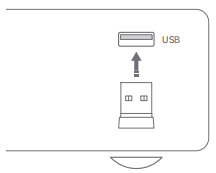
3. Install the AA battery into the mouse's battery compartment and turn on the mouse;
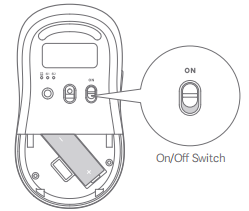
4. When the mouse is turned on for the first time, it defaults to the 2.4 GHz channel (the mouse has been paired with the dongle before leaving the factory). The 2.4 GHz channel indicator remains on for 3 seconds and then goes out after the mouse connects to your computer successfully;

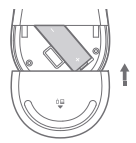
5. When there is a pop-up on your computer to notify you that the mouse is ready for use, you can close the battery compartment cover and start using the mouse.
Note:
Press the Function button to cycle through the channels of 2.4GHz, Bluetooth 1, and Bluetooth 2.
1. Slide down the Battery compartment cover to remove it as illustrated;
2. Take out the dongle and plug it into a USB port on the computer;
3. Install the AA battery into the mouse's battery compartment and turn on the mouse;
4. When the mouse is turned on for the first time, it defaults to the 2.4 GHz channel (the mouse has been paired with the dongle before leaving the factory). The 2.4 GHz channel indicator remains on for 3 seconds and then goes out after the mouse connects to your computer successfully;
5. When there is a pop-up on your computer to notify you that the mouse is ready for use, you can close the battery compartment cover and start using the mouse.
Note:
Press the Function button to cycle through the channels of 2.4GHz, Bluetooth 1, and Bluetooth 2.
Does it help?
Yes
No