

How to turn on the Auto night mode of the camera on the POCO F6 Pro?
The Auto night mode of the camera on the POCO F6 Pro is a feature designed to enhance the quality of photos taken in low-light or nighttime conditions. When enabled, the camera will detect low-light conditions while using Photo and Portrait modes to improve image quality automatically.
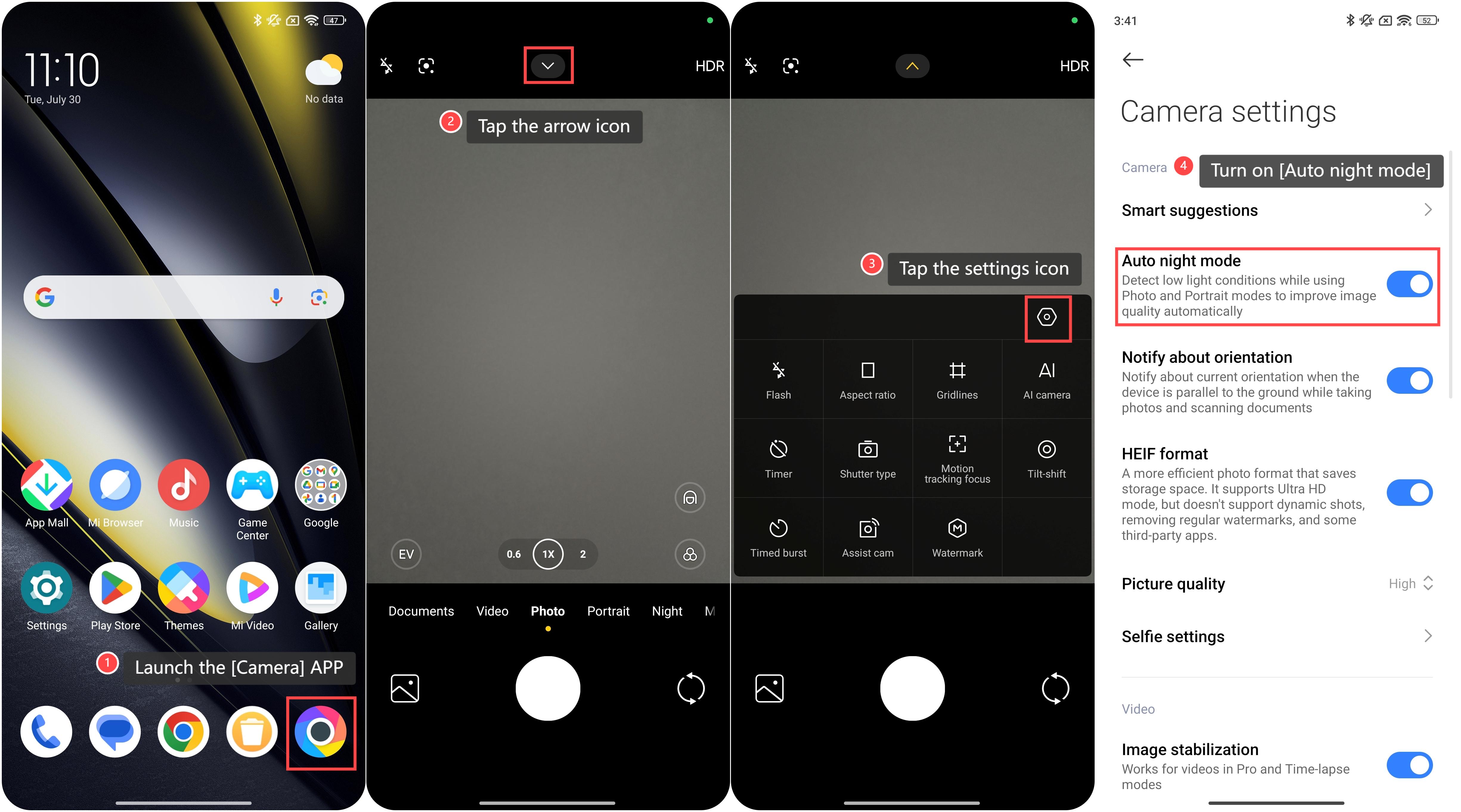
To turn on the Auto night mode, please refer to the following steps:
1. Launch the [Camera] APP;
2. Tap the arrow icon on the top of the screen;
3. Then tap the settings icon at the upper right corner;
4. Turn on [Auto night mode].
Friendly tips:
1. Hold the camera steady while taking the photo to avoid blur, as night mode requires a longer exposure time;
2. After taking a photo in Auto night mode, review it to ensure it meets your expectations.
To turn on the Auto night mode, please refer to the following steps:
1. Launch the [Camera] APP;
2. Tap the arrow icon on the top of the screen;
3. Then tap the settings icon at the upper right corner;
4. Turn on [Auto night mode].
Friendly tips:
1. Hold the camera steady while taking the photo to avoid blur, as night mode requires a longer exposure time;
2. After taking a photo in Auto night mode, review it to ensure it meets your expectations.
Does it help?
Yes
No