

Xiaomi Gaming Mouse Lite FAQ
Overview
1. Q: What are the differences between the Xiaomi Gaming Mouse Lite and other mouses?
A: The differences between the Xiaomi Gaming Mouse Lite and other mouses are listed below:
1. With the entry-level high-cost performance, the mouse uses a high-sensitivity sensor with a high-performance main control chip, has a gaming-level standard, and is sufficient to carry the current popular games;
2. The mouse weighs approximately 72g, featuring a “zero perforation” lightweight shell that balances body integrity with high-strength structural support, enabling flexible movement;
3. The body curves are designed to fully conform to the pressure points of the palm, providing a rich and full grip sensation. Suitable for various gripping habits such as palm grip and claw grip, ensuring comfortable and stable operation even during long-term use.
2. Q: What are the selling points of the Xiaomi Gaming Mouse Lite?
A: The selling points of the Xiaomi Gaming Mouse Lite are listed below:
1. The mouse weighs approximately 72g, with a perforation-free shell;
2. The body curves are designed to fully conform to the pressure points, with ergonomic contours;
3. The rear RGB colorful ambient light creates a vibrant atmosphere;
4. With 5 DPI levels, the PixArt sensor ensures precise tracking of mouse positioning.
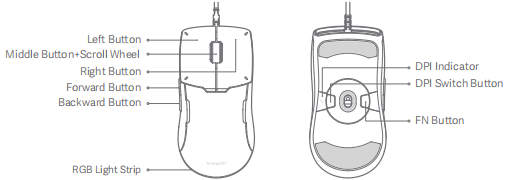
3. Q: What buttons does the Xiaomi Gaming Mouse Lite have?
A: The Xiaomi Gaming Mouse Lite has Left Button, Middle Button and Scroll Wheel, Right Button, Forward Button, Backward Button, DPI Switch Button and FN Button.
FAQs
1. Q: What is the rated input of the Xiaomi Gaming Mouse Lite?
A: The rated input of the Xiaomi Gaming Mouse Lite is 5V⎓150mA.
2. Q: How many DPI levels does the Xiaomi Gaming Mouse Lite have?
A: The Xiaomi Gaming Mouse Lite has five DPI (Dot Per Inch) levels. They are 400DPI, 800DPI, 1600DPI, 3200DPI, and 6200DPI. You can change the DPI according to your using habits to experience different game controls.
Note:
The Xiaomi Gaming Mouse Lite defaults to level 2 when being turned on for the first time. The next time it is turned on, the level will be the last used one.
3. Q: How to adjust the DPI levels of the Xiaomi Gaming Mouse Lite?
A: You can press the DPI Switch Button at the bottom of the Xiaomi Gaming Mouse Lite to adjust the DPI levels and the indicator color will change accordingly.
Note:
You can refer to the chart below to check the DPI level according to the indicator color:
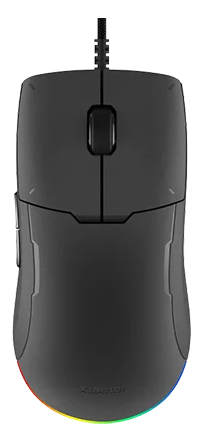
4. Q: What is the product picture of the Xiaomi Gaming Mouse Lite?
A: The product picture of the Xiaomi Gaming Mouse Lite is listed below:
5. Q: What is the connection method of the Xiaomi Gaming Mouse Lite?
A: The Xiaomi Gaming Mouse Lite uses USB wired connection.
6. Q: How to connect the Xiaomi Gaming Mouse Lite?
A: The steps for connecting the Xiaomi Gaming Mouse Lite are listed below:
1. Remove the protective film on the bottom of the mouse;
2. Remove the cable tie, and plug the USB connector into a computer. Then the computer will automatically detect the USB device and install the driver for the mouse;
3. After the installation is successful, the system prompts that the current device is available, and the mouse can be used normally.
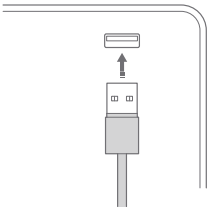
7. Q: What is the port type of the Xiaomi Gaming Mouse Lite?
A: The Xiaomi Gaming Mouse Lite uses the port of Type-A, USB 2.0 standard protocol.
8. Q: What is the length and material of the cable of the Xiaomi Gaming Mouse Lite?
A: The Xiaomi Gaming Mouse Lite uses a 2-meter-long sleeve cable, which is long enough to the connected to the USB port at the back of the host of the computer. A 2-meter-long cable with excellent flexibility reduces the friction on the desktop.
9. Q: What are the dimensions of the Xiaomi Gaming Mouse Lite?
A: The dimensions of the Xiaomi Gaming Mouse Lite are 125 × 63 × 39mm.
10. Q: What is the weight of the Xiaomi Gaming Mouse Lite?
A: To ensure a lightweight design, the Xiaomi Gaming Mouse Lite weighs approximately 72g (exclude cable) that balances body integrity with high-strength structural support, enabling flexible movement, accurate and fast positioning and reducing the load of the arm and wrist.
11. Q: What are the packaging contents of the Xiaomi Gaming Mouse Lite?
A: There is a Xiaomi Gaming Mouse Lite, a Replacement Mouse Feet, a User Manual and a Warranty Notice.
12. Q: Will the surface of the Xiaomi Gaming Mouse Lite heat up?
A: The rear RGB colorful ambient light will not make you feel any heat during daily use. However, during intense games, the body temperature will rise slightly, and the palms will secrete more sweat than usual. All these factors combined will cause a slight feeling of heat, however, it does not affect normal use.
13. Q: Is the Xiaomi Gaming Mouse Lite waterproof?
A: The Xiaomi Gaming Mouse Lite is not waterproof. Please do not splash or soak it in water to avoid damage to the mouse.
14. Q: What is the surface material of the Xiaomi Gaming Mouse Lite?
A: The material of the Xiaomi Gaming Mouse Lite is plastic. The surface of the mouse is covered with uniform wear-resistant texture, with moderate friction, and anti-fingerprint residue. It is easy to clean and has good air permeability, so you will not slip with sweaty hands.
15. Q: What is the Xiaomi Gaming Mouse Lite compatible with?
A: The Xiaomi Gaming Mouse Lite is compatible with Windows 10, macOS 10.13 and newer versions.
16. Q: What is the color of the Xiaomi Gaming Mouse Lite?
A: Currently, the Xiaomi Gaming Mouse Lite has only the color of dark gray.
17. Q: Are the buttons of the Xiaomi Gaming Mouse Lite mute?
A: The buttons of the Xiaomi Gaming Mouse Lite are not mute. Clicking the buttons has slight sounds, with a more real feeling of clicking and more rapid resilience compared with mute buttons.
18. Q: What microswitch does the Xiaomi Gaming Mouse Lite use?
A: The Xiaomi Gaming Mouse Lite uses a TTC gold microswitch. A dust-proof main TTC gold microswitch with responsive trigger feedback lasts for up to 80 million clicks. An IP54 rating, with 5 layers of reinforcement for increased reliability effectively prevents issues such as unintended, or consecutive clicking.
19. Q: What is the MCU of the Xiaomi Gaming Mouse Lite USB?
A: The MCU (Micro Controller Unit) of the Xiaomi Gaming Mouse Lite USB is 1000Hz, with a responding velocity of 1ms, a smooth moving track and an accurate positioning effect.
20. Q: What is the material of the Spare Mouse Skate Kit of the Xiaomi Gaming Mouse Lite?
A: The material of the Spare Mouse Skate Lit of the Xiaomi Gaming Mouse Lite is PTFE, with the adaptation of various surfaces, prolonged use, smooth movement and replaceable one.
21. Q: How to adjust the lighting effects of the Xiaomi Gaming Mouse Lite?
A: You can refer to the following chart to adjust the lighting effects:
22. Q: What are the precautions of the Xiaomi Gaming Mouse Lite?
A: The precautions of the Xiaomi Gaming Mouse Lite are listed below:
1. Keep the desktop flat during normal use. It is recommended to use it with a mouse pad, and a cloth mouse pad is the best;
2. Avoid using it on transparent glass and high-gloss mirror surfaces, which will have a certain impact on the movement and positioning of the mouse;
3. Do a good job of cleaning. If there is dust in the bottom lens hole, please clean it in time;
4. Pay attention to waterproofing during the use of the mouse. Liquids such as beverages invading the mouse will lead to the using problems;
5. It is recommended that the mouse be directly connected to the computer USB interface for use. It will be stuck when using a USB HUB or other adapter.
Troubleshooting
1. Q: Why can the Xiaomi Gaming Mouse Lite not be identified when the computer is turned on?
A: To check the problem, please refer to the following information:
1. Please make sure that the USB port is correctly inserted, or try to insert it into another USB port to see if it works normally;
2. Please check whether the current system version belongs to Windows10, macOS10.13 and newer versions;
3. Tap Scan for hardware changes in Device manager. The hardware will be scanned and the USB driver will be installed automatically. After the installation, the mouse can be used.
If the steps above are useless, please contact the local after-sales service center.
2. Q: Why are the indicators of the Xiaomi Gaming Mouse Lite abnormal?
A: To check the problem, please refer to the following steps:
1. Clicking the DPI switch can adjust the resolution, and the indicator will display the respective color;
2. Please check whether the DPI switch can work normally.
If the steps above are useless, please contact the local after-sales service center.
3. Q: Why is the scroll wheel of the Xiaomi Gaming Mouse Lite abnormal?
A: To check the problem, please refer to the following steps:
1. Check whether the connection of the mouse to the computer is normal;
2. Check whether the buttons of the mouse are pressed, so the functions of the buttons cannot be used;
3. Check whether the lens pole at the bottom of the mouse has the obstruction of foreign parts or dust, so the movement of the cursor will be affected;
4. The dirty mouse pat will affect the smoothness of the movement of the cursor, please keep it clean.
If the steps above are useless, please contact the after-sales service center.
4. Q: Why cannot the RGB lighting effects and color of the Xiaomi Gaming Mouse Lite be adjusted?
A: To check the problem, please refer to the following steps:
1. The combinations of FN button with other buttons can adjust different lighting conditions, please check whether you follow the instructions on the User Manual;
2. Please check whether the FN button is normal.
If the steps above are useless, please contact the local after-sales service center.
1. Q: What are the differences between the Xiaomi Gaming Mouse Lite and other mouses?
A: The differences between the Xiaomi Gaming Mouse Lite and other mouses are listed below:
1. With the entry-level high-cost performance, the mouse uses a high-sensitivity sensor with a high-performance main control chip, has a gaming-level standard, and is sufficient to carry the current popular games;
2. The mouse weighs approximately 72g, featuring a “zero perforation” lightweight shell that balances body integrity with high-strength structural support, enabling flexible movement;
3. The body curves are designed to fully conform to the pressure points of the palm, providing a rich and full grip sensation. Suitable for various gripping habits such as palm grip and claw grip, ensuring comfortable and stable operation even during long-term use.
2. Q: What are the selling points of the Xiaomi Gaming Mouse Lite?
A: The selling points of the Xiaomi Gaming Mouse Lite are listed below:
1. The mouse weighs approximately 72g, with a perforation-free shell;
2. The body curves are designed to fully conform to the pressure points, with ergonomic contours;
3. The rear RGB colorful ambient light creates a vibrant atmosphere;
4. With 5 DPI levels, the PixArt sensor ensures precise tracking of mouse positioning.
3. Q: What buttons does the Xiaomi Gaming Mouse Lite have?
A: The Xiaomi Gaming Mouse Lite has Left Button, Middle Button and Scroll Wheel, Right Button, Forward Button, Backward Button, DPI Switch Button and FN Button.
FAQs
1. Q: What is the rated input of the Xiaomi Gaming Mouse Lite?
A: The rated input of the Xiaomi Gaming Mouse Lite is 5V⎓150mA.
2. Q: How many DPI levels does the Xiaomi Gaming Mouse Lite have?
A: The Xiaomi Gaming Mouse Lite has five DPI (Dot Per Inch) levels. They are 400DPI, 800DPI, 1600DPI, 3200DPI, and 6200DPI. You can change the DPI according to your using habits to experience different game controls.
Note:
The Xiaomi Gaming Mouse Lite defaults to level 2 when being turned on for the first time. The next time it is turned on, the level will be the last used one.
3. Q: How to adjust the DPI levels of the Xiaomi Gaming Mouse Lite?
A: You can press the DPI Switch Button at the bottom of the Xiaomi Gaming Mouse Lite to adjust the DPI levels and the indicator color will change accordingly.
Note:
You can refer to the chart below to check the DPI level according to the indicator color:
| DPI Level | DPI | Indicator Color |
| 1 | 400DPI | Red |
| 2 | 800DPI | Purple |
| 3 | 1600DPI | Blue |
| 4 | 3200DPI | Green |
| 5 | 6200DPI | Yellow |
4. Q: What is the product picture of the Xiaomi Gaming Mouse Lite?
A: The product picture of the Xiaomi Gaming Mouse Lite is listed below:
5. Q: What is the connection method of the Xiaomi Gaming Mouse Lite?
A: The Xiaomi Gaming Mouse Lite uses USB wired connection.
6. Q: How to connect the Xiaomi Gaming Mouse Lite?
A: The steps for connecting the Xiaomi Gaming Mouse Lite are listed below:
1. Remove the protective film on the bottom of the mouse;
2. Remove the cable tie, and plug the USB connector into a computer. Then the computer will automatically detect the USB device and install the driver for the mouse;
3. After the installation is successful, the system prompts that the current device is available, and the mouse can be used normally.
7. Q: What is the port type of the Xiaomi Gaming Mouse Lite?
A: The Xiaomi Gaming Mouse Lite uses the port of Type-A, USB 2.0 standard protocol.
8. Q: What is the length and material of the cable of the Xiaomi Gaming Mouse Lite?
A: The Xiaomi Gaming Mouse Lite uses a 2-meter-long sleeve cable, which is long enough to the connected to the USB port at the back of the host of the computer. A 2-meter-long cable with excellent flexibility reduces the friction on the desktop.
9. Q: What are the dimensions of the Xiaomi Gaming Mouse Lite?
A: The dimensions of the Xiaomi Gaming Mouse Lite are 125 × 63 × 39mm.
10. Q: What is the weight of the Xiaomi Gaming Mouse Lite?
A: To ensure a lightweight design, the Xiaomi Gaming Mouse Lite weighs approximately 72g (exclude cable) that balances body integrity with high-strength structural support, enabling flexible movement, accurate and fast positioning and reducing the load of the arm and wrist.
11. Q: What are the packaging contents of the Xiaomi Gaming Mouse Lite?
A: There is a Xiaomi Gaming Mouse Lite, a Replacement Mouse Feet, a User Manual and a Warranty Notice.
12. Q: Will the surface of the Xiaomi Gaming Mouse Lite heat up?
A: The rear RGB colorful ambient light will not make you feel any heat during daily use. However, during intense games, the body temperature will rise slightly, and the palms will secrete more sweat than usual. All these factors combined will cause a slight feeling of heat, however, it does not affect normal use.
13. Q: Is the Xiaomi Gaming Mouse Lite waterproof?
A: The Xiaomi Gaming Mouse Lite is not waterproof. Please do not splash or soak it in water to avoid damage to the mouse.
14. Q: What is the surface material of the Xiaomi Gaming Mouse Lite?
A: The material of the Xiaomi Gaming Mouse Lite is plastic. The surface of the mouse is covered with uniform wear-resistant texture, with moderate friction, and anti-fingerprint residue. It is easy to clean and has good air permeability, so you will not slip with sweaty hands.
15. Q: What is the Xiaomi Gaming Mouse Lite compatible with?
A: The Xiaomi Gaming Mouse Lite is compatible with Windows 10, macOS 10.13 and newer versions.
16. Q: What is the color of the Xiaomi Gaming Mouse Lite?
A: Currently, the Xiaomi Gaming Mouse Lite has only the color of dark gray.
17. Q: Are the buttons of the Xiaomi Gaming Mouse Lite mute?
A: The buttons of the Xiaomi Gaming Mouse Lite are not mute. Clicking the buttons has slight sounds, with a more real feeling of clicking and more rapid resilience compared with mute buttons.
18. Q: What microswitch does the Xiaomi Gaming Mouse Lite use?
A: The Xiaomi Gaming Mouse Lite uses a TTC gold microswitch. A dust-proof main TTC gold microswitch with responsive trigger feedback lasts for up to 80 million clicks. An IP54 rating, with 5 layers of reinforcement for increased reliability effectively prevents issues such as unintended, or consecutive clicking.
19. Q: What is the MCU of the Xiaomi Gaming Mouse Lite USB?
A: The MCU (Micro Controller Unit) of the Xiaomi Gaming Mouse Lite USB is 1000Hz, with a responding velocity of 1ms, a smooth moving track and an accurate positioning effect.
20. Q: What is the material of the Spare Mouse Skate Kit of the Xiaomi Gaming Mouse Lite?
A: The material of the Spare Mouse Skate Lit of the Xiaomi Gaming Mouse Lite is PTFE, with the adaptation of various surfaces, prolonged use, smooth movement and replaceable one.
21. Q: How to adjust the lighting effects of the Xiaomi Gaming Mouse Lite?
A: You can refer to the following chart to adjust the lighting effects:
| Combinations | Lighting Effects |
| FN + Scrolling up the wheel | Change among the flowing light mode, the colorful & breathing light mode, and the single color mode. |
| FN + Scrolling down the wheel | Change the light flowing directions in the flowing light mode: From left to right, from right to left, and from the middle to both side |
| Change the light color in the single color mode: Red, orange, yellow, green, cyan, blue, and purple. | |
| FN + Left Button | Change the light brightness levels: High, low, and disabled. |
| FN + Right Button | Change the light strip's breathing frequencies: Fast, medium, and low. |
22. Q: What are the precautions of the Xiaomi Gaming Mouse Lite?
A: The precautions of the Xiaomi Gaming Mouse Lite are listed below:
1. Keep the desktop flat during normal use. It is recommended to use it with a mouse pad, and a cloth mouse pad is the best;
2. Avoid using it on transparent glass and high-gloss mirror surfaces, which will have a certain impact on the movement and positioning of the mouse;
3. Do a good job of cleaning. If there is dust in the bottom lens hole, please clean it in time;
4. Pay attention to waterproofing during the use of the mouse. Liquids such as beverages invading the mouse will lead to the using problems;
5. It is recommended that the mouse be directly connected to the computer USB interface for use. It will be stuck when using a USB HUB or other adapter.
Troubleshooting
1. Q: Why can the Xiaomi Gaming Mouse Lite not be identified when the computer is turned on?
A: To check the problem, please refer to the following information:
1. Please make sure that the USB port is correctly inserted, or try to insert it into another USB port to see if it works normally;
2. Please check whether the current system version belongs to Windows10, macOS10.13 and newer versions;
3. Tap Scan for hardware changes in Device manager. The hardware will be scanned and the USB driver will be installed automatically. After the installation, the mouse can be used.
If the steps above are useless, please contact the local after-sales service center.
2. Q: Why are the indicators of the Xiaomi Gaming Mouse Lite abnormal?
A: To check the problem, please refer to the following steps:
1. Clicking the DPI switch can adjust the resolution, and the indicator will display the respective color;
2. Please check whether the DPI switch can work normally.
If the steps above are useless, please contact the local after-sales service center.
3. Q: Why is the scroll wheel of the Xiaomi Gaming Mouse Lite abnormal?
A: To check the problem, please refer to the following steps:
1. Check whether the connection of the mouse to the computer is normal;
2. Check whether the buttons of the mouse are pressed, so the functions of the buttons cannot be used;
3. Check whether the lens pole at the bottom of the mouse has the obstruction of foreign parts or dust, so the movement of the cursor will be affected;
4. The dirty mouse pat will affect the smoothness of the movement of the cursor, please keep it clean.
If the steps above are useless, please contact the after-sales service center.
4. Q: Why cannot the RGB lighting effects and color of the Xiaomi Gaming Mouse Lite be adjusted?
A: To check the problem, please refer to the following steps:
1. The combinations of FN button with other buttons can adjust different lighting conditions, please check whether you follow the instructions on the User Manual;
2. Please check whether the FN button is normal.
If the steps above are useless, please contact the local after-sales service center.
Does it help?
Yes
No