

Xiaomi Desktop Heater FAQ
Overview
1. Q: What are the main selling points of the Xiaomi Desktop Heater?
A: The Xiaomi Desktop Heater is a touch-type AC with a high-power PTC ceramic heater. It provides wide-angle, gentle airflow with a 45° oscillating function for wrap-around warmth and comfort. Compact and lightweight, it meets various heating needs, while its V-0-rated flame-retardant ABS + PC shell ensures effective flame resistance for safe operation.
2. Q: What are the basic specifications of the Xiaomi Desktop Heater?
A: The Xiaomi Desktop Heater is a 600W desktop heater with a 45° oscillating angle and a net weight of 0.93kg.
3. Q: What is the power consumption of the Xiaomi Desktop Heater?
A: The overall power of the Xiaomi Desktop Heater is 600W, which means that the electricity consumption per hour is 0.6kWh.
4. Q: What certifications does the Xiaomi Desktop Heater obtain?
A: The whole device complies with RoHS standards.
5. Q: What is the PTC of the Xiaomi Desktop Heater? What are the advantages?
A: The PTC components, also known as PTC thermistor ceramics, are a type of semiconductor functional ceramics with a positive temperature coefficient.
Advantages: Before reaching the transition temperature, the resistance of the PTC decreases as the temperature increases. From the transition temperature to the thermal runaway temperature, the resistance significantly increases with the temperature.
PTC components offer unparalleled advantages over traditional electric heating elements, including constant temperature heating, long natural lifespan, energy efficiency, absence of open flames, excellent safety performance, easy adjustment of heat output, and minimal influence from power supply voltage.
Function related
1. Q: What about the operating noise of the Xiaomi Desktop Heater?
A: Thank you for choosing the Xiaomi Desktop Heater. The noise during use mainly comes from the high-speed rotation and airflow cutting of the axial fan. According to third-party laboratory results, the average sound pressure level is 38.6dB(A). If it is a bit noisy, you can try placing the heater at a slightly farther distance.
Testing environment: Semi-anechoic chamber;
Ambient temperature: 24.3℃;
Ambient humidity: 63.1%RH;
Atmospheric pressure: 100.19kPa;
Installation conditions: Placed centrally on the floor;
Test envelope surface: Hemispherical envelope surface;
Test radius: r = 1.5m.
2. Q: How to operate the Xiaomi Desktop Heater?
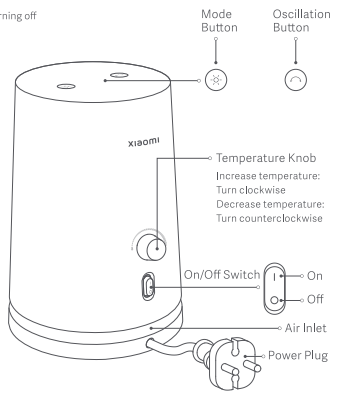
A: The product has four physical buttons on its casing: Temperature Knob, On/Off Switch, Mode Button and Oscillation Button.
3. Q: What are the components and the accessories list of the Xiaomi Desktop Heater?
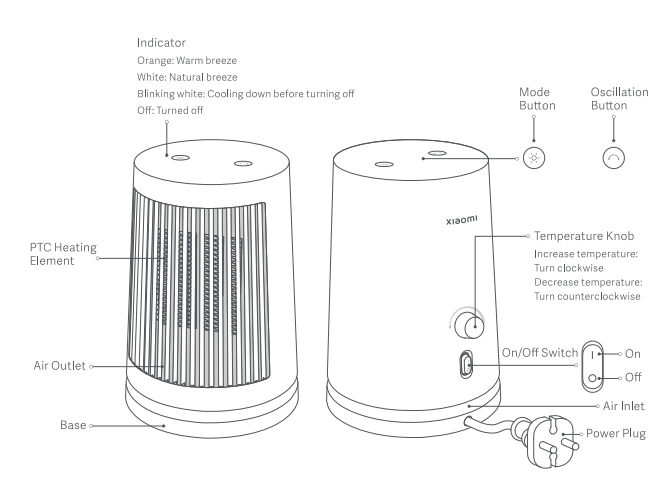
A: The product features an indicator, a PTC heating element, an air outlet, a base, an air inlet, and four control buttons: Mode Button, Oscillation Button, Temperature Knob, and an On/Off Switch. The packing list includes Fan heater × 1 and User manual × 1.
4. Q: How to activate the oscillation function of the Xiaomi Desktop Heater?
A: The oscillating angle is 45°. Press the oscillation button to enable or disable the oscillation function.
5. Q: What is the power of the Xiaomi Desktop Heater when blowing warm air and natural air?
A: The power is 600W for warm air and 3W for natural air.
6. Q: Does the Xiaomi Desktop Heater have a natural breeze function?
A: The Xiaomi Desktop Heater is a touch-type heater that includes a natural breeze function.
7. Q: Why does the Xiaomi Desktop Heater make unusual sounds during use?
A: The Xiaomi Desktop Heater produces a gentle airflow noise, with the maximum noise level not exceeding 38.6dB(A). If you hear other unusual noises, please check if the product is placed level. Additionally, intermittent noises caused by the thermal expansion and contraction of the metal heating element are normal.
8. Q: Why cannot the Xiaomi Desktop Heater be turned on?
A: 1. If there has been an unexpected power outage, the heater can not power on immediately due to the high-temperature protection of the thermostat. Please wait for the temperature to cool down before using it again;
2. If the heater is used in an environment where the temperature exceeds 26°C, the thermostat's high-temperature protection will prevent it from turning on. Allow the heater to cool down for a while, and it should operate again.
9. Q: Does the Xiaomi Desktop Heater support the network connection?
A: The Xiaomi Desktop Heater is a touch-type heater. It does not support the network connection.
10. Q: How many degrees does the Xiaomi Desktop Heater tilt to automatically shut down?
A: In the warm breeze mode, the heater will stop heating if tilted at 45°, and the natural breeze automatically dissipates heat for 1 minute. In the natural breeze mode, the heater will stop heating if tilted at 45°.
11. Q: Is the Xiaomi Desktop Heater waterproof?
A: The Xiaomi Desktop Heater is not waterproof.
12. Q: What is the surface temperature of the air outlet when the Xiaomi Desktop Heater is heating?
A: The surface temperature of the air outlet is approximately 50℃ when the heater is heating.
13. Q: What is the length of the power cable of the Xiaomi Desktop Heater?
A: The power cable is 1.2m.
14. Q: Can the Xiaomi Desktop Heater only heat without blowing air?
A: No, it cannot.
15. Q: Can the Xiaomi Desktop Heater be turned off directly during use?
A: Yes, you can turn off the device directly during use. However, when you turn it on again, it will need to wait for the internal temperature to decrease, which takes about 5 minutes.
16. Q: Does the Xiaomi Desktop Heater have a timer function for automatic shutdown?
A: It does not have a timer function, but it will automatically shut off after 12 hours of continuous operation.
17. Q: Will the casing of the Xiaomi Desktop Heater melt? What material is it made from and what is its flame-retardant temperature?
A: The casing is made of V-0 grade flame-retardant material: ABS + PC. It can withstand temperatures up to 110℃ and will not melt under normal operating conditions.
18. Q: How far can the warm air from the Xiaomi Desktop Heater blow?
A: In the absence of external interference, the airflow distance is approximately 0.6 meters.
19. Q: How much ambient temperature does it need to reach for the Xiaomi Desktop Heater to enter natural breeze mode?
A: The working temperature of the natural breeze mode is -10°C~50°C.
20. Q: How much ambient temperature does it need to reach for the Xiaomi Desktop Heater to enter warm breeze mode?
A: The working temperature of the warm breeze mode is -10°C~26°C.
Troubleshooting
1. Q: Why is there a smell while using the Xiaomi Desktop Heater?
A: The odor could be due to the metal modules heating up, which some people will perceive as an unusual smell. Additionally, dust, hair, or other particles entering the air outlet can also cause odors. If the smell is too strong or unpleasant, it's recommended to contact the after-sale service center for further inspection.
2. Q: Why does the Xiaomi Desktop Heater automatically shut off?
A: 1. The heater will automatically shut off if it is tilted at 45°, activating the tilt switch for safety;
2. It will automatically turn off after 12 hours of continuous operation;
3. If the heater is covered or if the air outlet is obstructed, causing internal temperatures to rise, it will automatically cut off power to protect against overheating.
3. Q: What to do if the Xiaomi Desktop Heater cannot be turned on?
A: 1. Check if the power cord is properly connected and in good contact;
2. Ensure that the on/off switch is turned on;
3. If the device's internal temperature is too high, wait for it to cool down before attempting to power it on again.
1. Q: What are the main selling points of the Xiaomi Desktop Heater?
A: The Xiaomi Desktop Heater is a touch-type AC with a high-power PTC ceramic heater. It provides wide-angle, gentle airflow with a 45° oscillating function for wrap-around warmth and comfort. Compact and lightweight, it meets various heating needs, while its V-0-rated flame-retardant ABS + PC shell ensures effective flame resistance for safe operation.
2. Q: What are the basic specifications of the Xiaomi Desktop Heater?
A: The Xiaomi Desktop Heater is a 600W desktop heater with a 45° oscillating angle and a net weight of 0.93kg.
3. Q: What is the power consumption of the Xiaomi Desktop Heater?
A: The overall power of the Xiaomi Desktop Heater is 600W, which means that the electricity consumption per hour is 0.6kWh.
4. Q: What certifications does the Xiaomi Desktop Heater obtain?
A: The whole device complies with RoHS standards.
5. Q: What is the PTC of the Xiaomi Desktop Heater? What are the advantages?
A: The PTC components, also known as PTC thermistor ceramics, are a type of semiconductor functional ceramics with a positive temperature coefficient.
Advantages: Before reaching the transition temperature, the resistance of the PTC decreases as the temperature increases. From the transition temperature to the thermal runaway temperature, the resistance significantly increases with the temperature.
PTC components offer unparalleled advantages over traditional electric heating elements, including constant temperature heating, long natural lifespan, energy efficiency, absence of open flames, excellent safety performance, easy adjustment of heat output, and minimal influence from power supply voltage.
Function related
1. Q: What about the operating noise of the Xiaomi Desktop Heater?
A: Thank you for choosing the Xiaomi Desktop Heater. The noise during use mainly comes from the high-speed rotation and airflow cutting of the axial fan. According to third-party laboratory results, the average sound pressure level is 38.6dB(A). If it is a bit noisy, you can try placing the heater at a slightly farther distance.
Testing environment: Semi-anechoic chamber;
Ambient temperature: 24.3℃;
Ambient humidity: 63.1%RH;
Atmospheric pressure: 100.19kPa;
Installation conditions: Placed centrally on the floor;
Test envelope surface: Hemispherical envelope surface;
Test radius: r = 1.5m.
2. Q: How to operate the Xiaomi Desktop Heater?
A: The product has four physical buttons on its casing: Temperature Knob, On/Off Switch, Mode Button and Oscillation Button.
3. Q: What are the components and the accessories list of the Xiaomi Desktop Heater?
A: The product features an indicator, a PTC heating element, an air outlet, a base, an air inlet, and four control buttons: Mode Button, Oscillation Button, Temperature Knob, and an On/Off Switch. The packing list includes Fan heater × 1 and User manual × 1.
4. Q: How to activate the oscillation function of the Xiaomi Desktop Heater?
A: The oscillating angle is 45°. Press the oscillation button to enable or disable the oscillation function.
5. Q: What is the power of the Xiaomi Desktop Heater when blowing warm air and natural air?
A: The power is 600W for warm air and 3W for natural air.
6. Q: Does the Xiaomi Desktop Heater have a natural breeze function?
A: The Xiaomi Desktop Heater is a touch-type heater that includes a natural breeze function.
7. Q: Why does the Xiaomi Desktop Heater make unusual sounds during use?
A: The Xiaomi Desktop Heater produces a gentle airflow noise, with the maximum noise level not exceeding 38.6dB(A). If you hear other unusual noises, please check if the product is placed level. Additionally, intermittent noises caused by the thermal expansion and contraction of the metal heating element are normal.
8. Q: Why cannot the Xiaomi Desktop Heater be turned on?
A: 1. If there has been an unexpected power outage, the heater can not power on immediately due to the high-temperature protection of the thermostat. Please wait for the temperature to cool down before using it again;
2. If the heater is used in an environment where the temperature exceeds 26°C, the thermostat's high-temperature protection will prevent it from turning on. Allow the heater to cool down for a while, and it should operate again.
9. Q: Does the Xiaomi Desktop Heater support the network connection?
A: The Xiaomi Desktop Heater is a touch-type heater. It does not support the network connection.
10. Q: How many degrees does the Xiaomi Desktop Heater tilt to automatically shut down?
A: In the warm breeze mode, the heater will stop heating if tilted at 45°, and the natural breeze automatically dissipates heat for 1 minute. In the natural breeze mode, the heater will stop heating if tilted at 45°.
11. Q: Is the Xiaomi Desktop Heater waterproof?
A: The Xiaomi Desktop Heater is not waterproof.
12. Q: What is the surface temperature of the air outlet when the Xiaomi Desktop Heater is heating?
A: The surface temperature of the air outlet is approximately 50℃ when the heater is heating.
13. Q: What is the length of the power cable of the Xiaomi Desktop Heater?
A: The power cable is 1.2m.
14. Q: Can the Xiaomi Desktop Heater only heat without blowing air?
A: No, it cannot.
15. Q: Can the Xiaomi Desktop Heater be turned off directly during use?
A: Yes, you can turn off the device directly during use. However, when you turn it on again, it will need to wait for the internal temperature to decrease, which takes about 5 minutes.
16. Q: Does the Xiaomi Desktop Heater have a timer function for automatic shutdown?
A: It does not have a timer function, but it will automatically shut off after 12 hours of continuous operation.
17. Q: Will the casing of the Xiaomi Desktop Heater melt? What material is it made from and what is its flame-retardant temperature?
A: The casing is made of V-0 grade flame-retardant material: ABS + PC. It can withstand temperatures up to 110℃ and will not melt under normal operating conditions.
18. Q: How far can the warm air from the Xiaomi Desktop Heater blow?
A: In the absence of external interference, the airflow distance is approximately 0.6 meters.
19. Q: How much ambient temperature does it need to reach for the Xiaomi Desktop Heater to enter natural breeze mode?
A: The working temperature of the natural breeze mode is -10°C~50°C.
20. Q: How much ambient temperature does it need to reach for the Xiaomi Desktop Heater to enter warm breeze mode?
A: The working temperature of the warm breeze mode is -10°C~26°C.
Troubleshooting
1. Q: Why is there a smell while using the Xiaomi Desktop Heater?
A: The odor could be due to the metal modules heating up, which some people will perceive as an unusual smell. Additionally, dust, hair, or other particles entering the air outlet can also cause odors. If the smell is too strong or unpleasant, it's recommended to contact the after-sale service center for further inspection.
2. Q: Why does the Xiaomi Desktop Heater automatically shut off?
A: 1. The heater will automatically shut off if it is tilted at 45°, activating the tilt switch for safety;
2. It will automatically turn off after 12 hours of continuous operation;
3. If the heater is covered or if the air outlet is obstructed, causing internal temperatures to rise, it will automatically cut off power to protect against overheating.
3. Q: What to do if the Xiaomi Desktop Heater cannot be turned on?
A: 1. Check if the power cord is properly connected and in good contact;
2. Ensure that the on/off switch is turned on;
3. If the device's internal temperature is too high, wait for it to cool down before attempting to power it on again.
Does it help?
Yes
No