

Xiaomi Wireless Mouse Lite 2 FAQ
Overview
1. Q: What type is the Xiaomi Wireless Mouse Lite 2?
A: The Xiaomi Wireless Mouse Lite 2 is an entry-level wireless mouse that uses a 2.4GHz wireless connection to meet most office needs.2. Q: What are the selling points of the Xiaomi Wireless Mouse Lite 2?
A: The selling points of the Xiaomi Wireless Mouse Lite 2 are as follows:1. The ergonomic design provides a comfortable grip and with medium-small size;
2. The 2.4GHz wireless connection ensures stable signal transmission, eliminating cable clutter and creating a clean, attractive work environment;
3. The mini dongle can be stored inside the mouse’s dongle compartment, making it convenient for travel;
4. Weighing just 45g (excluding the battery), the mouse is lightweight and offers quick movement and precise positioning, reducing wrist strain.
3. Q: What are the advantages of the Xiaomi Wireless Mouse Lite 2 compared to the Xiaomi Wireless Mouse Lite?
A: For your reference, the advantages are as follows:1. The overall size of the mouse has been slightly reduced;
2. The button curves have been optimized for a better fit in the palm;
3. The battery has been upgraded from AAA to AA, effectively doubling the battery capacity.
4. Q: What buttons does the Xiaomi Wireless Mouse Lite 2 have?
A: The Xiaomi Wireless Mouse Lite 2 has the following buttons: Left Button, Middle Button + Scroll Wheel, Right Button, On/Off Switch and Battery Compartment.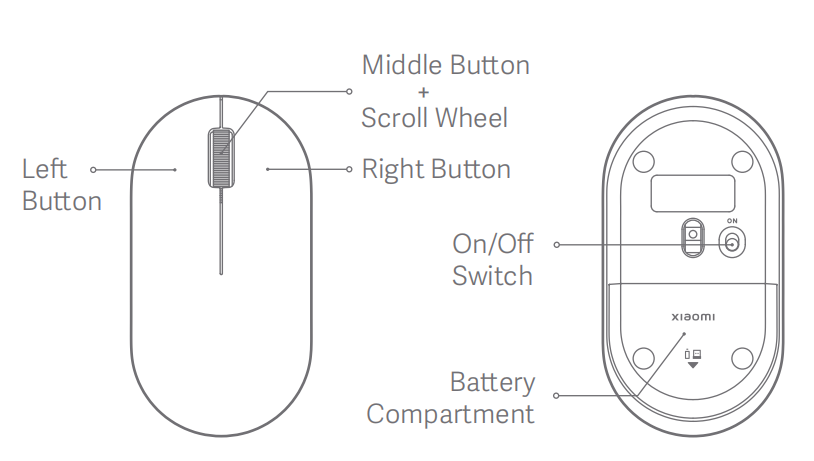
FAQs
5. Q: What is the rated power of the Xiaomi Wireless Mouse Lite 2?
A: The rated power of the Xiaomi Wireless Mouse Lite 2 is 1.5V⎓50mA.6. Q: What is the resolution of the Xiaomi Wireless Mouse Lite 2?
A: The Xiaomi Wireless Mouse Lite 2 has a standard resolution of 1000 DPI.7. Q: Can the Xiaomi Wireless Mouse Lite 2 connect to Bluetooth devices?
A: No, the Xiaomi Wireless Mouse Lite 2 uses 2.4GHz wireless technology and cannot connect to Bluetooth devices.8. Q: What is the appearance of the Xiaomi Wireless Mouse Lite 2?
A: The appearance of the Xiaomi Wireless Mouse Lite 2 is as follows: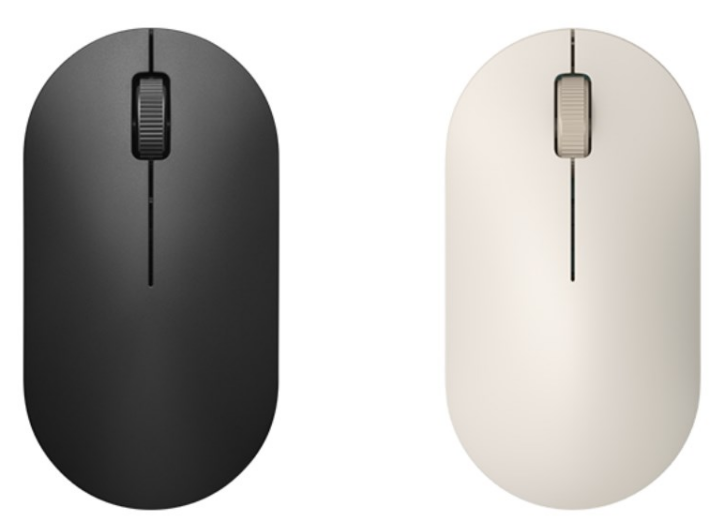
9. Q: What connection method does the Xiaomi Wireless Mouse Lite 2 use?
A: The Xiaomi Wireless Mouse Lite 2 uses a 2.4GHz wireless connection and connects to the computer via a USB interface.10. Q: How to use the Xiaomi Wireless Mouse Lite 2?
A: To use the Xiaomi Wireless Mouse Lite 2, please refer to the following steps:1. Slide down the battery compartment cover to remove it as illustrated;
2. Take out the dongle and plug it into the USB port on the computer;
3. Install an AA battery into the battery compartment, and turn on the mouse;
4. The mouse is ready for use when your computer system notifies that the installation is successful.
11. Q: What is the interface specification of the Xiaomi Wireless Mouse Lite 2?
A: The Xiaomi Wireless Mouse Lite 2 uses a USB Type-A port and adheres to the USB 2.0 standard protocol.12. Q: What type of battery does the Xiaomi Wireless Mouse Lite 2 use?
A: The Xiaomi Wireless Mouse Lite 2 uses a single AA alkaline battery.13. Q: What are the dimensions of the Xiaomi Wireless Mouse Lite 2?
A: The dimensions of the Xiaomi Wireless Mouse Lite 2 are 108.5 × 57.5 × 35.6 mm.14. Q: What is the weight of the Xiaomi Wireless Mouse Lite 2?
A: The Xiaomi Wireless Mouse Lite 2 is designed to be lightweight, with a total weight of 45g (excluding the battery), allowing for quick and effortless movement while reducing wrist strain.15. Q: What are the package contents of the Xiaomi Wireless Mouse Lite 2?
A: The package contents of the Xiaomi Wireless Mouse Lite 2 include: Xiaomi Wireless Mouse Lite 2 × 1, User manual × 1, Receiver × 1 (stored in receiver compartment), AA Battery × 1 (stored in battery compartment), Warranty card × 1.16. Q: Is the Xiaomi Wireless Mouse Lite 2 waterproof?
A: No, the Xiaomi Wireless Mouse Lite 2 is not waterproof. Avoid exposing it to water or submerging it to prevent damage.17. Q: What is the surface material of the Xiaomi Wireless Mouse Lite 2?
A: The Xiaomi Wireless Mouse Lite 2 is made from plastic with a matte texture on the surface, providing a smooth and comfortable touch.18. Q: What operating systems does the Xiaomi Wireless Mouse Lite 2 support?
A: The Xiaomi Wireless Mouse Lite 2 supports Windows 7 and later versions, as well as macOS 10.13 and later versions.19. Q: What colors are available for the Xiaomi Wireless Mouse Lite 2?
A: The Xiaomi Wireless Mouse Lite 2 has two colors: Black and White.20. Q: Is the Xiaomi Wireless Mouse Lite 2 equipped with silent buttons?
A: No, the Xiaomi Wireless Mouse Lite 2 does not have silent buttons. The click buttons produce a light, crisp sound, and they offer more responsive and tactile feedback compared to silent buttons.21. Q: What type of microswitch is used for the left and right buttons on the Xiaomi Wireless Mouse Lite 2?
A: The left and right main buttons of the Xiaomi Wireless Mouse Lite 2 use TTC microswitches, which provide quick triggering and a clear, comfortable button feel.22. Q: What is the USB report rate of the Xiaomi Wireless Mouse Lite 2?
A: The Xiaomi Wireless Mouse Lite 2 has a USB report rate of 125Hz.23. Q: What material is used for the foot pads of the Xiaomi Wireless Mouse Lite 2?
A: The Xiaomi Wireless Mouse Lite 2 features Teflon feet pads, which offer smooth movement with good self-lubrication and a low friction coefficient for long-lasting durability.24. Q: What should be noted when using the Xiaomi Wireless Mouse Lite 2?
A: The precautions for using the Xiaomi Wireless Mouse Lite 2 are as follows:1. Maintain a flat surface on your desk and consider using a mouse pad, preferably one with a fabric surface, for optimal performance;
2. Do not use the mouse on transparent glass or high-gloss mirror surfaces, as these can affect tracking accuracy;
3. Keep the mouse clean, and promptly remove any dust or debris from the lens area on the bottom;
4. Avoid exposing the mouse to liquids, as spills can cause issues with feel and electrical performance;
5. It is recommended to connect the mouse directly to the computer's USB port. Using USB hubs or adapters can cause lag or connectivity issues.
Troubleshooting
25. Q: Why is the computer unable to recognize the Xiaomi Wireless Mouse Lite 2 when powered on?
A: To resolve this issue, please refer to the following methods:1. Ensure that the mouse is correctly plugged into a USB port. Try connecting it to different USB ports to see if it works;
2. Make sure that your device meets the system requirements: Windows 7 or later, or macOS 10.13 or later;
3. Go to the system's Device Manager and tap on Scan for hardware changes to automatically reinstall the USB drivers. After the installation is complete, the mouse should work properly.
If the above steps do not resolve the issue, please contact the local after-sales service center for further assistance.
26. Q: Why does the Xiaomi Wireless Mouse Lite 2 experience lag or stuttering during use?
A: For your reference, here are the troubleshooting methods:1. For laptops, try plugging the dongle into a left-side USB port to avoid interference from the mouse's movement. For desktop PCs, try connecting the dongle to a front USB port of the main unit, which can offer better signal reception;
2. If the dongle is connected to a USB 3.0 hub, it will experience interference. Try plugging it directly into a USB port on the computer;
3. Keep the dongle away from devices that emit electromagnetic interference, such as routers, chargers, fans, and motors, to ensure a clear wireless signal;
4. Ensure that the desktop or mouse pad is clean and that there is no dust obstructing the lens on the bottom of the mouse for smoother movement.
If these steps do not resolve the issue, please contact the local after-sales service center for further assistance.
27. Q: Why are the Xiaomi Wireless Mouse Lite 2 button and scroll wheel functions abnormal, causing the cursor to not move?
A: To resolve this issue, here are the troubleshooting methods:1. Ensure the mouse is properly connected to the computer;
2. Verify that no keyboard keys are stuck, as this can interfere with mouse function;
3. Inspect the bottom lens of the mouse for any obstructions or dust that could affect cursor movement;
4. Make sure the mouse pad is clean and free of dirt, which can impact cursor movement.
If these steps do not resolve the issue, please contact the local after-sales service center for further assistance.
28. Q: Why doesn’t the indicator turn on after inserting the battery and turning on the Xiaomi Wireless Mouse Lite 2?
A: The Xiaomi Wireless Mouse Lite 2 does not have an indicator. The mouse uses an infrared optical sensor to enhance tracking accuracy and work on various surfaces. The infrared light is nearly invisible to the naked eye, and you can only see a faint red glow through the bottom lens.Does it help?
Yes
No