

How to speed up charging on the POCO F6 Pro?
The Speed up charging feature of the POCO F6 Pro, commonly known as fast charging technology, is a technology designed to significantly shorten the charging time of the phone. It can provide a large amount of power to the phone in a shorter time, significantly reducing the waiting time so that you can resume the use of the phone faster.
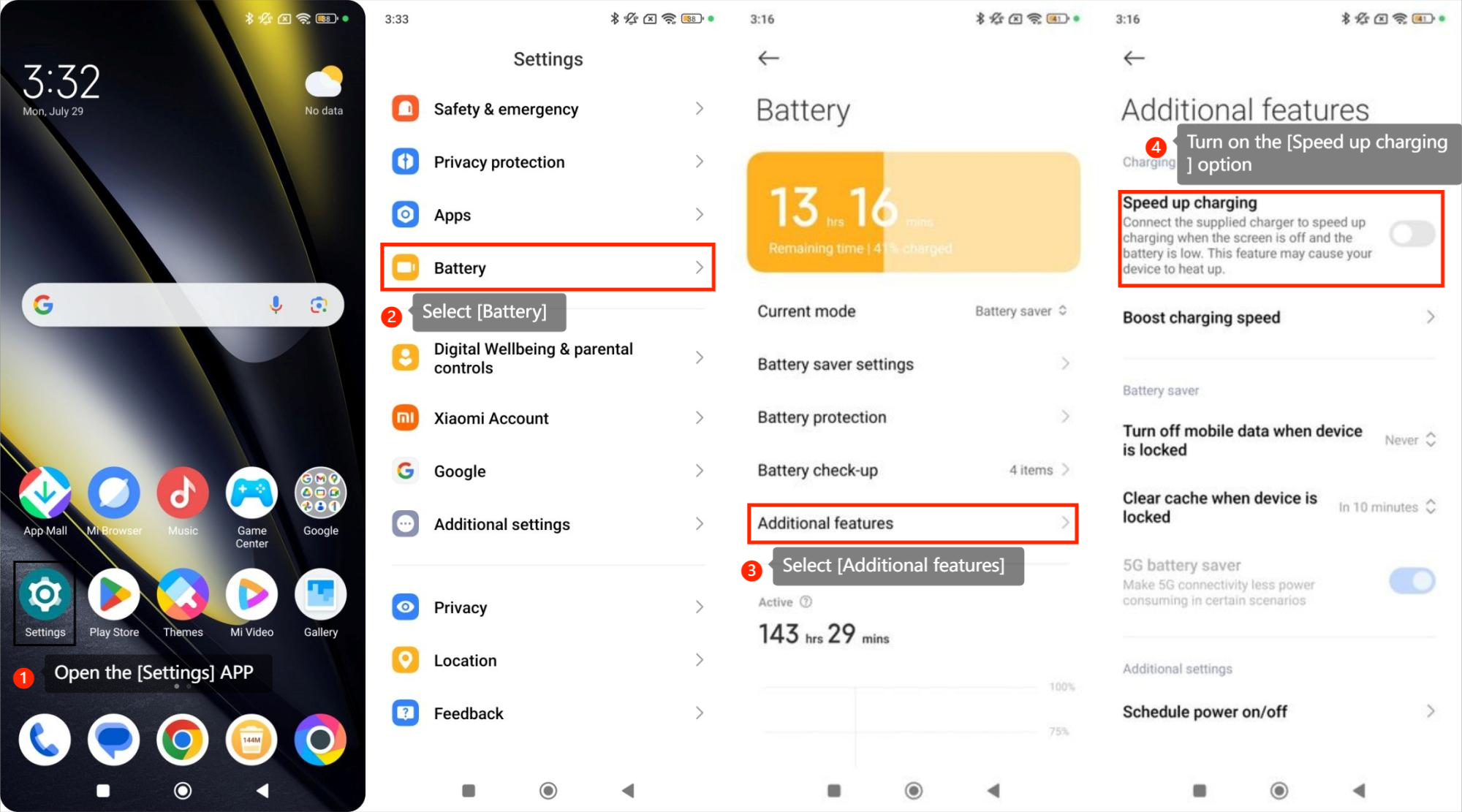
To enable this function, you can refer to the following steps:
1. Open the [Settings] APP;
2. Select [Battery];
3. Select [Additional features];
4. Turn on the [Speed up charging] option.
Note:
Connect the supplied charger to speed up charging when the screen is off and the battery is low. This feature can cause your device to heat up.
To enable this function, you can refer to the following steps:
1. Open the [Settings] APP;
2. Select [Battery];
3. Select [Additional features];
4. Turn on the [Speed up charging] option.
Note:
Connect the supplied charger to speed up charging when the screen is off and the battery is low. This feature can cause your device to heat up.
Does it help?
Yes
No