

What is OTG on the POCO F6?
OTG (On-The-Go) function is a technology that allows mobile phones to directly connect and exchange data with external devices. Through the OTG function, the POCO F6 can act as a USB host to control and interact with other external devices such as USB flash drives, keyboards, mice and game controllers without going through a computer as an intermediary.
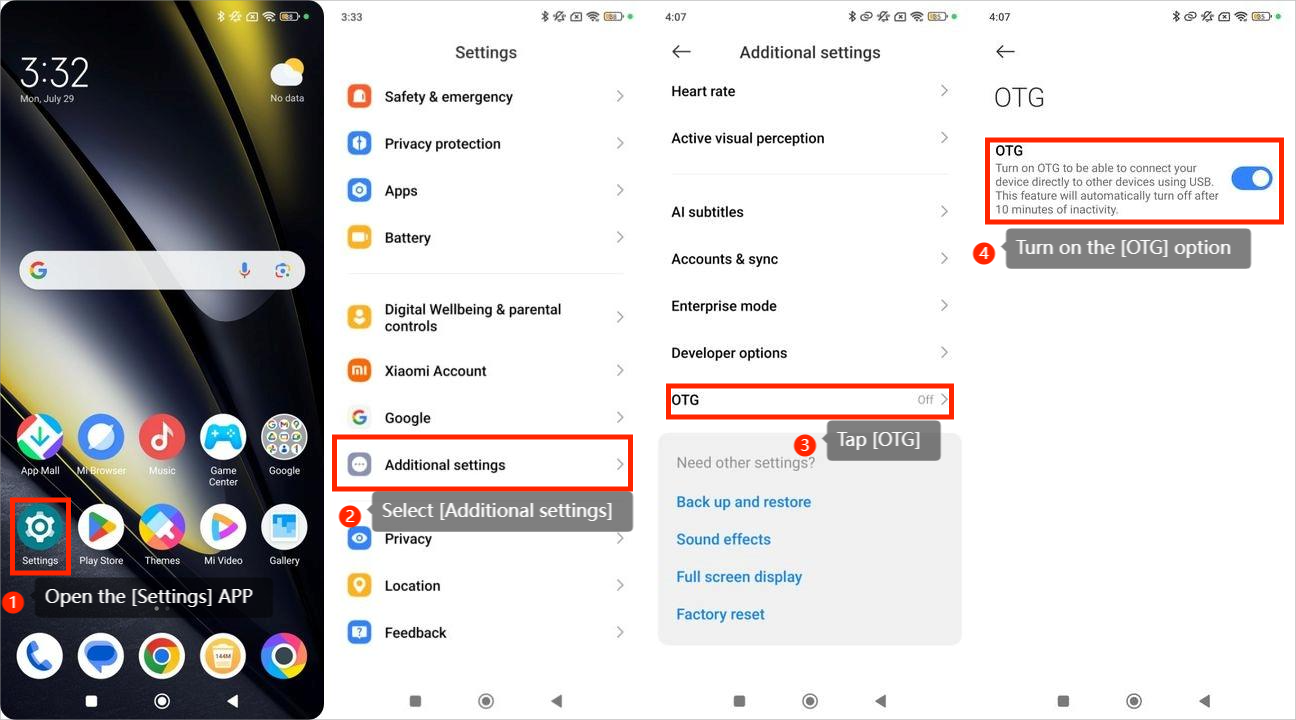
To turn the OTG, you can refer to the following steps:
1. Open the [Settings] APP;
2. Select [Additional settings];
3. Tap [OTG];
4. Turn on the [OTG] option.
Note:
Turn on the OTG to be able to connect your device directly to other devices using USB. This feature will automatically turn off after 10 minutes of inactivity.
To turn the OTG, you can refer to the following steps:
1. Open the [Settings] APP;
2. Select [Additional settings];
3. Tap [OTG];
4. Turn on the [OTG] option.
Note:
Turn on the OTG to be able to connect your device directly to other devices using USB. This feature will automatically turn off after 10 minutes of inactivity.
Does it help?
Yes
No