

How to turn on smart lock detection on the POCO F6 Pro?
Smart lock detection is also called Detect presence on the phone. When the smart lock detection is on, the POCO F6 Pro will remain unlocked when your presence is detected and lock when you move away from the screen. When using the device, you don't need to unlock it frequently, which is more convenient for tasks that require frequent interaction. Meanwhile, this feature ensures that the device is locked when not in use, reducing the risk of unauthorized access.
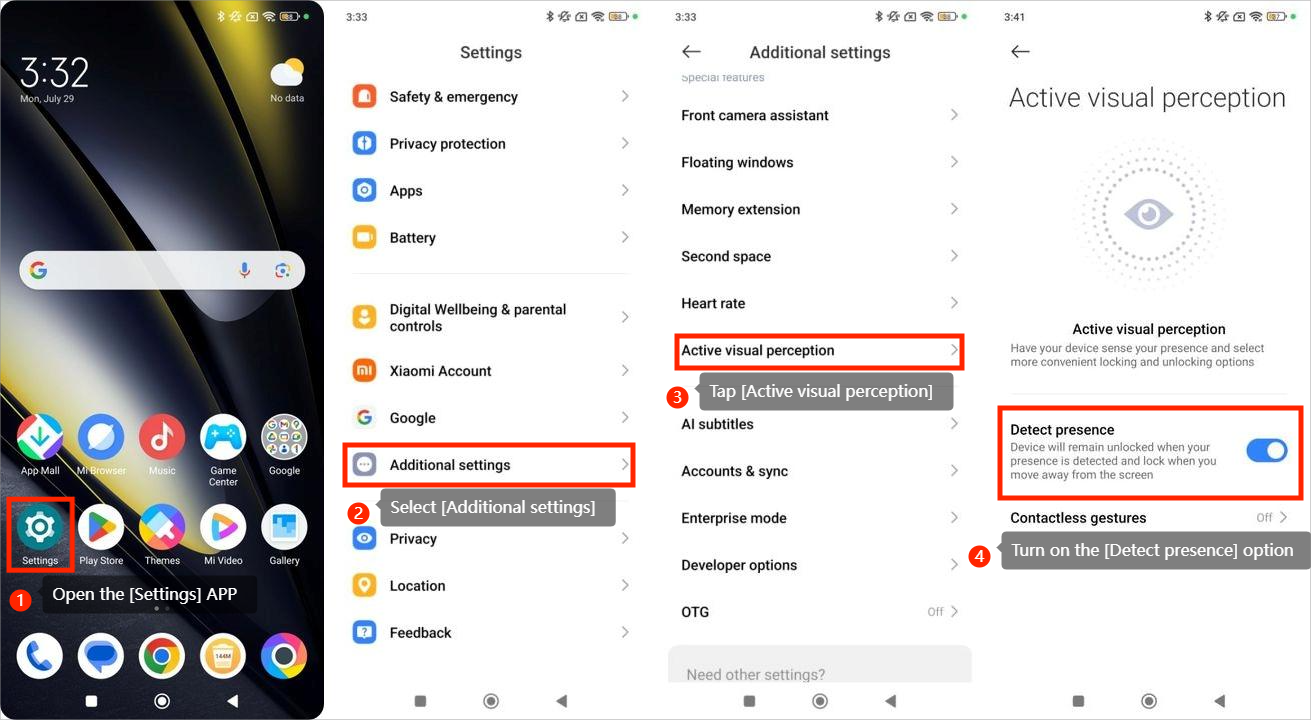
To turn on smart lock detection, you can refer to the following steps:
1. Open the [Settings] APP;
2. Select [Additional settings];
3. Tap [Active visual perception];
4. Turn on the [Detect presence] option.
To turn on smart lock detection, you can refer to the following steps:
1. Open the [Settings] APP;
2. Select [Additional settings];
3. Tap [Active visual perception];
4. Turn on the [Detect presence] option.
Does it help?
Yes
No