

How to adjust the refresh rate on the POCO F6?
The POCO F6 supports a maximum refresh rate of 120Hz. A higher refresh rate can ensure smoother images and bring a smoother visual experience. It can also reduce screen flicker, thereby reducing eye fatigue and improving comfort when using the phone for a long time. You can adjust the screen refresh rate to meet your viewing needs.
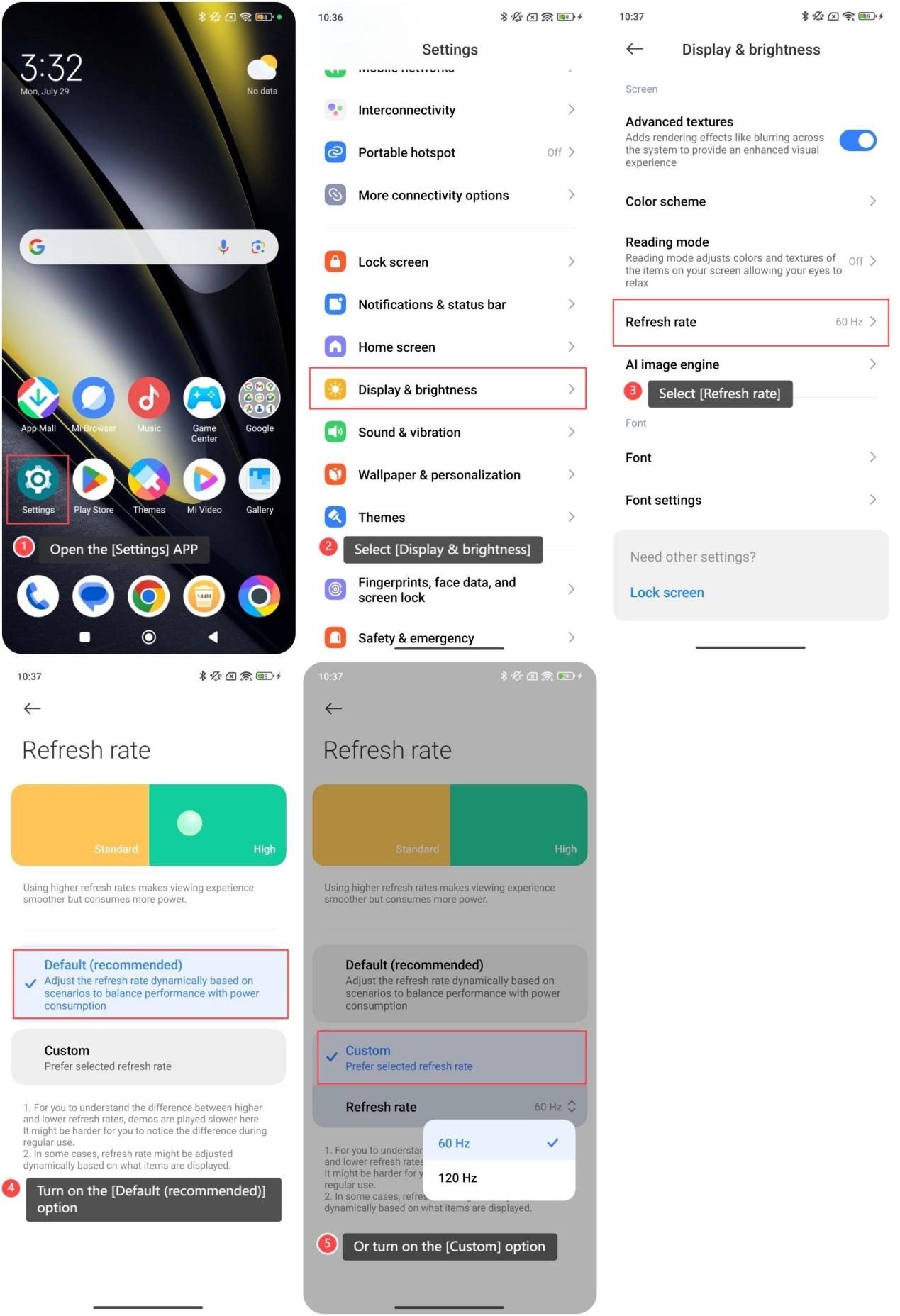
To adjust the refresh rate on the POCO F6 Pro, you can refer to the following steps:
1. Open the [Settings] APP;
2. Select [Display & brightness];
3. Select [Refresh rate];
4. Turn on the [Default (recommended)] option;
5. Or turn on the [Custom] option to select between 60Hz and 120Hz.
Note:
Screens with high refresh rates increase battery consumption, it is recommended to find a balance between smoothness and battery life in actual use.
To adjust the refresh rate on the POCO F6 Pro, you can refer to the following steps:
1. Open the [Settings] APP;
2. Select [Display & brightness];
3. Select [Refresh rate];
4. Turn on the [Default (recommended)] option;
5. Or turn on the [Custom] option to select between 60Hz and 120Hz.
Note:
Screens with high refresh rates increase battery consumption, it is recommended to find a balance between smoothness and battery life in actual use.
Does it help?
Yes
No