

How to turn on the Advanced textures on the POCO F6 Pro?
The advanced texture feature on the POCO F6 Pro enhances visual quality by providing richer, more detailed textures. It adds rendering effects like blurring across the system to provide an enhanced visual experience.
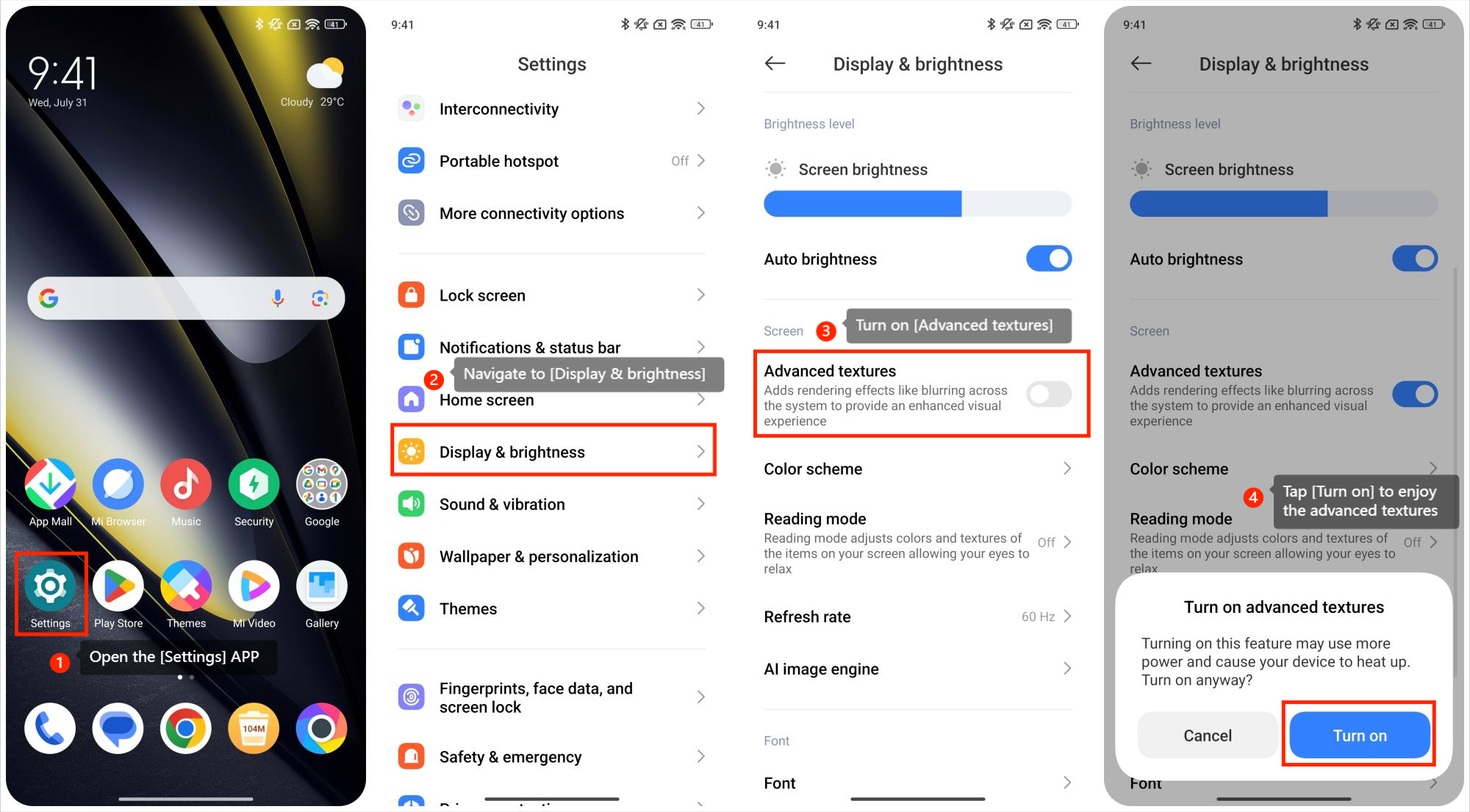
To turn on the Advanced textures, please refer to the following steps:
1. Open the [Settings] APP on your phone;
2. Navigate to [Display & brightness];
3. Turn on [Advanced textures] to add rendering effects like blurring across the system to provide an enhanced visual experience;
4. A pop-up will notify you that this feature will use more power and cause your device to heat up. Tap [Turn on] to enjoy the enhanced experience provided by the Advanced textures.
To turn on the Advanced textures, please refer to the following steps:
1. Open the [Settings] APP on your phone;
2. Navigate to [Display & brightness];
3. Turn on [Advanced textures] to add rendering effects like blurring across the system to provide an enhanced visual experience;
4. A pop-up will notify you that this feature will use more power and cause your device to heat up. Tap [Turn on] to enjoy the enhanced experience provided by the Advanced textures.
Does it help?
Yes
No