

How to turn on smart AOD on the POCO F6?
The POCO F6 comes with a smart AOD (Always-on display) technology, which can effectively manage the device’s battery consumption. When this feature is enabled, your phone will always display items, except when your device is in a pocket, when ambient light is low for a long time, or when you’re not looking at your device.
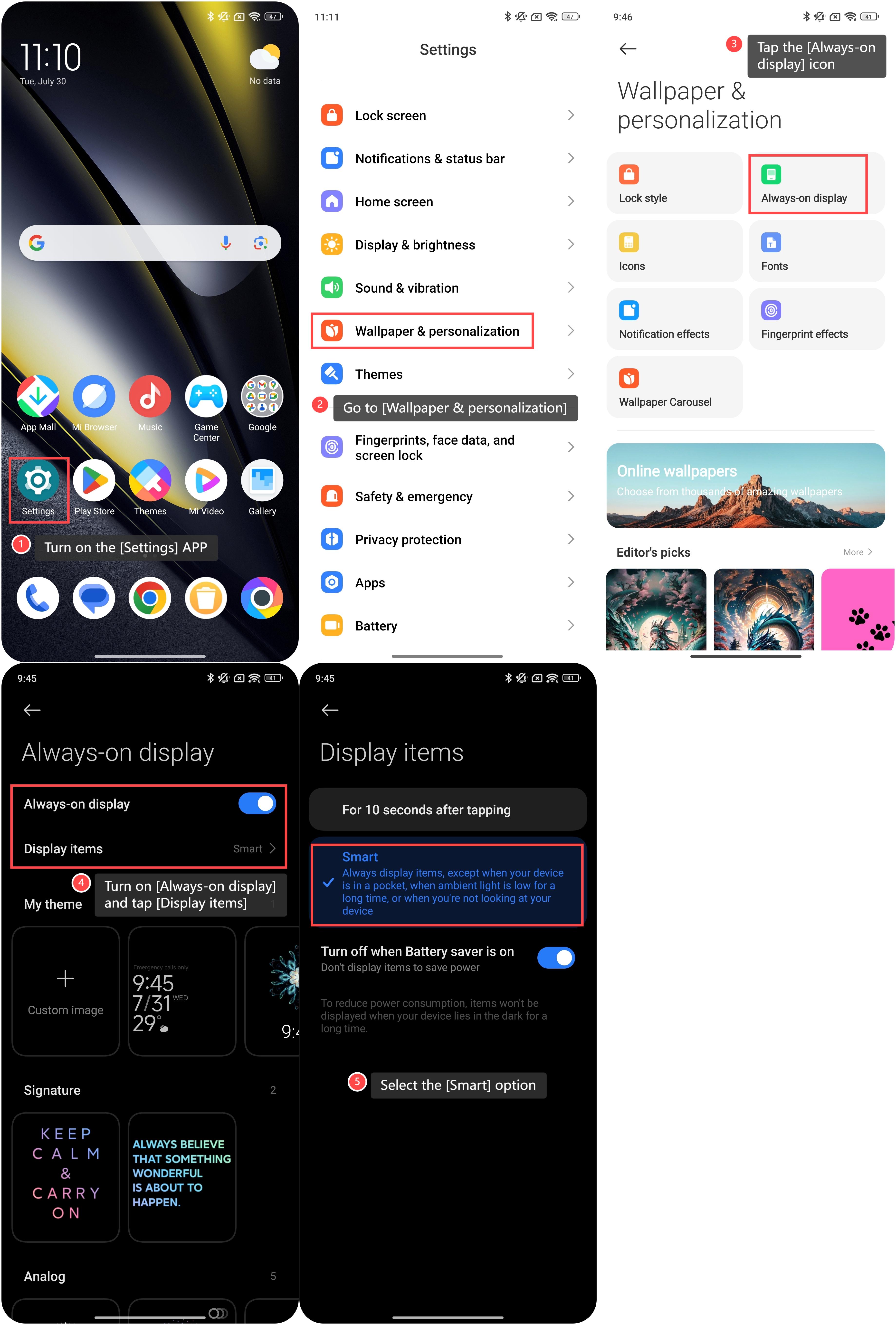
To turn on smart AOD on your phone, please refer to the following steps:
1. Turn on the [Settings] APP;
2. Go to [Wallpaper & personalization];
3. Tap the [Always-on display] icon;
4. Turn on [Always-on display] and tap [Display items] to set up it;
5. Select the [Smart] option to enable this feature.
Friendly tips:
You can choose themes, signatures, analogs and so on as your preference to customize the AOD.
To turn on smart AOD on your phone, please refer to the following steps:
1. Turn on the [Settings] APP;
2. Go to [Wallpaper & personalization];
3. Tap the [Always-on display] icon;
4. Turn on [Always-on display] and tap [Display items] to set up it;
5. Select the [Smart] option to enable this feature.
Friendly tips:
You can choose themes, signatures, analogs and so on as your preference to customize the AOD.
Does it help?
Yes
No