

How to turn on and adjust the Haptic feedback level on the POCO F6 Pro?
The Haptic feedback on the POCO F6 Pro refers to a tactile response to gestures and system controls. The Haptic feedback level refers to the intensity or strength of the vibration feedback that your phone provides in response to interactions such as taps, touches, or gestures.
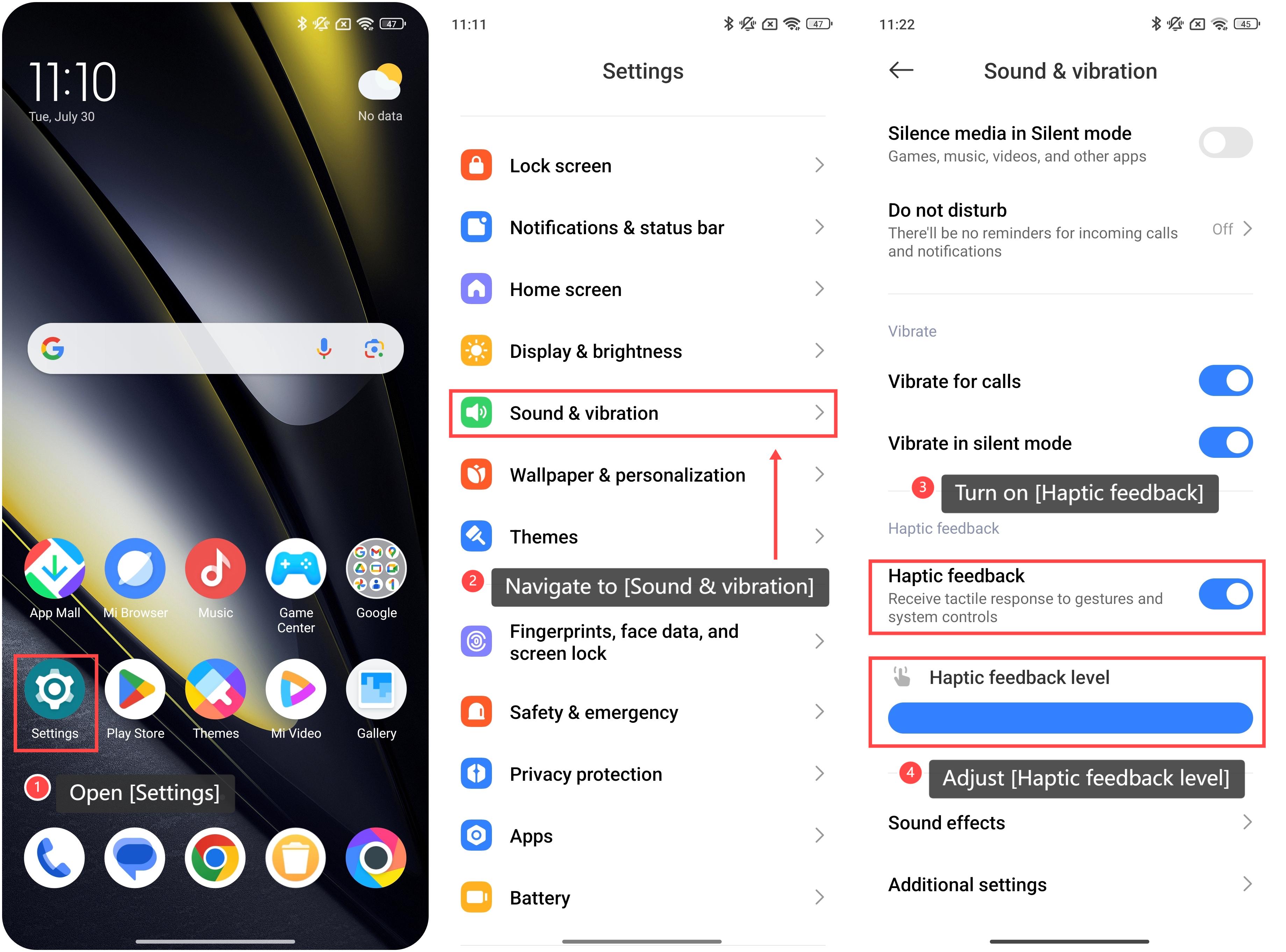
To turn on and adjust the Haptic feedback level, please refer to the following steps:
1. Open [Settings];
2. Navigate to [Sound & vibration];
3. Swipe down and turn on the [Haptic feedback] option;
4. You can adjust [Haptic feedback level] by sliding the bar to the left or right. The left is for gentle feedback, and the right is for strong feedback. During the adjustment, you can feel the vibration strength to fit the most proper feedback intensity according to your needs.
To turn on and adjust the Haptic feedback level, please refer to the following steps:
1. Open [Settings];
2. Navigate to [Sound & vibration];
3. Swipe down and turn on the [Haptic feedback] option;
4. You can adjust [Haptic feedback level] by sliding the bar to the left or right. The left is for gentle feedback, and the right is for strong feedback. During the adjustment, you can feel the vibration strength to fit the most proper feedback intensity according to your needs.
Does it help?
Yes
No