

How to adjust the battery mode of the POCO F6?
The battery modes featured on the POCO F6 offer you flexibility in managing your device's battery endurance and performance according to different situations and needs. By choosing the appropriate battery mode, you can balance battery longevity and device performance, ensuring an optimal experience with your phone.
To adjust the battery mode on the POCO F6, please refer to the following methods:
Method 1:
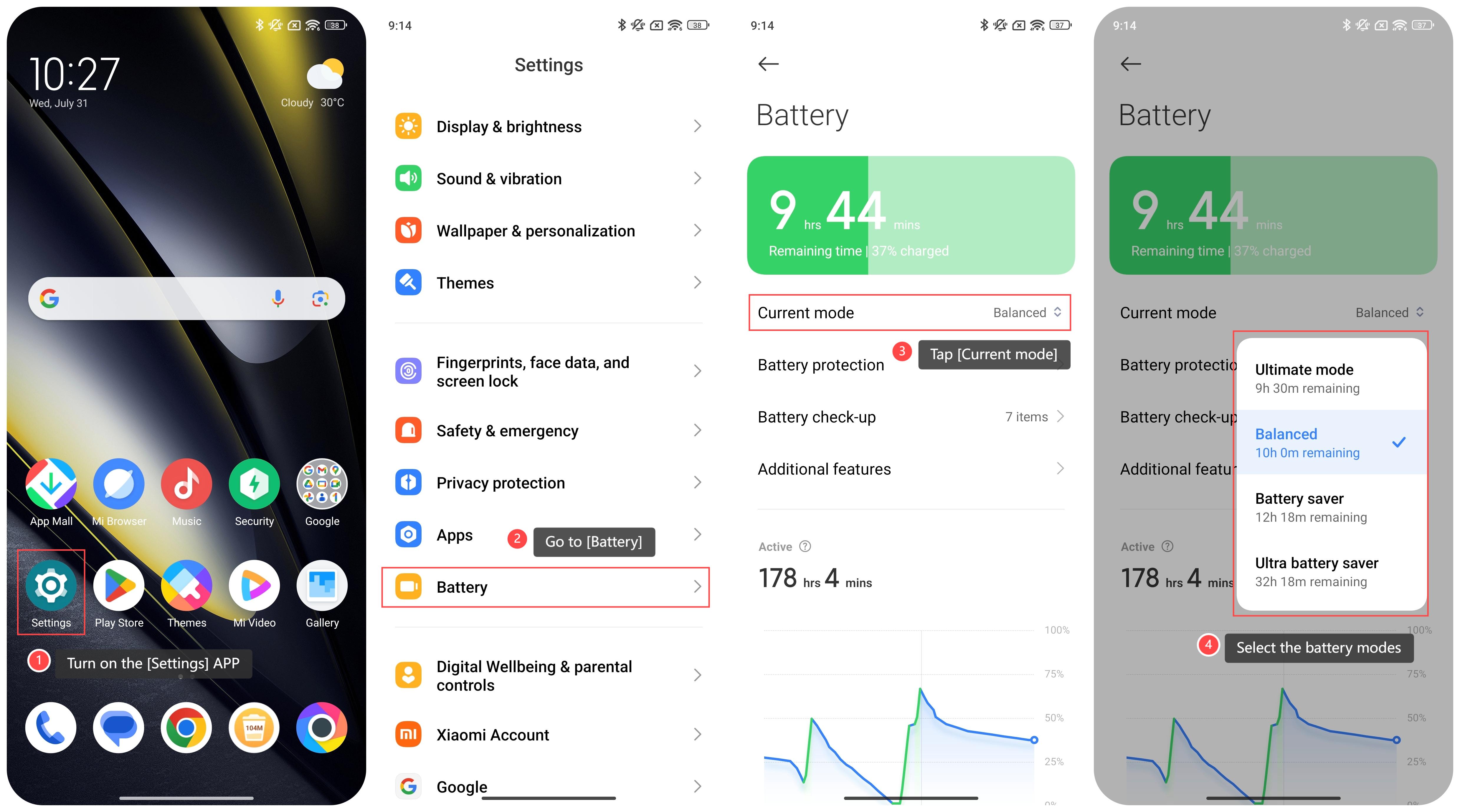
1. Turn on the [Settings] APP;
2. Go to [Battery];
3. Tap [Current mode];
4. Select the battery modes from the options: [Ultimate mode], [Balanced], [Battery saver] and [Ultra battery saver].
Method 2:
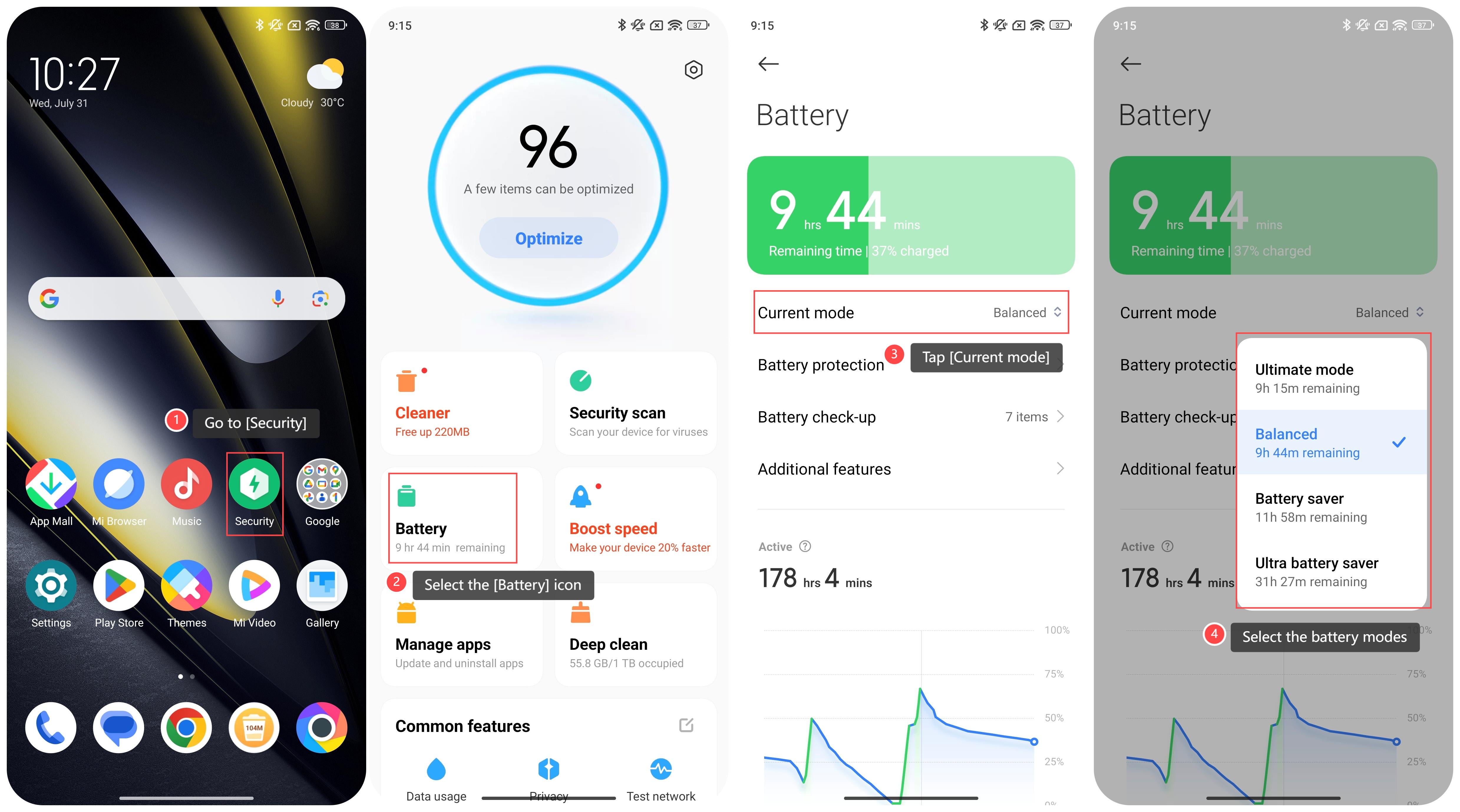
1. Go to [Security];
2. Select the [Battery] icon;
3. Tap [Current mode];
4. Select the battery modes from the options: [Ultimate mode], [Balanced], [Battery saver] and [Ultra battery saver].
Method 3:
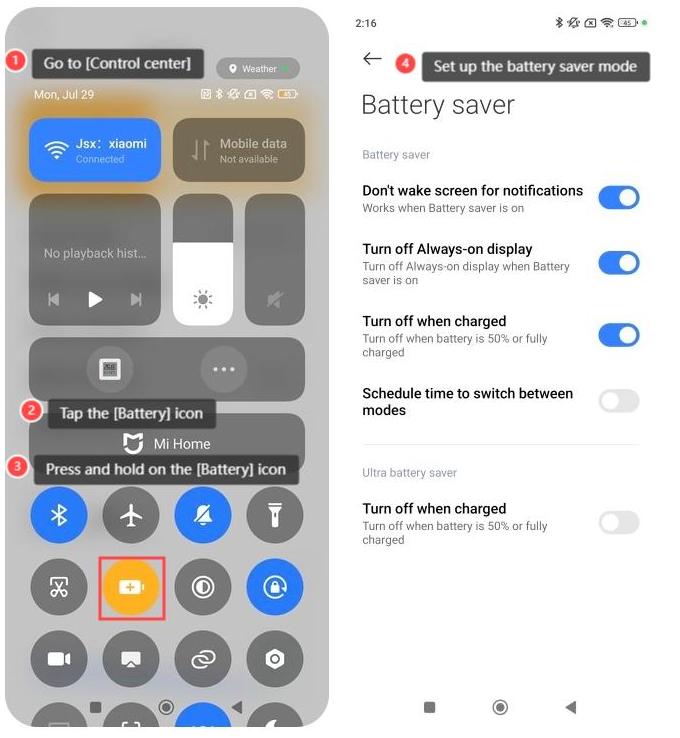
1. Swipe down from the right of the screen and go to [Control center];
2. Tap the [Battery] icon to turn on or off the feature;
3. Press and hold on the [Battery] icon;
4. Set up the battery saver mode.
Friendly tips:
1. Ultimate mode is designed to extend battery endurance significantly by optimizing various settings and limiting certain functions;
2. In Balanced mode, the device adjusts settings to optimize power consumption while still ensuring that the device runs smoothly for everyday tasks;
3. Battery saver mode reduces your device’s performance and limits background activity, location services, and other features that consume battery endurance;
4. Ultra battery saver mode is more aggressive than the regular Battery saver mode. It further restricts background processes by allowing only essential APPs and services to run, such as Phones, Messages and Contacts.
To adjust the battery mode on the POCO F6, please refer to the following methods:
Method 1:
1. Turn on the [Settings] APP;
2. Go to [Battery];
3. Tap [Current mode];
4. Select the battery modes from the options: [Ultimate mode], [Balanced], [Battery saver] and [Ultra battery saver].
Method 2:
1. Go to [Security];
2. Select the [Battery] icon;
3. Tap [Current mode];
4. Select the battery modes from the options: [Ultimate mode], [Balanced], [Battery saver] and [Ultra battery saver].
Method 3:
1. Swipe down from the right of the screen and go to [Control center];
2. Tap the [Battery] icon to turn on or off the feature;
3. Press and hold on the [Battery] icon;
4. Set up the battery saver mode.
Friendly tips:
1. Ultimate mode is designed to extend battery endurance significantly by optimizing various settings and limiting certain functions;
2. In Balanced mode, the device adjusts settings to optimize power consumption while still ensuring that the device runs smoothly for everyday tasks;
3. Battery saver mode reduces your device’s performance and limits background activity, location services, and other features that consume battery endurance;
4. Ultra battery saver mode is more aggressive than the regular Battery saver mode. It further restricts background processes by allowing only essential APPs and services to run, such as Phones, Messages and Contacts.
Does it help?
Yes
No