

How to use the Xiaomi Desktop Speaker?
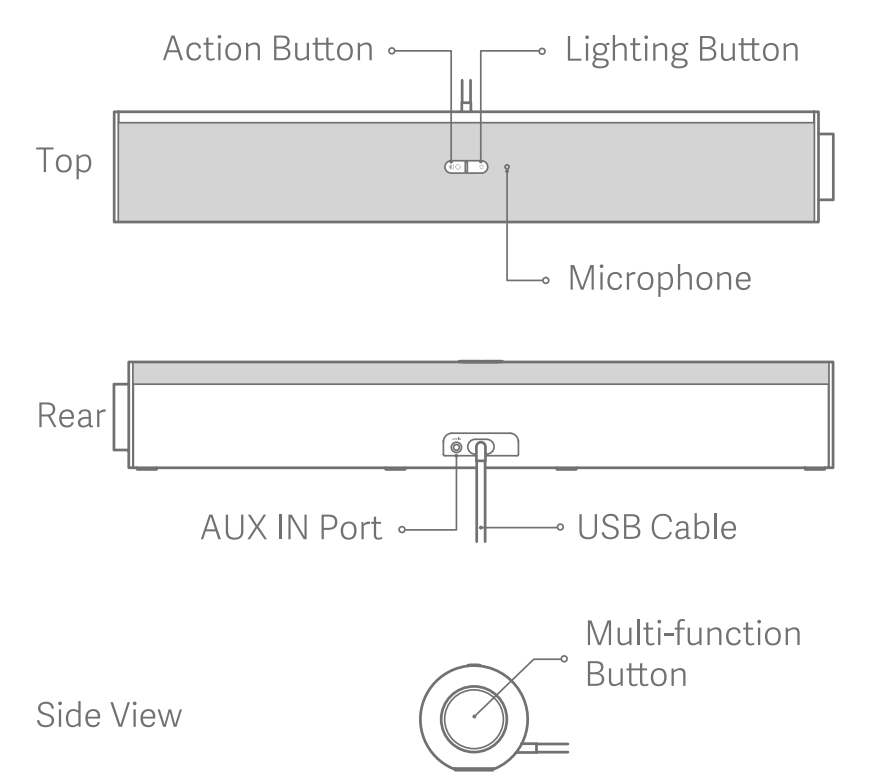
The product appearance is illustrated below:
On the top, there are an Action Button, a Lighting Button and a Microphone. In the rear, there are an AUX IN port (3.5mm TRS jack) and a USB Cable. At the side, there is a Muti-function Button.
The button operations are listed as below:
The indicator instructions are listed below:
There is an LED Indicator on the top of the product, and an RGB Light Strip at the bottom.

On the top, there are an Action Button, a Lighting Button and a Microphone. In the rear, there are an AUX IN port (3.5mm TRS jack) and a USB Cable. At the side, there is a Muti-function Button.
The button operations are listed as below:
| Button | Multi-function Button | Action Button | Lighting Button |
| Press | Turn on the speaker Play/Pause music Answer/End a call | Switch sound effects | Switch RGB light effects |
| Press rapidly in succession | Press twice: Play the next track, or switch between incoming calls Press thrice: Play the previous track | Press twice: Switch between audio channels | / |
| Press and hold | Press and hold for 2 seconds: Tum off the speaker or reject a call Press and hold for 8 seconds: Restore factory settings | Press and hold for 2 seconds: Enable the Bluetooth pairing mode | Press and hold for 2 seconds: Enable/disable RGB light effects |
| Rotate | Clockwise: Increase volume Counter-clockwise: Decrease volume | / | / |
There is an LED Indicator on the top of the product, and an RGB Light Strip at the bottom.
| LED Indicator Description | |
| Indicator status | Speaker status |
| Keeping in white | Bluetooth connected |
| Blinking in white | Bluetooth pairing |
| Blinking in orange | Charging |
| Keeping in red | Device error |
| RGB Light Strip Description | |
| Indicator status | Speaker status |
| Breathing in white | In-call |
| Blinking in white | Incoming call |
| Breathing in orange | Sleep mode |
Does it help?
Yes
No