

Does the Xiaomi Smart Temperature and Humidity Monitor 3 support firmware update?
The Xiaomi Smart Temperature and Humidity Monitor 3 supports firmware update to ensure the using experience.
To update to the latest version, please refer to the following steps:
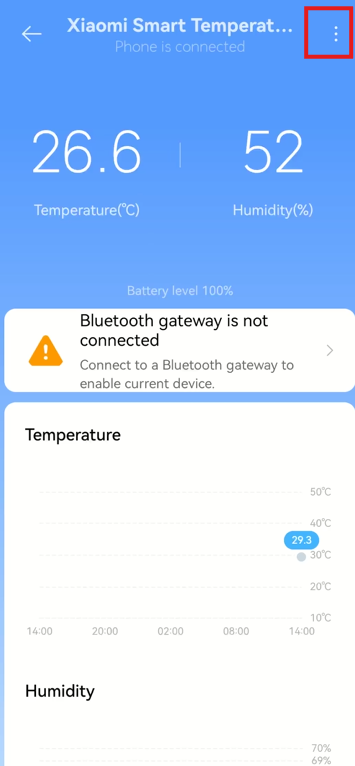
1. After the connection of the Xiaomi Smart Temperature and Humidity Monitor 3 to the Mi Home/Xiaomi Home APP, tap [Xiaomi Smart Temperature and Humidity Monitor 3] and you will see the homepage;
2. Tap [...] at the right top of the screen;
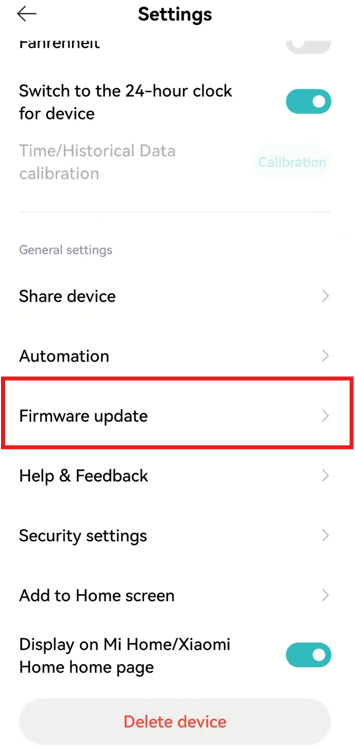
3. Tap [Firmware update];
4. Make your phone close to the monitor, press the button at the right bottom of the monitor and wait to be connected;
5. Check the updated firmware.
Note:
Only when the monitor is connected to the phone can the firmware be updated. When using the connection of Bluetooth gateway, the firmware cannot be updated.
To update to the latest version, please refer to the following steps:
1. After the connection of the Xiaomi Smart Temperature and Humidity Monitor 3 to the Mi Home/Xiaomi Home APP, tap [Xiaomi Smart Temperature and Humidity Monitor 3] and you will see the homepage;
2. Tap [...] at the right top of the screen;
3. Tap [Firmware update];
4. Make your phone close to the monitor, press the button at the right bottom of the monitor and wait to be connected;
5. Check the updated firmware.
Note:
Only when the monitor is connected to the phone can the firmware be updated. When using the connection of Bluetooth gateway, the firmware cannot be updated.
Does it help?
Yes
No