

Xiaomi Outdoor Camera Base Station FAQ
1. Q: What cameras does the Xiaomi Outdoor Camera Base Station support?
A: The current models that are supported are listed below:Xiaomi Outdoor Camera BW500
Xiaomi Outdoor Camera BW300
2. Q: Why do the videos recorded on the microSD card have incoherence and incoordination between sound and picture in the Xiaomi Outdoor Camera Base Station?
A: To check the problem, please refer to the following steps:1. Restart the device to see if it can return to normal;
2. The microSD card must be powered off when the camera is plugged in and out. Frequent hot-swapping will cause the microSD card to perform poorly and cause abnormal problems in the recorded video;
3. If the reading rate of the microSD card is too low, it is recommended to use a U3 type SD card;
4. Replace the microSD card.
3. Q: What to do if the Xiaomi Outdoor Camera Base Station cannot read the microSD card?
A: To check the problem, please refer to the following steps:1. Restart the device;
2. Check whether the firmware version of the camera or the Xiaomi Home/Mi Home APP needs to be updated;
3. Eliminate the data in the Xiaomi Home/Mi Home APP;
4. Replace the microSD card.
Note:
MicroSD cards have a limited lifespan. If you use a card for a long time, it will become unusable due to repeated erasures. Please be sure to use a different brand of microSD card.
4. Q: Can the Xiaomi Outdoor Camera Base Station reconnect to the network after a network outage?
A: The Xiaomi Outdoor Camera Base Station will try to reconnect automatically after a network outage. After the successful connection, the indicator will keep in blue. If the reconnection fails for a long time, please restart the base station.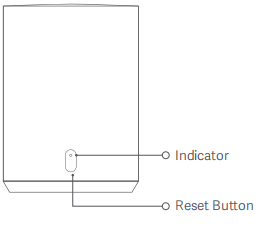

5. Q: What are the precautions for using a microSD card in the Xiaomi Outdoor Camera Base Station?
A: The precautions are listed below:1. The Xiaomi Outdoor Camera Base Station only supports FAT32 microSD card;
2. When the microSD card is full, the base station will automatically delete the oldest video and record it in a loop. To avoid video loss, please organize the videos on the microSD card regularly.
6. Q: Does the microSD card have to be installed in the Xiaomi Outdoor Camera Base Station?
A: It is not necessary.Note:
After the connection with the Xiaomi Home/Mi Home APP, the videos will be stored in the Cloud if the microSD card is not installed. If the microSD card is installed, the videos will be stored in the Cloud and microSD card simultaneously.
7. Q: Is there a distance limitation between the camera and the Xiaomi Outdoor Camera Base Station?
A: The distance between the Xiaomi Outdoor Camera Base Station and the camera should be within 15 meters to maintain smooth communication.8. Q: What to do if the microSD card cannot store videos, delete videos cyclically and conduct formatting in the Xiaomi Outdoor Camera Base Station?
A: To check the problem, please refer to the following steps:1. After installing the microSD card, conduct formatting in the Xiaomi Home/Mi Home APP first, or after conducting formatting via computer and install it;
2. If there are still problems after conducting formatting or formatting cannot be conducted in the Xiaomi Home/Mi Home APP, the microSD card does not accord with the station. Please use the standard camera SD card.
9. Q: How do the cameras store videos in the Xiaomi Outdoor Camera Base Station?
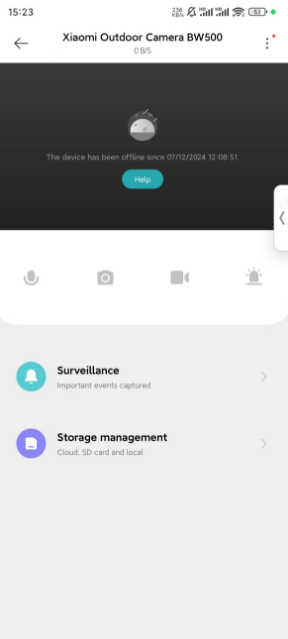
A: To conduct storage management, please refer to the following steps:
1. Tap [Mi Home/Xiaomi Home] APP;
2. Tap [Xiaomi Outdoor Camera Base Station];
3. Tap [...] at the right top of the screen;
4. Tap [Storage management];
5. You can select the Cloud or local storage to store videos.

Note:
When you select the microSD card of the station to store videos, you can check and manage storage in the correlated interface.
Does it help?
Yes
No