

Xiaomi Smart Temperature and Humidity Monitor 3 FAQ
FAQs
1. Q: What are the selling points of the Xiaomi Smart Temperature and Humidity Monitor 3?
A: The selling points of the Xiaomi Smart Temperature and Humidity Monitor 3 are listed below:
1. A large LCD screen, featuring a multifunctional display;
2. Equipped with a Swiss Sensirion's industrial-class precision digital sensor, it can accurately measure temperature and humidity changes;
3. The inclusion of one CR2450 button battery allows for extended operation for up to approximately 1.5 years;
4. With multi-function display and main screen customization, it can switch positions for temperature and humidity readings as well as time display;
5. In the Mi Home/Xiaomi Home APP, the Xiaomi Smart Temperature and Humidity Monitor 3 can be coordinated with other smart devices to activate air conditioning, fans, warmers, humidifiers, etc (which require the use of Bluetooth Gateway/Bluetooth Mesh Gateway);
6. Adaptable positioning, able to stand or adhere.
2. Q: What are the functions of Up Button and Down Button at the side of the Xiaomi Smart Temperature and Humidity Monitor 3?
A: The functions of Up Button and Down Button are listed below:
1. On the side of the body, two physical buttons have been designed. Pressing these buttons will activate the Bluetooth signals. Connecting to the Mi Home/Xiaomi Home APP enables access to additional functions;
2. Pressing the Up Button allows for the swapping of display positions of temperature, humidity, and time. The main display area supports a cycle switch between temperature, humidity, and time;
3. Press and hold the Up and Down Buttons simultaneously for 7 seconds to reset the monitor. The monitor will reset automatically, and you can then add and bind the monitor in the Mi Home/Xiaomi Home APP;
4. Press and hold the Up Button to activate the time setting. Simultaneously, press the Up and Down Buttons to switch the sequence between years, months, days, hours, and minutes.
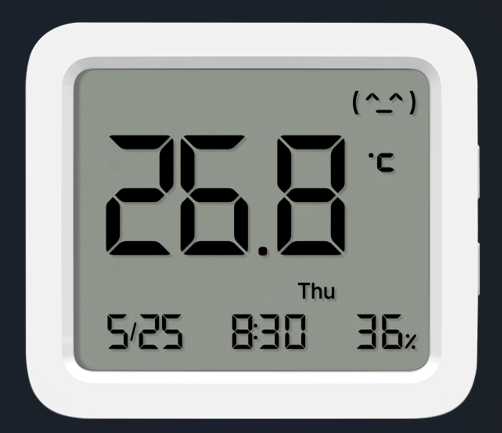
3. Q: What is the product overview of the Xiaomi Smart Temperature and Humidity Monitor 3?
A: The product overview of the Xiaomi Smart Temperature and Humidity Monitor 3 is listed below:
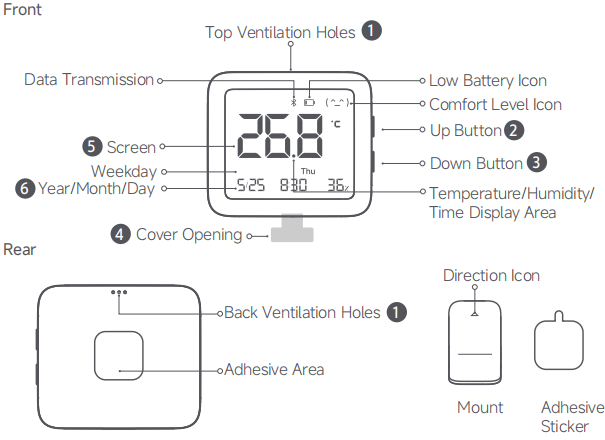
There are Top Ventilation Holes, Low Battery Icon, Comfort Level Icon, Up Button, Down Button, Temperate/Humidity/Time Display Area, Data Transmission, Screen, Weekday/Year/Month/Day and Cover Opening in the front. There are Back Ventilation Holes, Adhesive Area, Direction Icon, Mount and Adhesive Sticker in the rear.
4. Q: Can the display position of humidity, temperature and time of the Xiaomi Smart Temperature and Humidity Monitor 3 be swapped?
A: Support. In the normal condition, pressing the Up button on the right side of the monitor can switch the main display content for different usage scenes. The main display content supports three modes in a cycle: humidity, temperature, and time.
5. Q: What are the package contents of the Xiaomi Smart Temperature and Humidity Monitor 3?
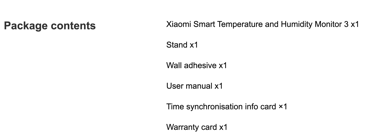
A: There is a Xiaomi Smart Temperature and Humidity Monitor 3, a Stand, a Wall adhesive, a User manual, a Time synchronisation info card and a Warranty card.
6. Q: What do the expressions displayed on the Xiaomi Smart Temperature and Humidity Monitor 3 represent?
A: The expressions displayed on the Xiaomi Smart Temperature and Humidity Monitor 3 represent the comfort level. A smile expression indicates comfort, while a sad expression indicates discomfort.

7. Q: What do the icons “H” and “L” displayed on the Xiaomi Smart Temperature and Humidity Monitor 3 represent?
A: When the screen displays “H”, the ambient temperature exceeds 60℃. When the screen displays “L”, the ambient temperature is below -9.9℃.
8. Q: How to place the Xiaomi Smart Temperature and Humidity Monitor 3 on the table?
A: There is a stand in the package contents of the Xiaomi Smart Temperature and Humidity Monitor 3. Simply attach this stand to the back of the monitor to place the Xiaomi Smart Temperature and Humidity Monitor 3 on a suitable flat as table or shelf.
9. Q: How to hang the Xiaomi Smart Temperature and Humidity Monitor 3 on the wall?
A: There is a wall adhesive in the package contents of the Xiaomi Smart Temperature and Humidity Monitor 3. Stick it in the adhesive area on the back of the monitor and stick the monitor in the desired place on a wall or any smooth surface.
10. Q: Can the Xiaomi Smart Temperature and Humidity Monitor 3 be attached to the refrigerator door or other iron surface?
A: Not support. There is no magnet fitting in the package contents.
11. Q: Is the Xiaomi Smart Temperature and Humidity Monitor 3 waterproof?
A: Not support. The monitor cannot be immersed in the water.
12. Q: What is the precaution when first using the Xiaomi Smart Temperature and Humidity Monitor 3?
A: When using the Xiaomi Smart Temperature and Humidity Monitor 3 for the first time, you need to pull the battery insulation sheet outwards and remove it before it can be powered on. Without removing the insulation sheet, the monitor cannot be powered on.
13. Q: If the Xiaomi Smart Temperature and Humidity Monitor 3 cannot display normally, how to solve it?
A: When the screen does not display or shows incomplete content, one of the reasons is the battery being out of power. Please replace it with a new CR2450 button battery.
14. Q: Why do the buttons of the Xiaomi Smart Temperature and Humidity Monitor 3 not respond to pressing?
A: If the button pressing does not respond, one of the reasons is the battery being out of power or the battery terminals being installed incorrectly. Reinstall the battery correctly to resolve the problem.
15. Q: How to install the battery on the Xiaomi Smart Temperature and Humidity Monitor 3?
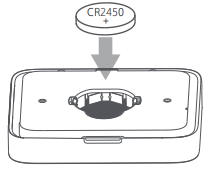
A: Remove the battery cover from the cover opening at the bottom of the monitor. Remove the depleted battery and install a CR2450 coin battery with the positive (+) side facing upwards, then securely reinstall the cover.
16. Q: Why are the values different on several Xiaomi Smart Temperature and Humidity Monitor 3?
A: Temperature and humidity are easily influenced by the external environment. People approaching, moving, or breathing can cause changes in temperature and humidity. Even in the same room, there will be differences in temperature and humidity between the two points. The scientific testing method is to use a dedicated constant temperature and humidity chamber to measure the accuracy of temperature and humidity.
It is recommended that you place several monitors in a relatively enclosed environment for about half an hour before making a comparison for reference.
17. Q: How to check the SN of the Xiaomi Smart Temperature and Humidity Monitor 3?
A: You can check the SN at the back of the package or open the rear cover of the Xiaomi Smart Temperature and Humidity 3.
18. Q: How to check the certifications of the Xiaomi Smart Temperature and Humidity Monitor 3?
A: You can check the certifications at the back of the package.
19. Q: How often does the Xiaomi Smart Temperature and Humidity Monitor 3 refresh the temperature and humidity value?
A: The Xiaomi Smart Temperature and Humidity Monitor 3 refreshes the temperature and humidity value every 6 seconds.
20. Q: How does the Xiaomi Smart Temperature and Humidity Monitor 3 calibrate the time?
A: The Xiaomi Smart Temperature and Humidity Monitor 3 offers 2 time calibration methods:
1. Automatic time calibration using the Mi Home/Xiaomi Home APP:
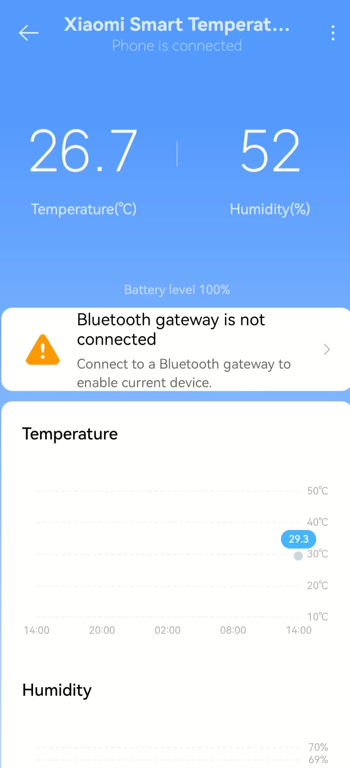
Once “Phone is connected” is displayed on the screen of the monitor plug-in in the Mi Home/Xiaomi Home APP, the monitor will automatically perform time calibration. (When the network is disconnected, time calibration cannot be performed and you need to connect to the phone.)
Note:
If “Connected to a Bluetooth gateway” is displayed on the screen of the monitor plug-in in the Mi Home/Xiaomi Home APP, automatic time calibration is unavailable in this mode.
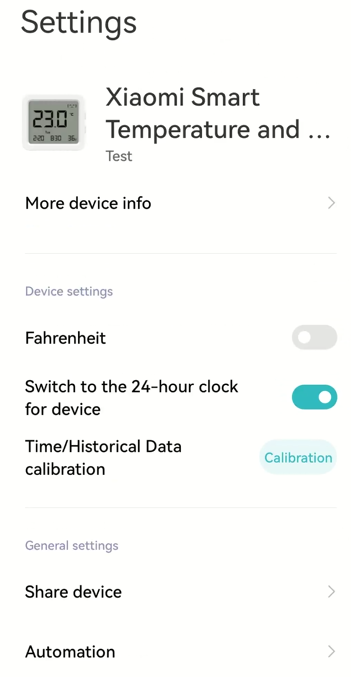
You need to calibrate the value in the [Settings]:
1. Open the [Mi Home/Xiaomi Home] APP;
2. Select the [Xiaomi Smart Temperature and Humidity Monitor 3];
3. Tap [...] at the right top of the screen;
4. Select [Time/Historical Data calibration].
2. Manual time setting:
Please refer to the following steps:
(1). Press and hold the Up Button on the right side of the monitor for 3 seconds until the digits representing “year” blink on the screen, indicating that the monitor has entered the time setting mode;

(2). Press both the Up and Down Buttons simultaneously to confirm the current setting item and move to the next one. The screen will display “year”, “month”, “day”, “hour”, and “minute” in sequence;
(3). During blinking, press the Up/Down button to adjust values;
(4). Adjustments save automatically. If there is no operation for more than 15 seconds, it will automatically save and exit the time setting mode.
Note:
The “weekday” information syncs automatically. No separate setup is needed.
About APP
1. Q: How to connect the Xiaomi Smart Temperature and Humidity Monitor 3 to the [Mi Home/Xiaomi Home] APP?
A: The methods of connection are listed below:
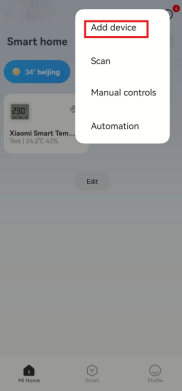
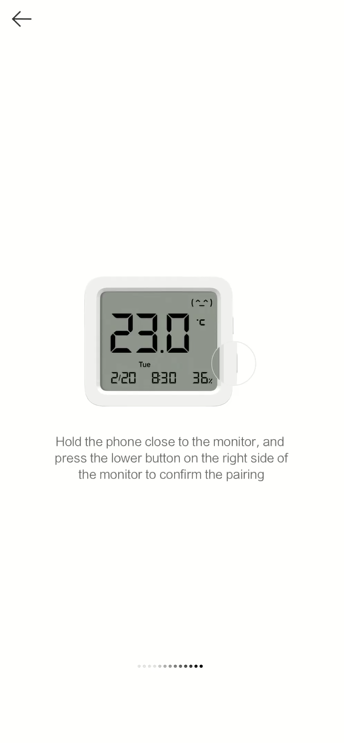
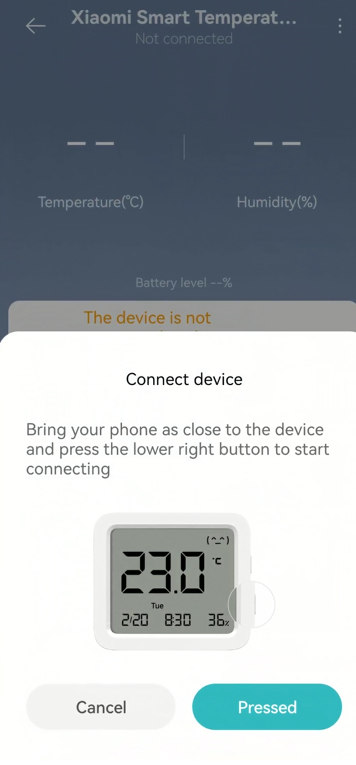
1. Scan the QR code to download and install the Mi Home/Xiaomi Home APP. If you have installed the APP, tap [Add device]. Or search the Mi Home/Xiaomi Home APP in the Play Store to download and install it;
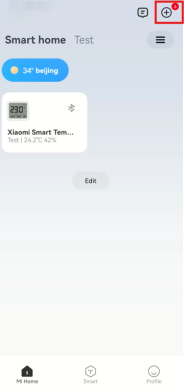
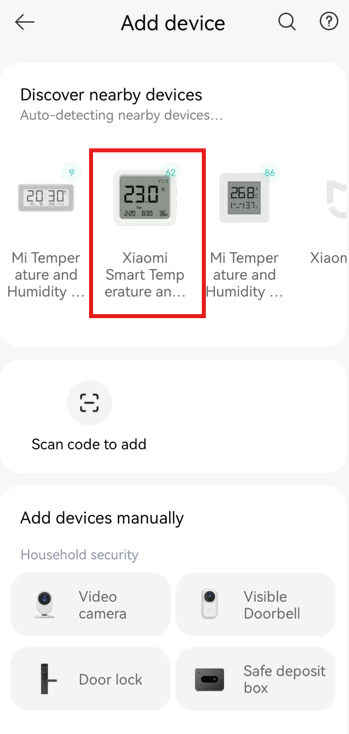
2. Open the [Mi Home/Xiaomi Home] APP, tap [+] at the right top of the screen and connect with the monitor according to the instructions.
Note:
1. Because the APP has not added new devices for a long time, you need to press and hold both the Up and Down Buttons simultaneously for 7 seconds to reset the monitor and connect;
2. The update of the Mi Home/Xiaomi Home APP will lead to some deviations in practical operations. Please follow the instructions of the current Mi Home/Xiaomi Home APP.
1. Q: What are the selling points of the Xiaomi Smart Temperature and Humidity Monitor 3?
A: The selling points of the Xiaomi Smart Temperature and Humidity Monitor 3 are listed below:
1. A large LCD screen, featuring a multifunctional display;
2. Equipped with a Swiss Sensirion's industrial-class precision digital sensor, it can accurately measure temperature and humidity changes;
3. The inclusion of one CR2450 button battery allows for extended operation for up to approximately 1.5 years;
4. With multi-function display and main screen customization, it can switch positions for temperature and humidity readings as well as time display;
5. In the Mi Home/Xiaomi Home APP, the Xiaomi Smart Temperature and Humidity Monitor 3 can be coordinated with other smart devices to activate air conditioning, fans, warmers, humidifiers, etc (which require the use of Bluetooth Gateway/Bluetooth Mesh Gateway);
6. Adaptable positioning, able to stand or adhere.
2. Q: What are the functions of Up Button and Down Button at the side of the Xiaomi Smart Temperature and Humidity Monitor 3?
A: The functions of Up Button and Down Button are listed below:
1. On the side of the body, two physical buttons have been designed. Pressing these buttons will activate the Bluetooth signals. Connecting to the Mi Home/Xiaomi Home APP enables access to additional functions;
2. Pressing the Up Button allows for the swapping of display positions of temperature, humidity, and time. The main display area supports a cycle switch between temperature, humidity, and time;
3. Press and hold the Up and Down Buttons simultaneously for 7 seconds to reset the monitor. The monitor will reset automatically, and you can then add and bind the monitor in the Mi Home/Xiaomi Home APP;
4. Press and hold the Up Button to activate the time setting. Simultaneously, press the Up and Down Buttons to switch the sequence between years, months, days, hours, and minutes.
3. Q: What is the product overview of the Xiaomi Smart Temperature and Humidity Monitor 3?
A: The product overview of the Xiaomi Smart Temperature and Humidity Monitor 3 is listed below:
There are Top Ventilation Holes, Low Battery Icon, Comfort Level Icon, Up Button, Down Button, Temperate/Humidity/Time Display Area, Data Transmission, Screen, Weekday/Year/Month/Day and Cover Opening in the front. There are Back Ventilation Holes, Adhesive Area, Direction Icon, Mount and Adhesive Sticker in the rear.
4. Q: Can the display position of humidity, temperature and time of the Xiaomi Smart Temperature and Humidity Monitor 3 be swapped?
A: Support. In the normal condition, pressing the Up button on the right side of the monitor can switch the main display content for different usage scenes. The main display content supports three modes in a cycle: humidity, temperature, and time.
5. Q: What are the package contents of the Xiaomi Smart Temperature and Humidity Monitor 3?
A: There is a Xiaomi Smart Temperature and Humidity Monitor 3, a Stand, a Wall adhesive, a User manual, a Time synchronisation info card and a Warranty card.
6. Q: What do the expressions displayed on the Xiaomi Smart Temperature and Humidity Monitor 3 represent?
A: The expressions displayed on the Xiaomi Smart Temperature and Humidity Monitor 3 represent the comfort level. A smile expression indicates comfort, while a sad expression indicates discomfort.
7. Q: What do the icons “H” and “L” displayed on the Xiaomi Smart Temperature and Humidity Monitor 3 represent?
A: When the screen displays “H”, the ambient temperature exceeds 60℃. When the screen displays “L”, the ambient temperature is below -9.9℃.
8. Q: How to place the Xiaomi Smart Temperature and Humidity Monitor 3 on the table?
A: There is a stand in the package contents of the Xiaomi Smart Temperature and Humidity Monitor 3. Simply attach this stand to the back of the monitor to place the Xiaomi Smart Temperature and Humidity Monitor 3 on a suitable flat as table or shelf.
9. Q: How to hang the Xiaomi Smart Temperature and Humidity Monitor 3 on the wall?
A: There is a wall adhesive in the package contents of the Xiaomi Smart Temperature and Humidity Monitor 3. Stick it in the adhesive area on the back of the monitor and stick the monitor in the desired place on a wall or any smooth surface.
10. Q: Can the Xiaomi Smart Temperature and Humidity Monitor 3 be attached to the refrigerator door or other iron surface?
A: Not support. There is no magnet fitting in the package contents.
11. Q: Is the Xiaomi Smart Temperature and Humidity Monitor 3 waterproof?
A: Not support. The monitor cannot be immersed in the water.
12. Q: What is the precaution when first using the Xiaomi Smart Temperature and Humidity Monitor 3?
A: When using the Xiaomi Smart Temperature and Humidity Monitor 3 for the first time, you need to pull the battery insulation sheet outwards and remove it before it can be powered on. Without removing the insulation sheet, the monitor cannot be powered on.
13. Q: If the Xiaomi Smart Temperature and Humidity Monitor 3 cannot display normally, how to solve it?
A: When the screen does not display or shows incomplete content, one of the reasons is the battery being out of power. Please replace it with a new CR2450 button battery.
14. Q: Why do the buttons of the Xiaomi Smart Temperature and Humidity Monitor 3 not respond to pressing?
A: If the button pressing does not respond, one of the reasons is the battery being out of power or the battery terminals being installed incorrectly. Reinstall the battery correctly to resolve the problem.
15. Q: How to install the battery on the Xiaomi Smart Temperature and Humidity Monitor 3?
A: Remove the battery cover from the cover opening at the bottom of the monitor. Remove the depleted battery and install a CR2450 coin battery with the positive (+) side facing upwards, then securely reinstall the cover.
16. Q: Why are the values different on several Xiaomi Smart Temperature and Humidity Monitor 3?
A: Temperature and humidity are easily influenced by the external environment. People approaching, moving, or breathing can cause changes in temperature and humidity. Even in the same room, there will be differences in temperature and humidity between the two points. The scientific testing method is to use a dedicated constant temperature and humidity chamber to measure the accuracy of temperature and humidity.
It is recommended that you place several monitors in a relatively enclosed environment for about half an hour before making a comparison for reference.
17. Q: How to check the SN of the Xiaomi Smart Temperature and Humidity Monitor 3?
A: You can check the SN at the back of the package or open the rear cover of the Xiaomi Smart Temperature and Humidity 3.
18. Q: How to check the certifications of the Xiaomi Smart Temperature and Humidity Monitor 3?
A: You can check the certifications at the back of the package.
19. Q: How often does the Xiaomi Smart Temperature and Humidity Monitor 3 refresh the temperature and humidity value?
A: The Xiaomi Smart Temperature and Humidity Monitor 3 refreshes the temperature and humidity value every 6 seconds.
20. Q: How does the Xiaomi Smart Temperature and Humidity Monitor 3 calibrate the time?
A: The Xiaomi Smart Temperature and Humidity Monitor 3 offers 2 time calibration methods:
1. Automatic time calibration using the Mi Home/Xiaomi Home APP:
Once “Phone is connected” is displayed on the screen of the monitor plug-in in the Mi Home/Xiaomi Home APP, the monitor will automatically perform time calibration. (When the network is disconnected, time calibration cannot be performed and you need to connect to the phone.)
Note:
If “Connected to a Bluetooth gateway” is displayed on the screen of the monitor plug-in in the Mi Home/Xiaomi Home APP, automatic time calibration is unavailable in this mode.
You need to calibrate the value in the [Settings]:
1. Open the [Mi Home/Xiaomi Home] APP;
2. Select the [Xiaomi Smart Temperature and Humidity Monitor 3];
3. Tap [...] at the right top of the screen;
4. Select [Time/Historical Data calibration].
2. Manual time setting:
Please refer to the following steps:
(1). Press and hold the Up Button on the right side of the monitor for 3 seconds until the digits representing “year” blink on the screen, indicating that the monitor has entered the time setting mode;
(2). Press both the Up and Down Buttons simultaneously to confirm the current setting item and move to the next one. The screen will display “year”, “month”, “day”, “hour”, and “minute” in sequence;
(3). During blinking, press the Up/Down button to adjust values;
(4). Adjustments save automatically. If there is no operation for more than 15 seconds, it will automatically save and exit the time setting mode.
Note:
The “weekday” information syncs automatically. No separate setup is needed.
About APP
1. Q: How to connect the Xiaomi Smart Temperature and Humidity Monitor 3 to the [Mi Home/Xiaomi Home] APP?
A: The methods of connection are listed below:
1. Scan the QR code to download and install the Mi Home/Xiaomi Home APP. If you have installed the APP, tap [Add device]. Or search the Mi Home/Xiaomi Home APP in the Play Store to download and install it;
2. Open the [Mi Home/Xiaomi Home] APP, tap [+] at the right top of the screen and connect with the monitor according to the instructions.
Note:
1. Because the APP has not added new devices for a long time, you need to press and hold both the Up and Down Buttons simultaneously for 7 seconds to reset the monitor and connect;
2. The update of the Mi Home/Xiaomi Home APP will lead to some deviations in practical operations. Please follow the instructions of the current Mi Home/Xiaomi Home APP.
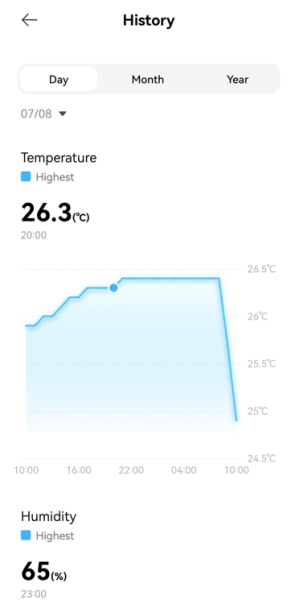
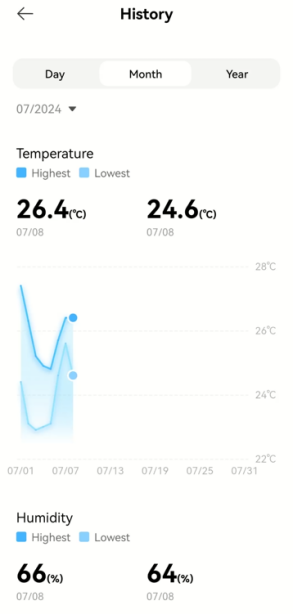
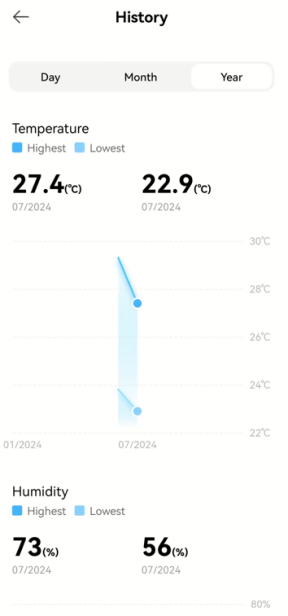
2. Q: How to check the history values of temperature and humidity of the Xiaomi Smart Temperature and Humidity Monitor 3?
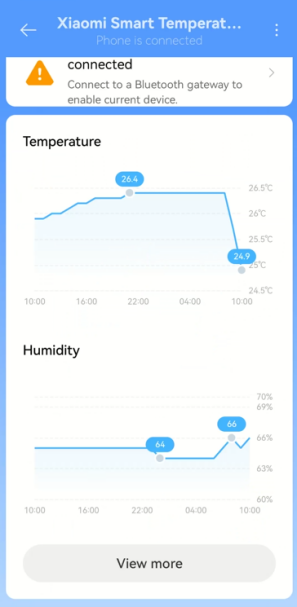
A: When the monitor is connected to the APP, tap [View more] and you will see history records according to day, month or half-year.
3. Q: How to switch between Celsius and Fahrenheit in the Xiaomi Smart Temperature and Humidity Monitor 3? (Fahrenheit is not supported to switch in Korea.)
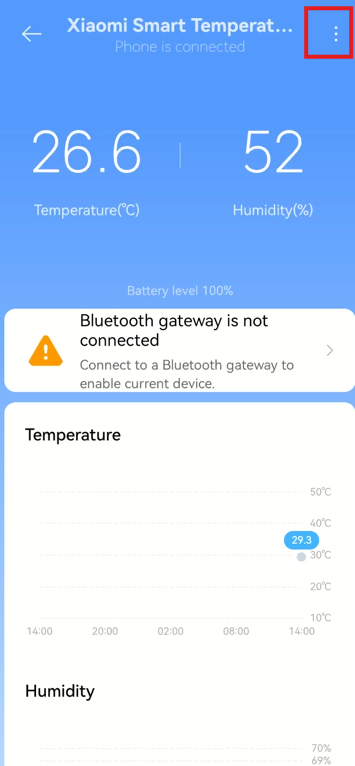
A: To switch the temperature unit, please refer to the following steps:
1. Connect the monitor to the APP;
2. You will see the interface of device controlling;
3. Tap [...] at the right top of the screen;
4. Tap [Fahrenheit] to turn on or turn off.
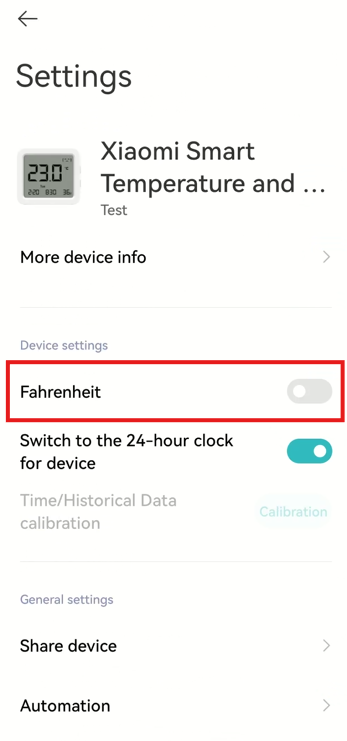
Note:
1. ℃ represents Celsius, and ℉ represents Fahrenheit;
2. If the temperature displayed on the monitor is very high, please check if the Fahrenheit display mode is turned on. Switch to Celsius display mode according to instructions;
3. Fahrenheit is not supported to switch in Korea in the Xiaomi Smart Temperature and Humidity Monitor 3.
4. Q: How does the Xiaomi Smart Temperature and Humidity Monitor 3 connect to the humidifier?
A: The Xiaomi Smart Temperature and Humidity Monitor 3 can only be connected to the humidifier through a Bluetooth gateway, please refer to the following steps:
1. Bind the Xiaomi Smart Temperature and Humidity Monitor 3, the humidifier and Bluetooth gateway under one Xiaomi Account, and the distance between the Bluetooth gateway and the Xiaomi Smart Temperature and Humidity Monitor 3 cannot exceed 5m;
2. Open the [Mi Home/Xiaomi Home] APP, tap [...] at the right top of the homage, tap [Automation], tap [+] at the right top of the screen, tap [Automation], tap [Xiaomi Smart Temperature and Humidity Monitor 3] to set the condition you want, tap [Add an action] to select the humidifier and select the action, and the humidifier will follow the action that you set.
5. Q: Does the Xiaomi Smart Temperature and Humidity Monitor 3 support firmware update?
A: The Xiaomi Smart Temperature and Humidity Monitor 3 supports firmware update to ensure the using experience.
To update to the latest version, please refer to the following steps:
1. After the connection of the Xiaomi Smart Temperature and Humidity Monitor 3 to the Mi Home/Xiaomi Home APP, tap [Xiaomi Smart Temperature and Humidity Monitor 3] and you will see the homepage;
2. Tap [...] at the right top of the screen;
3. Tap [Firmware update];
4. Make your phone close to the monitor, press the button at the right bottom of the monitor and wait to be connected;
5. Check the updated firmware.
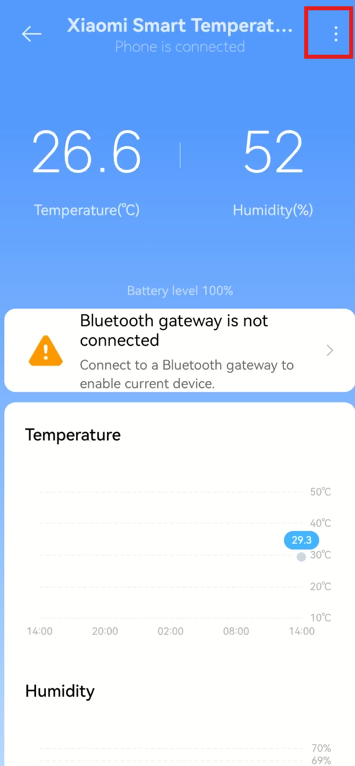
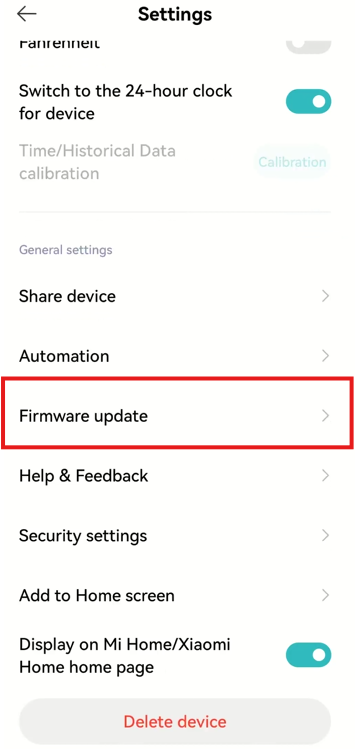
Note:
Only when the monitor is connected to the phone can the firmware be updated. When using the connection of Bluetooth gateway, the firmware cannot be updated.
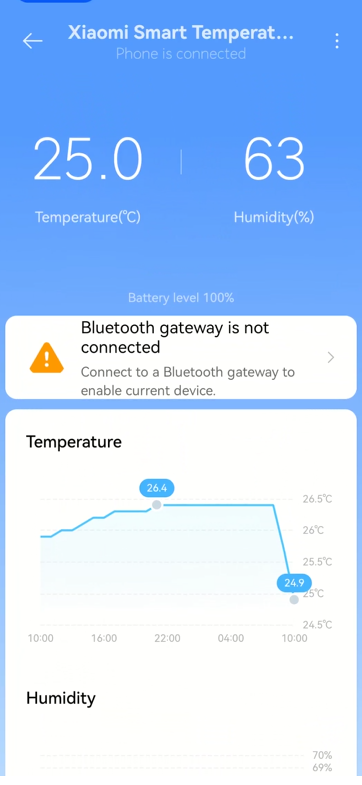
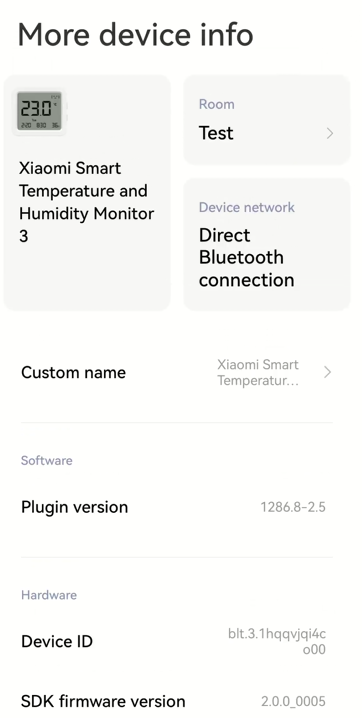
6. Q: How to check such information as the plugin version of the Xiaomi Smart Temperature and Humidity Monitor 3?
A: To check the information, please refer to the following steps:
1. Open [Mi Home/Xiaomi Home] APP;
2. Select [Xiaomi Smart Temperature and Humidity Monitor 3];
3. Tap [...] at the right top of the screen;
4. Tap [More device info];
5. You will see the device network, plugin version and device ID (the device ID of each device is different).

7. Q: How many phones can the Xiaomi Smart Temperature and Humidity Monitor 3 connect?
A: The Xiaomi Smart Temperature and Humidity Monitor 3 only supports connection to one Xiaomi Account, but it can be shared with other Xiaomi Accounts or households through the Mi Home /Xiaomi Home APP.
To share the device, please refer to the following steps:
1. After the connection of the Xiaomi Smart Temperature and Humidity Monitor 3 to the Mi Home/Xiaomi Home APP, you will see the interface of device controlling;
2. Tap [...] at the right top of the screen;
3. Tap [Share device] to share your monitor with other accounts.
Note:
After the shared one confirms the device in the Mi Home/Xiaomi Home APP, the sharing is completed.
8. Q: How to reset the Xiaomi Smart Temperature and Humidity Monitor 3?
A: Xiaomi Smart Temperature and Humidity Monitor 3 needs to be bound with a Xiaomi Account. If you want to change the account binding, you need to press and hold the Up and Down Buttons on the right side of the monitor for 7 seconds. Then you can follow the prompts in the Mi Home/Xiaomi Home APP to bind it with a new account. After binding it with the new account, it will automatically unbind from the original account.
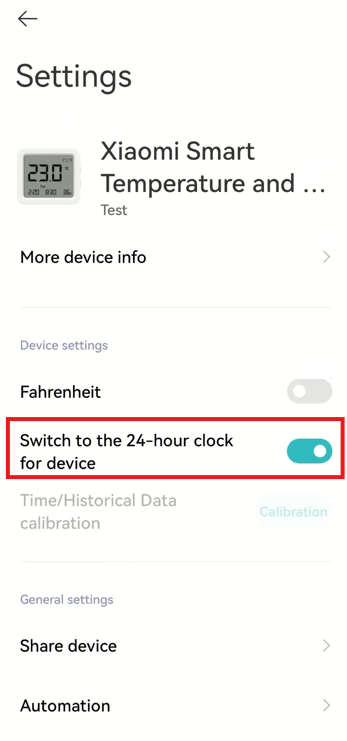
9. Q: How to switch to the 24-hour clock displayed on the Xiaomi Smart Temperature and Humidity Monitor 3?
A: To switch to the 24-hour clock, please refer to the following steps:
1. Open the [Mi Home/Xiaomi Home] APP;
2. Select [Xiaomi Smart Temperature and Humidity Monitor 3];
3. Tap [...] at the right top of the screen;
4. Tap [Switch to the 24-hour clock for device].
10. Q: What smart scenes does the Xiaomi Smart Temperature and Humidity Monitor 3 support?
A: Trigger conditions:
1. The temperature is higher or lower than the specified temperature;
2. The humidity is higher or lower than the specified humidifier;
3. The battery level is lower than a specific value.
An example is listed below:
Temperature higher than specified temperature: used for state conditions, for example, when the human body sensor detects someone and the temperature is higher than 30℃, the air conditioner is turned on. At this time, there is no need for the temperature to transition from below 30℃ to above 30℃, just the moment when the human body sensor detects someone, the temperature is already above 30℃, and the automation can be executed. In addition, if only the trigger condition is set, for example: if the temperature is above 30℃, then turn on a device. In the case of only one trigger condition, there is no need for transition. As long as the temperature meets the condition at that time, it will be triggered. When the temperature rises from 25℃ to 26℃, a transition is needed and smart scenes will be activated.
11. Q: How often does the Xiaomi Smart Temperature and Humidity Monitor 3 upload the values to the cloud?
A: When the monitor is connected to the phone, the temperature and humidity values will be transmitted to the phone every 6 seconds, while historical records are synchronized to the phone and uploaded directly to the cloud. When the monitor is connected to the Bluetooth gateway, the temperature and humidity monitor reports values to the Bluetooth gateway at the fastest every 1 minute and at the slowest every 5 minutes. The duration for the values to be uploaded to the cloud varies depending on the gateway, with most of which taking around 5 to 10 minutes.
12. Q: Does the Xiaomi Smart Temperature and Humidity Monitor 3 upload the values in real-time?
A: It is not in real-time. Uploading the values to the Bluetooth gateway in 1 minute fastest, and in 5 minutes slowest. The duration for the values to be uploaded to the cloud varies depending on the gateway, with most of which taking around 5 to 10 minutes.
13. Q: What are the values of history data displayed in the Xiaomi Smart Temperature and Humidity Monitor 3?
A: Every hour: The minimum time unit for the display page is a day, showing the highest temperature and humidity for each hour;
Day: The highest temperature and humidity for each hour;
Month: The highest and lowest temperature and humidity for each day;
Half-year: The highest and lowest temperature and humidity for every month.
14. Q: Does the Xiaomi Smart Temperature and Humidity Monitor 3 support values storage?
A: Support. The Xiaomi Home Smart Temperature and Humidity Monitor 3 can store temperature and humidity values for 3 months locally. After the connection with the phone or the connection with a Bluetooth gateway, the locally stored values can be uploaded to the cloud.
Trouble
1. Q: If the Xiaomi Home Smart Temperature and Humidity Monitor 3 shows incorrect values, how to solve it?
A: To solve the problem, please refer to the following steps:
1. The ventilation holes are blocked. Remove any obstructions;
2. Water gets into the ventilation holes. Dry the monitor in a well-ventilated area or use absorbent paper to wipe it dry.
2. Q: Why does the Mi Home/Xiaomi Home APP have no humidity values after connecting to the Xiaomi Smart Temperature and Humidity Monitor 3?
A: After the Xiaomi Smart Temperature and Humidity Monitor 3 is turned on, it will start to save temperature and humidity values. The saved values will be displayed in the Mi Home/Xiaomi Home APP on the hour after the monitor is turned on.
3. Q: Why is there a difference between the values displayed on the Mi Home/Xiaomi Home APP and the Xiaomi Smart Temperature and Humidity Monitor 3?
A: Only when the phone is directly connected to the monitor, the temperature and humidity values displayed on the Mi Home/Xiaomi Home APP homepage will be consistent with the monitor. If the phone is only connected to the Bluetooth gateway, the value displayed on the Mi Home/Xiaomi Home APP homepage is reported by the Bluetooth gateway and will not be real-time data, so it will not match the monitor value.
Does it help?
Yes
No