

How does the Xiaomi Smart Pet Food Feeder 2 make the warnings of food bowl errors and inform insufficient food?
The warnings of food bowl error are informed as below:
The Mi Home/Xiaomi Home APP and the indicator of food bowl error will display the abnormal conditions of the food bowl. Please empty, adjust the food bowl, and calibrate the weight in the next interface of the Mi Home/Xiaomi Home APP.
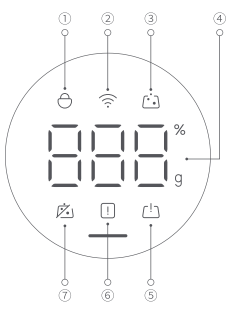
Note:
The indicator ⑤ represents food bowl error.
Insufficient food is informed as below:
Built-in infrared sensors continuously monitor the remaining food level, alerting you immediately via the indicator of insufficient food with the lighting up of orange and the Mi Home/Xiaomi Home APP.
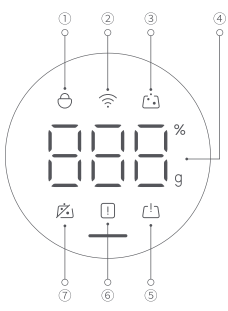
Note:
1. The indicator ⑥ represents insufficient food;
2. There are differences in dry foods with different sizes, so the remaining foods reminded by the feeder are not fixed. It is recommended to fill the food compartments in time.
The Mi Home/Xiaomi Home APP and the indicator of food bowl error will display the abnormal conditions of the food bowl. Please empty, adjust the food bowl, and calibrate the weight in the next interface of the Mi Home/Xiaomi Home APP.
Note:
The indicator ⑤ represents food bowl error.
Insufficient food is informed as below:
Built-in infrared sensors continuously monitor the remaining food level, alerting you immediately via the indicator of insufficient food with the lighting up of orange and the Mi Home/Xiaomi Home APP.
Note:
1. The indicator ⑥ represents insufficient food;
2. There are differences in dry foods with different sizes, so the remaining foods reminded by the feeder are not fixed. It is recommended to fill the food compartments in time.
Does it help?
Yes
No