

What do the indicators of the Xiaomi Smart Pet Food Feeder 2 mean?
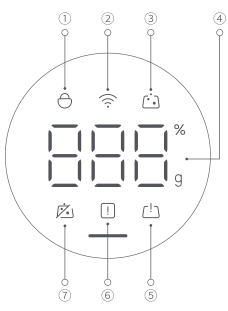
1. Child lock: When the indicator lights up, the child lock function is enabled and the buttons on the feeder will not work except the power button;
2. Wi-Fi indicator:
(1). Blinking: Awaiting network connection;
(2). Quickly blinking: Connecting to network;
(3). On: Network configured successfully;
(4). Off: Network disconnected.
3. Dispensing indicator: Press the dispense button, and the dispensing indicator blinks;
4. Food weight: The number displayed is the weight of the food (g) in the food bowl;
Note:
If the feeding schedule has been set in the Mi Home/Xiaomi Home APP, the display will show the food weight (g) first and then switch to the percentage of the dispensed food weight to the total pet food.
5. Food bowl error: When the indicator lights up in orange, a food bowl error occurs. Empty the food bowl, put it in place, then calibrate it as instructed in the Mi Home/Xiaomi Home APP;
6. Insufficient food: When the indicator lights up in orange, the food is insufficient. Fill the food compartment in time;
7. Blockage reminder: When the indicator lights up in orange, the food outlet is blocked. Clean it as instructed in the Mi Home/Xiaomi Home APP.
2. Wi-Fi indicator:
(1). Blinking: Awaiting network connection;
(2). Quickly blinking: Connecting to network;
(3). On: Network configured successfully;
(4). Off: Network disconnected.
3. Dispensing indicator: Press the dispense button, and the dispensing indicator blinks;
4. Food weight: The number displayed is the weight of the food (g) in the food bowl;
Note:
If the feeding schedule has been set in the Mi Home/Xiaomi Home APP, the display will show the food weight (g) first and then switch to the percentage of the dispensed food weight to the total pet food.
5. Food bowl error: When the indicator lights up in orange, a food bowl error occurs. Empty the food bowl, put it in place, then calibrate it as instructed in the Mi Home/Xiaomi Home APP;
6. Insufficient food: When the indicator lights up in orange, the food is insufficient. Fill the food compartment in time;
7. Blockage reminder: When the indicator lights up in orange, the food outlet is blocked. Clean it as instructed in the Mi Home/Xiaomi Home APP.
Does it help?
Yes
No