

Can the Xiaomi Buds 5 connect to two mobile phones simultaneously?
The Xiaomi Buds 5 supports the Dual connection function.
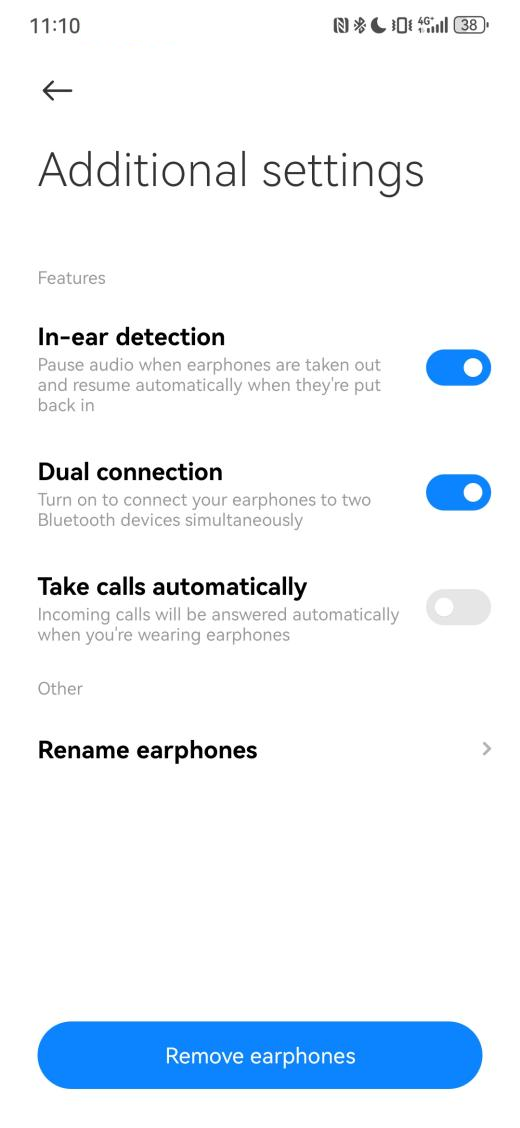
To enable the Dual connection function, please refer to the following steps:
1. Open the Xiaomi Earbuds APP;
2. Select [Xiaomi Buds 5];
3. Tap [Additional settings];
4. Turn on [Dual connection].
To use this function to connect to two devices, please refer to the following steps:
1. Put the earbuds in the charging case with the lid open;
2. Press and hold the function button of the charging case for 2s. The indicator flashes continuously and the earbuds enter the pairing mode;
3. Use another mobile phone to search for the Bluetooth name of the earbuds and connect.
To enable the Dual connection function, please refer to the following steps:
1. Open the Xiaomi Earbuds APP;
2. Select [Xiaomi Buds 5];
3. Tap [Additional settings];
4. Turn on [Dual connection].
To use this function to connect to two devices, please refer to the following steps:
1. Put the earbuds in the charging case with the lid open;
2. Press and hold the function button of the charging case for 2s. The indicator flashes continuously and the earbuds enter the pairing mode;
3. Use another mobile phone to search for the Bluetooth name of the earbuds and connect.
Does it help?
Yes
No