

How to delete the pair records between the Xiaomi Buds 5 and the phone and reset the Xiaomi Buds 5?
To delete the pair records, please refer to the following steps:
1. Android phone: Open the Settings APP >> [Bluetooth] >> [Xiaomi Buds 5] >> tap [Unpair] (Take the Xiaomi smartphone as an example);
2. iPhone: Open the Settings APP >> [Bluetooth] >> [Xiaomi Buds 5] >> tap the [i] icon on the right >> tap [Forget This Device] (Take the iPhone 15 as an example).
To reset the earbuds, please refer to the following steps:
1. Put the earbuds into the charging case;
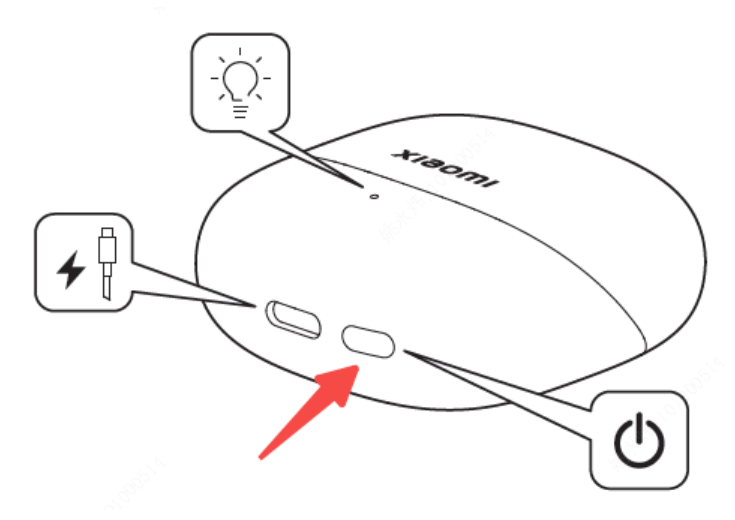
2. Press the function button of the charging case for more than 10 seconds, the indicator of the charging case flashes in orange, then release the button. The earbuds are reset, and the pair records are deleted. The indicator of the charging case flashes in white, indicating that the earbuds re-enter the pairing mode.
1. Android phone: Open the Settings APP >> [Bluetooth] >> [Xiaomi Buds 5] >> tap [Unpair] (Take the Xiaomi smartphone as an example);
2. iPhone: Open the Settings APP >> [Bluetooth] >> [Xiaomi Buds 5] >> tap the [i] icon on the right >> tap [Forget This Device] (Take the iPhone 15 as an example).
To reset the earbuds, please refer to the following steps:
1. Put the earbuds into the charging case;
2. Press the function button of the charging case for more than 10 seconds, the indicator of the charging case flashes in orange, then release the button. The earbuds are reset, and the pair records are deleted. The indicator of the charging case flashes in white, indicating that the earbuds re-enter the pairing mode.
Does it help?
Yes
No