

How to use the Adaptive noise cancellation function of the Xiaomi Buds 5?
The Xiaomi Buds 5 features the Adaptive noise cancellation. After this function is enabled, your earbuds will reduce noise automatically according to the surrounding environment.
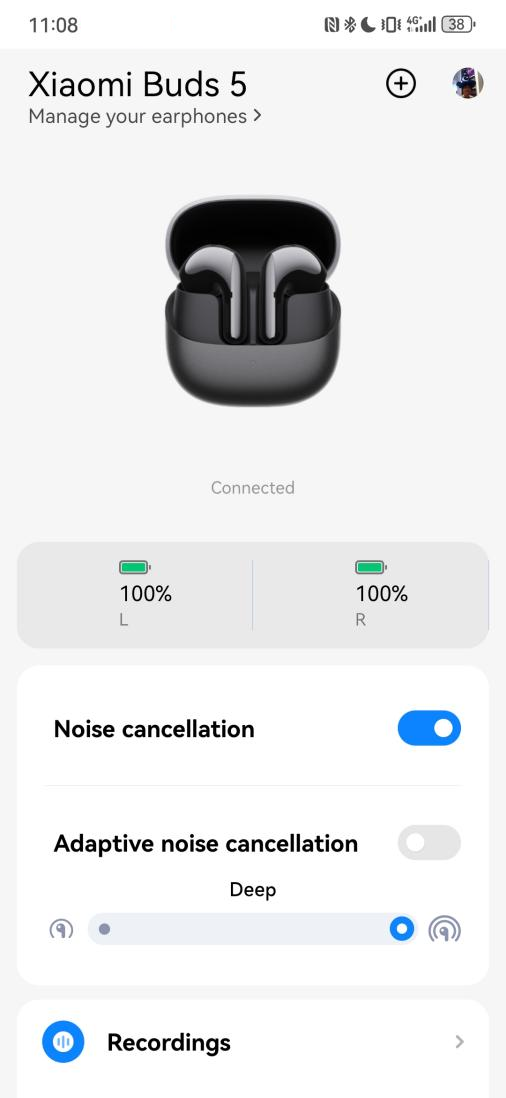
To enable the Adaptive noise cancellation function, please refer to the following steps:
1. Ensure the earbuds are connected to the phone;
2. Open the Xiaomi Earbuds APP;
3. Select [Xiaomi Buds 5];
4. Turn on [Adaptive noise cancellation].
Note:
1. To avoid the discomfort caused by the strong noise cancellation state for a long time, the Adaptive noise cancellation function will automatically adjust to the appropriate ear pressure and noise cancellation effect according to the noise level of the surrounding environment;
2. The noise reduction depth has balance mode and deep mode. The noise cancellation mode is the deep mode by default.
To enable the Adaptive noise cancellation function, please refer to the following steps:
1. Ensure the earbuds are connected to the phone;
2. Open the Xiaomi Earbuds APP;
3. Select [Xiaomi Buds 5];
4. Turn on [Adaptive noise cancellation].
Note:
1. To avoid the discomfort caused by the strong noise cancellation state for a long time, the Adaptive noise cancellation function will automatically adjust to the appropriate ear pressure and noise cancellation effect according to the noise level of the surrounding environment;
2. The noise reduction depth has balance mode and deep mode. The noise cancellation mode is the deep mode by default.
Does it help?
Yes
No