

How to use the Charging Dock of the Xiaomi Robot Vacuum S20?
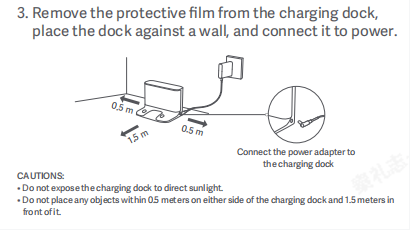
Place the Charging Dock against the wall on level ground, ensure there is more than 0.5m of space on both sides of the Charging Dock, and connect the plug to the power socket. To give you a better experience using the Mi Home/Xiaomi Home APP, please place the Charging Dock within Wi-Fi coverage.
1. Install the Charging Dock in an open location with a good Wi-Fi signal;
2. Install the power cord to the Charging Dock and connect the power supply.
Please refer to the following steps and picture:
1. Remove the protective film from the Charging Dock;
2. Place the dock against a wall, and connect it to power;
3. Connect the power adapter to the Charging Dock.
Note:
1. Do not expose the charging dock to direct sunlight;
2. Do not place any objects within 0.5 meters on either side of the charging dock and 1.5 meters in front of it;
3. Before use, place the main unit on the Charging Dock, and the main unit will automatically turn on and charge;
4. After fully charged, the main unit indicator stays on for 10 minutes and then goes off.
1. Install the Charging Dock in an open location with a good Wi-Fi signal;
2. Install the power cord to the Charging Dock and connect the power supply.
Please refer to the following steps and picture:
1. Remove the protective film from the Charging Dock;
2. Place the dock against a wall, and connect it to power;
3. Connect the power adapter to the Charging Dock.
Note:
1. Do not expose the charging dock to direct sunlight;
2. Do not place any objects within 0.5 meters on either side of the charging dock and 1.5 meters in front of it;
3. Before use, place the main unit on the Charging Dock, and the main unit will automatically turn on and charge;
4. After fully charged, the main unit indicator stays on for 10 minutes and then goes off.
Does it help?
Yes
No