

What are the meanings of the different colors of the indicator on the Xiaomi Buds 5?
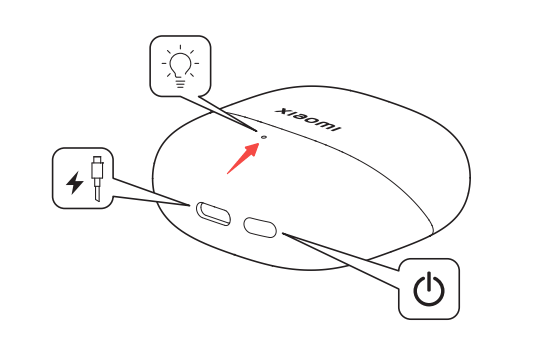
For your reference, the indicator statuses are as follows:
1. When charging, if the battery level is greater than 90%, the indicator is always in green, otherwise, the indicator is always in orange;
2. After opening the lid, press and hold the function button for 2 seconds, the indicator of the charging case will flash in white, and the earbuds will wait for connection. The earbuds will enter sleep mode without connection in 1 minute, and the indicator will turn off;
3. When the charging case lid is closed, press the function button once, the charging case battery is greater than 40%, the indicator is always in green for 5 seconds, and then turns off. When the charging case battery is ≤40%, the indicator is always in orange for 5 seconds, and then turns off;
4. When the earbuds are placed in the case, the battery status of the earbuds is displayed in the first second (in green if the earbuds’ battery level is >60%, otherwise in orange). The battery level of the charging case is displayed after 1 second. If the battery level of the charging case is >40%, the green light will be on for 8 seconds and then turn off. If the battery level of the charging case is ≤40%, the orange light will be on for 8 seconds and then turn off.
1. When charging, if the battery level is greater than 90%, the indicator is always in green, otherwise, the indicator is always in orange;
2. After opening the lid, press and hold the function button for 2 seconds, the indicator of the charging case will flash in white, and the earbuds will wait for connection. The earbuds will enter sleep mode without connection in 1 minute, and the indicator will turn off;
3. When the charging case lid is closed, press the function button once, the charging case battery is greater than 40%, the indicator is always in green for 5 seconds, and then turns off. When the charging case battery is ≤40%, the indicator is always in orange for 5 seconds, and then turns off;
4. When the earbuds are placed in the case, the battery status of the earbuds is displayed in the first second (in green if the earbuds’ battery level is >60%, otherwise in orange). The battery level of the charging case is displayed after 1 second. If the battery level of the charging case is >40%, the green light will be on for 8 seconds and then turn off. If the battery level of the charging case is ≤40%, the orange light will be on for 8 seconds and then turn off.
Does it help?
Yes
No