

How to use the running clip mode on the Xiaomi Smart Band 8?
We provide a running posture recognition function for sports enthusiasts who are concerned about their running posture. Through a specific wearing method, you can obtain some specific running posture information from the wearable device to help you analyze your running posture and improve it.
Running Clip Mode Wearing Method:
Press the band body into the running pod cavity in the correct direction;
Press the shoe buckle clip button at the bottom of the running pod to pop open the spring clip;
Pass the shoe buckle clip under the shoelaces and press and tighten the spring clip.
Note:
After wearing, please check whether the dial content is facing you. If the direction is wrong, the data recording will be incorrect.
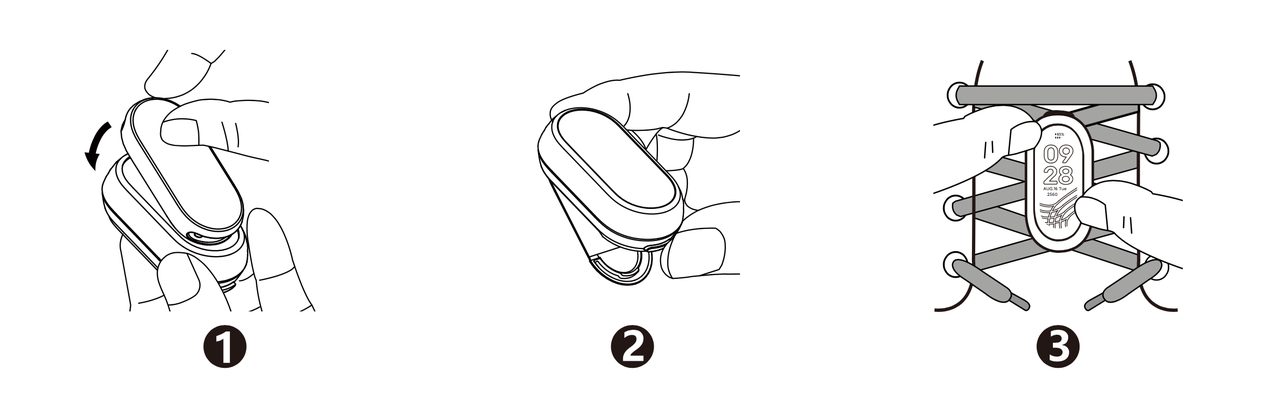
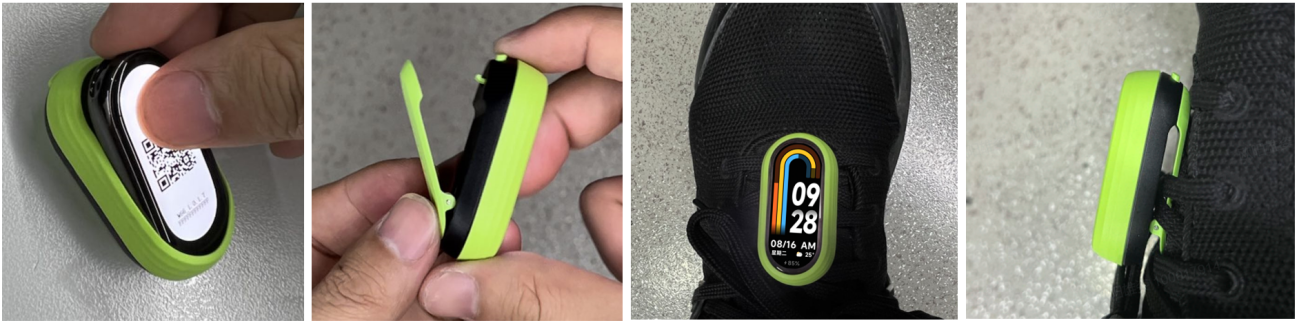
Running Clip Mode Disassembly Method:
Press the shoe clip button at the bottom of the running pod to pop open the spring clip and remove the running pod from the shoelace;
Use your fingertips or a prying piece to gently insert the top or bottom of the running pod, grab the groove of the band body and pull it up;
Separate the band body from the running pod.
Running Clip Mode Wearing Method:
Press the band body into the running pod cavity in the correct direction;
Press the shoe buckle clip button at the bottom of the running pod to pop open the spring clip;
Pass the shoe buckle clip under the shoelaces and press and tighten the spring clip.
Note:
After wearing, please check whether the dial content is facing you. If the direction is wrong, the data recording will be incorrect.
Running Clip Mode Disassembly Method:
Press the shoe clip button at the bottom of the running pod to pop open the spring clip and remove the running pod from the shoelace;
Use your fingertips or a prying piece to gently insert the top or bottom of the running pod, grab the groove of the band body and pull it up;
Separate the band body from the running pod.
Does it help?
Yes
No