

How to reset the Xiaomi Smart Camera C300?
For your reference, the reset steps are as follows:
1. To power on the device, please connect it to the power outlet;
2. Press and hold the [Reset] button for 5 seconds until the indicator turns orange.
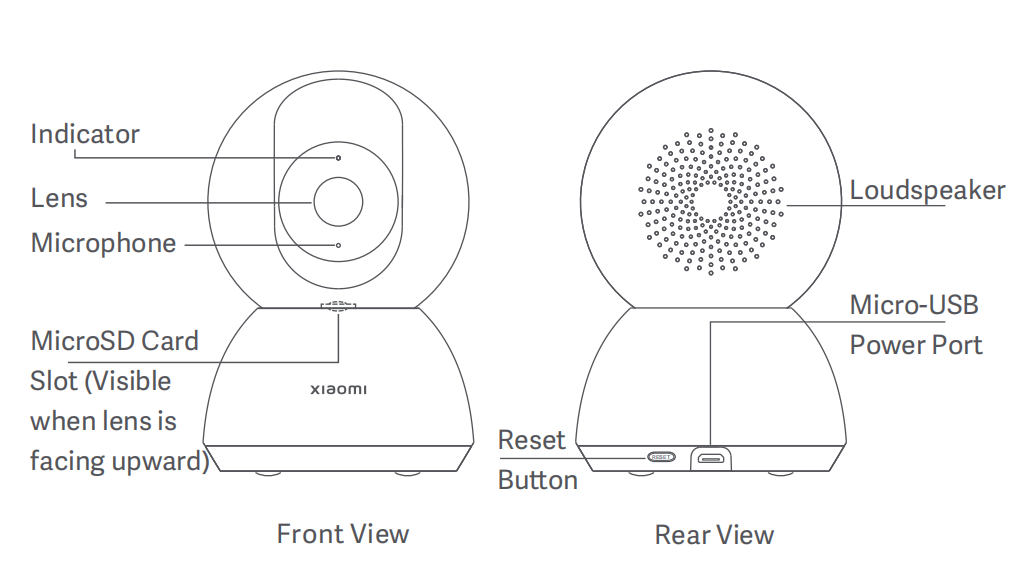
Note:
After the device is restored to factory settings, the contents on the MicroSD memory card will not be deleted. It's recommended to back up any important data before performing the reset to ensure no data loss occurs.
1. To power on the device, please connect it to the power outlet;
2. Press and hold the [Reset] button for 5 seconds until the indicator turns orange.
Note:
After the device is restored to factory settings, the contents on the MicroSD memory card will not be deleted. It's recommended to back up any important data before performing the reset to ensure no data loss occurs.
Does it help?
Yes
No