

How to clean the Dust Compartment and filtration components of the Xiaomi Vacuum Cleaner G20?
Clean the Dust Compartment:
Before cleaning the Dust Compartment, please confirm that the power adapter is disconnected and remove the Extension Rod. When the dust reaches the maximum mark, continuing to use will affect the vacuum effect. Please clean it as soon as possible before using.
Dust Dumping:
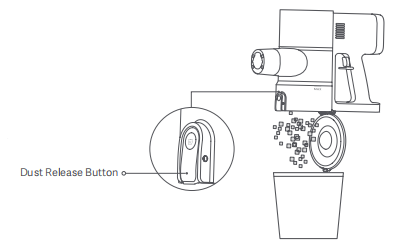
Align the Dust Compartment cover with the trash can, press the Release Button to dump the dust.
Clean filter components
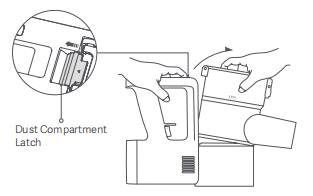
1. Release the dust compartment latch to remove the dust compartment outwards;
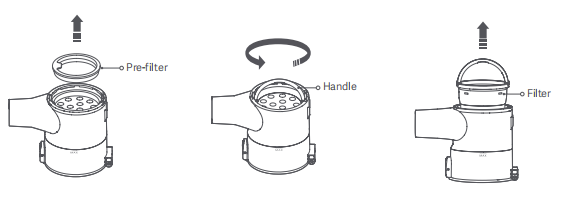
2. To remove the Pre-filter, pull up on the filter carrying handle and then turn counterclockwise to remove the filter;
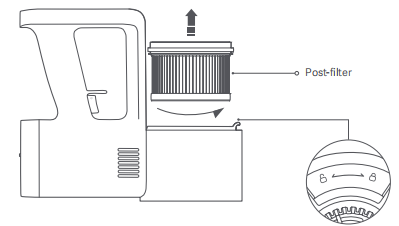
3. Remove the Post-filter by turning it counterclockwise;
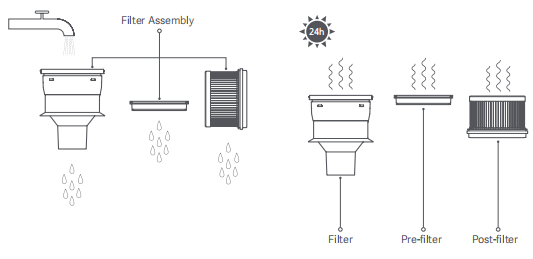
4. Rinse the filter, pre-filter, and post-filter under running tap water until clean, then set them aside to fully dry for at least 24 hours.
Note:
1. The Pre-filter element and post-filter element can only be rinsed and avoid to be soaking;
2. When cleaning the post-filter, please rinse and tap the frame to gently remove dirt until it is clean;
3. Do not use hands, brushes, or other sharp objects to clean the Pre-filter and post-filter to avoid damage;
4. After cleaning the Pre-filter and post-filter, if there is still a significant decrease in suction, please replace an adaptive original filter set.
Before cleaning the Dust Compartment, please confirm that the power adapter is disconnected and remove the Extension Rod. When the dust reaches the maximum mark, continuing to use will affect the vacuum effect. Please clean it as soon as possible before using.
Dust Dumping:
Align the Dust Compartment cover with the trash can, press the Release Button to dump the dust.
Clean filter components
1. Release the dust compartment latch to remove the dust compartment outwards;
2. To remove the Pre-filter, pull up on the filter carrying handle and then turn counterclockwise to remove the filter;
3. Remove the Post-filter by turning it counterclockwise;
4. Rinse the filter, pre-filter, and post-filter under running tap water until clean, then set them aside to fully dry for at least 24 hours.
Note:
1. The Pre-filter element and post-filter element can only be rinsed and avoid to be soaking;
2. When cleaning the post-filter, please rinse and tap the frame to gently remove dirt until it is clean;
3. Do not use hands, brushes, or other sharp objects to clean the Pre-filter and post-filter to avoid damage;
4. After cleaning the Pre-filter and post-filter, if there is still a significant decrease in suction, please replace an adaptive original filter set.
Does it help?
Yes
No