

How to use the necklace mode on the Xiaomi Smart Band 8?
We offer stylish and fashionable necklace pendants. The device can be worn as a pendant for improved aesthetics and presentation in this mode.
We provide several exquisite band displays specifically designed for necklace wear. These band displays offer superior visual effects on both the active and standby screens. For more details, please visit the [Manage band displays] and then go to [Necklace mode] section.
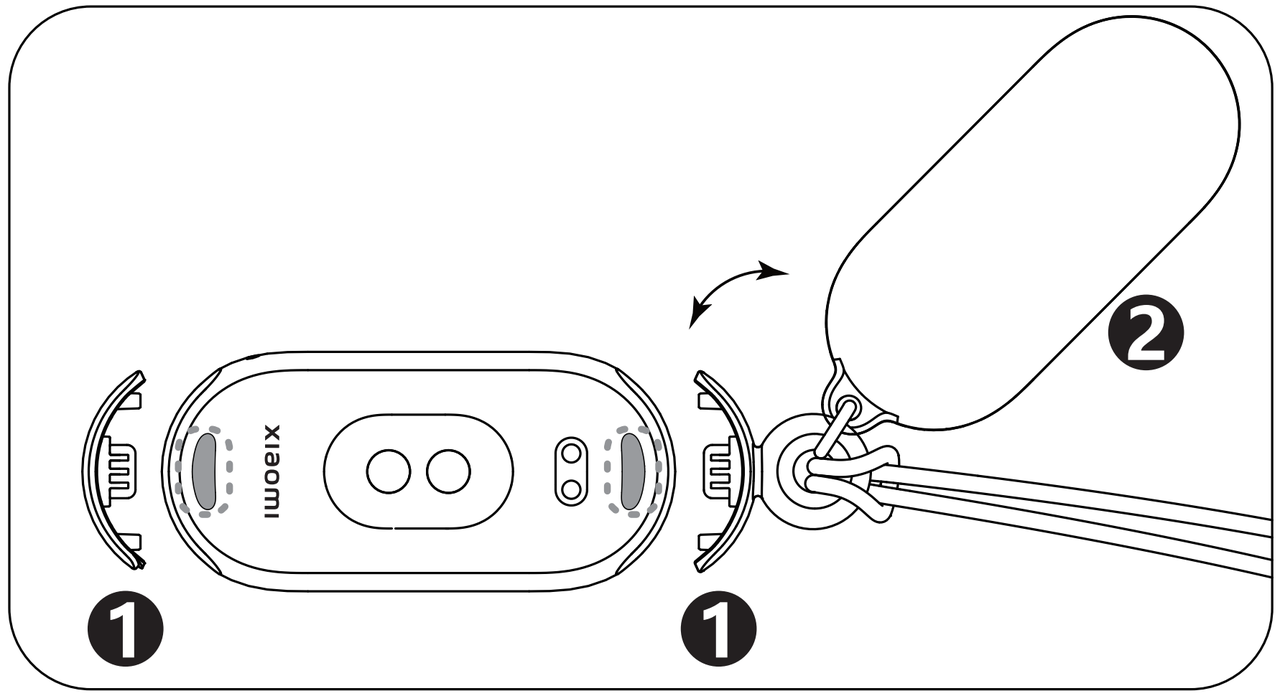
To use the necklace mode, first press the button on the back cover to detach the band. Then, assemble the necklace clasp and close the necklace backplate. Once assembled, the necklace mode is ready for use.
In this mode, the data of steps are supported for monitoring. However, the data items such as heart rate, blood oxygen, sleep, vitality score, calories and duration of medium-to-high intensity activities are not supported for monitoring. Due to the wearing style, detection accuracy cannot be ensured.
Note:
You cannot switch to necklace mode from the APP while in the middle of an exercise session, Pomodoro or timer.
We provide several exquisite band displays specifically designed for necklace wear. These band displays offer superior visual effects on both the active and standby screens. For more details, please visit the [Manage band displays] and then go to [Necklace mode] section.
To use the necklace mode, first press the button on the back cover to detach the band. Then, assemble the necklace clasp and close the necklace backplate. Once assembled, the necklace mode is ready for use.
In this mode, the data of steps are supported for monitoring. However, the data items such as heart rate, blood oxygen, sleep, vitality score, calories and duration of medium-to-high intensity activities are not supported for monitoring. Due to the wearing style, detection accuracy cannot be ensured.
Note:
You cannot switch to necklace mode from the APP while in the middle of an exercise session, Pomodoro or timer.
Does it help?
Yes
No