

How to clean the dust compartment and filter components of the Xiaomi Vacuum Cleaner G20 Max?
1. Cleaning the Dust Compartment
Before cleaning the dust compartment, turn off the vacuum cleaner, disconnect the power supply, and remove the extension rod. The vacuum's cleaning ability will be reduced if the dust compartment is filled to the "MAX" mark. To regain performance, empty the dust compartment.
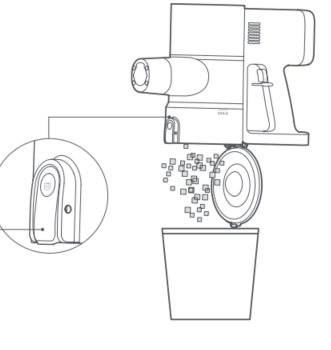
Empty the dust compartment: Hold the dust compartment over a trash bin, then press the dust release button to empty the contents.
2. Cleaning the Filter Assembly
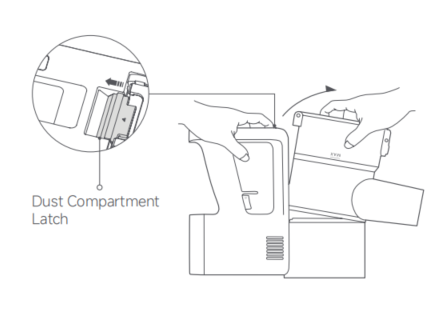
(1). As illustrated, release the dust compartment latch to remove the dust compartment outwards;
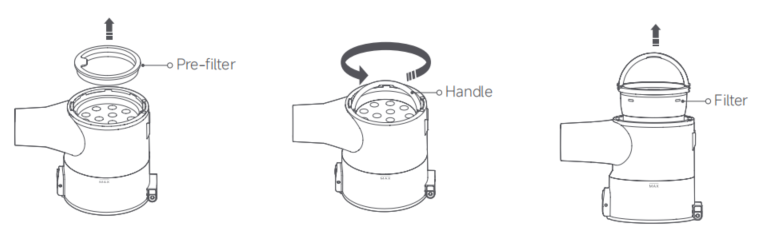
(2). Remove the pre-filter, lift the handle, and twist counterclockwise to take out the filter;
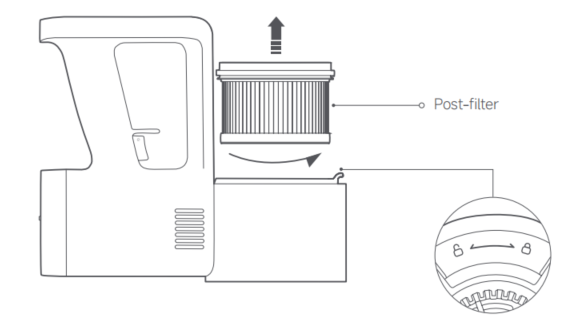
(3). Rotate counterclockwise to remove the post-filter.
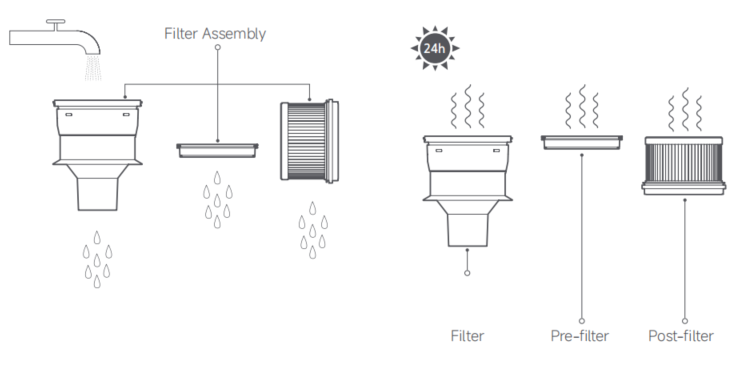
(4). Rinse the filter, pre-filter, and post-filter under running tap water until clean, then set them aside to fully dry for at least 24 hours.
Note:
1. The pre-filter and post-filter can only be rinsed, do not soak them;
2. When cleaning the post-filter, it is recommended to repeatedly rinse and tap its edges to gently remove dirt until it is clean;
3. Do not use hands, brushes, or other sharp objects to clean the pre-filter and post-filter to avoid damage;
4. If the suction power still significantly decreases after cleaning the pre-filter and post-filter, consider purchasing a compatible set of genuine replacement filters.
Note:
1. When cleaning the filter, rinse and tap the edges of the filter repeatedly until the dirt is gently knocked out and it is clean;
2. Do not touch the filter or sponge surface with hands, brushes, or sharp objects to avoid damaging the filter;
3. Do not soak the filter in water;
4. After cleaning the filter component. If suction still significantly decreases. Consider purchasing genuine replacement filters.
Before cleaning the dust compartment, turn off the vacuum cleaner, disconnect the power supply, and remove the extension rod. The vacuum's cleaning ability will be reduced if the dust compartment is filled to the "MAX" mark. To regain performance, empty the dust compartment.
Empty the dust compartment: Hold the dust compartment over a trash bin, then press the dust release button to empty the contents.
2. Cleaning the Filter Assembly
(1). As illustrated, release the dust compartment latch to remove the dust compartment outwards;
(2). Remove the pre-filter, lift the handle, and twist counterclockwise to take out the filter;
(3). Rotate counterclockwise to remove the post-filter.
(4). Rinse the filter, pre-filter, and post-filter under running tap water until clean, then set them aside to fully dry for at least 24 hours.
Note:
1. The pre-filter and post-filter can only be rinsed, do not soak them;
2. When cleaning the post-filter, it is recommended to repeatedly rinse and tap its edges to gently remove dirt until it is clean;
3. Do not use hands, brushes, or other sharp objects to clean the pre-filter and post-filter to avoid damage;
4. If the suction power still significantly decreases after cleaning the pre-filter and post-filter, consider purchasing a compatible set of genuine replacement filters.
Note:
1. When cleaning the filter, rinse and tap the edges of the filter repeatedly until the dirt is gently knocked out and it is clean;
2. Do not touch the filter or sponge surface with hands, brushes, or sharp objects to avoid damaging the filter;
3. Do not soak the filter in water;
4. After cleaning the filter component. If suction still significantly decreases. Consider purchasing genuine replacement filters.
Does it help?
Yes
No