

How to clean the dust compartment of the Xiaomi Dust Mite Vacuum Cleaner Pro?
To clean the dust compartment daily, please refer to the following steps:
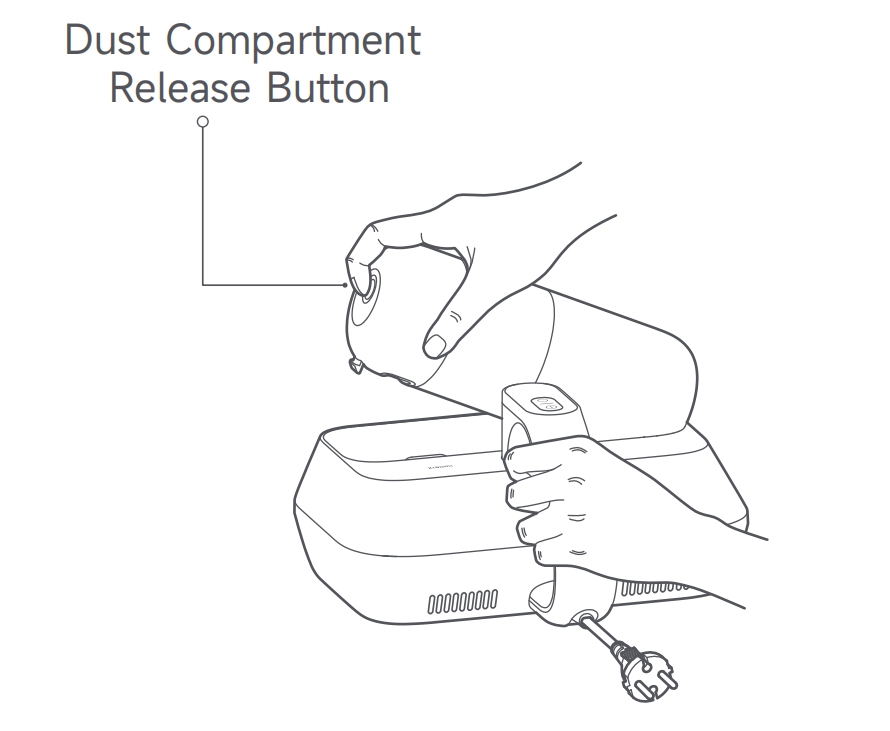
1. Press and hold the Dust Compartment Release Button, and simultaneously pull out the dust compartment assembly;
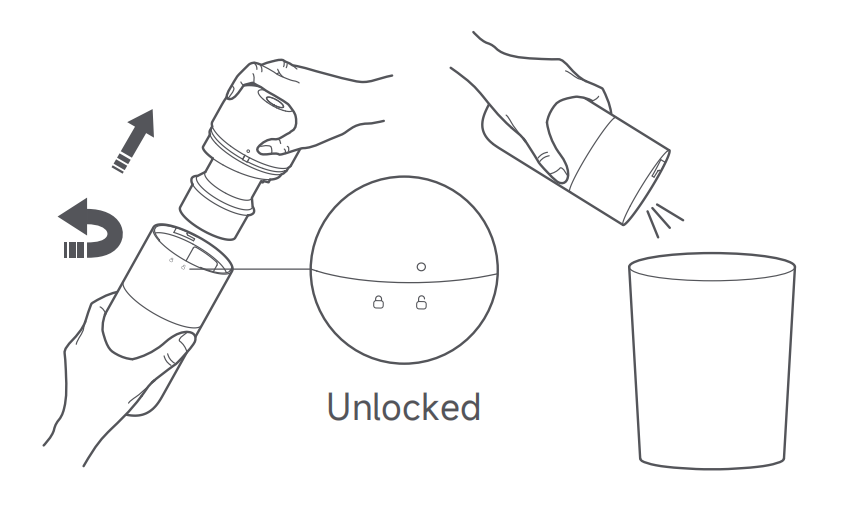
2. Rotate the dust compartment over a trash bin until the mark “○” aligns with the unlocking icon. Open the dust compartment assembly upside down, empty the dust compartment, and clean the surface of the dust compartment cover;
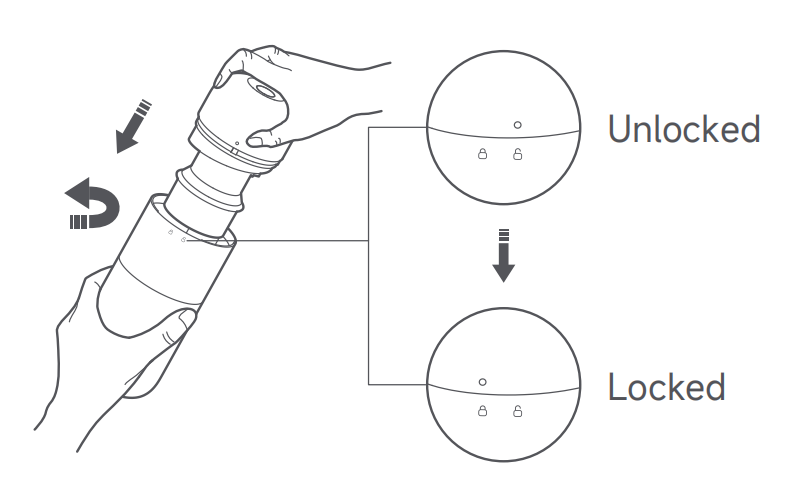
3. After emptying the dust compartment, align the mark “○” with the unlocking icon to reinstall the dust compartment cover to the dust compartment. Then, rotate the dust compartment until its “○” mark aligns with the locking icon. When you hear a "click" sound, they are properly locked;
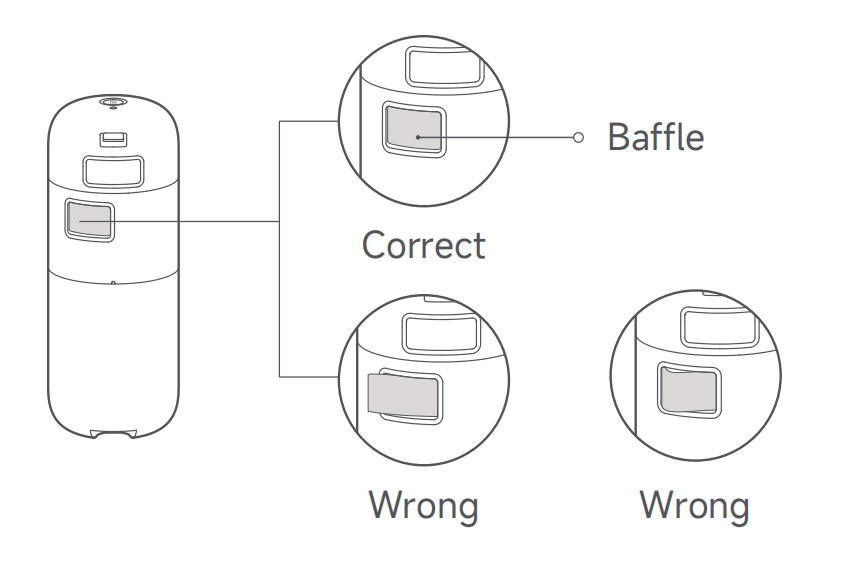
4. Check that the baffle of the dust compartment assembly is properly installed. Then reinstall the dust compartment assembly into the main body;
If suction decreases, wash the dust compartment assembly promptly to regain the mite removal performance and prevent blockage from the air duct that will cause the dust mite vacuum cleaner to shut down.
To wash the dust compartment, please refer to the following steps:
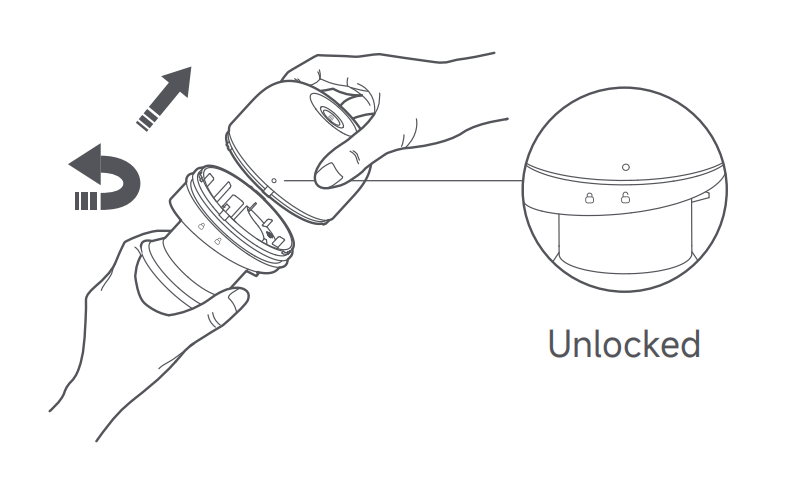
1. Remove the dust compartment cover, and rotate it to remove the
cyclone separator from it;
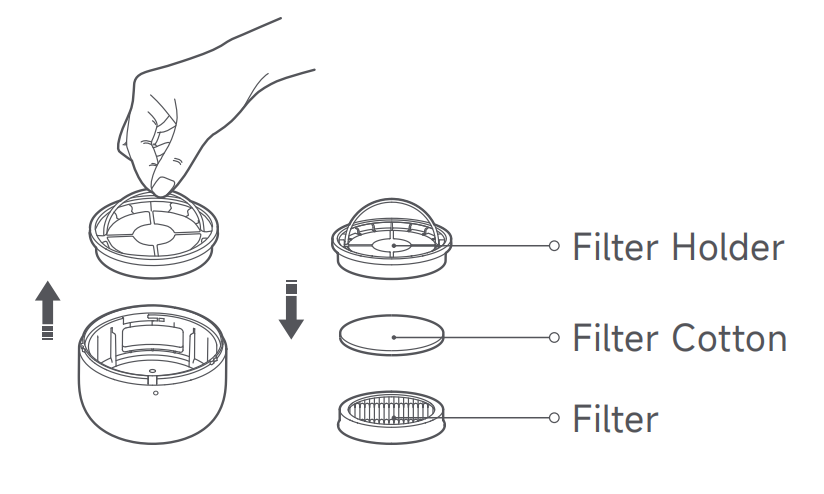
2. Take the filter holder assembly out of the dust compartment cover, and then remove the filter and filter cotton in turn;
3. Clean the surfaces of the dust compartment, dust compartment
cover, cyclone separator, filter holder, filter, and filter cotton. Then rinse them with clean tap water, and air-dry them thoroughly;

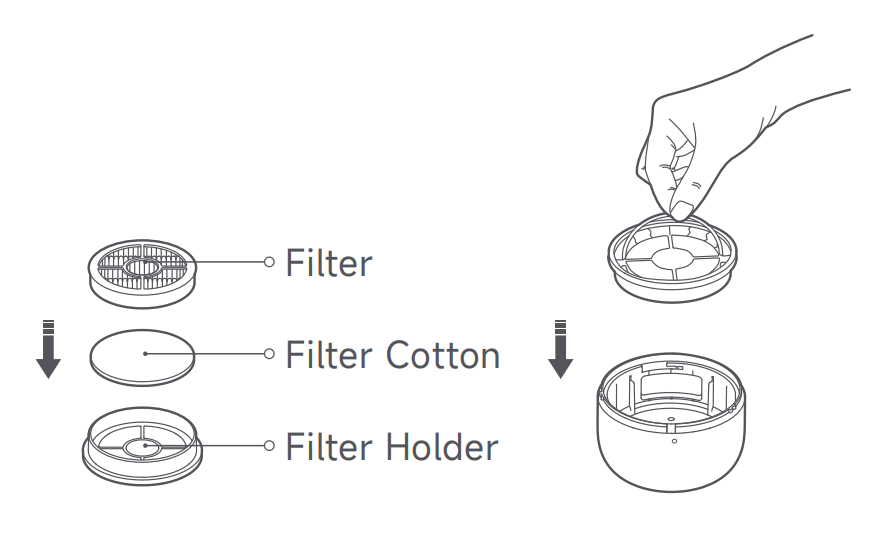
4. Reinstall the filter cotton and filter into the filter holder, and press them in place. Then place the filter holder assembly into the dust compartment cover and press it in place;
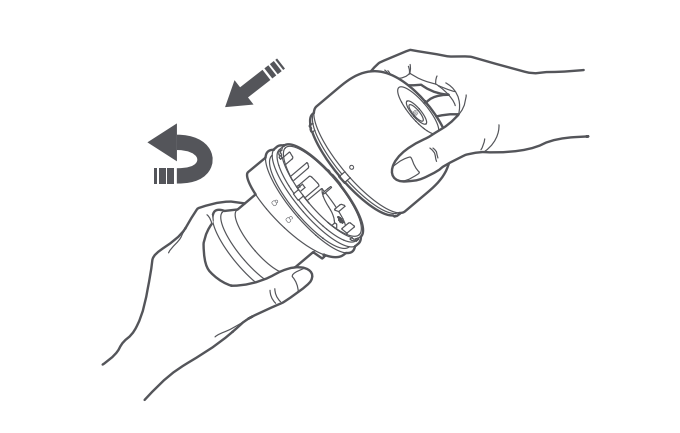
5. Align the unlocking icon on the cyclone separator with the “○” mark on the dust compartment cover. Then, rotate the cyclone separator until the “○” mark aligns with the locking icon. When you hear a “click” sound, they are firmly locked;
6. Lock the dust compartment and the dust compartment cover securely, and then reinstall the dust compartment assembly into the dust mite vacuum cleaner.
Note:
1. It is recommended to wash and clean the filter every 5-6 times of vacuuming, or you can change the cleaning frequency as needed;
2. It is recommended to replace the filter every 2-3 months to ensure optimal vacuuming performance;
3. After rinsing, be sure to thoroughly air-dry the components (away from direct sunlight) before re-installation.
1. Press and hold the Dust Compartment Release Button, and simultaneously pull out the dust compartment assembly;
2. Rotate the dust compartment over a trash bin until the mark “○” aligns with the unlocking icon. Open the dust compartment assembly upside down, empty the dust compartment, and clean the surface of the dust compartment cover;
3. After emptying the dust compartment, align the mark “○” with the unlocking icon to reinstall the dust compartment cover to the dust compartment. Then, rotate the dust compartment until its “○” mark aligns with the locking icon. When you hear a "click" sound, they are properly locked;
4. Check that the baffle of the dust compartment assembly is properly installed. Then reinstall the dust compartment assembly into the main body;
If suction decreases, wash the dust compartment assembly promptly to regain the mite removal performance and prevent blockage from the air duct that will cause the dust mite vacuum cleaner to shut down.
To wash the dust compartment, please refer to the following steps:
1. Remove the dust compartment cover, and rotate it to remove the
cyclone separator from it;
2. Take the filter holder assembly out of the dust compartment cover, and then remove the filter and filter cotton in turn;
3. Clean the surfaces of the dust compartment, dust compartment
cover, cyclone separator, filter holder, filter, and filter cotton. Then rinse them with clean tap water, and air-dry them thoroughly;
4. Reinstall the filter cotton and filter into the filter holder, and press them in place. Then place the filter holder assembly into the dust compartment cover and press it in place;
5. Align the unlocking icon on the cyclone separator with the “○” mark on the dust compartment cover. Then, rotate the cyclone separator until the “○” mark aligns with the locking icon. When you hear a “click” sound, they are firmly locked;
6. Lock the dust compartment and the dust compartment cover securely, and then reinstall the dust compartment assembly into the dust mite vacuum cleaner.
Note:
1. It is recommended to wash and clean the filter every 5-6 times of vacuuming, or you can change the cleaning frequency as needed;
2. It is recommended to replace the filter every 2-3 months to ensure optimal vacuuming performance;
3. After rinsing, be sure to thoroughly air-dry the components (away from direct sunlight) before re-installation.
Does it help?
Yes
No