

How to use the vacuum and mop synchronization function on the Xiaomi Robot Vacuum X20+?
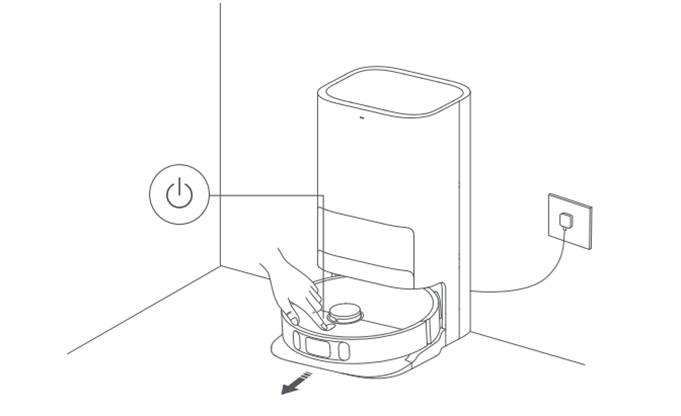
1. Ensure the Xiaomi Robot Vacuum X20+ has the mop component installed. Select the vacuum and mop function in the APP, then start the cleaning using the APP or by pressing the power button on the robot vacuum. The robot vacuum will start from the Omni station and execute the cleaning task according to the optimal cleaning plan planned on the created map;
Note:
If certain areas will block the robot vacuum or if it can scratch the surface of furniture during operation, you can set up a restricted area in the APP to prevent it from entering these areas.
2. During the cleaning process, the robot vacuum will automatically return to the Omni station to clean the mop and then continue the cleaning task;
3. After completing the cleaning task, the robot vacuum will automatically collect dust, clean the mop, and then air dry it;
4. After the robot vacuum completes the automatic cleaning, please clean the dirty water tank promptly to avoid odors.
Note:
1. Before starting, ensure that the Omni Station is powered on and the Xiaomi Robot Vacuum X20+ is connected to the Omni Station.
2. Before starting the cleaning cycle, the Xiaomi Robot Vacuum X20+ will first clean the mop. Please be patient.
3. To ensure the robot vacuum returns to the Omni Station after vacuuming and mopping smoothly, it is recommended that using it starts from the Omni Station. Do not move the robot vacuum during the cleaning process.
Note:
If certain areas will block the robot vacuum or if it can scratch the surface of furniture during operation, you can set up a restricted area in the APP to prevent it from entering these areas.
2. During the cleaning process, the robot vacuum will automatically return to the Omni station to clean the mop and then continue the cleaning task;
3. After completing the cleaning task, the robot vacuum will automatically collect dust, clean the mop, and then air dry it;
4. After the robot vacuum completes the automatic cleaning, please clean the dirty water tank promptly to avoid odors.
Note:
1. Before starting, ensure that the Omni Station is powered on and the Xiaomi Robot Vacuum X20+ is connected to the Omni Station.
2. Before starting the cleaning cycle, the Xiaomi Robot Vacuum X20+ will first clean the mop. Please be patient.
3. To ensure the robot vacuum returns to the Omni Station after vacuuming and mopping smoothly, it is recommended that using it starts from the Omni Station. Do not move the robot vacuum during the cleaning process.
Does it help?
Yes
No