

How to configure the Mesh networking of the Xiaomi Mesh System AC1200?
Xiaomi Mesh networking technology supports Mesh networking of up to 10 routers to achieve broader network coverage.
Note:
Go to “www.mi.com” to check the product model and version of the routers that support the Xiaomi Mesh networking function.
Please follow the methods below to configure the Mesh networking:
Method 1:
1. Open the Mi Home/Xiaomi Home APP;
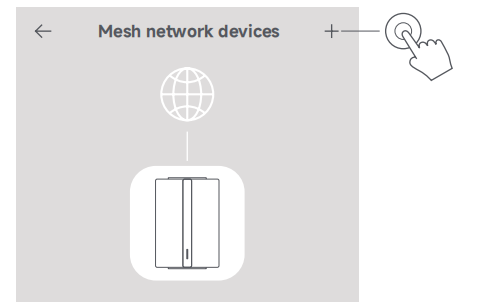
2. Go to the Mesh network devices page of the main router;
3. Tap [+] at the upper right corner of the page;
4. Follow the instructions to complete Mesh networking;
5. When the Mesh networking is completed, the indicator of the satellite router turns blue.
Method 2:
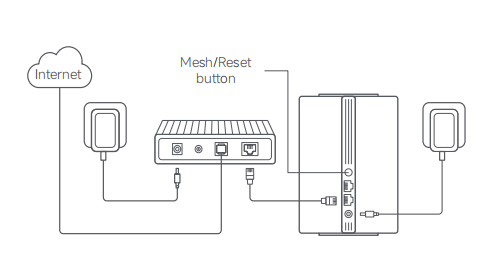
1. Make sure the main router is connected to the network. Connect the satellite router to power and place it near but at least one meter away from the main router. Otherwise, they will interfere with each other and affect the networking;
2. After the satellite router powers on, the main router will automatically discover it, and the indicator of the main router will start breathing blue;
Note:
If the satellite router is already configured, press its reset button to restore it to the factory settings first.
3. Press the mesh button on the main router, and the indicators of the main router and satellite router will start blinking. It will take about 2 minutes to complete the Mesh networking;
4. When the Mesh networking is completed, the indicator of the satellite router turns blue.
Method 3:
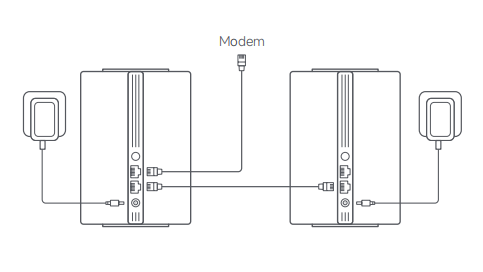
1. Make sure the main router is connected to the network. Place the satellite router in the location where you need Wi-Fi coverage and power it on;
2. Connect any port of the satellite router to any port of the main router via a network cable. The indicators of the main router and satellite router will start blinking. It will take about 2 minutes to complete the Mesh networking;
3. When the Mesh networking is completed, the indicator of the satellite router turns blue.
Note:
Go to “www.mi.com” to check the product model and version of the routers that support the Xiaomi Mesh networking function.
Please follow the methods below to configure the Mesh networking:
Method 1:
1. Open the Mi Home/Xiaomi Home APP;
2. Go to the Mesh network devices page of the main router;
3. Tap [+] at the upper right corner of the page;
4. Follow the instructions to complete Mesh networking;
5. When the Mesh networking is completed, the indicator of the satellite router turns blue.
Method 2:
1. Make sure the main router is connected to the network. Connect the satellite router to power and place it near but at least one meter away from the main router. Otherwise, they will interfere with each other and affect the networking;
2. After the satellite router powers on, the main router will automatically discover it, and the indicator of the main router will start breathing blue;
Note:
If the satellite router is already configured, press its reset button to restore it to the factory settings first.
3. Press the mesh button on the main router, and the indicators of the main router and satellite router will start blinking. It will take about 2 minutes to complete the Mesh networking;
4. When the Mesh networking is completed, the indicator of the satellite router turns blue.
Method 3:
1. Make sure the main router is connected to the network. Place the satellite router in the location where you need Wi-Fi coverage and power it on;
2. Connect any port of the satellite router to any port of the main router via a network cable. The indicators of the main router and satellite router will start blinking. It will take about 2 minutes to complete the Mesh networking;
3. When the Mesh networking is completed, the indicator of the satellite router turns blue.
Does it help?
Yes
No