

What are the methods for the network configuration of the Xiaomi Mesh System AC1200?
For your reference, here are two methods for the network configuration:
Method 1:
1. Scan the QR code to download the Mi Home/Xiaomi Home APP. Or search for "Mi Home/Xiaomi Home" in the APP store to download and install it;
2. Open the Mi Home/Xiaomi Home APP >> tap [+] at the upper right corner >> select [Device card] >> follow the instructions to complete the network configuration.
Note:
Please ensure that the APP is updated to the latest version.
Method 2:
1. Check the Wi-Fi name on the label at the bottom of the router and then connect your phone or computer to the Wi-Fi;
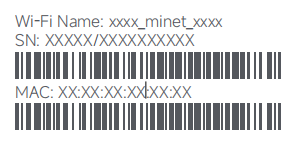
2. Then an automatic redirection will take you to the network setup page. If not, open the web browser and enter “miwifi.com” or “192.168.31.1”;
3. Follow the instructions on the setup page to complete the network configuration;
4. After the configuration of the router is completed, the Wi-Fi module will restart. Try to search the Wi-Fi again later.
Note:
1. For the product of a 2-pack or 3-pack version, the routers in the box have been pre-paired when leaving the factory. When the network configuration of one router is completed, just power on the rest of the routers and they will Mesh networking automatically;
2. After completing the network configuration, you can also add the router via the Mi Home/Xiaomi Home APP;
3. Make sure that the settings of the country or region via the web browser are consistent with the country or region selected in the Mi Home/Xiaomi Home APP, otherwise, adding the router will fail;
Method 1:
1. Scan the QR code to download the Mi Home/Xiaomi Home APP. Or search for "Mi Home/Xiaomi Home" in the APP store to download and install it;
2. Open the Mi Home/Xiaomi Home APP >> tap [+] at the upper right corner >> select [Device card] >> follow the instructions to complete the network configuration.
Note:
Please ensure that the APP is updated to the latest version.
Method 2:
1. Check the Wi-Fi name on the label at the bottom of the router and then connect your phone or computer to the Wi-Fi;
2. Then an automatic redirection will take you to the network setup page. If not, open the web browser and enter “miwifi.com” or “192.168.31.1”;
3. Follow the instructions on the setup page to complete the network configuration;
4. After the configuration of the router is completed, the Wi-Fi module will restart. Try to search the Wi-Fi again later.
Note:
1. For the product of a 2-pack or 3-pack version, the routers in the box have been pre-paired when leaving the factory. When the network configuration of one router is completed, just power on the rest of the routers and they will Mesh networking automatically;
2. After completing the network configuration, you can also add the router via the Mi Home/Xiaomi Home APP;
3. Make sure that the settings of the country or region via the web browser are consistent with the country or region selected in the Mi Home/Xiaomi Home APP, otherwise, adding the router will fail;
4. Contact your Internet service provider to get the details if you are not familiar with the Internet connection type.
Does it help?
Yes
No