

Xiaomi Dust Mite Vacuum Cleaner Pro FAQ
Overview
1. Q: What is a mite?
A: The body size of mites is generally about 0.5mm. Some are as small as 0.1mm. Most species are less than 1mm.
There are more than 40 species of mites. More than 10 species of mites are related to human health. Mites are widely distributed in the dark corners of the room, carpet, mattress, pillow, sofa, air conditioner, mat and other places.
The most common species of mites are dust mites, acaroid mites, demodex mites, and sarcoptic mange mites, among which dust mites are the most widely distributed and have the greatest impact. The bodies, secretions and excreta of mites are allergic sources, which can cause allergic dermatitis, asthma, bronchitis, nephritis, allergic rhinitis and other diseases, seriously endangering human health. The survey shows that about 97% of adults are infected with dust mites.
2. Q: What are the methods to remove mites?
A: There are three main ways to remove mites:
1. Mites can be removed by using sunlight to dry clothes and quilts, but some live mites, dandruff, dust, and other particles will remain;
2. Ultraviolet irradiation can destroy the chromosomes and cells of mites, however some live mites, dandruff, dust, and other debris will remain;
3. Mites can be removed using the mite removal instrument, which employs strong suction, ultraviolet rays, and a high temperature.
3. Q: What is a mite removal device?
A: A mite removal device can destroy the living environment of mites through high-frequency beating, strong suction, heating, ultraviolet irradiation and ultrasound. It can kill and suck out mites from quilts and other items. Thereby, it will reduce the density of dust mites and allergens in the space and the incidence of diseases such as allergies and asthma.
4. Q: What are the ultraviolet rays?
A: Ultraviolet rays are rays of sunlight with a wavelength of 10 to 400 nanometers (nm), which are divided into three types: UVA (wavelength 320 to 400nm, long wave), UVB (wavelength 280 to 320nm, medium wave), and UVC (wavelength 100 to 280nm, short wave). Among them, UVA is the most carcinogenic, and its sunburn effects are 1,000 times more than UVB. UVC is blocked by the ozone layer.
The wavelength of 250-260nm can play a good bactericidal role, which can destroy the chromosomes of bacterium and provide a photochemical effect. Therefore, an ultraviolet germicidal light is within this wavelength. Ultraviolet sterilization and disinfection use ultraviolet rays of appropriate wavelengths to destroy the molecular structure of DNA (deoxyribonucleic acid) or RNA (ribonucleic acid) in the cells of microorganisms, causing growth cell death and regenerative cell death. The Xiaomi Dust Mite Vacuum Cleaner Pro uses 253.7nm UVC light with a sterilization rate of 99%.
Product Introduction and Using Guidance
1. Q: What are the features of the Xiaomi Dust Mite Vacuum Cleaner Pro?
A: The Xiaomi Dust Mite Vacuum Cleaner Pro is a mite removal device with a flapping electric roller brush, ultraviolet germicidal light, and hot air function.
For your reference, the main features are as follows:
1. It can start quickly, and the electric roller brush rotates at high speed to deeply beat out mites and improve the mite removal effect;
2. The UV light can kill mites and bacteria deeply, and it also has an automatic sensing shutdown function to prevent harm to the body;
3. Hot air destroys the growth environment of mites and inhibits the breeding of mites from the source;
4. It adopts a prone structure, with a high-speed vacuum motor and a wide vacuum port, it can quickly suck away mites and allergens, and efficiently complete the mite removal work.
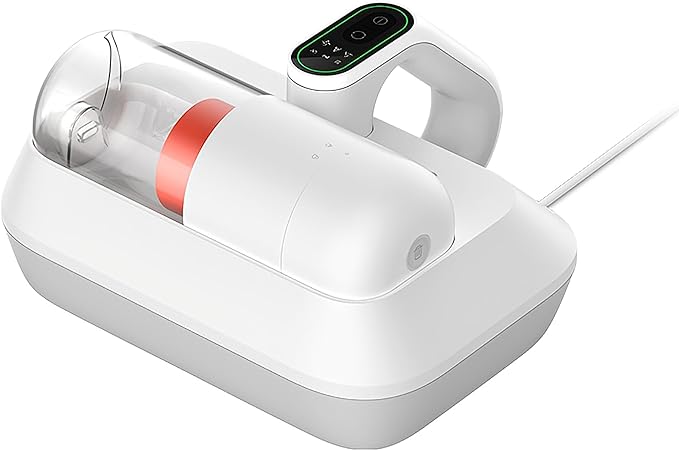
2. Q: What is the appearance of the Xiaomi Dust Mite Vacuum Cleaner Pro?
A: The Xiaomi Dust Mite Vacuum Cleaner Pro’s item dimensions are 265 × 246 × 142mm, and the package dimensions are 385 × 155 × 280mm.
For your reference, the appearance is shown as the enclosed picture:
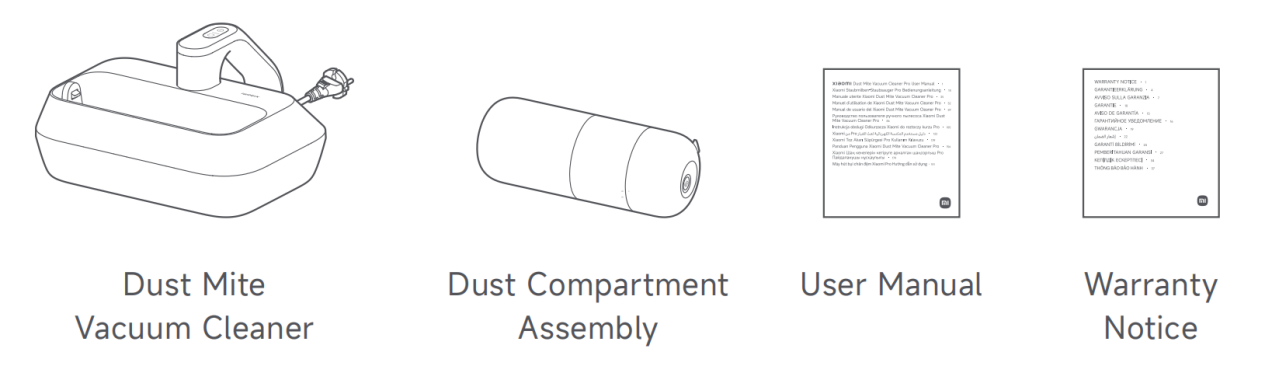
3. Q: What are the package contents of the Xiaomi Dust Mite Vacuum Cleaner Pro?
A: The package contents of the Xiaomi Dust Mite Vacuum Cleaner Pro including Dust Mite Vacuum Cleaner ×1, Dust Compartment Assembly ×1, User Manual ×1, and Warranty Notice ×1.
For your reference, the package contents are shown as the enclosed picture:
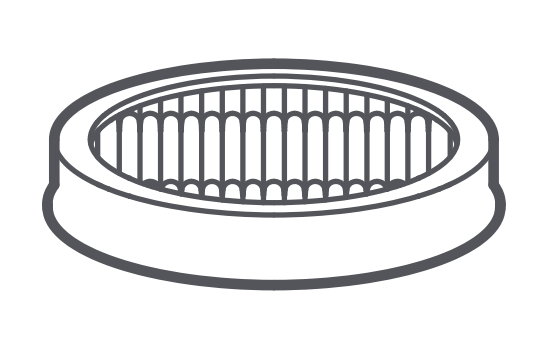
4. Q: Are there consumables for the Xiaomi Dust Mite Vacuum Cleaner Pro?
A: The Xiaomi Dust Mite Vacuum Cleaner Pro has a consumable HEPA filter (High Efficiency Particulate Air Filter).
For your reference, the illustration of the filter is shown as the enclosed picture:
5. Q: How many modes does the Xiaomi Dust Mite Vacuum Cleaner Pro have?
A: The Xiaomi Dust Mite Vacuum Cleaner Pro has three modes. After turning on the device, press the Mode Button to cycle through modes.
For your reference, the introductions to the modes are as follows:
1. Low suction mode: Suitable for daily cleaning of soft textiles such as dolls and quilts;
2. Smart mode: Suitable for various cleaning scenarios. The dust mite vacuum cleaner will automatically adjust its suction to the density of dust mites. The higher the density of the dust mites, the stronger suction force of the dust mite vacuum cleaner;
3. High suction mode: Suitable for deeply cleaning hard textiles such as mattresses and sofas.
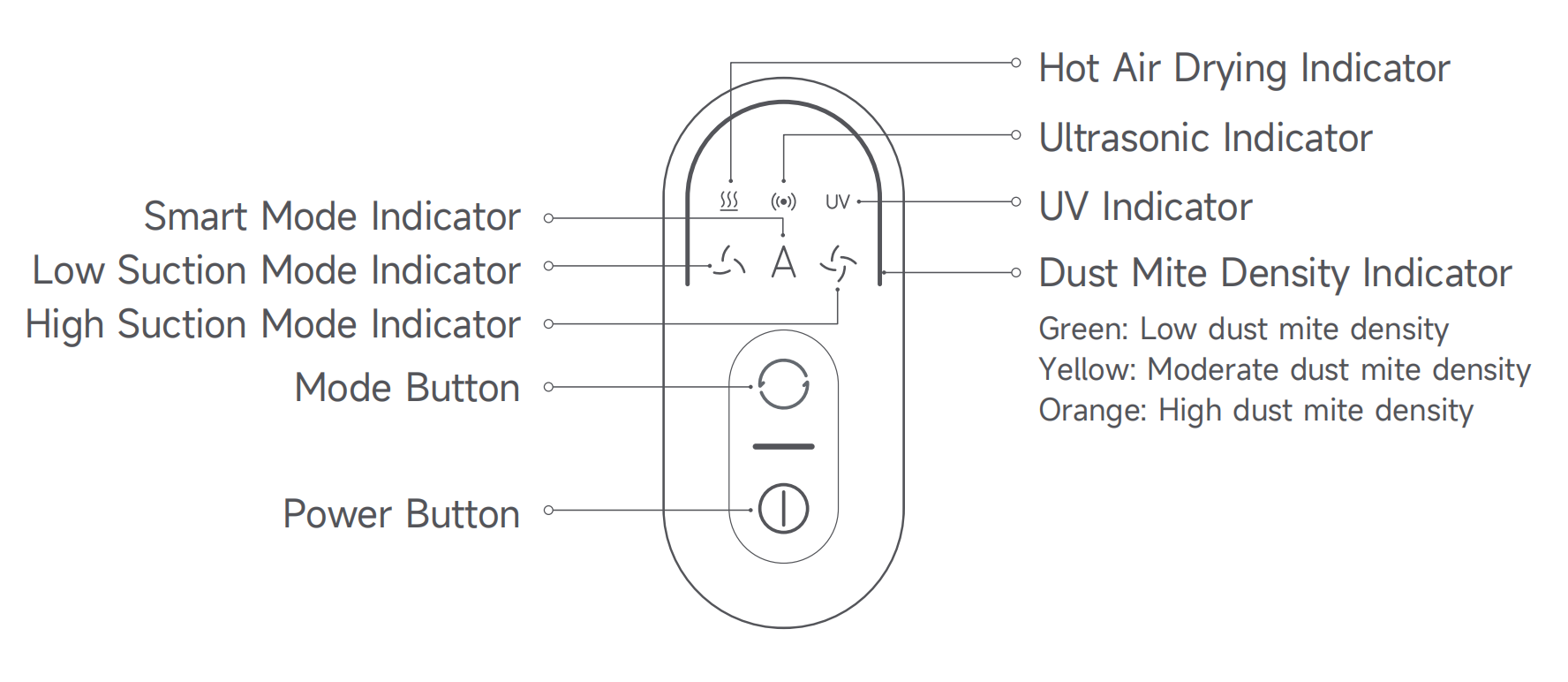
6. Q: What are the functions of the display on the Xiaomi Dust Mite Vacuum Cleaner Pro?
A: The Xiaomi Dust Mite Vacuum Cleaner Pro’s display has several indicators and buttons on it, including a Hot Air Drying Indicator, an Ultrasonic Indicator, a UV Indicator, a Low Suction Mode Indicator, a Smart Mode Indicator, a High Suction Mode Indicator, a Dust Mite Density Indicator, a Mode Button, and a Power Button.
The Dust Mite Density Indicator has three statuses, including green light (Low dust mite density), yellow light (Moderate dust mite density), and orange light (High dust mite density).
For your reference, the illustration of the display is shown as the attachment:
Note:
1. The Hot Air Drying, Ultrasonic, and UV functions are enabled by default;
2. When the UV function is enabled, the UV indicator is on. When the UV function is disabled, the UV indicator is off;
3. It is normal for the UV indicator to go out when you lift (more than 5cm from the textile surface), tilt the dust mite vacuum cleaner during operation, or clean dark-colored textiles;
4. During cleaning, a steady yellow or orange dust mite density indicator indicates a high dust mite density in the current area. It is recommended to clean this area multiple times.
7. Q: How to use the Xiaomi Dust Mite Vacuum Cleaner Pro?
A: To use the Xiaomi Dust Mite Vacuum Cleaner Pro, please refer to the following steps:
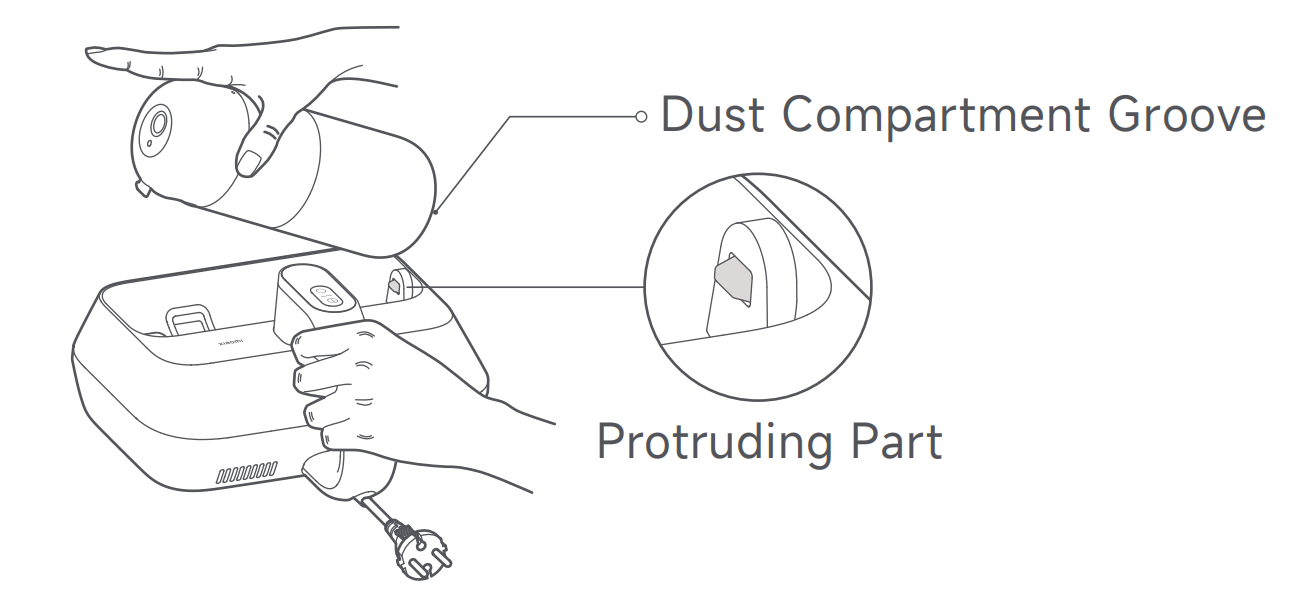
1. Align the dust compartment groove with the protruding part. Press down on the dust compartment until you hear a "click" sound, indicating it is installed in place;
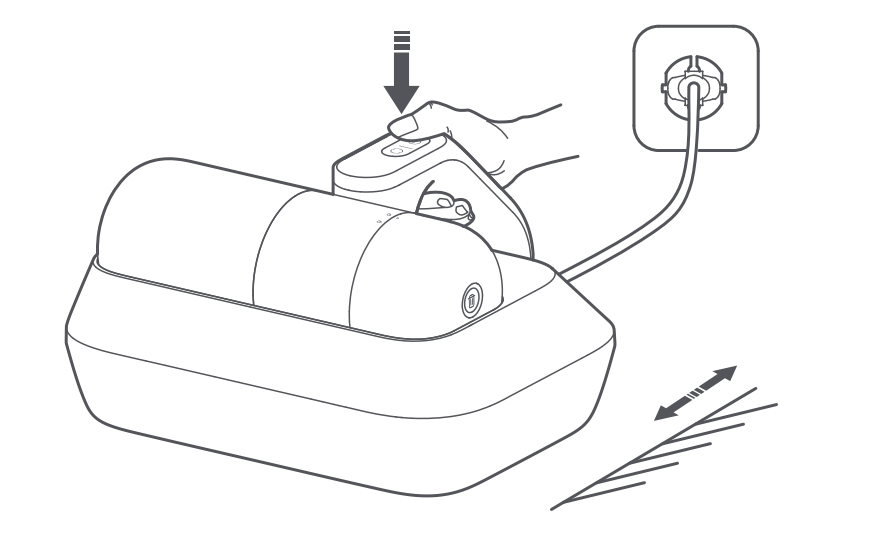
2. Connect the dust mite vacuum cleaner to power, and press its Power Button to turn it on. The dust mite vacuum cleaner defaults to the low suction mode the first time it is turned on. When the device is powered on, press the Power Button to turn it off. After use, please unplug the power cord;
Note:
During use, hot air will come out from the heat dissipation vent. For the first use, it is normal for a slight odor to come from the cooling vent, and the odor will naturally dissipate after a period of use.
3. Turn on the dust mite vacuum cleaner, and press the Mode Button to switch from modes.
8. Q: What is the dust compartment of the Xiaomi Dust Mite Vacuum Cleaner Pro?
A: The dust compartment of the Xiaomi Dust Mite Vacuum Cleaner Pro is a spiral centrifugal cyclone visible dust cup, with 4-fold washable filter components including pinhole fine steel filter, HEPA filter, front air inlet filter cotton, and air outlet filter cotton.
Additionally, it is an upgraded dust and gas separation transparent dust cup, and it is washable.
9. Q: How to install or disassemble the Xiaomi Dust Mite Vacuum Cleaner Pro?
A: To install or disassemble the Xiaomi Dust Mite Vacuum Cleaner Pro, please refer to the following steps:
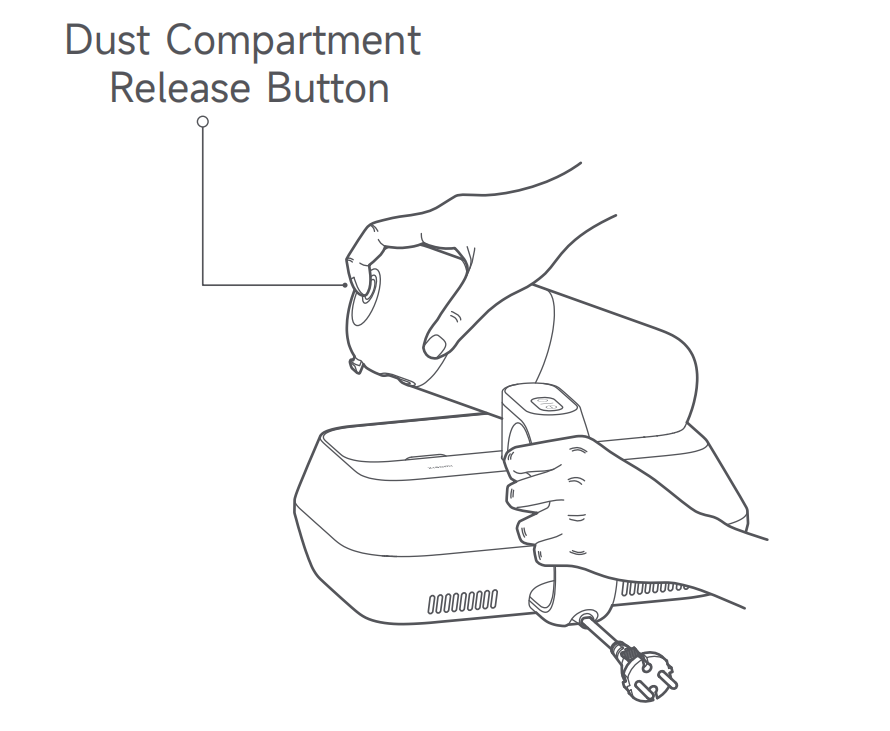
1. Press and hold the Dust Compartment Release Button, and simultaneously pull out the dust compartment assembly;
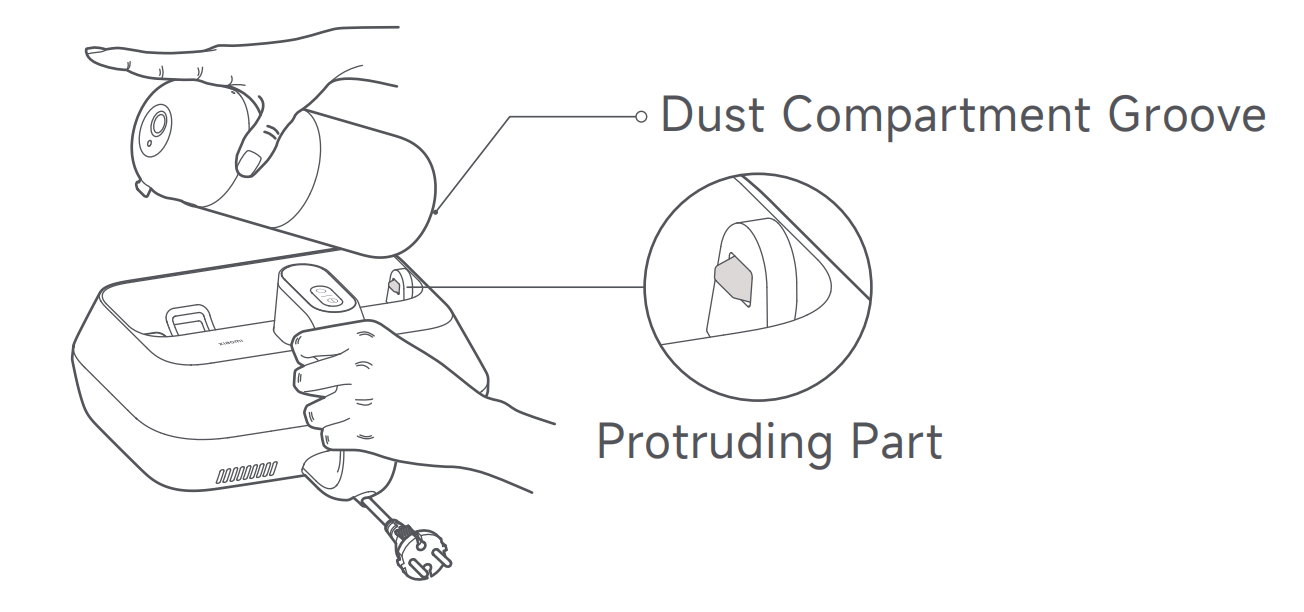
2. Align the dust compartment groove with the protruding part. Press down on the dust compartment until you hear a "click" sound, indicating it is installed in place.
10. Q: How to disassemble and clean the roller brush of the Xiaomi Dust Mite Vacuum Cleaner Pro?
A: To disassemble and clean the roller brush, please refer to the following steps:
1. Toggle the roller brush release button as indicated on the dust mite vacuum cleaner and the roller brush cover will pop open automatically. Remove the roller brush cover;
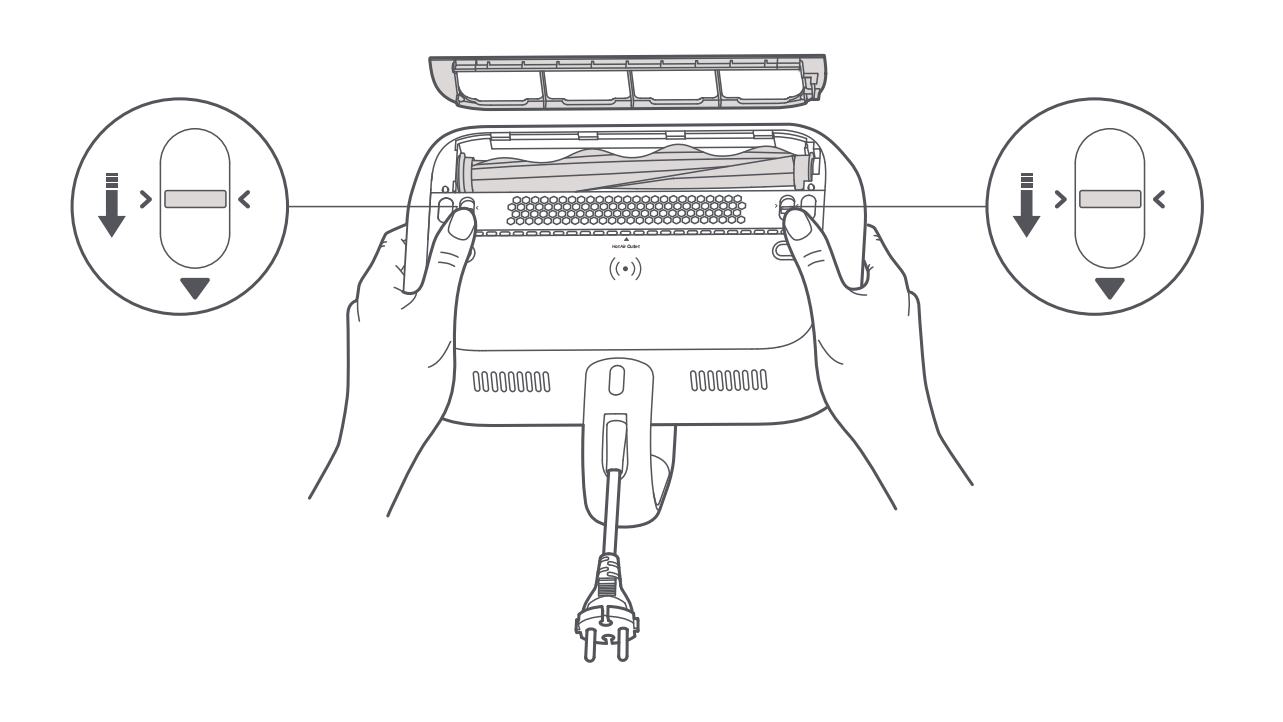
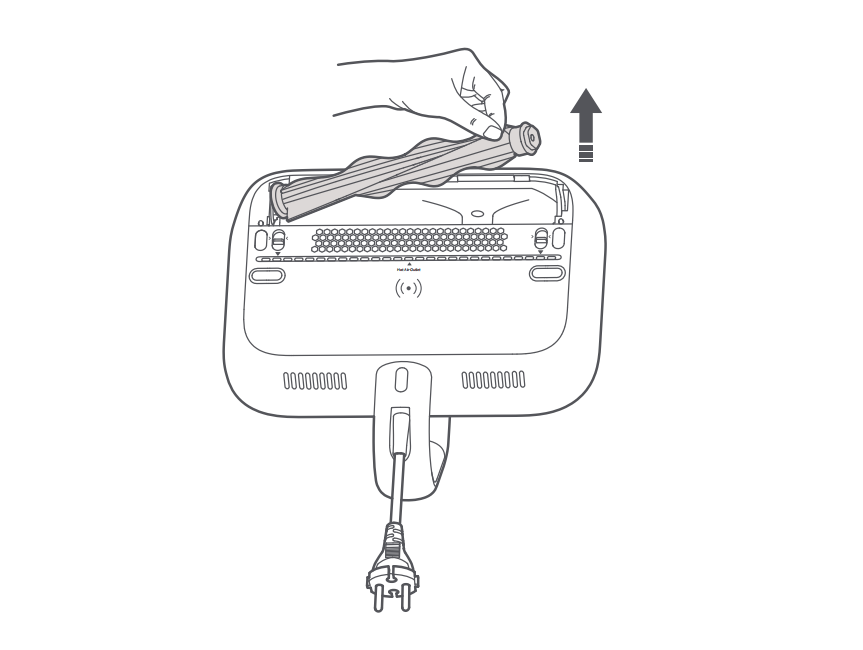
2. Remove the roller brush from the right side by pulling it upwards. Remove any hair and other waste from the roller brush;
Note:
It is recommended to clean the roller brush at least once a month. Rinsing is not recommended.
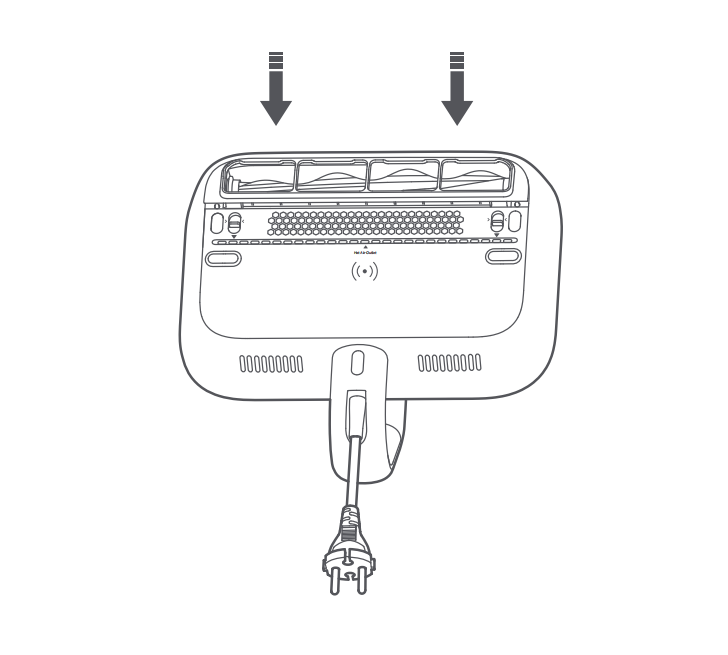
3. After cleaning, reinstall the roller brush. Then, align the clips on the roller brush cover with the corresponding slots to reinstall the roller brush cover, and press it down until you hear a "click" sound.
11. Q: Is the Xiaomi Dust Mite Vacuum Cleaner Pro waterproof?
A: The Xiaomi Dust Mite Vacuum Cleaner Pro is only for use on dry surfaces indoors.
Do not place the device in a scene where there is a risk of immersion, spraying, or splashing, otherwise it will cause damage to internal components.
It is prohibited to use it outdoors or on wet surfaces. Do not touch the plug or any part of the device with wet hands.
12. Q: How to clean the dust compartment of the Xiaomi Dust Mite Vacuum Cleaner Pro?
A: To clean the dust compartment daily, please refer to the following steps:
1. Press and hold the Dust Compartment Release Button, and simultaneously pull out the dust compartment assembly;
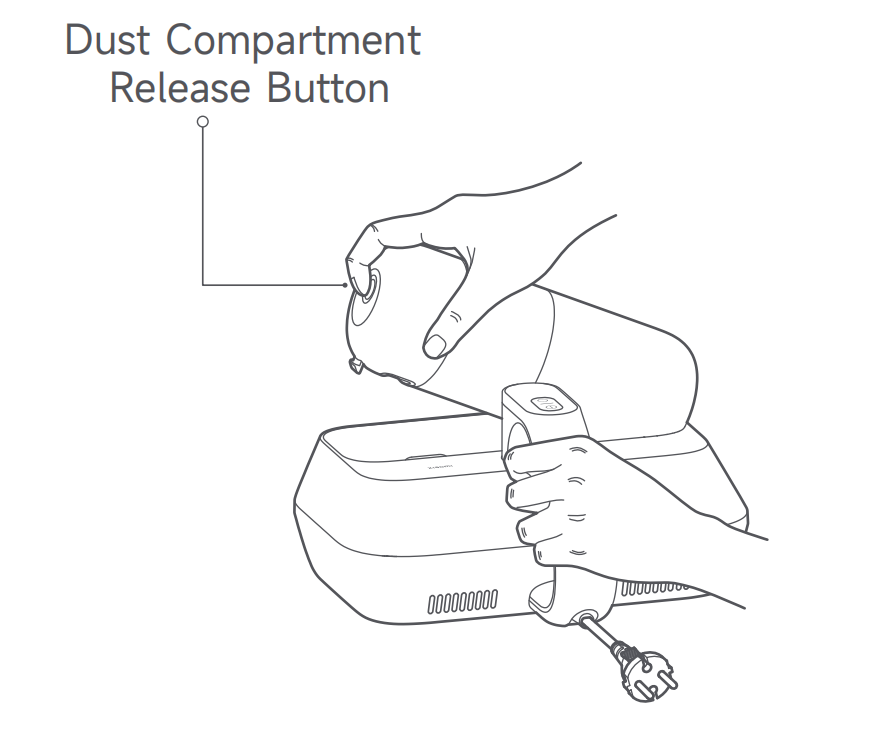
2. Rotate the dust compartment over a trash bin until the mark “○” aligns with the unlocking icon. Open the dust compartment assembly upside down, empty the dust compartment, and clean the surface of the dust compartment cover assembly;
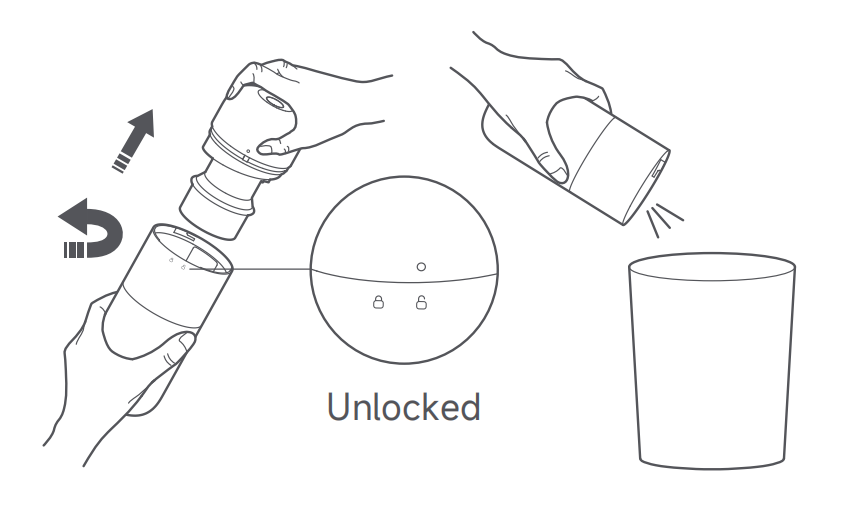
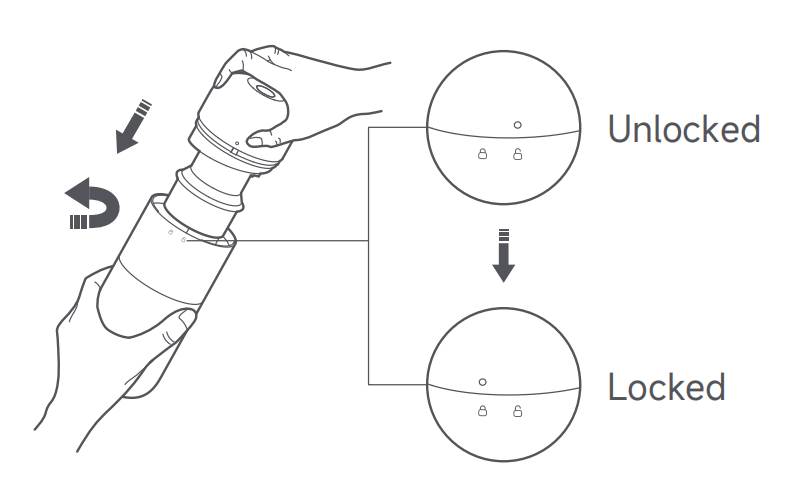
3. After emptying the dust compartment, align the mark “○” with the unlocking icon to reinstall the dust compartment cover assembly to the dust compartment. Then, rotate the dust compartment until its “○” mark aligns with the locking icon. When you hear a "click" sound, they are properly locked;
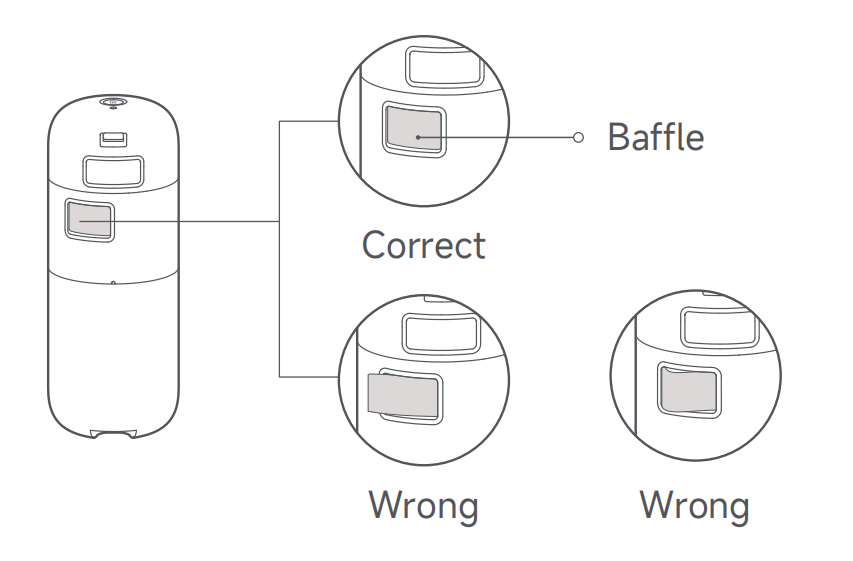
4. Check that the baffle of the dust compartment assembly is properly installed. Then reinstall the dust compartment assembly into the main body;
If suction decreases, clean the dust compartment assembly promptly to regain the mite removal performance and prevent blockage from the air duct that will cause the dust mite vacuum cleaner to shut down.
To wash the dust compartment, please refer to the following steps:
1. Remove the dust compartment cover, and rotate it to remove the
cyclone separator from it;
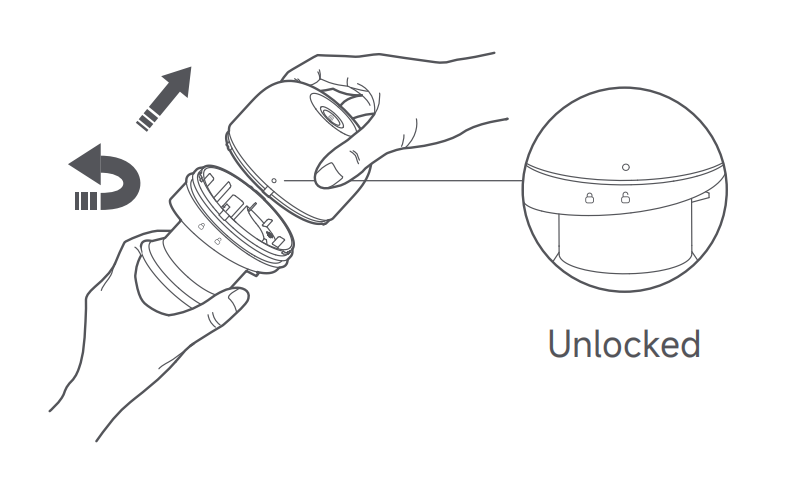
2. Take the filter holder assembly out of the dust compartment cover, and then remove the filter and filter cotton in turn;
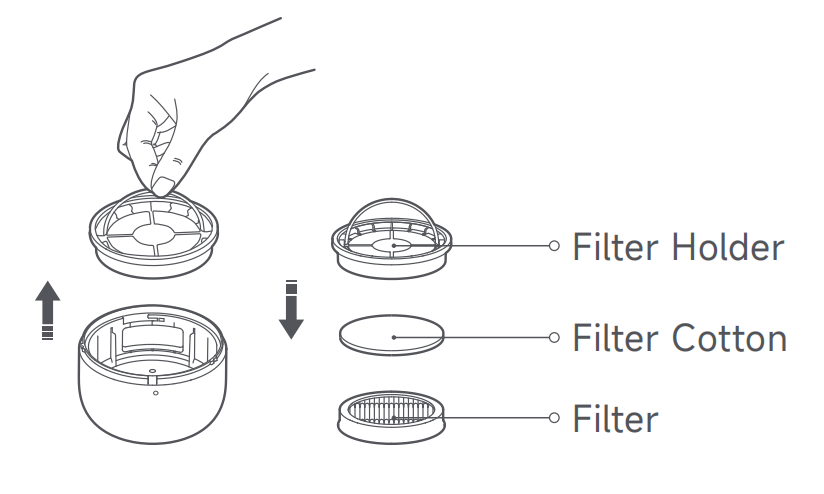
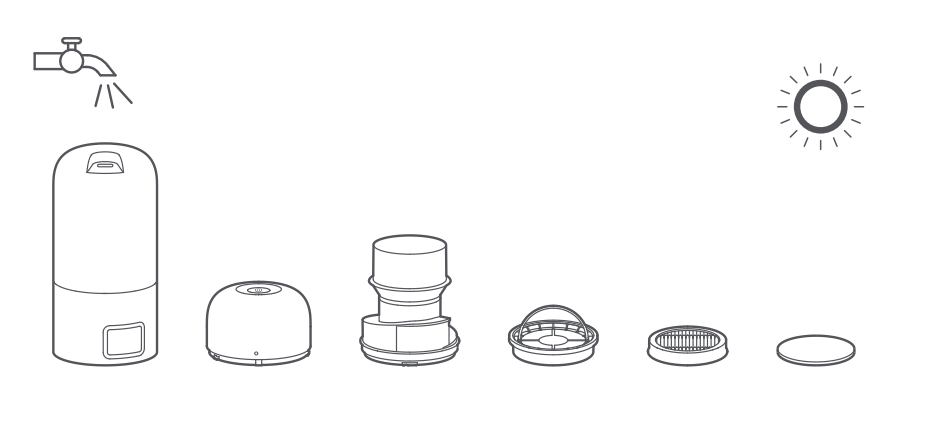
3. Clean the surfaces of the dust compartment, dust compartment
cover, cyclone separator, filter holder, filter, and filter cotton. Then rinse them with clean tap water, and air-dry them thoroughly;
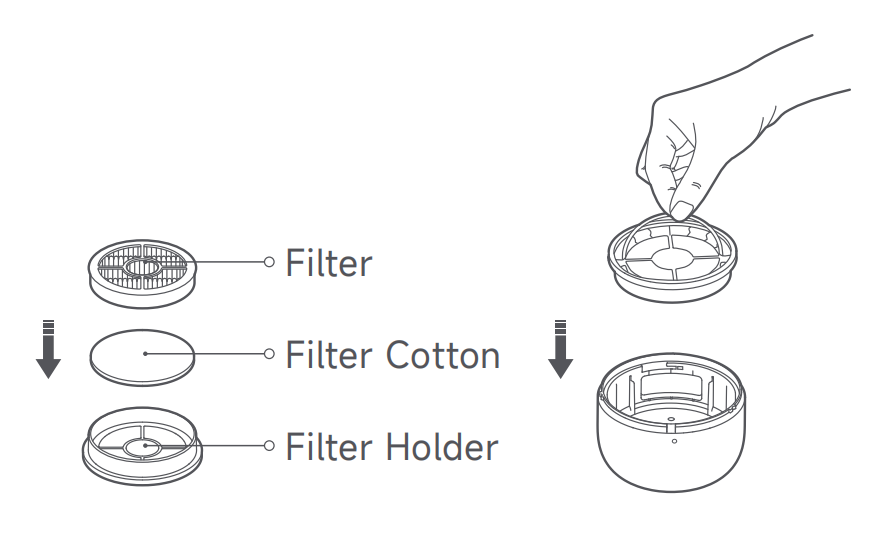
4. Reinstall the filter cotton and filter into the filter holder, and press them in place. Then place the filter holder assembly into the dust compartment cover and press it in place;
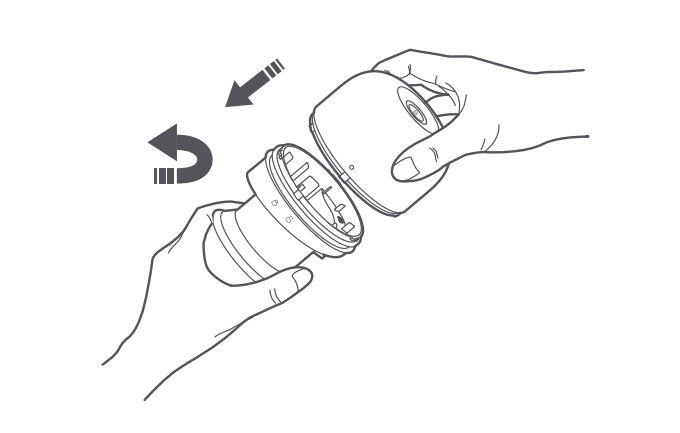
5. Align the unlocking icon on the cyclone separator with the “○” mark on the dust compartment cover. Then, rotate the cyclone separator until the “○” mark aligns with the locking icon. When you hear a “click” sound, they are firmly locked;
6. Lock the dust compartment and the dust compartment cover assembly securely, and then reinstall the dust compartment assembly into the dust mite vacuum cleaner.
Note:
1. It is recommended to wash and clean the filter every 5-6 times vacuuming, or you can change the cleaning frequency as needed;
2. It is recommended to replace the filter every 2-3 months to ensure optimal vacuuming performance;
3. After rinsing, be sure to thoroughly air-dry the components (away from direct sunlight) before re-installation.
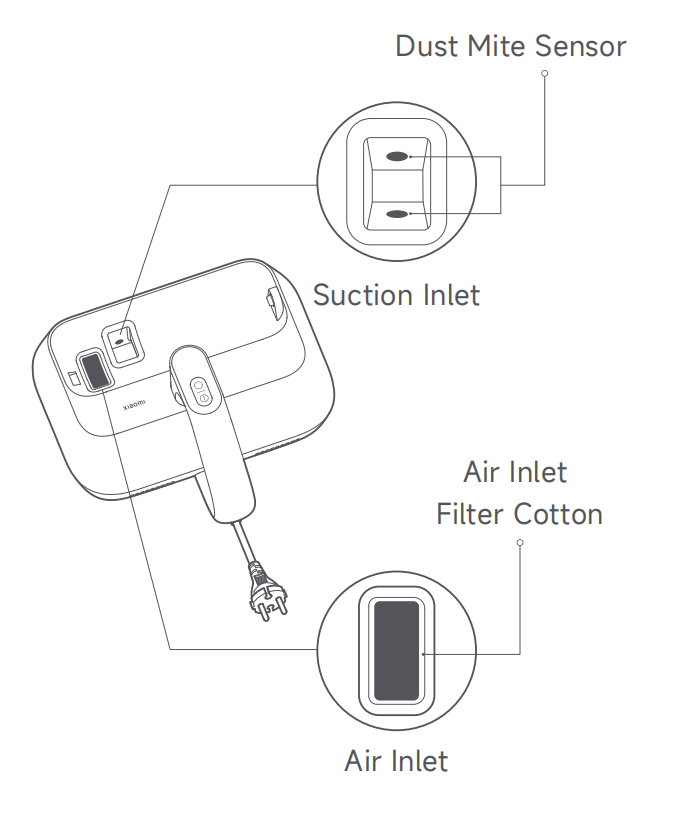
13. Q: How to clean the suction inlet and dust mite sensors of the Xiaomi Dust Mite Vacuum Cleaner Pro?
A: Remove the dust compartment assembly, and you will see dust mite sensors in the suction inlet. Clean them with a dry cloth or tissue.
Note:
1. It is normal for dust and other particles to adhere to the suction
inlet. Clean it in a timely manner;
2. When the dust mite sensors are dirty, the dust mite density indicator will blink in orange. Clean the dust mite sensors promptly. Frequent cleaning of the dust mite sensors can prevent dust buildup to ensure their detection accuracy;
3. The function of the air inlet filter cotton is filtration. Please do not discard it. If the filter cotton becomes dirty, remove and rinse it with clean tap water. Be sure to thoroughly air-dry it (away from direct sunlight) before re-installation.
14. Q: How to ensure electric circuit safety when using the Xiaomi Dust Mite Vacuum Cleaner Pro?
A: To avoid fire, electric shock or damage, please use the power cord and socket according to the following precautions:
1. Ensure to connect to a suitable power socket;
2. Do not pull the power cord;
3. Before performing maintenance work or moving the device, be sure to disconnect the power supply.
15. Q: What are the notes on cleaning the Xiaomi Dust Mite Vacuum Cleaner Pro?
A: Please refer to the following notes when cleaning the device:
1. Before cleaning the dust cup, make sure the device is turned off;
2. Please clean the dust compartment regularly to avoid clogging the suction port;
3. Do not press or rub the suction inlet and air outlet with your fingernails or sharp objects to avoid damaging the device;
4. Do not let corrosive liquids or abrasives contact the device such as alcohol, nail polish remover or detergent. Otherwise it will cause malfunction, cracking or fading.
16. Q: Can the Xiaomi Dust Mite Vacuum Cleaner Pro be left in the same place for a long time while it is running?
A: When the Xiaomi Dust Mite Vacuum Cleaner Pro is in operation, it should not be placed in the same position for a long time. After the device is turned on, the roller brush will continue to run, which will wear out the bed surface or bedding. The temperature at the bottom of the whole device will rise, which can damage the device.
17. Q: Can the Xiaomi Dust Mite Vacuum Cleaner Pro be used on wet surfaces or outdoors?
A: No. The Xiaomi Dust Mite Vacuum Cleaner Pro is limited to indoor dry surfaces and is not allowed to be used outdoors or on wet surfaces.
18. Q: Can the Xiaomi Dust Mite Vacuum Cleaner Pro clean up ashes?
A: No. Please do not use the Xiaomi Dust Mite Vacuum Cleaner Pro as a vacuum cleaner. Do not use it to clean plasterboard ash, fireplace ash, or other ashes. Do not inhale smoking or burning materials, such as charcoal, cigarette butts, or firewood.
19. Q: Is the UV light of the Xiaomi Dust Mite Vacuum Cleaner Pro harmful to the human body? Is there a safety design?
A: It will cause varying degrees of damage if the UV light is irradiated directly on the skin or eyes.
The Xiaomi Dust Mite Vacuum Cleaner Pro features an infrared intelligent sensor switch, which is more sensitive than a push-type micro switch and can effectively prevent ultraviolet rays from damaging the eyes.
After the product is turned on, the UV light distance sensor starts working. When it is lifted off the contact surface, the UV light automatically turns off to prevent ultraviolet rays from leaking out and causing harm to the human body.
20. Q: How to use the Xiaomi Dust Mite Vacuum Cleaner Pro correctly?
A: The Xiaomi Dust Mite Vacuum Cleaner Pro is only used for cleaning and removing mites from textiles such as mattresses, blankets, pillows, sofas, etc. It is not suitable for other occasions, and do not take the risk of trying it out of curiosity. When related consumables need to be replaced, please use the accessories and replacement parts recommended by Xiaomi.
21. Q: How to use the UV light of the Xiaomi Dust Mite Vacuum Cleaner Pro correctly?
A: For your reference, please refer to the following points:
1. Please avoid looking at the bottom of the device when the power is on, or tilting and flipping it to prevent harm to the human body during ultraviolet sterilization;
2. To prevent burns, avoid touching the UV light with your hands when it's in use or just extinguished;
3. Do not use the UV light to irradiate plants directly to avoid damage to them;
4. Please do not use the UV light in one place continuously, otherwise it will cause damage to the cleaning object;
5. Do not use the UV light to directly irradiate the eyes and skin of people or animals to prevent accidents.
22. Q: What is the recommended frequency for replacing the filter on the Xiaomi Dust Mite Vacuum Cleaner Pro? Can it be cleaned?
A: It is recommended to clean the filter after every 5-6 times vacuuming, or adjust it according to usage. And it is recommended to replace the filter every 2-3 months to ensure the vacuuming effect.
Note:
After rinsing each component, please make sure to fully dry it (avoid exposure to the sun) before installation.
23. Q: Does the Xiaomi Dust Mite Vacuum Cleaner Pro have a roller brush jam protection function?
A: The Xiaomi Dust Mite Vacuum Cleaner Pro has a roller brush jam protection function. When the roller brush is entangled with other objects and cannot rotate, the product will automatically shut down. It can be turned on again after cleaning.
24. Q: Can children use the Xiaomi Dust Mite Vacuum Cleaner Pro?
A: This product cannot be used by people with physical, sensory or intellectual disabilities and people without relevant experience and knowledge (including children) unless they are supervised or guided by a guardian to ensure that they can use this product safely.
Children are prohibited from operating the product or using it as a toy. When using the product near children, close attention is required. Children are prohibited from cleaning or maintaining the product without supervision.
25. Q: Does the Xiaomi Dust Mite Vacuum Cleaner Pro have a hot air function?
A: This product has a hot air function. When it is turned on and used, hot air is blown out from the bottom of the product, and the hot air drying temperature is about 55±5℃.
26. Q: What does the QR code on the bottom of the Xiaomi Dust Mite Vacuum Cleaner Pro show? What is it used for?
A: The QR code scanned out is the SN, which is equivalent to the unique product ID number.
27. Q: What is the weight of the Xiaomi Dust Mite Vacuum Cleaner Pro?
A: The weight of the Xiaomi Dust Mite Vacuum Cleaner Pro is 2.06kg.
28. Q: Why is there a bend on the bottom of the dust compartment of the Xiaomi Dust Mite Vacuum Cleaner Pro? Is it a quality issue?
A: The bend on the bottom of the dust compartment is designed to meet the suction loss requirements and it is not a quality issue.
29. Q: What is the principle of the roller brush jam protection of the Xiaomi Dust Mite Vacuum Cleaner Pro?
A: In the fully blocked state, when the current of the roller brush motor is detected to be not less than 2.3A for 5 seconds, the roller brush jam protection is triggered. In the partially blocked state, when the current of the roller brush motor is detected to be above 1.25A for 5 minutes, the roller brush jam protection is triggered.
When the roller brush jam protection is triggered, the vacuum motor, roller brush motor, UV light, and ultrasonic wave stop working. The dust mite density indicator on the display board flashes in red for 5 seconds and stays on for 15 seconds, then turns off the display and the device. If you press the Power Button while the indicator is flashing or stays on, the device will shut down in advance.
28. Q: What are the suction forces corresponding to the high and low suction modes of the Xiaomi Dust Mite Vacuum Cleaner Pro?
A: 1. High suction mode: 14kPa;
2. Low suction mode: 11kPa.
29. Q: Is it normal that the bristles of the roller brush are bent, or become bent after the Xiaomi Dust Mite Vacuum Cleaner Pro is rubbed against the quilt?
A: This is a normal phenomenon and you can continue to use it.
30. Q: What is the noise level of the Xiaomi Dust Mite Vacuum Cleaner Pro?
A: 1. High suction mode: ≤78dB(A);
2. Low suction mode: ≤76dB(A).
Troubleshooting
1. Q: Why does static electricity occur when using the Xiaomi Dust Mite Vacuum Cleaner Pro?
A: Static electricity is a common phenomenon, just like when you take off your clothes in winter, clothes generate static electricity. The main reason is that in dry weather, insulators (chemical fibers) rub against each other, causing electric charges to peel off from each other. After the charges continue to accumulate, they are instantly released into the human body, generating static electricity. It is normal for the product to generate static electricity due to friction between it and the fabric when using it.
2. Q: Why does the tube of the UV light on the Xiaomi Dust Mite Vacuum Cleaner Pro become black?
A: It is normal for the double sides of the UV light to turn black, just like household light bulbs turn black after long-term use. The reason is that when the UV light is in use, its temperature rises and the mercury in it evaporates upward along the tube wall. After the UV light is extinguished, the mercury will condense due to cooling, and the traces of mercury pollution left will turn black. This is a normal phenomenon and does not affect the normal use of the product. If the UV light is not bright and cannot work, it is recommended to contact the after-sales center for inspection.
3. Q: What to do if the Xiaomi Dust Mite Vacuum Cleaner Pro reduces suction force, sounds loud, shuts down automatically or doesn’t work?
A: For your reference, the reasons are due to the following situations:
1. The dust compartment is full of dust and garbage;
2. The filter cotton absorbs garbage and dust;
3. The HEPA filter absorbs too much dust;
4. The suction inlet is blocked;
5. The product stays on a soft sheet for a long time;
6. The product’s roller brush is entangled with debris or the rubber strip on the roller brush is loose.
Please refer to the following troubleshooting steps:
1. Check whether the power cord plug is loose, re-plug it and then turn it on;
2. Clean up the dust compartment in time.
Note:
If you wash the dust compartment with water, please install it after it is completely dried, otherwise it will cause water ingress and damage the internal components.
4. Q: What to do if the UV light of the Xiaomi Dust Mite Vacuum Cleaner Pro doesn’t work?
A: For your reference, it is caused by the following situations:
1. If the UV light distance sensor does not contact with the cleaning surface or is too high (3cm±2cm) from the surface, the UV light will not work;
2. If the cleaning surface is black or has other dark colors, the infrared sensor will fail to work.
5. Q: What to do if the display of the Xiaomi Dust Mite Vacuum Cleaner Pro is not clear?
A: There is a protective film on the surface of the display. If it is not clear during use, you can tear off the protective film.
6. Q: What to do if there are odors of the Xiaomi Dust Mite Vacuum Cleaner Pro?
A: Hot air is blown out of the heat dissipation vent. It is normal to have a slight odor when using it for the first time. The odor will disappear automatically after using it for a period of time.
7. Q: Why is there no hot air blown out of the Xiaomi Dust Mite Vacuum Cleaner Pro?
A: This product has a hot air function. When it is in operation, hot air will blow out from the bottom of the product. To prevent other hidden dangers caused by excessive temperatures, the hot air drying temperature is about 55℃.
8. Q: What to do if the Xiaomi Dust Mite Vacuum Cleaner Pro doesn’t work?
A: Please refer to the following troubleshooting steps:
1. Plug the power cord properly;
2. Use special electrician tools to check and ensure that the power socket can supply power normally;
3. Check whether the Power Button can work normally, and whether the device can be turned on and off normally.
If the issue still exists after trying the steps above, please contact the local after-sales service center.
9. Q: What to do if the indicator of the Xiaomi Dust Mite Vacuum Cleaner Pro keeps in red after blinking?
A: It is caused by the roller brush jam protection. Please remove the roller brush and clean it.
10. Q: What to do if the indicator blinks in yellow or orange on the Xiaomi Dust Mite Vacuum Cleaner Pro?
A: The dust mite sensor is dirty and needs to be cleaned. After assembling the dust compartment, you can see the suction inlet of the device, which contains the dust mite sensor. You can use a dry cloth or paper towel to clean up the dust adhering here.
Note:
1. When the dust mite density indicator flashes in yellow/orange, it means that the dust mite sensor is dirty and needs to be cleaned in time;
2. The dust mite sensor should be cleaned frequently to avoid dust adhesion and other factors that affect the detection accuracy.
11. Q: What to do if the silicone dust mat falls out of the Xiaomi Dust Mite Vacuum Cleaner Pro when installing the dust compartment?
A: It is easy for the silicone dust mat to fall out when installing the dust compartment. Please put back the silicone dust mat and install it again.
12. Q: What to do if there are strange sounds when shaking the Xiaomi Dust Mite Vacuum Cleaner Pro?
A: Small hard particles sucked into the Xiaomi Dust Mite Vacuum Cleaner Pro can cause noises when the device is in use. Once the small hard particles are cleaned out, the device can be used normally.
13. Q: What to do if the interface of the power cord is adhered to dust when using the Xiaomi Dust Mite Vacuum Cleaner Pro?
A: The static electricity causes the dust adsorption on the power cord interface. It will not affect normal use. You can clean the power cord and use it normally.
1. Q: What is a mite?
A: The body size of mites is generally about 0.5mm. Some are as small as 0.1mm. Most species are less than 1mm.
There are more than 40 species of mites. More than 10 species of mites are related to human health. Mites are widely distributed in the dark corners of the room, carpet, mattress, pillow, sofa, air conditioner, mat and other places.
The most common species of mites are dust mites, acaroid mites, demodex mites, and sarcoptic mange mites, among which dust mites are the most widely distributed and have the greatest impact. The bodies, secretions and excreta of mites are allergic sources, which can cause allergic dermatitis, asthma, bronchitis, nephritis, allergic rhinitis and other diseases, seriously endangering human health. The survey shows that about 97% of adults are infected with dust mites.
2. Q: What are the methods to remove mites?
A: There are three main ways to remove mites:
1. Mites can be removed by using sunlight to dry clothes and quilts, but some live mites, dandruff, dust, and other particles will remain;
2. Ultraviolet irradiation can destroy the chromosomes and cells of mites, however some live mites, dandruff, dust, and other debris will remain;
3. Mites can be removed using the mite removal instrument, which employs strong suction, ultraviolet rays, and a high temperature.
3. Q: What is a mite removal device?
A: A mite removal device can destroy the living environment of mites through high-frequency beating, strong suction, heating, ultraviolet irradiation and ultrasound. It can kill and suck out mites from quilts and other items. Thereby, it will reduce the density of dust mites and allergens in the space and the incidence of diseases such as allergies and asthma.
4. Q: What are the ultraviolet rays?
A: Ultraviolet rays are rays of sunlight with a wavelength of 10 to 400 nanometers (nm), which are divided into three types: UVA (wavelength 320 to 400nm, long wave), UVB (wavelength 280 to 320nm, medium wave), and UVC (wavelength 100 to 280nm, short wave). Among them, UVA is the most carcinogenic, and its sunburn effects are 1,000 times more than UVB. UVC is blocked by the ozone layer.
The wavelength of 250-260nm can play a good bactericidal role, which can destroy the chromosomes of bacterium and provide a photochemical effect. Therefore, an ultraviolet germicidal light is within this wavelength. Ultraviolet sterilization and disinfection use ultraviolet rays of appropriate wavelengths to destroy the molecular structure of DNA (deoxyribonucleic acid) or RNA (ribonucleic acid) in the cells of microorganisms, causing growth cell death and regenerative cell death. The Xiaomi Dust Mite Vacuum Cleaner Pro uses 253.7nm UVC light with a sterilization rate of 99%.
Product Introduction and Using Guidance
1. Q: What are the features of the Xiaomi Dust Mite Vacuum Cleaner Pro?
A: The Xiaomi Dust Mite Vacuum Cleaner Pro is a mite removal device with a flapping electric roller brush, ultraviolet germicidal light, and hot air function.
For your reference, the main features are as follows:
1. It can start quickly, and the electric roller brush rotates at high speed to deeply beat out mites and improve the mite removal effect;
2. The UV light can kill mites and bacteria deeply, and it also has an automatic sensing shutdown function to prevent harm to the body;
3. Hot air destroys the growth environment of mites and inhibits the breeding of mites from the source;
4. It adopts a prone structure, with a high-speed vacuum motor and a wide vacuum port, it can quickly suck away mites and allergens, and efficiently complete the mite removal work.
2. Q: What is the appearance of the Xiaomi Dust Mite Vacuum Cleaner Pro?
A: The Xiaomi Dust Mite Vacuum Cleaner Pro’s item dimensions are 265 × 246 × 142mm, and the package dimensions are 385 × 155 × 280mm.
For your reference, the appearance is shown as the enclosed picture:
3. Q: What are the package contents of the Xiaomi Dust Mite Vacuum Cleaner Pro?
A: The package contents of the Xiaomi Dust Mite Vacuum Cleaner Pro including Dust Mite Vacuum Cleaner ×1, Dust Compartment Assembly ×1, User Manual ×1, and Warranty Notice ×1.
For your reference, the package contents are shown as the enclosed picture:
4. Q: Are there consumables for the Xiaomi Dust Mite Vacuum Cleaner Pro?
A: The Xiaomi Dust Mite Vacuum Cleaner Pro has a consumable HEPA filter (High Efficiency Particulate Air Filter).
For your reference, the illustration of the filter is shown as the enclosed picture:
5. Q: How many modes does the Xiaomi Dust Mite Vacuum Cleaner Pro have?
A: The Xiaomi Dust Mite Vacuum Cleaner Pro has three modes. After turning on the device, press the Mode Button to cycle through modes.
For your reference, the introductions to the modes are as follows:
1. Low suction mode: Suitable for daily cleaning of soft textiles such as dolls and quilts;
2. Smart mode: Suitable for various cleaning scenarios. The dust mite vacuum cleaner will automatically adjust its suction to the density of dust mites. The higher the density of the dust mites, the stronger suction force of the dust mite vacuum cleaner;
3. High suction mode: Suitable for deeply cleaning hard textiles such as mattresses and sofas.
6. Q: What are the functions of the display on the Xiaomi Dust Mite Vacuum Cleaner Pro?
A: The Xiaomi Dust Mite Vacuum Cleaner Pro’s display has several indicators and buttons on it, including a Hot Air Drying Indicator, an Ultrasonic Indicator, a UV Indicator, a Low Suction Mode Indicator, a Smart Mode Indicator, a High Suction Mode Indicator, a Dust Mite Density Indicator, a Mode Button, and a Power Button.
The Dust Mite Density Indicator has three statuses, including green light (Low dust mite density), yellow light (Moderate dust mite density), and orange light (High dust mite density).
For your reference, the illustration of the display is shown as the attachment:
Note:
1. The Hot Air Drying, Ultrasonic, and UV functions are enabled by default;
2. When the UV function is enabled, the UV indicator is on. When the UV function is disabled, the UV indicator is off;
3. It is normal for the UV indicator to go out when you lift (more than 5cm from the textile surface), tilt the dust mite vacuum cleaner during operation, or clean dark-colored textiles;
4. During cleaning, a steady yellow or orange dust mite density indicator indicates a high dust mite density in the current area. It is recommended to clean this area multiple times.
7. Q: How to use the Xiaomi Dust Mite Vacuum Cleaner Pro?
A: To use the Xiaomi Dust Mite Vacuum Cleaner Pro, please refer to the following steps:
1. Align the dust compartment groove with the protruding part. Press down on the dust compartment until you hear a "click" sound, indicating it is installed in place;
2. Connect the dust mite vacuum cleaner to power, and press its Power Button to turn it on. The dust mite vacuum cleaner defaults to the low suction mode the first time it is turned on. When the device is powered on, press the Power Button to turn it off. After use, please unplug the power cord;
Note:
During use, hot air will come out from the heat dissipation vent. For the first use, it is normal for a slight odor to come from the cooling vent, and the odor will naturally dissipate after a period of use.
3. Turn on the dust mite vacuum cleaner, and press the Mode Button to switch from modes.
8. Q: What is the dust compartment of the Xiaomi Dust Mite Vacuum Cleaner Pro?
A: The dust compartment of the Xiaomi Dust Mite Vacuum Cleaner Pro is a spiral centrifugal cyclone visible dust cup, with 4-fold washable filter components including pinhole fine steel filter, HEPA filter, front air inlet filter cotton, and air outlet filter cotton.
Additionally, it is an upgraded dust and gas separation transparent dust cup, and it is washable.
9. Q: How to install or disassemble the Xiaomi Dust Mite Vacuum Cleaner Pro?
A: To install or disassemble the Xiaomi Dust Mite Vacuum Cleaner Pro, please refer to the following steps:
1. Press and hold the Dust Compartment Release Button, and simultaneously pull out the dust compartment assembly;
2. Align the dust compartment groove with the protruding part. Press down on the dust compartment until you hear a "click" sound, indicating it is installed in place.
10. Q: How to disassemble and clean the roller brush of the Xiaomi Dust Mite Vacuum Cleaner Pro?
A: To disassemble and clean the roller brush, please refer to the following steps:
1. Toggle the roller brush release button as indicated on the dust mite vacuum cleaner and the roller brush cover will pop open automatically. Remove the roller brush cover;
2. Remove the roller brush from the right side by pulling it upwards. Remove any hair and other waste from the roller brush;
Note:
It is recommended to clean the roller brush at least once a month. Rinsing is not recommended.
3. After cleaning, reinstall the roller brush. Then, align the clips on the roller brush cover with the corresponding slots to reinstall the roller brush cover, and press it down until you hear a "click" sound.
11. Q: Is the Xiaomi Dust Mite Vacuum Cleaner Pro waterproof?
A: The Xiaomi Dust Mite Vacuum Cleaner Pro is only for use on dry surfaces indoors.
Do not place the device in a scene where there is a risk of immersion, spraying, or splashing, otherwise it will cause damage to internal components.
It is prohibited to use it outdoors or on wet surfaces. Do not touch the plug or any part of the device with wet hands.
12. Q: How to clean the dust compartment of the Xiaomi Dust Mite Vacuum Cleaner Pro?
A: To clean the dust compartment daily, please refer to the following steps:
1. Press and hold the Dust Compartment Release Button, and simultaneously pull out the dust compartment assembly;
2. Rotate the dust compartment over a trash bin until the mark “○” aligns with the unlocking icon. Open the dust compartment assembly upside down, empty the dust compartment, and clean the surface of the dust compartment cover assembly;
3. After emptying the dust compartment, align the mark “○” with the unlocking icon to reinstall the dust compartment cover assembly to the dust compartment. Then, rotate the dust compartment until its “○” mark aligns with the locking icon. When you hear a "click" sound, they are properly locked;
4. Check that the baffle of the dust compartment assembly is properly installed. Then reinstall the dust compartment assembly into the main body;
If suction decreases, clean the dust compartment assembly promptly to regain the mite removal performance and prevent blockage from the air duct that will cause the dust mite vacuum cleaner to shut down.
To wash the dust compartment, please refer to the following steps:
1. Remove the dust compartment cover, and rotate it to remove the
cyclone separator from it;
2. Take the filter holder assembly out of the dust compartment cover, and then remove the filter and filter cotton in turn;
3. Clean the surfaces of the dust compartment, dust compartment
cover, cyclone separator, filter holder, filter, and filter cotton. Then rinse them with clean tap water, and air-dry them thoroughly;
4. Reinstall the filter cotton and filter into the filter holder, and press them in place. Then place the filter holder assembly into the dust compartment cover and press it in place;
5. Align the unlocking icon on the cyclone separator with the “○” mark on the dust compartment cover. Then, rotate the cyclone separator until the “○” mark aligns with the locking icon. When you hear a “click” sound, they are firmly locked;
6. Lock the dust compartment and the dust compartment cover assembly securely, and then reinstall the dust compartment assembly into the dust mite vacuum cleaner.
Note:
1. It is recommended to wash and clean the filter every 5-6 times vacuuming, or you can change the cleaning frequency as needed;
2. It is recommended to replace the filter every 2-3 months to ensure optimal vacuuming performance;
3. After rinsing, be sure to thoroughly air-dry the components (away from direct sunlight) before re-installation.
13. Q: How to clean the suction inlet and dust mite sensors of the Xiaomi Dust Mite Vacuum Cleaner Pro?
A: Remove the dust compartment assembly, and you will see dust mite sensors in the suction inlet. Clean them with a dry cloth or tissue.
Note:
1. It is normal for dust and other particles to adhere to the suction
inlet. Clean it in a timely manner;
2. When the dust mite sensors are dirty, the dust mite density indicator will blink in orange. Clean the dust mite sensors promptly. Frequent cleaning of the dust mite sensors can prevent dust buildup to ensure their detection accuracy;
3. The function of the air inlet filter cotton is filtration. Please do not discard it. If the filter cotton becomes dirty, remove and rinse it with clean tap water. Be sure to thoroughly air-dry it (away from direct sunlight) before re-installation.
14. Q: How to ensure electric circuit safety when using the Xiaomi Dust Mite Vacuum Cleaner Pro?
A: To avoid fire, electric shock or damage, please use the power cord and socket according to the following precautions:
1. Ensure to connect to a suitable power socket;
2. Do not pull the power cord;
3. Before performing maintenance work or moving the device, be sure to disconnect the power supply.
15. Q: What are the notes on cleaning the Xiaomi Dust Mite Vacuum Cleaner Pro?
A: Please refer to the following notes when cleaning the device:
1. Before cleaning the dust cup, make sure the device is turned off;
2. Please clean the dust compartment regularly to avoid clogging the suction port;
3. Do not press or rub the suction inlet and air outlet with your fingernails or sharp objects to avoid damaging the device;
4. Do not let corrosive liquids or abrasives contact the device such as alcohol, nail polish remover or detergent. Otherwise it will cause malfunction, cracking or fading.
16. Q: Can the Xiaomi Dust Mite Vacuum Cleaner Pro be left in the same place for a long time while it is running?
A: When the Xiaomi Dust Mite Vacuum Cleaner Pro is in operation, it should not be placed in the same position for a long time. After the device is turned on, the roller brush will continue to run, which will wear out the bed surface or bedding. The temperature at the bottom of the whole device will rise, which can damage the device.
17. Q: Can the Xiaomi Dust Mite Vacuum Cleaner Pro be used on wet surfaces or outdoors?
A: No. The Xiaomi Dust Mite Vacuum Cleaner Pro is limited to indoor dry surfaces and is not allowed to be used outdoors or on wet surfaces.
18. Q: Can the Xiaomi Dust Mite Vacuum Cleaner Pro clean up ashes?
A: No. Please do not use the Xiaomi Dust Mite Vacuum Cleaner Pro as a vacuum cleaner. Do not use it to clean plasterboard ash, fireplace ash, or other ashes. Do not inhale smoking or burning materials, such as charcoal, cigarette butts, or firewood.
19. Q: Is the UV light of the Xiaomi Dust Mite Vacuum Cleaner Pro harmful to the human body? Is there a safety design?
A: It will cause varying degrees of damage if the UV light is irradiated directly on the skin or eyes.
The Xiaomi Dust Mite Vacuum Cleaner Pro features an infrared intelligent sensor switch, which is more sensitive than a push-type micro switch and can effectively prevent ultraviolet rays from damaging the eyes.
After the product is turned on, the UV light distance sensor starts working. When it is lifted off the contact surface, the UV light automatically turns off to prevent ultraviolet rays from leaking out and causing harm to the human body.
20. Q: How to use the Xiaomi Dust Mite Vacuum Cleaner Pro correctly?
A: The Xiaomi Dust Mite Vacuum Cleaner Pro is only used for cleaning and removing mites from textiles such as mattresses, blankets, pillows, sofas, etc. It is not suitable for other occasions, and do not take the risk of trying it out of curiosity. When related consumables need to be replaced, please use the accessories and replacement parts recommended by Xiaomi.
21. Q: How to use the UV light of the Xiaomi Dust Mite Vacuum Cleaner Pro correctly?
A: For your reference, please refer to the following points:
1. Please avoid looking at the bottom of the device when the power is on, or tilting and flipping it to prevent harm to the human body during ultraviolet sterilization;
2. To prevent burns, avoid touching the UV light with your hands when it's in use or just extinguished;
3. Do not use the UV light to irradiate plants directly to avoid damage to them;
4. Please do not use the UV light in one place continuously, otherwise it will cause damage to the cleaning object;
5. Do not use the UV light to directly irradiate the eyes and skin of people or animals to prevent accidents.
22. Q: What is the recommended frequency for replacing the filter on the Xiaomi Dust Mite Vacuum Cleaner Pro? Can it be cleaned?
A: It is recommended to clean the filter after every 5-6 times vacuuming, or adjust it according to usage. And it is recommended to replace the filter every 2-3 months to ensure the vacuuming effect.
Note:
After rinsing each component, please make sure to fully dry it (avoid exposure to the sun) before installation.
23. Q: Does the Xiaomi Dust Mite Vacuum Cleaner Pro have a roller brush jam protection function?
A: The Xiaomi Dust Mite Vacuum Cleaner Pro has a roller brush jam protection function. When the roller brush is entangled with other objects and cannot rotate, the product will automatically shut down. It can be turned on again after cleaning.
24. Q: Can children use the Xiaomi Dust Mite Vacuum Cleaner Pro?
A: This product cannot be used by people with physical, sensory or intellectual disabilities and people without relevant experience and knowledge (including children) unless they are supervised or guided by a guardian to ensure that they can use this product safely.
Children are prohibited from operating the product or using it as a toy. When using the product near children, close attention is required. Children are prohibited from cleaning or maintaining the product without supervision.
25. Q: Does the Xiaomi Dust Mite Vacuum Cleaner Pro have a hot air function?
A: This product has a hot air function. When it is turned on and used, hot air is blown out from the bottom of the product, and the hot air drying temperature is about 55±5℃.
26. Q: What does the QR code on the bottom of the Xiaomi Dust Mite Vacuum Cleaner Pro show? What is it used for?
A: The QR code scanned out is the SN, which is equivalent to the unique product ID number.
27. Q: What is the weight of the Xiaomi Dust Mite Vacuum Cleaner Pro?
A: The weight of the Xiaomi Dust Mite Vacuum Cleaner Pro is 2.06kg.
28. Q: Why is there a bend on the bottom of the dust compartment of the Xiaomi Dust Mite Vacuum Cleaner Pro? Is it a quality issue?
A: The bend on the bottom of the dust compartment is designed to meet the suction loss requirements and it is not a quality issue.
29. Q: What is the principle of the roller brush jam protection of the Xiaomi Dust Mite Vacuum Cleaner Pro?
A: In the fully blocked state, when the current of the roller brush motor is detected to be not less than 2.3A for 5 seconds, the roller brush jam protection is triggered. In the partially blocked state, when the current of the roller brush motor is detected to be above 1.25A for 5 minutes, the roller brush jam protection is triggered.
When the roller brush jam protection is triggered, the vacuum motor, roller brush motor, UV light, and ultrasonic wave stop working. The dust mite density indicator on the display board flashes in red for 5 seconds and stays on for 15 seconds, then turns off the display and the device. If you press the Power Button while the indicator is flashing or stays on, the device will shut down in advance.
28. Q: What are the suction forces corresponding to the high and low suction modes of the Xiaomi Dust Mite Vacuum Cleaner Pro?
A: 1. High suction mode: 14kPa;
2. Low suction mode: 11kPa.
29. Q: Is it normal that the bristles of the roller brush are bent, or become bent after the Xiaomi Dust Mite Vacuum Cleaner Pro is rubbed against the quilt?
A: This is a normal phenomenon and you can continue to use it.
30. Q: What is the noise level of the Xiaomi Dust Mite Vacuum Cleaner Pro?
A: 1. High suction mode: ≤78dB(A);
2. Low suction mode: ≤76dB(A).
Troubleshooting
1. Q: Why does static electricity occur when using the Xiaomi Dust Mite Vacuum Cleaner Pro?
A: Static electricity is a common phenomenon, just like when you take off your clothes in winter, clothes generate static electricity. The main reason is that in dry weather, insulators (chemical fibers) rub against each other, causing electric charges to peel off from each other. After the charges continue to accumulate, they are instantly released into the human body, generating static electricity. It is normal for the product to generate static electricity due to friction between it and the fabric when using it.
2. Q: Why does the tube of the UV light on the Xiaomi Dust Mite Vacuum Cleaner Pro become black?
A: It is normal for the double sides of the UV light to turn black, just like household light bulbs turn black after long-term use. The reason is that when the UV light is in use, its temperature rises and the mercury in it evaporates upward along the tube wall. After the UV light is extinguished, the mercury will condense due to cooling, and the traces of mercury pollution left will turn black. This is a normal phenomenon and does not affect the normal use of the product. If the UV light is not bright and cannot work, it is recommended to contact the after-sales center for inspection.
3. Q: What to do if the Xiaomi Dust Mite Vacuum Cleaner Pro reduces suction force, sounds loud, shuts down automatically or doesn’t work?
A: For your reference, the reasons are due to the following situations:
1. The dust compartment is full of dust and garbage;
2. The filter cotton absorbs garbage and dust;
3. The HEPA filter absorbs too much dust;
4. The suction inlet is blocked;
5. The product stays on a soft sheet for a long time;
6. The product’s roller brush is entangled with debris or the rubber strip on the roller brush is loose.
Please refer to the following troubleshooting steps:
1. Check whether the power cord plug is loose, re-plug it and then turn it on;
2. Clean up the dust compartment in time.
Note:
If you wash the dust compartment with water, please install it after it is completely dried, otherwise it will cause water ingress and damage the internal components.
4. Q: What to do if the UV light of the Xiaomi Dust Mite Vacuum Cleaner Pro doesn’t work?
A: For your reference, it is caused by the following situations:
1. If the UV light distance sensor does not contact with the cleaning surface or is too high (3cm±2cm) from the surface, the UV light will not work;
2. If the cleaning surface is black or has other dark colors, the infrared sensor will fail to work.
5. Q: What to do if the display of the Xiaomi Dust Mite Vacuum Cleaner Pro is not clear?
A: There is a protective film on the surface of the display. If it is not clear during use, you can tear off the protective film.
6. Q: What to do if there are odors of the Xiaomi Dust Mite Vacuum Cleaner Pro?
A: Hot air is blown out of the heat dissipation vent. It is normal to have a slight odor when using it for the first time. The odor will disappear automatically after using it for a period of time.
7. Q: Why is there no hot air blown out of the Xiaomi Dust Mite Vacuum Cleaner Pro?
A: This product has a hot air function. When it is in operation, hot air will blow out from the bottom of the product. To prevent other hidden dangers caused by excessive temperatures, the hot air drying temperature is about 55℃.
8. Q: What to do if the Xiaomi Dust Mite Vacuum Cleaner Pro doesn’t work?
A: Please refer to the following troubleshooting steps:
1. Plug the power cord properly;
2. Use special electrician tools to check and ensure that the power socket can supply power normally;
3. Check whether the Power Button can work normally, and whether the device can be turned on and off normally.
If the issue still exists after trying the steps above, please contact the local after-sales service center.
9. Q: What to do if the indicator of the Xiaomi Dust Mite Vacuum Cleaner Pro keeps in red after blinking?
A: It is caused by the roller brush jam protection. Please remove the roller brush and clean it.
10. Q: What to do if the indicator blinks in yellow or orange on the Xiaomi Dust Mite Vacuum Cleaner Pro?
A: The dust mite sensor is dirty and needs to be cleaned. After assembling the dust compartment, you can see the suction inlet of the device, which contains the dust mite sensor. You can use a dry cloth or paper towel to clean up the dust adhering here.
Note:
1. When the dust mite density indicator flashes in yellow/orange, it means that the dust mite sensor is dirty and needs to be cleaned in time;
2. The dust mite sensor should be cleaned frequently to avoid dust adhesion and other factors that affect the detection accuracy.
11. Q: What to do if the silicone dust mat falls out of the Xiaomi Dust Mite Vacuum Cleaner Pro when installing the dust compartment?
A: It is easy for the silicone dust mat to fall out when installing the dust compartment. Please put back the silicone dust mat and install it again.
12. Q: What to do if there are strange sounds when shaking the Xiaomi Dust Mite Vacuum Cleaner Pro?
A: Small hard particles sucked into the Xiaomi Dust Mite Vacuum Cleaner Pro can cause noises when the device is in use. Once the small hard particles are cleaned out, the device can be used normally.
13. Q: What to do if the interface of the power cord is adhered to dust when using the Xiaomi Dust Mite Vacuum Cleaner Pro?
A: The static electricity causes the dust adsorption on the power cord interface. It will not affect normal use. You can clean the power cord and use it normally.
Does it help?
Yes
No