

Xiaomi Router AC1200 FAQ
About product
1. Q: What is the basic information about the Xiaomi Router AC1200?
A: This product is a router belonging to the Xiaomi brand, with its model number RB02. The color of this product is white.
2. Q: What are the key features of the Xiaomi Router AC1200?
A: For your reference, the key features are as follows:
1. The Xiaomi Router AC1200 uses the powerful 802.11ac Wi-Fi technology, so its network speed can be up to 1200Mbps;
2. It is equipped with a dual-core CPU, which runs much more smoothly and steadily when carrying many devices;
3. It has 3 built-in Gigabit Ethernet ports to provide stable and fast connections;
4. This product has 4 external antennas, maintaining incredible speeds even over great distances;
5. It can carry up to 128 devices, which is a perfect choice for your smart home;
6. It is easy to set up and connect using the Mi Home/Xiaomi Home APP.
3. Q: What are the hardware configurations of the Xiaomi Router AC1200?
A: The Xiaomi Router AC1200 features an MT7621AT chip, which is a dual-core CPU with an MIPS (Million Instructions Per Second) execution speed of 880MHz. The ROM is 16MB and the RAM is 128MB. The protocol standards are IEEE 802.11a/b/g/n/ac and 802.3/3u.
4. Q: What are the software specifications of the Xiaomi Router AC1200?
A: The Xiaomi Router AC1200 supports Wi-Fi encryption with the methods of WPA-PSK and WPA2-PSK (Preshared Key). It also supports connecting to the Mi Home/Xiaomi Home APP to easily manage your router anytime and anywhere.
5. Q: What are the wireless specifications of the Xiaomi Router AC1200?
A: The Xiaomi Router AC1200 supports dual-band Wi-Fi, including the 2.4GHz Wi-Fi with up to 300Mbps network speed and the 5GHz Wi-Fi with up to 867Mbps network speed. The Wi-Fi channel of the 2.4GHz is 1~13, and the 5GHz Wi-Fi channel is 36, 40, 44, and 48.
6. Q: What is the operation temperature of the Xiaomi Router AC1200?
A: The operation temperature of the Xiaomi Router AC1200 is 0~40°C.
7. Q: What are the operating frequencies of the Xiaomi Router AC1200?
A: The operating frequencies of the Xiaomi Router AC1200 are 2400MHz-2483.5MHz (≤20dBm) and 5150MHz-5250MHz (≤23dBm).
8. Q: What is the power input of the Xiaomi Router AC1200?
A: The power input of the Xiaomi Router AC1200 is 12V 1A.
F&Qs
1. Q: How to install and configure the Xiaomi Router AC1200 for the first time?
A: Please refer to the following installation and configuration steps:
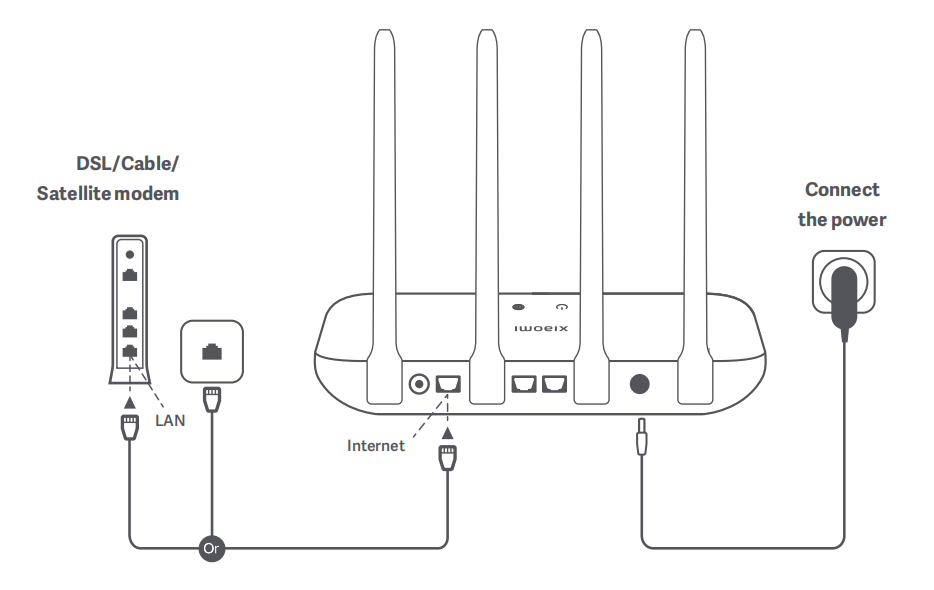
1. Power on the router, then connect the Internet (WAN) port to the DSL/Cable/Satellite modem;
Note:
If your Internet network is connected by a network cable via the Internet wall socket, connect the cable directly to the router's WAN port.
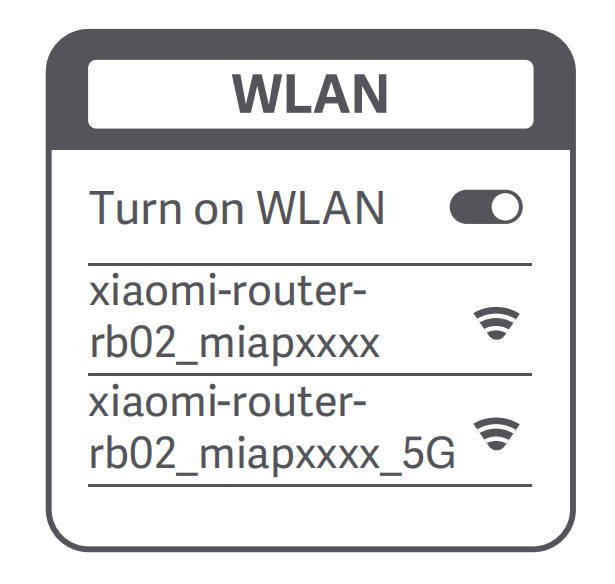
2. Wait until the system indicator light turns blue. Search for the Wi-Fi network and connect to it using a phone or computer (no password). Refer to the information at the bottom of the router for the Wi-Fi name;
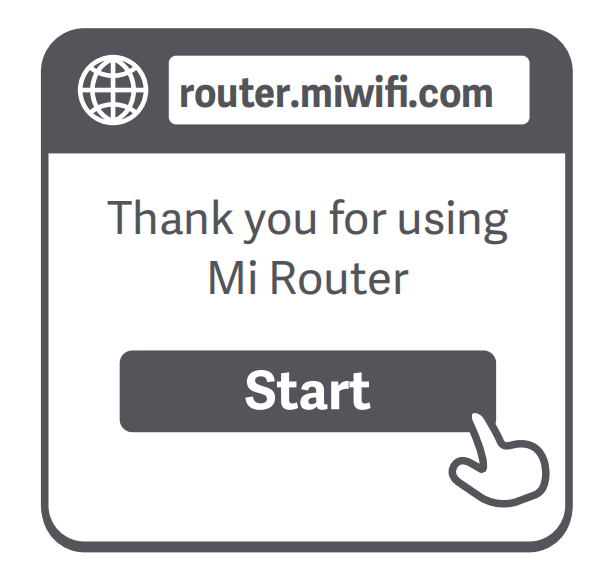
3. Once the Wi-Fi is connected, you will be directed to the configuration page. If the configuration page is not present, open the browser and go to "router.miwifi.com" or "192.168.31.1" to complete the configuration;
Note:
Mi Router EULA is available at "http://www1.miwifi.com/router/eula/20191230.html".
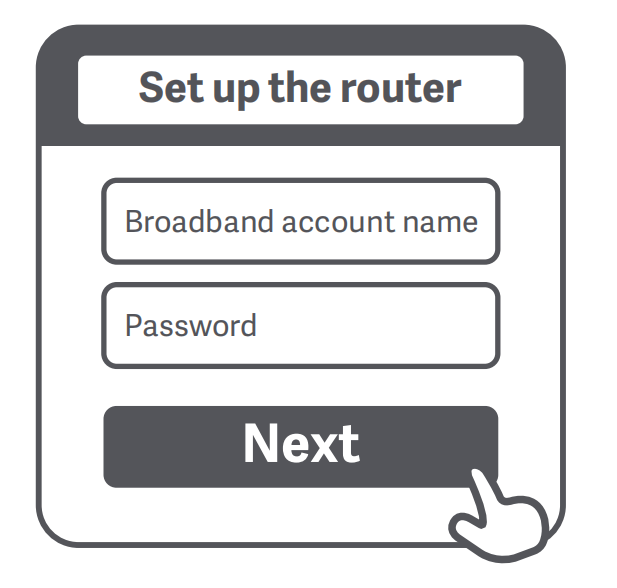
4. Enter the account name and password provided by your broadband provider, then click/tap [Next] (It depends on the Internet Service Provider you selected, whether your account name and password are required or not);
Note:
If you have forgotten your broadband account name or password, you can get them by contacting your broadband provider.
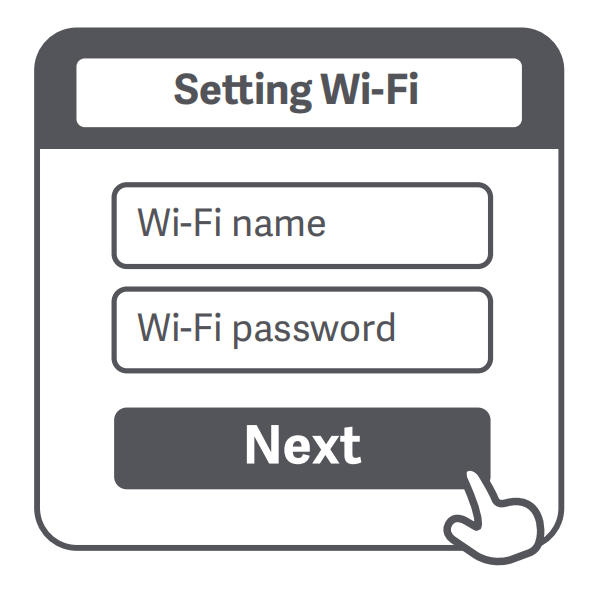
5. Set a new Wi-Fi and administrator password. You can choose to use your Wi-Fi password as your administrator password as well;
6. Please wait until the indicator light turns blue and stops flashing, then reconnect to the Wi-Fi.
2. Q: Why can't connect to the Internet after finishing setting up the network on the Xiaomi Router AC1200?
A: Please refer to the following troubleshooting steps:
1. Use your phone to search for the Wi-Fi network set by your router. If you can’t find it, make sure that the router is connected to the power and starts working normally;
2. Connect your phone to your router's Wi-Fi network, go to "router.miwifi.com", and try to fix the problem based on the network diagnostics results.
3. Q: What to do if the administrator password of the Xiaomi Router AC1200 is forgotten?
A: If you haven’t set a specific password, your administrator password will be the same as your Wi-Fi password, so try using this to log in. If the problem persists, it is recommended that you restore your router to the factory settings, then set up the network again.
4. Q: How to restore the Xiaomi Router AC1200 to the factory settings?
A: First make sure that the router starts working normally, then hold down the Reset button at the base of the router for more than 5 seconds and let go when the system status light turns orange.
5. Q: What do the indicator statuses of the Xiaomi Router AC1200 mean?
A: There are two indicator lights on the front panel of the Xiaomi Router AC1200, which are the network status light and the system status light. Both two indicators have two colors, which are blue and orange.
For your reference, the indicator statuses are as follows:
1. When the network status light is off, it means that the network cable is not plugged into the WAN port;
2. When the network status light is always orange, it means that the network cable is plugged into the WAN port but the upstream network is not available;
3. When the network status light is always blue, it means that the network cable is plugged into the WAN port and the upstream network is available;
4. When the system status light is off, it means that the router is not connected to a power source;
5. When the system status light is flashing in orange, it means that the system update is in process;
6. When the system status light is orange and then turns blue after approx. one minute, it means that the system is booting up;
7. When the system status light is orange and doesn’t turn blue after approx. two minutes, it means that a system fault occurs;
8. When the system status light is always blue, it means that the system is working normally.
1. Q: What is the basic information about the Xiaomi Router AC1200?
A: This product is a router belonging to the Xiaomi brand, with its model number RB02. The color of this product is white.
2. Q: What are the key features of the Xiaomi Router AC1200?
A: For your reference, the key features are as follows:
1. The Xiaomi Router AC1200 uses the powerful 802.11ac Wi-Fi technology, so its network speed can be up to 1200Mbps;
2. It is equipped with a dual-core CPU, which runs much more smoothly and steadily when carrying many devices;
3. It has 3 built-in Gigabit Ethernet ports to provide stable and fast connections;
4. This product has 4 external antennas, maintaining incredible speeds even over great distances;
5. It can carry up to 128 devices, which is a perfect choice for your smart home;
6. It is easy to set up and connect using the Mi Home/Xiaomi Home APP.
3. Q: What are the hardware configurations of the Xiaomi Router AC1200?
A: The Xiaomi Router AC1200 features an MT7621AT chip, which is a dual-core CPU with an MIPS (Million Instructions Per Second) execution speed of 880MHz. The ROM is 16MB and the RAM is 128MB. The protocol standards are IEEE 802.11a/b/g/n/ac and 802.3/3u.
4. Q: What are the software specifications of the Xiaomi Router AC1200?
A: The Xiaomi Router AC1200 supports Wi-Fi encryption with the methods of WPA-PSK and WPA2-PSK (Preshared Key). It also supports connecting to the Mi Home/Xiaomi Home APP to easily manage your router anytime and anywhere.
5. Q: What are the wireless specifications of the Xiaomi Router AC1200?
A: The Xiaomi Router AC1200 supports dual-band Wi-Fi, including the 2.4GHz Wi-Fi with up to 300Mbps network speed and the 5GHz Wi-Fi with up to 867Mbps network speed. The Wi-Fi channel of the 2.4GHz is 1~13, and the 5GHz Wi-Fi channel is 36, 40, 44, and 48.
6. Q: What is the operation temperature of the Xiaomi Router AC1200?
A: The operation temperature of the Xiaomi Router AC1200 is 0~40°C.
7. Q: What are the operating frequencies of the Xiaomi Router AC1200?
A: The operating frequencies of the Xiaomi Router AC1200 are 2400MHz-2483.5MHz (≤20dBm) and 5150MHz-5250MHz (≤23dBm).
8. Q: What is the power input of the Xiaomi Router AC1200?
A: The power input of the Xiaomi Router AC1200 is 12V 1A.
F&Qs
1. Q: How to install and configure the Xiaomi Router AC1200 for the first time?
A: Please refer to the following installation and configuration steps:
1. Power on the router, then connect the Internet (WAN) port to the DSL/Cable/Satellite modem;
Note:
If your Internet network is connected by a network cable via the Internet wall socket, connect the cable directly to the router's WAN port.
2. Wait until the system indicator light turns blue. Search for the Wi-Fi network and connect to it using a phone or computer (no password). Refer to the information at the bottom of the router for the Wi-Fi name;
3. Once the Wi-Fi is connected, you will be directed to the configuration page. If the configuration page is not present, open the browser and go to "router.miwifi.com" or "192.168.31.1" to complete the configuration;
Note:
Mi Router EULA is available at "http://www1.miwifi.com/router/eula/20191230.html".
4. Enter the account name and password provided by your broadband provider, then click/tap [Next] (It depends on the Internet Service Provider you selected, whether your account name and password are required or not);
Note:
If you have forgotten your broadband account name or password, you can get them by contacting your broadband provider.
5. Set a new Wi-Fi and administrator password. You can choose to use your Wi-Fi password as your administrator password as well;
6. Please wait until the indicator light turns blue and stops flashing, then reconnect to the Wi-Fi.
2. Q: Why can't connect to the Internet after finishing setting up the network on the Xiaomi Router AC1200?
A: Please refer to the following troubleshooting steps:
1. Use your phone to search for the Wi-Fi network set by your router. If you can’t find it, make sure that the router is connected to the power and starts working normally;
2. Connect your phone to your router's Wi-Fi network, go to "router.miwifi.com", and try to fix the problem based on the network diagnostics results.
3. Q: What to do if the administrator password of the Xiaomi Router AC1200 is forgotten?
A: If you haven’t set a specific password, your administrator password will be the same as your Wi-Fi password, so try using this to log in. If the problem persists, it is recommended that you restore your router to the factory settings, then set up the network again.
4. Q: How to restore the Xiaomi Router AC1200 to the factory settings?
A: First make sure that the router starts working normally, then hold down the Reset button at the base of the router for more than 5 seconds and let go when the system status light turns orange.
5. Q: What do the indicator statuses of the Xiaomi Router AC1200 mean?
A: There are two indicator lights on the front panel of the Xiaomi Router AC1200, which are the network status light and the system status light. Both two indicators have two colors, which are blue and orange.
For your reference, the indicator statuses are as follows:
1. When the network status light is off, it means that the network cable is not plugged into the WAN port;
2. When the network status light is always orange, it means that the network cable is plugged into the WAN port but the upstream network is not available;
3. When the network status light is always blue, it means that the network cable is plugged into the WAN port and the upstream network is available;
4. When the system status light is off, it means that the router is not connected to a power source;
5. When the system status light is flashing in orange, it means that the system update is in process;
6. When the system status light is orange and then turns blue after approx. one minute, it means that the system is booting up;
7. When the system status light is orange and doesn’t turn blue after approx. two minutes, it means that a system fault occurs;
8. When the system status light is always blue, it means that the system is working normally.
Does it help?
Yes
No