
Xiaomi Dust Mite Vacuum Cleaner FAQ
Overview
1. Q: What are mites?
A: Mites are tiny creatures, generally measuring around 0.5 millimeters, with some as small as 0.1 millimeters. Most species are less than 1 millimeter in size. There are over 40 species of mites, with more than ten related to human health. The most common ones include dust mites, flour mites, demodex mites, and scabies mites. Mites are widely distributed in the dark corners of living spaces, carpets, mattresses, pillows, sofas, air conditioners, bamboo mats, and other places. Among these, dust mites are the most widespread and have the greatest impact. The bodies, secretions, and excretions of mites are allergens, which can cause allergic dermatitis, asthma, bronchitis, nephritis, and allergic rhinitis, posing serious threats to human health. Studies show that about 97% of adults are infected with mites, with dust mites being the most prevalent.2. Q: What are the methods of removing mites?
A: There are three main methods for removing mites:1. Using sunlight to air clothes and quilts can effectively reduce mites. However, some live mites, dander, and dust remain;
2. UV radiation can destroy the chromosomes and cells of mites. However, some live mites, dander, and dust persist;
3. Mite removal devices can use strong suction, ultraviolet (UV) radiation, and high temperatures to eliminate mites, dander, and dust effectively.
3. Q: What is a mite removal device?
A: A mite removal device uses high-frequency tapping, strong suction, heating, ultraviolet (UV) radiation, and ultrasound to disrupt the living environment of mites, killing and extracting them from items such as bedding. This helps to reduce the density of dust mites and allergens in the space, thereby lowering the incidence of allergies and asthma.4. Q: What is ultraviolet radiation?
A: Ultraviolet (UV) radiation refers to sunlight with wavelengths ranging from 10 to 400 nanometers (nm), divided into three types: UVA (320-400nm, long-wave), UVB (280-320nm, medium-wave), and UVC (100-280nm, short-wave). Among these, UVA is the most carcinogenic, with sunburn and sun damage effects 1000 times greater than UVB. UVC is generally blocked by the Ozone Layer. Wavelengths between 250-260nm are effective for sterilization, as they can disrupt the chromosomes and play a photochemical role. Therefore, UV light generally uses this band. Ultraviolet sterilization and disinfection use ultraviolet radiation of appropriate wavelengths to destroy the molecular structure of DNA (deoxyribonucleic acid) or RNA (ribonucleic acid) in the cells of microorganisms, causing growth cell death and regenerative cell death, achieving the effect of sterilization and disinfection. The Xiaomi Dust Mite Vacuum Cleaner uses 253.7nm ultraviolet radiation with a sterilization rate of 99%.Product introduction and usage
1. Q: What are the features of the Xiaomi Dust Mite Vacuum Cleaner?
A: The Xiaomi Dust Mite Vacuum Cleaner is an electric mite remover equipped with a tapping electric roller brush, UV light, and hot air function. It features instant start-up, with the electric roller brush spinning at high speed to beat out mites, enhancing mite removal effectively. The UV light deeply eliminates mites and bacteria, incorporating an automatic sensing shutdown feature to prevent harm to the body. The hot air function disrupts the mites' growth environment, effectively suppressing mites' reproduction at the source. Its flat structure design, combined with a high-speed suction motor and wide suction inlet, swiftly removes mites and allergens, efficiently completing mites removal tasks.2. Q: How to use the Xiaomi Dust Mite Vacuum Cleaner?
A: After connecting the power supply, press the power button briefly to turn on. When the dust mite vacuum cleaner is turned on, press its [Power Button] to turn it off. After use, please turn off the device and unplug the power cord.After powering on, gently press and slowly move the dust mite vacuum cleaner across the fabric surface. The roller's downward pressure triggers a micro switch, activating the UV light and tapping module. When the dust mite vacuum cleaner lifts off the fabric surface, the roller rebounds, closing the micro switch, and stopping the UV light and tapping module.
Note:
The micro switch is hidden inside the device and is not visible.
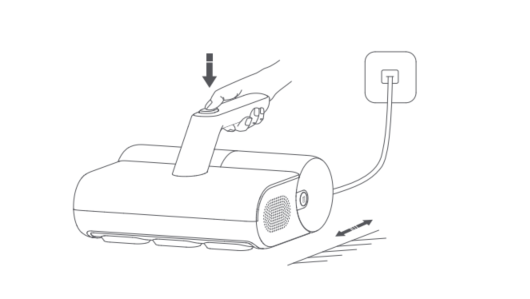
3. Q: How to clean the dust compartment assembly of the Xiaomi Dust Mite Vacuum Cleaner?
A: Here are the steps to clean the dust compartment as follows:1. Press and hold the [Dust Compartment Release Button] and simultaneously pull it backward to remove the dust compartment assembly;
2. Above the trash can, lift the cyclone separator assembly, pour out the garbage in the dust compartment, and clean the dust on the surface of the cyclone separator assembly;
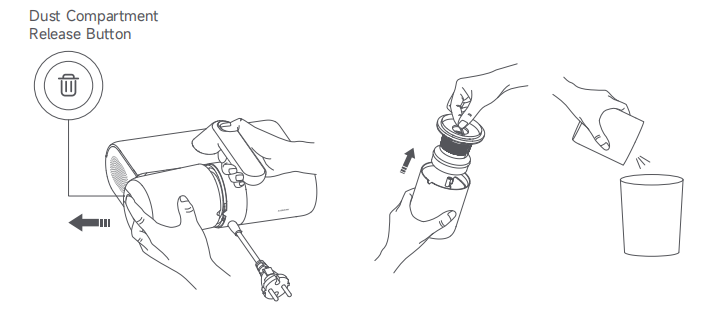
3. After cleaning the garbage, install the cyclone separator assembly back into the dust compartment;
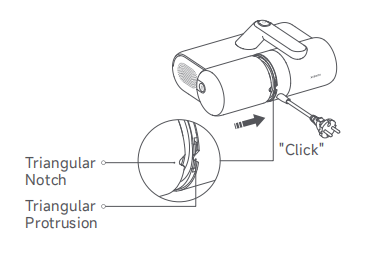
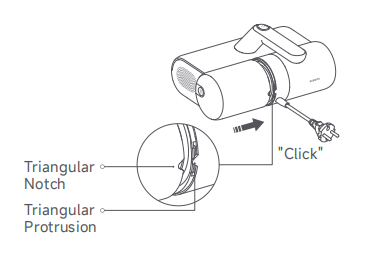
4. Align the triangular notch of the dust compartment assembly with the triangular protrusion on the dust mite vacuum cleaner, then push the dust compartment assembly into the vacuum cleaner. It is properly installed when you hear a "click".
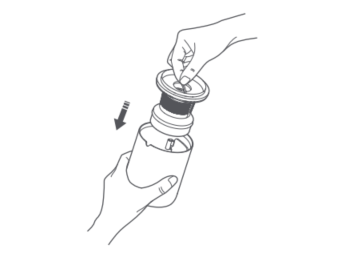
4. Q: How to wash the dust compartment assembly of the Xiaomi Dust Mite Vacuum Cleaner?
A: If suction decreases, clean the dust compartment assembly promptly to regain the mite removal performance and prevent blockage from the air duct that causes the dust mite vacuum cleaner to shut down.Here are the steps to wash the dust compartment as follows:
1. Remove the dust compartment assembly, and take out the cyclone separator assembly. Hold the [Filter Bracket] and rotate the cyclone separator counterclockwise to remove it;
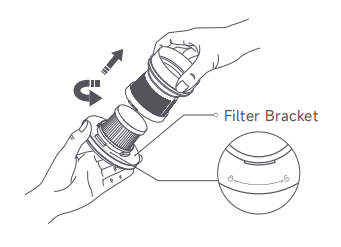
2. Rotate the filter counterclockwise to remove it;

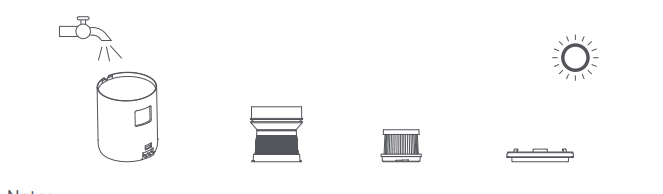
3. Clean the surfaces of the dust compartment, cyclone separator, filter, and filter bracket, rinse them with clean tap water, and then air-dry them thoroughly.
Note:
1. It is recommended to wash and clean the filter every 5 to 6 vacuuming, or you can change the cleaning frequency as needed;
2. It is recommended to replace the filter every 2-3 months to ensure optimal vacuuming performance;
3. Rinse the filter and the air inlet filter cotton with clean water. To prevent damage, do not rub, scrub, wash them with hands or any sharp objects such as brushes;
4. After rinsing, be sure to thoroughly air-dry the components (away from direct sunlight) before re-installation;
4. After cleaning and fully drying, reinstall the filter and cyclone separator into the filter bracket clockwise in order. Then place the cyclone separator assembly into the dust compartment and press it firmly;
5. Reinstall the dust compartment assembly back into the dust mite vacuum cleaner.
5. Q: Does the Xiaomi Dust Mite Vacuum Cleaner have waterproof capability?
A: The Xiaomi Dust Mite Vacuum Cleaner is designed for use only on dry indoor surfaces. It should not be placed in environments where there is a risk of immersion, spraying, or splashing, as this can damage internal components. Outdoor or moist surface use is prohibited.Note:
Do not touch the plug or any part of the vacuum cleaner with wet hands.
6. Q: How to clean the suction inlets on the Xiaomi Dust Mite Vacuum Cleaner?
A: Remove the dust compartment assembly and flip the dust mite vacuum cleaner. There are two suction inlets: one at the bottom and the other one on the dust compartment. Use a dry cloth or tissue to clean the dust from these inlets.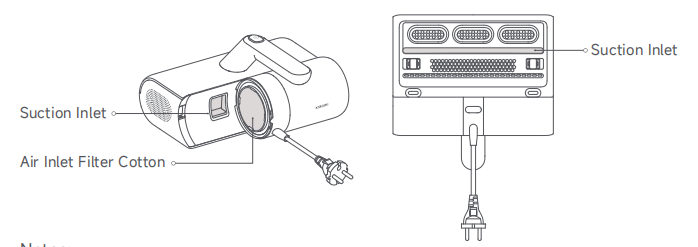
Note:
1. It is normal for dust and other particles to adhere to the two suction inlets. Please clean them regularly;
2. The air inlet filter cotton functions as a filter, and do not discard it. If the filter cotton becomes dirty, remove and rinse it with clean tap water. Be sure to thoroughly air-dry it (away from direct sunlight) before reinstallation.
7. Q: How to ensure electric circuit safety when using the Xiaomi Dust Mite Vacuum Cleaner?
A: Use a power cord and socket as instructed to prevent fire, electric shock, or damage. Always connect to a suitable power socket with the correct plug. Avoid pulling the power cord, and remember to disconnect the power supply before maintenance or removing the dust mite vacuum cleaner.8. Q: What precautions should be taken when using the Xiaomi Dust Mite Vacuum Cleaner?
A: Before cleaning the dust compartment, ensure the dust mite vacuum cleaner is turned off.The precautions of the Xiaomi Dust Mite Vacuum Cleaner are shown below:
1. Clean the dust compartment regularly to avoid the buildup of dust that could cause blockage and a decrease in suction;
2. Do not press or rub the suction and air outlet with nails or sharp objects to avoid damaging the dust mite vacuum cleaner;
3. Do not let corrosive liquids or abrasives contact the device such as alcohol, nail polish remover or detergent. Otherwise, it will cause malfunction, cracking or fading.
9. Q: Can the Xiaomi Dust Mite Vacuum Cleaner stay in one position for a long time while running?
A: The Xiaomi Dust Mite Vacuum Cleaner should not be left in one position for a long time while running. After the device is turned on, the roller brush will continue to operate, which can wear out the bed surface or bedding. The increased temperature at the bottom of the device can damage the dust mite vacuum cleaner.10. Q: Can the Xiaomi Dust Mite Vacuum Cleaner be used on wet surfaces or outdoors?
A: No, the Xiaomi Dust Mite Vacuum Cleaner is designed for indoor use on dry surfaces. It should not be used outdoors or on wet surfaces.11. Q: Can the Xiaomi Dust Mite Vacuum Cleaner clean up ashes?
A: No, please do not use the dust mite vacuum cleaner as a vacuum cleaner. It is prohibited to use the Xiaomi Dust Mite Vacuum Cleaner to clean drywall dust, fireplace ash, or other ashes and to vacuum up smoking or burning objects.12. Q: Does the Xiaomi Dust Mite Vacuum Cleaner have a safety design?
A: If the UV light is directly irradiated on the skin or eyes, it will cause varying degrees of damage. The Xiaomi Dust Mite Vacuum Cleaner is equipped with a press-type micro switch, which effectively prevents ultraviolet radiation from harming the eyes. After the dust mite vacuum cleaner is turned on, the roller is pressed when in contact with the cleaned surface. The UV light automatically turns off when the dust mite vacuum cleaner is lifted off the contact surface, protecting your body from UV rays.13. Q: How to use the Xiaomi Dust Mite Vacuum Cleaner correctly?
A: The Xiaomi Dust Mite Vacuum Cleaner is only used for cleaning and removing mites from textiles such as mattresses, blankets, pillows, and sofas. It is not suitable for other occasions. When related consumables need to be replaced, please use the accessories and replacement parts recommended by Xiaomi.14. Q: How to safely use the ultraviolet light on the Xiaomi Dust Mite Vacuum Cleaner?
A: Here are some safety guidelines as follows:1. Please avoid looking at the bottom of the dust mite vacuum cleaner when the power is on, or tilting and flipping the dust mite vacuum cleaner to prevent harm from ultraviolet sterilization;
2. Do not touch the ultraviolet light with your hands while it is in use or just after it has been turned off to prevent burns;
3. Avoid directly shining the ultraviolet light on plants to prevent damage;
4. Do not concentrate the ultraviolet light in one place for continuous use, as this will cause harm to the surfaces being cleaned;
5. Do not shine the ultraviolet light directly on the eyes or skin of humans or animals to prevent accidents.
15. Q: How often should the filter of the Xiaomi Dust Mite Vacuum Cleaner be replaced? Can it be cleaned?
A: To ensure optimal performance and longevity, please follow these maintenance recommendations:1. It is recommended to clean the filter after every 5-6 uses of vacuuming, or adjust it according to usage;
2. It is recommended to replace the filter every 2-3 months to maintain vacuuming effectiveness. The filter and the air inlet filter cotton should only be rinsed with clean water. Do not rub, scrub, or use brushes or sharp objects to clean them to avoid damage;
3. After washing each component, ensure they are thoroughly air-dried (avoid direct sunlight) before reinstalling.
16. Q: Can children use the Xiaomi Dust Mite Vacuum Cleaner?
A: The Xiaomi Dust Mite Vacuum Cleaner should not be used by individuals with physical, sensory, or intellectual disabilities, nor by individuals without relevant experience or knowledge (including children), unless under the supervision or guidance of a guardian to ensure safe use of the product.It is prohibited for children to operate the product or use it as a toy. It is necessary to close supervision when using the product near children. Children are prohibited from cleaning or maintaining the product without supervision.
17. Q: Does the Xiaomi Dust Mite Vacuum Cleaner have a hot air function?
A: The Xiaomi Dust Mite Vacuum Cleaner has a hot air function. During operation, hot air blows out from the bottom of the product, with a drying temperature of approximately 50°C.Note:
Please do not touch the bottom of the dust mite vacuum cleaner to avoid burns.
18. Q: What does the QR code on the bottom of the Xiaomi Dust Mite Vacuum Cleaner show? What is it used for?
A: Scanning the QR code reveals the product ID, which serves as a unique identification number.19. Q: Why does the UV light on the Xiaomi Dust Mite Vacuum Cleaner not light up when lifted for operation?
A: To prevent unnecessary harm from the UV light during use, the bottom of the dust mite vacuum cleaner is designed with two safety switches to start the UV light. The UV light will only illuminate when both safety switches are activated by placing the dust mite vacuum cleaner on a cleaning surface. When the dust mite vacuum cleaner is lifted off the surface, the UV light automatically turns off. This is a normal operation feature, so please use it with confidence.20. Q: Why is there a stripe/crack next to the button on the top of the dust compartment of the Xiaomi Dust Mite Vacuum Cleaner?
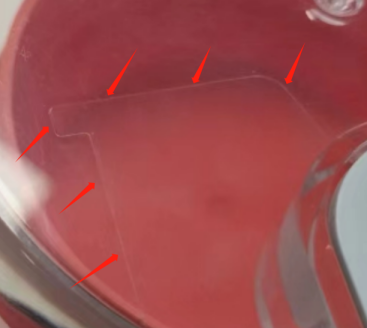
A: The stripe is an imprint left by the mold or slider during the molding process. It is a normal mark that is not prominent and does not affect the functionality of the product. This imprint is a result of the manufacturing process and should not be mistaken for a scratch or crack. Please be assured that it is safe to use.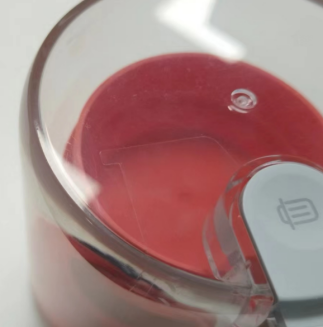
Troubleshooting
1. Q: Why does static electricity occur when using the Xiaomi Dust Mite Vacuum Cleaner?
A: The Xiaomi Dust Mite Vacuum Cleaner can cause static electricity from friction with fabrics, which is a normal occurrence. Static electricity is a common phenomenon, similar to the static generated when taking off clothes in winter. The main reason is due to dry weather, where friction occurs between insulating materials (such as synthetic fibers), causing the separation of charges. As charges accumulate over time, they can discharge suddenly into the human body, resulting in static electricity.2. Q: Why does the UV light tube on the Xiaomi Dust Mite Vacuum Cleaner turn black?
A: The blackening of the UV light tube on both sides is a normal phenomenon, similar to household light bulbs that darken after prolonged use. During operation the temperature of the light tube rises, causing mercury vaporization which deposits along the tube walls. Over time, this deposition becomes lighter until it disappears completely. After the light tube is turned off and cools down, the condensed mercury leaves a darkened residue, which is a normal occurrence and does not affect the product's functionality. If the light tube does not light up or operate properly, it is recommended to contact the local after-sales service center.3. Q: Why is there an odor or burning smell when using the Xiaomi Dust Mite Vacuum Cleaner?
A: During initial use, it is normal for the heat vents to emit hot air and a slight odor. This odor will dissipate over time with continued use.If a burning smell occurs after extended use, it is due to dirt and blockage in the dust compartment or filter, preventing proper ventilation and causing overheating. Please follow the cleaning instructions for the dust compartment and filter, or replace them if necessary. Allow the device to cool down before using it again.
Note:
After cleaning the filter, ensure it is completely dry before reinstalling to prevent blockage.
4. Q: Why does the Xiaomi Dust Mite Vacuum Cleaner not blow out hot air?
A: The Xiaomi Dust Mite Vacuum Cleaner features a hot air function. During operation, hot air blows out from the bottom of the device. To prevent potential hazards from high temperatures, the drying temperature of the hot air is approximately 50°C.5. Q: What to do if the UV light on the Xiaomi Dust Mite Vacuum Cleaner cannot function properly?
A: For your reference, please check for the following conditions:1. If the main unit is not in contact with the fabric, the UV light will automatically turn off to prevent UV leakage. Place the main unit back onto the fabric surface to restore normal operation. This is a normal occurrence, so please use it with confidence;
2. Ensure that the bottom roller is properly pressed down. Clear any obstructions that prevent the roller from fully engaging.
If the above steps do not resolve the issue, it indicates the UV light is broken. Please contact customer support for assistance.
6. Q: What to do if the Xiaomi Dust Mite Vacuum Cleaner does not turn on?
A: To resolve the issue, please follow these steps:1. Ensure the power cord is correctly plugged in;
2. Check and ensure the power outlet is supplying electricity properly;
3. Press the [Power Button] several times to confirm if it starts.
7. Q: What to do if the main motor of the Xiaomi Dust Mite Vacuum Cleaner does not start after powering on?
A: For your reference, here are some solutions to the issue:1. The main motor has temperature protection. Turn off the device, unplug the power cord, and wait for the main motor to cool down before attempting to use it again;
2. If the main motor is damaged and does not start despite cooling down, it is recommended to contact the local after-sales service.
8. Q: What to do if the Xiaomi Dust Mite Vacuum Cleaner's tapping module is not working?
A: For your reference, Here are some solutions as follows:1. If the main unit is not in contact with the fabric, the tapping motor stops working as a safety feature. Place the main unit back onto the fabric surface to restore operation. This is a normal occurrence;
2. Check if the bottom roller is properly pressed down. Clear any obstructions that cause the roller to stick.
If the tapping motor still does not start despite checking the above steps, it is recommended to contact the local after-sales service.
9. Q: What to do if the Xiaomi Dust Mite Vacuum Cleaner experiences reduced suction, excessive noise, or overheating?
A: To resolve the issue, please follow these steps:1. Remove the dust compartment and cyclone separator assembly, then clean out any accumulated dust and wash the filter and filter sponge;
2. Check if the suction port is blocked by foreign objects, and clear the blockage if necessary;
3. Ensure that after cleaning the filter, it is thoroughly dried before reassembly to prevent blockage.
10. Q: Why does the Xiaomi Dust Mite Vacuum Cleaner make strange noises when shaken?
A: If the dust mite vacuum cleaner ingests hard particles, it can cause abnormal noise during use. Cleaning out these hard particles can restore normal operation.11. Q: What should be done if the power cord interface of the Xiaomi Dust Mite Vacuum Cleaner gets dusty during use?
A: If dust accumulates around the power cord interface due to static electricity causing adhesion, clean it off. This does not affect the functionality of the device.12. Q: What should be done if the dust compartment of the Xiaomi Dust Mite Vacuum Cleaner cannot be installed?
A: If the dust compartment cannot be installed, it is due to improper installation methods or damage to the latch.You should align the triangular notch on the dust compartment assembly with the triangular protrusion on the main unit. Push the dust compartment assembly into the main unit until you hear a "click," indicating that the dust compartment assembly is securely installed in place.
13. Q: What should be done if there are water marks on the dust compartment of the Xiaomi Dust Mite Vacuum Cleaner?
A: The dust compartment is initially clean and free of water marks when it leaves the factory. During operation, the device will accumulate dust, which can adhere to the inner walls of the dust compartment resemble water marks. Clean the dust cup as usual after use, or wipe it clean with a towel to remove any marks.Does it help?
Yes
No