

Xiaomi Mini LED Gaming Monitor G Pro 27i FAQ
1. Q: What is the rated power of the Xiaomi Mini LED Gaming Monitor G Pro 27i?
A: The rated power of the Xiaomi Mini LED Gaming Monitor G Pro 27i is 65W.
2. Q: What is the stand-by power consumption of the Xiaomi Mini LED Gaming Monitor G Pro 27i?
A: The stand-by power consumption of the Xiaomi Mini LED Gaming Monitor G Pro 27i is no more than 0.5W.
3. Q: What is the voltage of the Xiaomi Mini LED Gaming Monitor G Pro 27i?
A: The voltage of the Xiaomi Mini LED Gaming Monitor G Pro 27i is 100-240V~50/60Hz.
4. Q: What is the power input of the Xiaomi Mini LED Gaming Monitor G Pro 27i?
A: The power input of the Xiaomi Mini LED Gaming Monitor G Pro 27i is 24V ⎓ 2.71A.
5. Q: What is the display size of the Xiaomi Mini LED Gaming Monitor G Pro 27i?
A: The display size of the Xiaomi Mini LED Gaming Monitor G Pro 27i is 27".
6. Q: Is the screen of the Xiaomi Mini LED Gaming Monitor G Pro 27i flat or curve?
A: The screen of the Xiaomi Mini LED Gaming Monitor G Pro 27i is flat.
7. Q: What is the display aspect ratio of the Xiaomi Mini LED Gaming Monitor G Pro 27i?
A: The display aspect ratio of the Xiaomi Mini LED Gaming Monitor G Pro 27i is 16:9.
8. Q: What is the resolution of the Xiaomi Mini LED Gaming Monitor G Pro 27i?
A: The resolution of the Xiaomi Mini LED Gaming Monitor G Pro 27i is 2560×1440.
9. Q: What is the panel backlight type of the Xiaomi Mini LED Gaming Monitor G Pro 27i?
A: The panel backlight type of the Xiaomi Mini LED Gaming Monitor G Pro 27i is the direct backlight.
10. Q: What is the static contrast ratio of the Xiaomi Mini LED Gaming Monitor G Pro 27i?
A: The static contrast ratio of the Xiaomi Mini LED Gaming Monitor G Pro 27i is 1000:1 (typ).
11. Q: What is the contrast ratio viewing angle of the Xiaomi Mini LED Gaming Monitor G Pro 27i?
A: The contrast ratio viewing angle of the Xiaomi Mini LED Gaming Monitor G Pro 27i is 178 (H)/178 (V).
12. Q: What is the panel bit depth of the Xiaomi Mini LED Gaming Monitor G Pro 27i?
A: The panel bit depth of the Xiaomi Mini LED Gaming Monitor G Pro 27i is 10bit (8bit+FRC)/1.07 billion colors.
13. Q: What is the G to G response time of the Xiaomi Mini LED Gaming Monitor G Pro 27i?
A: The G to G response time of the Xiaomi Mini LED Gaming Monitor G Pro 27i is 1ms (typ).
14. Q: What is the panel refresh rate of the Xiaomi Mini LED Gaming Monitor G Pro 27i?
A: The panel refresh rate of the Xiaomi Mini LED Gaming Monitor G Pro 27i is 180Hz (Max.).
15. Q: What is the brightness of the Xiaomi Mini LED Gaming Monitor G Pro 27i?
A: The brightness of the Xiaomi Mini LED Gaming Monitor G Pro 27i is 600nits (typ).
16. Q: What is the peak brightness of the Xiaomi Mini LED Gaming Monitor G Pro 27i?
A: The peak brightness of the Xiaomi Mini LED Gaming Monitor G Pro 27i is 1000nits (typ).
17. Q: What are the local dimming zones of the Xiaomi Mini LED Gaming Monitor G Pro 27i?
A: The local dimming zones of the Xiaomi Mini LED Gaming Monitor G Pro 27i are 1152 zones.
18. Q: Does the Xiaomi Mini LED Gaming Monitor G Pro 27i support global dimming?
A: Yes, the Xiaomi Mini LED Gaming Monitor G Pro 27i supports global dimming.
19. Q: What is the color gamut of the Xiaomi Mini LED Gaming Monitor G Pro 27i?
A: The color gamut of the Xiaomi Mini LED Gaming Monitor G Pro 27i is 99% DCI-P3/97% Adobe RGB/100% sRGB.
20. Q: What is the luminance uniformity of the Xiaomi Mini LED Gaming Monitor G Pro 27i?
A: The luminance uniformity of the Xiaomi Mini LED Gaming Monitor G Pro 27i is 80%.
21. Q: What is the color correction of the Xiaomi Mini LED Gaming Monitor G Pro 27i?
A: The color correction of the Xiaomi Mini LED Gaming Monitor G Pro 27i is <2ΔE.
22. Q: What is the VRR (Variable Refresh Rate) of the Xiaomi Mini LED Gaming Monitor G Pro 27i?
A: The Xiaomi Mini LED Gaming Monitor G Pro 27i doesn’t support VRR.
23. Q: Does the Xiaomi Mini LED Gaming Monitor G Pro 27i come with the patent light strip?
A: Yes, the Xiaomi Mini LED Gaming Monitor G Pro 27i comes with the patent light strip.
24. Q: What is the panel type of the Xiaomi Mini LED Gaming Monitor G Pro 27i?
A: The panel type of the Xiaomi Mini LED Gaming Monitor G Pro 27i is Fast IPS.
25. Q: What is the panel source of the Xiaomi Mini LED Gaming Monitor G Pro 27i?
A: The panel source of the Xiaomi Mini LED Gaming Monitor G Pro 27i is BOE.
26. Q: What is the chipset type of the Xiaomi Mini LED Gaming Monitor G Pro 27i?
A: The chipset type of the Xiaomi Mini LED Gaming Monitor G Pro 27i is MT9800UWPT/HF.
27. Q: Does the Xiaomi Mini LED Gaming Monitor G Pro 27i have eye care certification?
A: Yes, the Xiaomi Mini LED Gaming Monitor G Pro 27i has TÜV Low Blue Light Certification.
28. Q: What HDR does the Xiaomi Mini LED Gaming Monitor G Pro 27i support?
A: The Xiaomi Mini LED Gaming Monitor G Pro 27i supports HDR1000 with VESA Certified DisplayHDR. However, it doesn’t support HLG, HDR10 and HDR10+.
29. Q: Does the Xiaomi Mini LED Gaming Monitor G Pro 27i have DP (DisplayPort) certification?
A: Yes, the Xiaomi Mini LED Gaming Monitor G Pro 27i has DP (DisplayPort) certification.
30. Q: Does the Xiaomi Mini LED Gaming Monitor G Pro 27i support Adaptive-Sync?
A: Yes, the Xiaomi Mini LED Gaming Monitor G Pro 27i supports Adaptive-Sync.
31. Q: Does the Xiaomi Mini LED Gaming Monitor G Pro 27i support FreeSync?
A: Yes, the Xiaomi Mini LED Gaming Monitor G Pro 27i supports FreeSync.
32. Q: Does the Xiaomi Mini LED Gaming Monitor G Pro 27i support G-Sync?
A: No, the Xiaomi Mini LED Gaming Monitor G Pro 27i doesn’t support G-Sync.
33. Q: Does the Xiaomi Mini LED Gaming Monitor G Pro 27i have any sensors?
A: The Xiaomi Mini LED Gaming Monitor G Pro 27i doesn’t have sensors.
34. Q: Does the Xiaomi Mini LED Gaming Monitor G Pro 27i have a gyroscope?
A: The Xiaomi Mini LED Gaming Monitor G Pro 27i doesn’t have a gyroscope.
35. Q: Does the Xiaomi Mini LED Gaming Monitor G Pro 27i support NFC?
A: No, the Xiaomi Mini LED Gaming Monitor G Pro 27i doesn’t support NFC.
36. Q: What languages does the Xiaomi Mini LED Gaming Monitor G Pro 27i support?
A: The system languages of the Xiaomi Mini LED Gaming Monitor G Pro 27i are English, Spanish, Russian, French, Italian, German, Polish, Arabic, Latin, Portuguese, Dutch, Indonesian, Hebrew, Traditional Chinese (Hong Kong), Traditional Chinese (Taiwan), Korean, Japanese.
37. Q: What is the button type of the Xiaomi Mini LED Gaming Monitor G Pro 27i?
A: The button type of the Xiaomi Mini LED Gaming Monitor G Pro 27i is a physical button.
38. Q: How many control buttons does the Xiaomi Mini LED Gaming Monitor G Pro 27i have?
A: The Xiaomi Mini LED Gaming Monitor G Pro 27i has one five-way joystick control button.
39. Q: How many ports does the Xiaomi Mini LED Gaming Monitor G Pro 27i have?
A: The Xiaomi Mini LED Gaming Monitor G Pro 27i has DP 1.4 port *2, HDMI 2.0 port*2, DC IN power port*1 and Audio port*1. It doesn’t support the Type-C port, VGA port, and USB (2.0/3.0) port.
40. Q: What are the package contents of the Xiaomi Mini LED Gaming Monitor G Pro 27i?
A: The package contents of the Xiaomi Mini LED Gaming Monitor G Pro 27i are Display*1, Base (with stand)*1, Base mount*1, Power adaptor (European standard)*1, DP cable (1.5m)*1, Colour accuracy report*1, User manual*1, Warranty card*1.
41. Q: What are the colors of the Xiaomi Mini LED Gaming Monitor G Pro 27i?
A: The Xiaomi Mini LED Gaming Monitor G Pro 27i is black/white.
42. Q: What are the border widths of the Xiaomi Mini LED Gaming Monitor G Pro 27i?
A: The top border width is 8.3mm, the left border width is 8.3mm, the right border width is 8.3mm, and the bottom border width is 21mm.
43. Q: What is the screen-to-body ratio of the Xiaomi Mini LED Gaming Monitor G Pro 27i?
A: The screen-to-body ratio of the Xiaomi Mini LED Gaming Monitor G Pro 27i is 89.50%.
44. Q: What is the thinnest dimension of the Xiaomi Mini LED Gaming Monitor G Pro 27i?
A: The thinnest dimension of the Xiaomi Mini LED Gaming Monitor G Pro 27i is 20mm.
45. Q: What is the thickness dimension of the Xiaomi Mini LED Gaming Monitor G Pro 27i?
A: The thickness dimension of the Xiaomi Mini LED Gaming Monitor G Pro 27i is 68.47mm.
46. Q: What are the dimensions of the Xiaomi Mini LED Gaming Monitor G Pro 27i?
A: The dimensions including Base (L*W*H) are 613.35*169.45*526.5mm. The dimensions not including Base (L*W*H) are 613.35*68.47*364.95mm. The packing size (L*W*H) is 685*220*445mm. The Wall Mount dimensions (L*H) are 75*75mm.
47. Q: What is the weight of the Xiaomi Mini LED Gaming Monitor G Pro 27i?
A: The weight including Base is 6.8kg. The weight not including Base is 4.82kg. The weight including Packing is 8.5kg.
48. Q: What is the tilt angle of the Xiaomi Mini LED Gaming Monitor G Pro 27i?
A: Forwards tilt angle: 5°+2. Backwards tilt angle: 21°±2.
49. Q: What is the swivel angle of the Xiaomi Mini LED Gaming Monitor G Pro 27i?
A: The swivel angle of the Xiaomi Mini LED Gaming Monitor G Pro 27i is -35°±3 ~ +35°±3.
50. Q: What is the pivot angle/direction of the Xiaomi Mini LED Gaming Monitor G Pro 27i?
A: The pivot angle/direction of the Xiaomi Mini LED Gaming Monitor G Pro 27i is -92°±2 ~ +92°±2.
51. Q: What is the height adjustment range of the Xiaomi Mini LED Gaming Monitor G Pro 27i?
A: The height adjustment range of the Xiaomi Mini LED Gaming Monitor G Pro 27i is 0~120mm.
52. Q: What is the RGB lights design of the Xiaomi Mini LED Gaming Monitor G Pro 27i?
A: The Xiaomi Mini LED Gaming Monitor G Pro 27i adopts the RGB ambient light on its back cover, however it doesn’t have RGB lights.
53. Q: What is the bezel design of the Xiaomi Mini LED Gaming Monitor G Pro 27i?
A: The Xiaomi Mini LED Gaming Monitor G Pro 27i adopts narrow bezels on three sides design.
A: The rated power of the Xiaomi Mini LED Gaming Monitor G Pro 27i is 65W.
2. Q: What is the stand-by power consumption of the Xiaomi Mini LED Gaming Monitor G Pro 27i?
A: The stand-by power consumption of the Xiaomi Mini LED Gaming Monitor G Pro 27i is no more than 0.5W.
3. Q: What is the voltage of the Xiaomi Mini LED Gaming Monitor G Pro 27i?
A: The voltage of the Xiaomi Mini LED Gaming Monitor G Pro 27i is 100-240V~50/60Hz.
4. Q: What is the power input of the Xiaomi Mini LED Gaming Monitor G Pro 27i?
A: The power input of the Xiaomi Mini LED Gaming Monitor G Pro 27i is 24V ⎓ 2.71A.
5. Q: What is the display size of the Xiaomi Mini LED Gaming Monitor G Pro 27i?
A: The display size of the Xiaomi Mini LED Gaming Monitor G Pro 27i is 27".
6. Q: Is the screen of the Xiaomi Mini LED Gaming Monitor G Pro 27i flat or curve?
A: The screen of the Xiaomi Mini LED Gaming Monitor G Pro 27i is flat.
7. Q: What is the display aspect ratio of the Xiaomi Mini LED Gaming Monitor G Pro 27i?
A: The display aspect ratio of the Xiaomi Mini LED Gaming Monitor G Pro 27i is 16:9.
8. Q: What is the resolution of the Xiaomi Mini LED Gaming Monitor G Pro 27i?
A: The resolution of the Xiaomi Mini LED Gaming Monitor G Pro 27i is 2560×1440.
9. Q: What is the panel backlight type of the Xiaomi Mini LED Gaming Monitor G Pro 27i?
A: The panel backlight type of the Xiaomi Mini LED Gaming Monitor G Pro 27i is the direct backlight.
10. Q: What is the static contrast ratio of the Xiaomi Mini LED Gaming Monitor G Pro 27i?
A: The static contrast ratio of the Xiaomi Mini LED Gaming Monitor G Pro 27i is 1000:1 (typ).
11. Q: What is the contrast ratio viewing angle of the Xiaomi Mini LED Gaming Monitor G Pro 27i?
A: The contrast ratio viewing angle of the Xiaomi Mini LED Gaming Monitor G Pro 27i is 178 (H)/178 (V).
12. Q: What is the panel bit depth of the Xiaomi Mini LED Gaming Monitor G Pro 27i?
A: The panel bit depth of the Xiaomi Mini LED Gaming Monitor G Pro 27i is 10bit (8bit+FRC)/1.07 billion colors.
13. Q: What is the G to G response time of the Xiaomi Mini LED Gaming Monitor G Pro 27i?
A: The G to G response time of the Xiaomi Mini LED Gaming Monitor G Pro 27i is 1ms (typ).
14. Q: What is the panel refresh rate of the Xiaomi Mini LED Gaming Monitor G Pro 27i?
A: The panel refresh rate of the Xiaomi Mini LED Gaming Monitor G Pro 27i is 180Hz (Max.).
15. Q: What is the brightness of the Xiaomi Mini LED Gaming Monitor G Pro 27i?
A: The brightness of the Xiaomi Mini LED Gaming Monitor G Pro 27i is 600nits (typ).
16. Q: What is the peak brightness of the Xiaomi Mini LED Gaming Monitor G Pro 27i?
A: The peak brightness of the Xiaomi Mini LED Gaming Monitor G Pro 27i is 1000nits (typ).
17. Q: What are the local dimming zones of the Xiaomi Mini LED Gaming Monitor G Pro 27i?
A: The local dimming zones of the Xiaomi Mini LED Gaming Monitor G Pro 27i are 1152 zones.
18. Q: Does the Xiaomi Mini LED Gaming Monitor G Pro 27i support global dimming?
A: Yes, the Xiaomi Mini LED Gaming Monitor G Pro 27i supports global dimming.
19. Q: What is the color gamut of the Xiaomi Mini LED Gaming Monitor G Pro 27i?
A: The color gamut of the Xiaomi Mini LED Gaming Monitor G Pro 27i is 99% DCI-P3/97% Adobe RGB/100% sRGB.
20. Q: What is the luminance uniformity of the Xiaomi Mini LED Gaming Monitor G Pro 27i?
A: The luminance uniformity of the Xiaomi Mini LED Gaming Monitor G Pro 27i is 80%.
21. Q: What is the color correction of the Xiaomi Mini LED Gaming Monitor G Pro 27i?
A: The color correction of the Xiaomi Mini LED Gaming Monitor G Pro 27i is <2ΔE.
22. Q: What is the VRR (Variable Refresh Rate) of the Xiaomi Mini LED Gaming Monitor G Pro 27i?
A: The Xiaomi Mini LED Gaming Monitor G Pro 27i doesn’t support VRR.
23. Q: Does the Xiaomi Mini LED Gaming Monitor G Pro 27i come with the patent light strip?
A: Yes, the Xiaomi Mini LED Gaming Monitor G Pro 27i comes with the patent light strip.
24. Q: What is the panel type of the Xiaomi Mini LED Gaming Monitor G Pro 27i?
A: The panel type of the Xiaomi Mini LED Gaming Monitor G Pro 27i is Fast IPS.
25. Q: What is the panel source of the Xiaomi Mini LED Gaming Monitor G Pro 27i?
A: The panel source of the Xiaomi Mini LED Gaming Monitor G Pro 27i is BOE.
26. Q: What is the chipset type of the Xiaomi Mini LED Gaming Monitor G Pro 27i?
A: The chipset type of the Xiaomi Mini LED Gaming Monitor G Pro 27i is MT9800UWPT/HF.
27. Q: Does the Xiaomi Mini LED Gaming Monitor G Pro 27i have eye care certification?
A: Yes, the Xiaomi Mini LED Gaming Monitor G Pro 27i has TÜV Low Blue Light Certification.
28. Q: What HDR does the Xiaomi Mini LED Gaming Monitor G Pro 27i support?
A: The Xiaomi Mini LED Gaming Monitor G Pro 27i supports HDR1000 with VESA Certified DisplayHDR. However, it doesn’t support HLG, HDR10 and HDR10+.
29. Q: Does the Xiaomi Mini LED Gaming Monitor G Pro 27i have DP (DisplayPort) certification?
A: Yes, the Xiaomi Mini LED Gaming Monitor G Pro 27i has DP (DisplayPort) certification.
30. Q: Does the Xiaomi Mini LED Gaming Monitor G Pro 27i support Adaptive-Sync?
A: Yes, the Xiaomi Mini LED Gaming Monitor G Pro 27i supports Adaptive-Sync.
31. Q: Does the Xiaomi Mini LED Gaming Monitor G Pro 27i support FreeSync?
A: Yes, the Xiaomi Mini LED Gaming Monitor G Pro 27i supports FreeSync.
32. Q: Does the Xiaomi Mini LED Gaming Monitor G Pro 27i support G-Sync?
A: No, the Xiaomi Mini LED Gaming Monitor G Pro 27i doesn’t support G-Sync.
33. Q: Does the Xiaomi Mini LED Gaming Monitor G Pro 27i have any sensors?
A: The Xiaomi Mini LED Gaming Monitor G Pro 27i doesn’t have sensors.
34. Q: Does the Xiaomi Mini LED Gaming Monitor G Pro 27i have a gyroscope?
A: The Xiaomi Mini LED Gaming Monitor G Pro 27i doesn’t have a gyroscope.
35. Q: Does the Xiaomi Mini LED Gaming Monitor G Pro 27i support NFC?
A: No, the Xiaomi Mini LED Gaming Monitor G Pro 27i doesn’t support NFC.
36. Q: What languages does the Xiaomi Mini LED Gaming Monitor G Pro 27i support?
A: The system languages of the Xiaomi Mini LED Gaming Monitor G Pro 27i are English, Spanish, Russian, French, Italian, German, Polish, Arabic, Latin, Portuguese, Dutch, Indonesian, Hebrew, Traditional Chinese (Hong Kong), Traditional Chinese (Taiwan), Korean, Japanese.
37. Q: What is the button type of the Xiaomi Mini LED Gaming Monitor G Pro 27i?
A: The button type of the Xiaomi Mini LED Gaming Monitor G Pro 27i is a physical button.
38. Q: How many control buttons does the Xiaomi Mini LED Gaming Monitor G Pro 27i have?
A: The Xiaomi Mini LED Gaming Monitor G Pro 27i has one five-way joystick control button.
39. Q: How many ports does the Xiaomi Mini LED Gaming Monitor G Pro 27i have?
A: The Xiaomi Mini LED Gaming Monitor G Pro 27i has DP 1.4 port *2, HDMI 2.0 port*2, DC IN power port*1 and Audio port*1. It doesn’t support the Type-C port, VGA port, and USB (2.0/3.0) port.
40. Q: What are the package contents of the Xiaomi Mini LED Gaming Monitor G Pro 27i?
A: The package contents of the Xiaomi Mini LED Gaming Monitor G Pro 27i are Display*1, Base (with stand)*1, Base mount*1, Power adaptor (European standard)*1, DP cable (1.5m)*1, Colour accuracy report*1, User manual*1, Warranty card*1.
41. Q: What are the colors of the Xiaomi Mini LED Gaming Monitor G Pro 27i?
A: The Xiaomi Mini LED Gaming Monitor G Pro 27i is black/white.
42. Q: What are the border widths of the Xiaomi Mini LED Gaming Monitor G Pro 27i?
A: The top border width is 8.3mm, the left border width is 8.3mm, the right border width is 8.3mm, and the bottom border width is 21mm.
43. Q: What is the screen-to-body ratio of the Xiaomi Mini LED Gaming Monitor G Pro 27i?
A: The screen-to-body ratio of the Xiaomi Mini LED Gaming Monitor G Pro 27i is 89.50%.
44. Q: What is the thinnest dimension of the Xiaomi Mini LED Gaming Monitor G Pro 27i?
A: The thinnest dimension of the Xiaomi Mini LED Gaming Monitor G Pro 27i is 20mm.
45. Q: What is the thickness dimension of the Xiaomi Mini LED Gaming Monitor G Pro 27i?
A: The thickness dimension of the Xiaomi Mini LED Gaming Monitor G Pro 27i is 68.47mm.
46. Q: What are the dimensions of the Xiaomi Mini LED Gaming Monitor G Pro 27i?
A: The dimensions including Base (L*W*H) are 613.35*169.45*526.5mm. The dimensions not including Base (L*W*H) are 613.35*68.47*364.95mm. The packing size (L*W*H) is 685*220*445mm. The Wall Mount dimensions (L*H) are 75*75mm.
47. Q: What is the weight of the Xiaomi Mini LED Gaming Monitor G Pro 27i?
A: The weight including Base is 6.8kg. The weight not including Base is 4.82kg. The weight including Packing is 8.5kg.
48. Q: What is the tilt angle of the Xiaomi Mini LED Gaming Monitor G Pro 27i?
A: Forwards tilt angle: 5°+2. Backwards tilt angle: 21°±2.
49. Q: What is the swivel angle of the Xiaomi Mini LED Gaming Monitor G Pro 27i?
A: The swivel angle of the Xiaomi Mini LED Gaming Monitor G Pro 27i is -35°±3 ~ +35°±3.
50. Q: What is the pivot angle/direction of the Xiaomi Mini LED Gaming Monitor G Pro 27i?
A: The pivot angle/direction of the Xiaomi Mini LED Gaming Monitor G Pro 27i is -92°±2 ~ +92°±2.
51. Q: What is the height adjustment range of the Xiaomi Mini LED Gaming Monitor G Pro 27i?
A: The height adjustment range of the Xiaomi Mini LED Gaming Monitor G Pro 27i is 0~120mm.
52. Q: What is the RGB lights design of the Xiaomi Mini LED Gaming Monitor G Pro 27i?
A: The Xiaomi Mini LED Gaming Monitor G Pro 27i adopts the RGB ambient light on its back cover, however it doesn’t have RGB lights.
53. Q: What is the bezel design of the Xiaomi Mini LED Gaming Monitor G Pro 27i?
A: The Xiaomi Mini LED Gaming Monitor G Pro 27i adopts narrow bezels on three sides design.
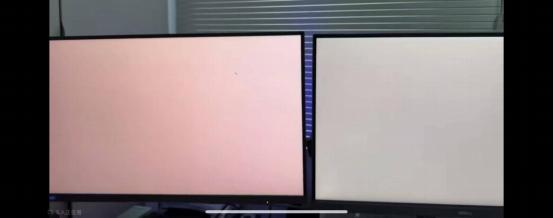
54. Q: Why is there an excessive red hue of the Xiaomi Mini LED Gaming Monitor G Pro 27i display?
A: This product features Quantum Dot (QD) display technology, which expands the backlight color gamut, making the display appear more vibrant than typical models. This is a normal optical display characteristic. If you find the colors too intense, you can fine-tune the color space and color temperature settings in the menu's [Picture mode] options. Choose the settings that provide the optimal display effect for your preferences.
To adjust the display color settings, please refer to the following steps:
1. Open the display menu >> [Picture mode] >> [Color space] >> [Native];
To adjust the display color settings, please refer to the following steps:
1. Open the display menu >> [Picture mode] >> [Color space] >> [Native];
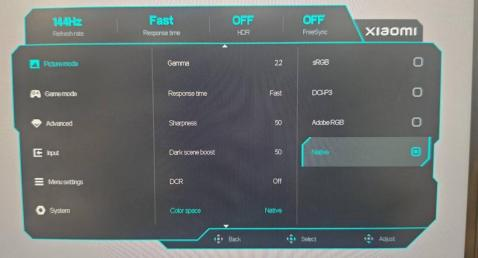
2. Open the display menu >> [Picture mode] >> [Color temperature] >> [Custom] >> [Red] >> decrease the RED number till you could accept it.

For your reference, here are the detailed explanations for this phenomenon:
1. When comparing the color gamut triangles of QD (Quantum Dot) technology with general color gamut (KSF) technologies, you will notice that the QD triangle vertices are more saturated in the red, green, and blue regions. In particular, under a pure red display, the QD (Quantum Dot) technology renders the color more vivid. The same effect applies to green and blue as well;
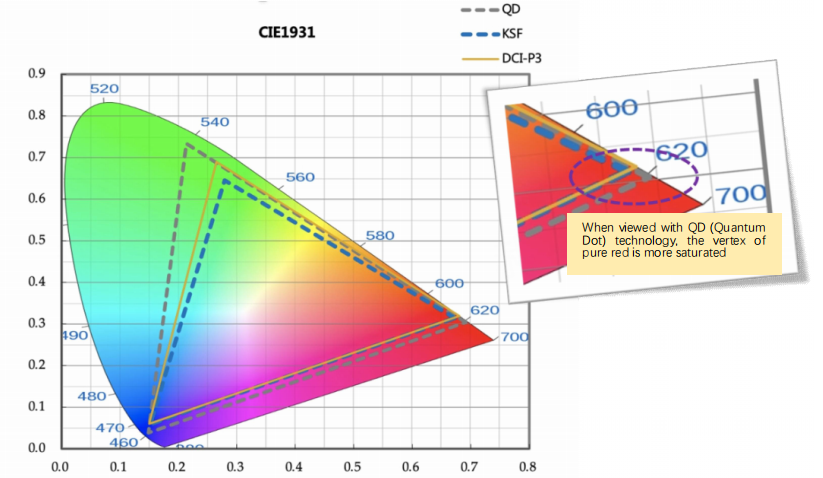
2. The LCD panel is made from silicon-based glass, which inherently involves light projection and refraction. Under certain viewing angles, such as from the side, the glass will slightly attenuate blue and green, allowing more red light to pass through. This results in the red component appearing more intense when viewed from these angles, contributing to the subjective "red effect". This phenomenon can be understood as a characteristic of the enhanced vibrancy introduced by the Quantum Dot technology. It does not indicate any reliability or performance defects with the product. Such effects are common across Quantum Dot displays in the industry;
3. The product offers several color space modes. The default Native mode is designed to display colors more vibrantly. If you prefer to reduce the intensity, you can try switching to the DCI-P3 mode to see if it mitigates the effect;
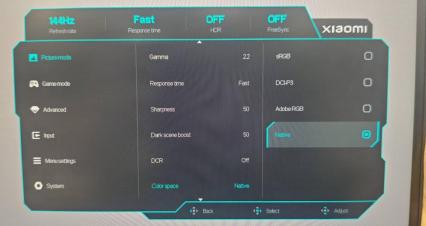
4. As the color gamut expands with the Quantum Dot technology, the component sensitivity requires more precise calibration. Consequently, the colors need a brief warm-up period of about 10 to 15 minutes after powering on. This is a normal characteristic of Quantum Dot technology and not a defect specific to Xiaomi displays. Similar behavior can be observed in other Quantum Dot displays within the industry.
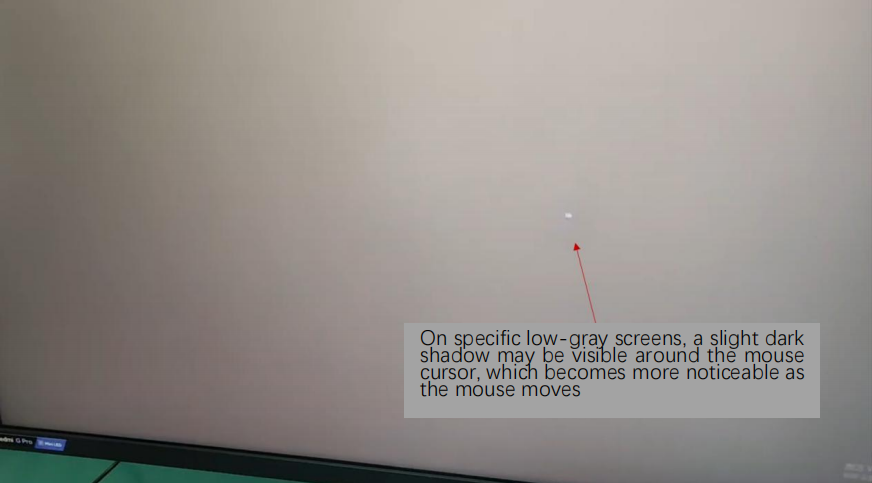
55. Q: Why is there a localized shadow effect when moving the mouse on a low-gray screen of the Xiaomi Mini LED Gaming Monitor G Pro 27i display?
A: If you encounter a localized shadow effect when moving the mouse, please refer to the following information:
1. To meet HDR standards, this product features a local dimming backlight design, which adjusts the backlight brightness based on the content displayed in different regions. As the brightness of the mouse cursor differs from that of surrounding pixels, this can create noticeable brightness differences around the cursor. This is not a reliability issue and will not affect product quality. Please feel free to use the product. Similar behavior is observed in other products of the same type in the industry;
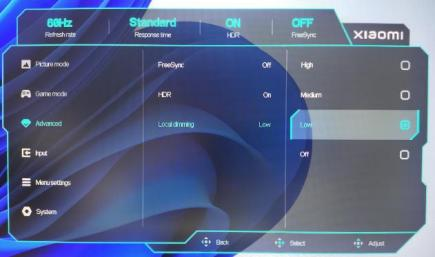
2. Additionally, to offer a more flexible user experience, the product includes an adjustable dimming setting in the menu with High, Medium, and Low levels. Adjusting this setting can help provide the best experience across various usage scenarios.
To adjust the dimming settings, please open the menu >> [Advanced] >> [Local dimming]. For this issue, it is recommended to choose [Low].
Note:
1. To deliver a more flexible and diversified user experience in response to this phenomenon, this monitor offers multiple dimming levels (High, Medium, Low) designed to optimize performance across various environments. These levels are available in the menu for easy adjustment according to personal preferences;
2. When set to [High], the overall brightness and peak brightness will reach the maximum, which is ideal for bright environments;
3. When set to [Low], the overall halo effect and shadow around the mouse will be optimal, providing the best performance in darker environments.
1. To meet HDR standards, this product features a local dimming backlight design, which adjusts the backlight brightness based on the content displayed in different regions. As the brightness of the mouse cursor differs from that of surrounding pixels, this can create noticeable brightness differences around the cursor. This is not a reliability issue and will not affect product quality. Please feel free to use the product. Similar behavior is observed in other products of the same type in the industry;
2. Additionally, to offer a more flexible user experience, the product includes an adjustable dimming setting in the menu with High, Medium, and Low levels. Adjusting this setting can help provide the best experience across various usage scenarios.
To adjust the dimming settings, please open the menu >> [Advanced] >> [Local dimming]. For this issue, it is recommended to choose [Low].
Note:
1. To deliver a more flexible and diversified user experience in response to this phenomenon, this monitor offers multiple dimming levels (High, Medium, Low) designed to optimize performance across various environments. These levels are available in the menu for easy adjustment according to personal preferences;
2. When set to [High], the overall brightness and peak brightness will reach the maximum, which is ideal for bright environments;
3. When set to [Low], the overall halo effect and shadow around the mouse will be optimal, providing the best performance in darker environments.
56. Q: Why is there a dead pixel on the Xiaomi Mini LED Gaming Monitor G Pro 27i?
A: Dear customer, thank you for your feedback. We understand your concerns regarding dead pixels on the screen. The term "dead pixel" refers to dark spots that appear on the display. While industry standards specify the acceptable size and quantity of dead pixels, we recognize that these benchmarks do not fully meet your expectations and needs.
We would like to clarify that the occurrence of dead pixels is linked to the presence of foreign particles during the panel manufacturing process. To minimize the occurrence of such cases, we have implemented Class 1000 cleanroom standards and Class 100 internal equipment particle control to ensure both cleanliness and precision. Although the occurrence of dark spots cannot be entirely avoided, we have met the industry's most rigorous standards. Please rest assured that it will not impact the reliability of the product.
We are committed to continuously improving product quality and providing you with the best products and services. Thank you for your understanding and support.
We would like to clarify that the occurrence of dead pixels is linked to the presence of foreign particles during the panel manufacturing process. To minimize the occurrence of such cases, we have implemented Class 1000 cleanroom standards and Class 100 internal equipment particle control to ensure both cleanliness and precision. Although the occurrence of dark spots cannot be entirely avoided, we have met the industry's most rigorous standards. Please rest assured that it will not impact the reliability of the product.
We are committed to continuously improving product quality and providing you with the best products and services. Thank you for your understanding and support.
Does it help?
Yes
No