

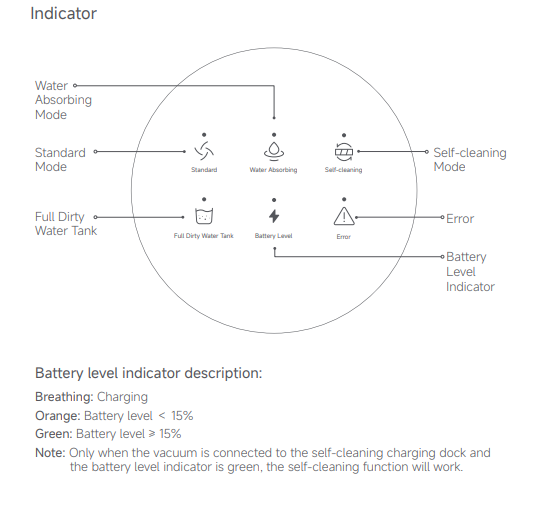
What do the icons displayed on the screen of the Xiaomi Truclean W20 Wet Dry Vacuum represent?
1. Standard: Standard mode;
2. Full Dirty Water Tank: Check the dirty water in the water tank;
3. Water Absorbing: Water Absorbing Mode;
4. Battery Level: Check the battery level of the device;
5. Self-cleaning: Self-cleaning Mode;
6. Error Indicator: There is an error in the device.
Battery level indicator description:
1. When the indicator is breathing, it indicates that the device is charging;
2. When the indicator is in orange, it indicates that the battery level is <15%;
3. When the indicator is in green, it indicates that the battery level is ≥15%.
Note:
The self-cleaning function only operates when the vacuum is connected to the self-cleaning charging dock and the battery level indicator is green.
2. Full Dirty Water Tank: Check the dirty water in the water tank;
3. Water Absorbing: Water Absorbing Mode;
4. Battery Level: Check the battery level of the device;
5. Self-cleaning: Self-cleaning Mode;
6. Error Indicator: There is an error in the device.
Battery level indicator description:
1. When the indicator is breathing, it indicates that the device is charging;
2. When the indicator is in orange, it indicates that the battery level is <15%;
3. When the indicator is in green, it indicates that the battery level is ≥15%.
Note:
The self-cleaning function only operates when the vacuum is connected to the self-cleaning charging dock and the battery level indicator is green.
Does it help?
Yes
No