

How to install the Xiaomi Truclean W20 Wet Dry Vacuum?
To install the Xiaomi Truclean W20 Wet Dry Vacuum, please refer to the following steps:
1. Mount the handle:
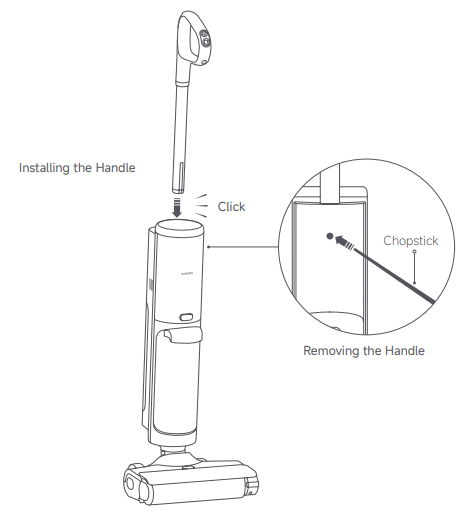
Insert the handle vertically into the scrubber and hear the "click" sound to indicate successful installation;
Note:
After installation, please make sure again that the handle is installed stably and not loose.
2. Remove the handle:
Use a non-sharp assistive tool (such as a chopstick) to press the handle removal button on the back of the unit while moving vertically upwards to pull out the handle;
3. Install the base:
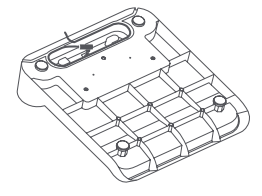
(1). Connect the power adapter: Plug the power adapter into the power connector on the bottom of the cleaning base, and the extra power cord can be twisted for storage;
(2). Turn on the power: Place the base on a flat surface, plug the power adapter into a compliant outlet and turn on the power;
Note:
Do not place near heat sources or in humid areas (e.g., radiators, kitchens, bathrooms).
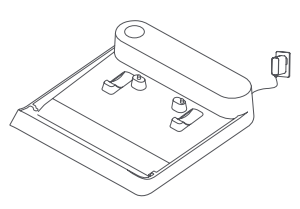
(3). Store the cleaning brush: As shown in the picture, the cleaning brush can be stored in the cleaning base.
4. Charge the main unit:
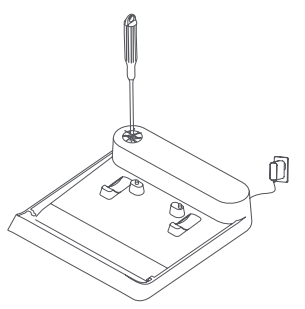
After the base is powered on, align the charging electrode at the bottom of the floor brush of the floor scrubber with the charging electrode pin of the cleaning base and place it. When you hear the beep sound of the buzzer, it indicates that it has entered the charging state.
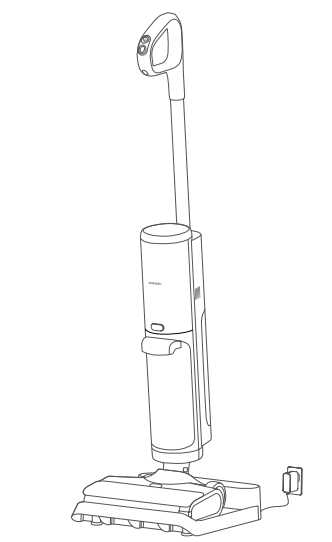
1. Mount the handle:
Insert the handle vertically into the scrubber and hear the "click" sound to indicate successful installation;
Note:
After installation, please make sure again that the handle is installed stably and not loose.
2. Remove the handle:
Use a non-sharp assistive tool (such as a chopstick) to press the handle removal button on the back of the unit while moving vertically upwards to pull out the handle;
3. Install the base:
(1). Connect the power adapter: Plug the power adapter into the power connector on the bottom of the cleaning base, and the extra power cord can be twisted for storage;
(2). Turn on the power: Place the base on a flat surface, plug the power adapter into a compliant outlet and turn on the power;
Note:
Do not place near heat sources or in humid areas (e.g., radiators, kitchens, bathrooms).
(3). Store the cleaning brush: As shown in the picture, the cleaning brush can be stored in the cleaning base.
4. Charge the main unit:
After the base is powered on, align the charging electrode at the bottom of the floor brush of the floor scrubber with the charging electrode pin of the cleaning base and place it. When you hear the beep sound of the buzzer, it indicates that it has entered the charging state.
Does it help?
Yes
No