

Xiaomi Smart Filtered Water Dispenser Pro FAQ
Overview
1.Q: What are the selling points of the Xiaomi Smart Filtered Water Dispenser Pro?
A: The selling points of the Xiaomi Smart Filtered Water Dispenser Pro are as follows:
1. It can purify and heat the water. The operation is simple: no installation required, just power on and off;
2. The product is versatile for various situations like preparing milk for infants and toddlers during the night, heating water in the morning, and brewing tea for parents;
3. 3 seconds of quick heating to avoid repeated boiling of water, once the cup is placed, hot water will come;
4. The product comes with an NFC water function to free up your hands, allowing your children to access water more safely;
5. This product features professional RO reverse osmosis water purification capability. It includes 2 filter cartridges that need replacement once a year. The average daily cost is very low;
6. The Xiaomi Smart Filtered Water Dispenser Pro supports customized temperature breakdown to 1°C;
7. The Xiaomi Smart Filtered Water Dispenser Pro has a range of water intake from 80ml~1000ml, which can be flexibly adjusted and stops when the water is full;
8. The Xiaomi Smart Filtered Water Dispenser Pro is equipped with a TFT screen that displays several features in real-time such as water dispensing mode, water temperature, water volume, filter life and more;
9. The Xiaomi Smart Filtered Water Dispenser Pro features a 6.2L large-capacity raw water tank with a lift-and-go design for easy water changes;
10. The Xiaomi Smart Filtered Water Dispenser Pro has a 1.2L pure water tank for water storage so that there’s no waiting time when collecting water. Meanwhile, the device has a built-in UV light to inhibit bacteria;
11. The Xiaomi Smart Filtered Water Dispenser Pro is designed with dual NTC temperature sensing probes for temperature control and triple protection for intimate care;
12. The Xiaomi Smart Filtered Water Dispenser Pro comes with water dispensing ambient light, so take a big sip when the white light is on and sip slower when the orange light is on;
13. The Xiaomi Smart Filtered Water Dispenser Pro is a multi-functional product that can be used as a kettle, thermostat, water filter, water purifier, and water dispenser at the same time.
2.Q: What filtration technology does the Xiaomi Smart Filtered Water Dispenser Pro use and how many stages of filtration are there?
A: The Xiaomi Smart Filtered Water Dispenser Pro adopts RO reverse osmosis filtration technology, which produces water through 6-stage deep filtration by folded PP cotton + activated carbon stick + scale inhibitor + RO membrane + charcoal fiber + non-woven fabric.
FAQs
1.Q: The appearance introduction of the Xiaomi Smart Filtered Water Dispenser Pro
A: The appearance of the Xiaomi Smart Filtered Water Dispenser Pro is shown in the picture below:
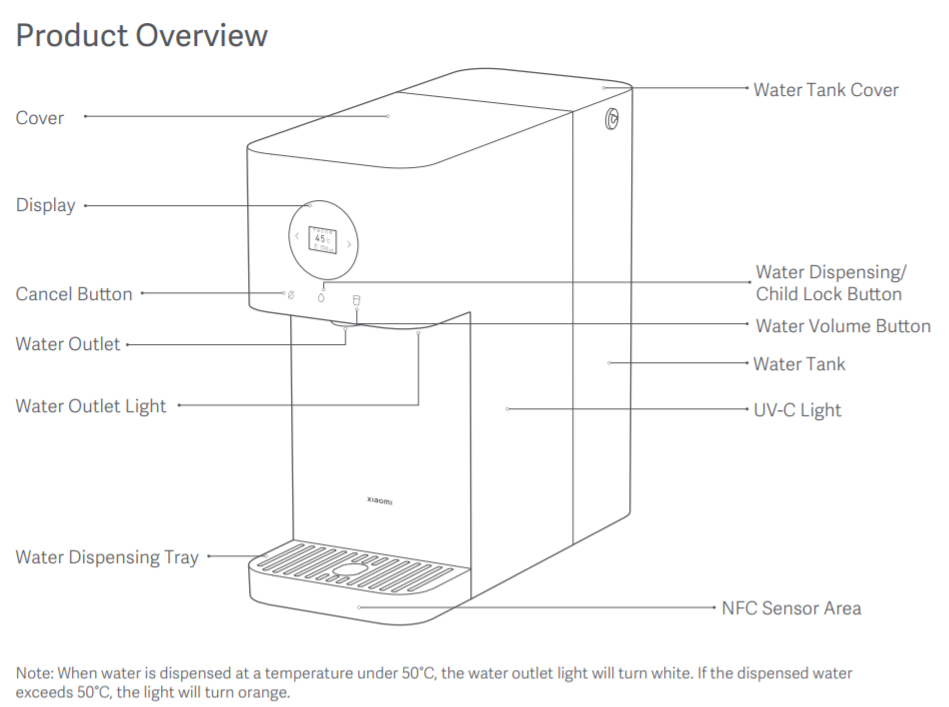
2.Q: Does the Xiaomi Smart Filtered Water Dispenser Pro have a plastic wrap?
A: The Xiaomi Smart Filtered Water Dispenser Pro filters are packaged in plastic sealing film, and the entire unit is packaged in an environmentally friendly CPE bag. Please remove the plastic sealing film and CPE bag when using.
3.Q: What does the Xiaomi Smart Filtered Water Dispenser Pro spout dust plug do?
A: The Xiaomi Smart Filtered Water Dispenser Pro spout dust plug prevents dust from entering the inside of the device from the spout.
Please remove the dust plug before using the Xiaomi Smart Filtered Water Dispenser Pro. Otherwise, the device will not be able to dispense water or the water will not come out abnormally.
4.Q: Why does the Xiaomi Smart Filtered Water Dispenser Pro have a small amount of water stains when I unpack it?
A: The Xiaomi Smart Filtered Water Dispenser Pro To ensure product quality and stability, and minimize usage risks, each product undergoes water testing in the factory (including sealing, heating, and water production tests). After testing, it is normal to find residual water droplets in the internal pipeline and a small amount of water residue at the host outlet due to transportation vibrations. Please rest assured of its use.
5.Q: Why does the Xiaomi Smart Filtered Water Dispenser Pro get impurities when rinsing the new device?
A: The filter of the Xiaomi Smart Filtered Water Dispenser Pro contains charcoal rods and other filtration materials. During the initial use of the new device, flushed water may contain some impurities or floating objects. This is normal, so please continue using it without worry.
6.Q: Does the Xiaomi Smart Filtered Water Dispenser Pro produce concentrated water? Where is the concentrated water?
A: The Xiaomi Smart Filtered Water Dispenser Pro utilizes reverse osmosis filtration technology, where tap water in the tank is filtered to produce pure water, while concentrated water is generated and returned to the wastewater area in the tank.
When the screen prompts “Change water”, please be sure to pour out the remaining raw water/ wastewater in the tank to avoid clogging and crystallization of the filter cartridge.
Note:
Please refer to the user manual for regular cleaning of the raw water tank, and pour out the residual water after cleaning.
7.Q: Why is the color of water coming out of the Xiaomi Smart Filtered Water Dispenser Pro milky?
A: The Xiaomi Smart Filtered Water Dispenser Pro pressurizes water through the pump. During this pressurized water purification process, air bubbles dissolve in the water, giving it a milky white appearance. These bubbles will naturally vanish over time. This is a common physical occurrence and does not impact the water quality. Please feel free to use it.
Tips:
The Xiaomi Smart Filtered Water Dispenser Pro delivers water through the tank and hoses under pressure. The pressure causes gases in the hoses and atmospheric gases to dissolve in the water, significantly increasing the gas content in tap water.
For reverse osmosis membrane filtration in the water tank, the pump must apply additional pressure to enhance the process. As the pump pressurizes the water, it also increases the dissolved gas pressure, leading to even higher gas solubility. These gases pass through the membrane, forming small bubbles. Due to the system's internal pressure, these bubbles cannot escape. When the water exits the system, the sudden release of pressure causes the gas molecules to expand into observable bubbles.
This results in the presence of numerous tiny bubbles, creating the milky white water effect. Over time, these bubbles will gradually disappear. This is a normal physical phenomenon that does not affect the water quality. Feel assured in using the dispenser for drinking water.
8.Q: What is the water tank capacity of the Xiaomi Smart Filtered Water Dispenser Pro?
A: The Xiaomi Smart Filtered Water Dispenser Pro has a water tank volume of 6.2L (4.4L in the raw water area and 1.8L in the wastewater area).
9.Q: Does the Xiaomi Smart Filtered Water Dispenser Pro support antibacterial function?
A: The Xiaomi Smart Filtered Water Dispenser Pro supports the anti-bacterial of purified water, with a built-in UV light inside the purified water tank, which inhibits bacteria using UV light irradiation, and can avoid secondary pollution of purified water.
10.Q: Does the UV light of the Xiaomi Smart Filtered Water Dispenser Pro stay on constantly?
A: The Xiaomi Smart Filtered Water Dispenser Pro is equipped with a UV light inside the water tank. The UV light is turned on continuously for 1 hour after the product is powered on and the water production is finished.
During normal use, the UV light is turned on for 15 minutes and then turned off for 20 minutes to achieve an antibacterial effect. Due to the closed water tank, it is impossible to tell whether the UV light is on or off.
11.Q: What is the heating power of the Xiaomi Smart Filtered Water Dispenser Pro?
A: The heating power of the Xiaomi Smart Filtered Water Dispenser Pro is 220V/2100W, 240V/2500W.
12.Q: What is the standby power of the Xiaomi Smart Filtered Water Dispenser Pro?
A: The Xiaomi Smart Filtered Water Dispenser Pro has a standby power of about 2W.
13.Q: What is the length of the Xiaomi Smart Filtered Water Dispenser Pro power cable?
A: The length of the power cable that leaks out of the Xiaomi Smart Filtered Water Dispenser Pro body is about 1.5 meters.
14.Q: How to clean the Xiaomi Smart Filtered Water Dispenser Pro?
A: Whenever the water tank is replaced, start by cleaning it with water. Begin by soaking it in citric acid for approximately 20 minutes, then pour off the soaked water and use the brush attachment in the device to scrub it clean.
Note:
(1) Please clean the water tank every 48 hours;
(2) If the device won't be used for over 48 hours, please empty the water tank;
(3) Fill the water tank with room temperature water, set the water volume to MAX, and drain the device's stored water. Finally, unplug the power cable.
15.Q: Does the Xiaomi Smart Filtered Water Dispenser Pro work with tap water? How long can it be stored?
A: The Xiaomi Smart Filtered Water Dispenser Pro can be used with tap water, the product uses RO reverse osmosis filtration technology to filter the tap water in the tank.
For the health reason, it is recommended to replace the water in the original tank once in 2 days.
16.Q: What are the requirements for the Xiaomi Smart Filtered Water Dispenser Pro in terms of ambient temperature, water pressure, water source used and applicable water temperature?
A: The Xiaomi Smart Filtered Water Dispenser Pro uses an ambient temperature of 4~40℃, the applicable water source is municipal tap water, the applicable water temperature is 5~38℃, the water tank needs to be loaded with a certain amount of water, and there is no inlet water pressure requirement.
17.Q: Can the Xiaomi Smart Filtered Water Dispenser Pro be filled directly with pure water?
A: The Xiaomi Smart Filtered Water Dispenser Pro can be used directly with pure water; The device can filter municipal tap water, so it is recommended to add municipal tap water.
18.Q: How does the Xiaomi Smart Filtered Water Dispenser Pro produce wastewater after adding pure water?
A: The Xiaomi Smart Filtered Water Dispenser Pro produces wastewater after adding pure water because of the characteristics of the cartridge. Because of the characteristics of RO reverse osmosis, in the high-pressure filtration process, the water will not pass through 100%. So every time the filter produces water, there is a certain amount of wastewater outflow, which is a normal phenomenon.
19.Q: Does the Xiaomi Smart Filtered Water Dispenser Pro water tank need to be cleaned, and how to clean it?
A: The Xiaomi Smart Filtered Water Dispenser Pro water tank needs to be cleaned regularly. It is recommended that it be cleaned once every 48 hours.
Cleaning operation:
1. Add an appropriate amount of citric acid into the water tank and fill it with tap water, soak for about 20 minutes;
2. Use a brush to remove odors and foreign matter, and then rinse with tap water.
Note:
1. Please be careful when cleaning the tank;
2. Cleaning water tank: please note that when adding citric acid soak, please do not install it on the body to avoid the product starting water production, cleaning water into the device).
20.Q: Why must the Xiaomi Smart Filtered Water Dispenser Pro be unlocked before each use?
A: This is designed to prevent children from accidentally operating scalding; the Xiaomi Smart Filtered Water Dispenser Pro has an automatic Child lock function. The device will automatically enter the lock state if it is not operating at the default time.
Tips:
1. To avoid accidental scalding, the default water above 50℃ needs to be unlocked by the Child lock;
2. In the process of taking water above 50℃ water, before taking water need to press the Child lock button for 1 second, temporary unlock before taking water;
3. To cancel the Child lock completely, please press and hold the Child lock button for 5 seconds. to cancel the Child lock, and you will not need to click the Child lock button to unlock it when you use hot water in the future;
4. To restore the Child lock function, you need to press and hold the Child lock button for 5 seconds to restore the Child lock.
5. After connecting the Mi Home App, please set the Child lock mode, which can be selected according to actual use.
21.Q: Why does the Xiaomi Smart Filtered Water Dispenser Pro dispense hot water that is cool for the first few seconds and takes a few seconds to reach the set temperature?
A: When using the Xiaomi Smart Filtered Water Dispenser Pro for the first time, room-temperature water flows for 3 seconds before activating the heating process due to the absence of water in the hoses.
During regular use, as water is already present in the hoses, the initial water temperature may be lower as the instantaneous heating process requires some time.
A limited hot water supply can accentuate the initial low temperature in both scenarios mentioned above.
Tips:
Please discard the first cup of water before use to minimize temperature deviation.
22.Q: Why does the boiling water flow rate of the Xiaomi Smart Filtered Water Dispenser Pro is slow?
A: The Xiaomi Smart Filtered Water Dispenser Pro achieves precise water temperature and efficient water flow by intelligently regulating heating power and flow rate. This results in the product benefit of rapidly dispensing hot water in 3 seconds, eliminating the necessity for repetitive boiling.
23.Q: What are the precautions for the Xiaomi Smart Filtered Water Dispenser Pro?
A: Please refer to the following guidelines for the first-time use of the Xiaomi Smart Filtered Water Dispenser Pro:
1. Please connect the device to the Wi-Fi network for a better user experience;
2. Avoid placing heavy objects or liquids on or near the device to prevent damage;
3. Please note that the water temperature below 5℃ or above 38℃ may harm the device and filter;
4. This product is intended for home use only; please refrain from using it for commercial purposes;
5. Please perform the new device rinse mode and place a larger container for water;
6. The Xiaomi Smart Filtered Water Dispenser Pro will be installed to test the water before leaving the factory; there may be a small amount of water beads in the first unboxing, which is a normal phenomenon; please rest assured that the use;
7. The device is for indoor use only. Avoid direct light and microbial growth so as not to affect the daily use;
8. Do not place the device near high temperatures or strong magnetic fields to prevent device failure;
9. Keep the device in a dry environment as humid or dusty areas can damage the circuit board.
Tips:
After the rinse mode, you can rinse the product again using three raw water tanks. The entire unit is left to stand for 24 hours, and then the water is rinsed in three tanks of raw water to taste better. It is recommended to follow this method after changing the filter.
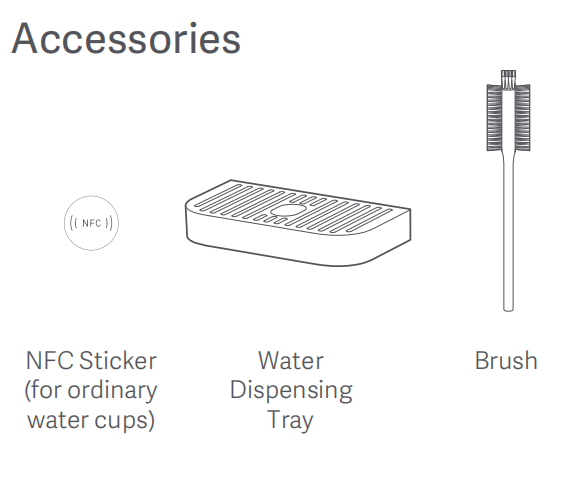
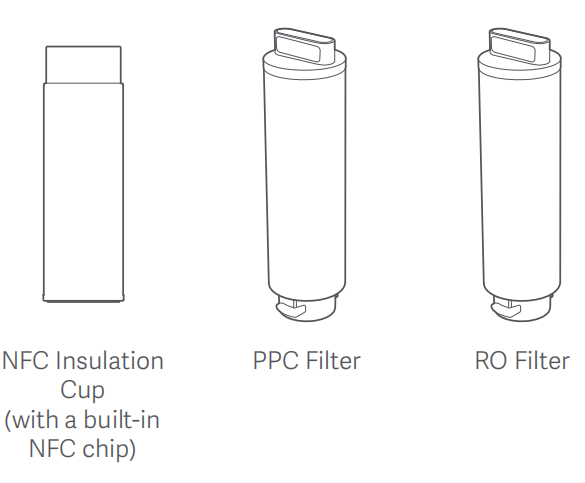
24.Q: What are the standard accessories of the Xiaomi Smart Filtered Water Dispenser Pro?
A: The Xiaomi Smart Filtered Water Dispenser Pro comes standard with:
1. The Xiaomi Smart Filtered Water Dispenser Pro main unit x 1 (with water tank);
2. User manual x 1;
3. Water water dispensing tray x 1;
4. PPC filter cartridge x 1;
5. RO filter cartridge x 1;
6. NFC insulated cup x 1;
7. NFC sticker x 1;
8. Brush x 1.
1.Q: What are the selling points of the Xiaomi Smart Filtered Water Dispenser Pro?
A: The selling points of the Xiaomi Smart Filtered Water Dispenser Pro are as follows:
1. It can purify and heat the water. The operation is simple: no installation required, just power on and off;
2. The product is versatile for various situations like preparing milk for infants and toddlers during the night, heating water in the morning, and brewing tea for parents;
3. 3 seconds of quick heating to avoid repeated boiling of water, once the cup is placed, hot water will come;
4. The product comes with an NFC water function to free up your hands, allowing your children to access water more safely;
5. This product features professional RO reverse osmosis water purification capability. It includes 2 filter cartridges that need replacement once a year. The average daily cost is very low;
6. The Xiaomi Smart Filtered Water Dispenser Pro supports customized temperature breakdown to 1°C;
7. The Xiaomi Smart Filtered Water Dispenser Pro has a range of water intake from 80ml~1000ml, which can be flexibly adjusted and stops when the water is full;
8. The Xiaomi Smart Filtered Water Dispenser Pro is equipped with a TFT screen that displays several features in real-time such as water dispensing mode, water temperature, water volume, filter life and more;
9. The Xiaomi Smart Filtered Water Dispenser Pro features a 6.2L large-capacity raw water tank with a lift-and-go design for easy water changes;
10. The Xiaomi Smart Filtered Water Dispenser Pro has a 1.2L pure water tank for water storage so that there’s no waiting time when collecting water. Meanwhile, the device has a built-in UV light to inhibit bacteria;
11. The Xiaomi Smart Filtered Water Dispenser Pro is designed with dual NTC temperature sensing probes for temperature control and triple protection for intimate care;
12. The Xiaomi Smart Filtered Water Dispenser Pro comes with water dispensing ambient light, so take a big sip when the white light is on and sip slower when the orange light is on;
13. The Xiaomi Smart Filtered Water Dispenser Pro is a multi-functional product that can be used as a kettle, thermostat, water filter, water purifier, and water dispenser at the same time.
2.Q: What filtration technology does the Xiaomi Smart Filtered Water Dispenser Pro use and how many stages of filtration are there?
A: The Xiaomi Smart Filtered Water Dispenser Pro adopts RO reverse osmosis filtration technology, which produces water through 6-stage deep filtration by folded PP cotton + activated carbon stick + scale inhibitor + RO membrane + charcoal fiber + non-woven fabric.
FAQs
1.Q: The appearance introduction of the Xiaomi Smart Filtered Water Dispenser Pro
A: The appearance of the Xiaomi Smart Filtered Water Dispenser Pro is shown in the picture below:
2.Q: Does the Xiaomi Smart Filtered Water Dispenser Pro have a plastic wrap?
A: The Xiaomi Smart Filtered Water Dispenser Pro filters are packaged in plastic sealing film, and the entire unit is packaged in an environmentally friendly CPE bag. Please remove the plastic sealing film and CPE bag when using.
3.Q: What does the Xiaomi Smart Filtered Water Dispenser Pro spout dust plug do?
A: The Xiaomi Smart Filtered Water Dispenser Pro spout dust plug prevents dust from entering the inside of the device from the spout.
Please remove the dust plug before using the Xiaomi Smart Filtered Water Dispenser Pro. Otherwise, the device will not be able to dispense water or the water will not come out abnormally.
4.Q: Why does the Xiaomi Smart Filtered Water Dispenser Pro have a small amount of water stains when I unpack it?
A: The Xiaomi Smart Filtered Water Dispenser Pro To ensure product quality and stability, and minimize usage risks, each product undergoes water testing in the factory (including sealing, heating, and water production tests). After testing, it is normal to find residual water droplets in the internal pipeline and a small amount of water residue at the host outlet due to transportation vibrations. Please rest assured of its use.
5.Q: Why does the Xiaomi Smart Filtered Water Dispenser Pro get impurities when rinsing the new device?
A: The filter of the Xiaomi Smart Filtered Water Dispenser Pro contains charcoal rods and other filtration materials. During the initial use of the new device, flushed water may contain some impurities or floating objects. This is normal, so please continue using it without worry.
6.Q: Does the Xiaomi Smart Filtered Water Dispenser Pro produce concentrated water? Where is the concentrated water?
A: The Xiaomi Smart Filtered Water Dispenser Pro utilizes reverse osmosis filtration technology, where tap water in the tank is filtered to produce pure water, while concentrated water is generated and returned to the wastewater area in the tank.
When the screen prompts “Change water”, please be sure to pour out the remaining raw water/ wastewater in the tank to avoid clogging and crystallization of the filter cartridge.
Note:
Please refer to the user manual for regular cleaning of the raw water tank, and pour out the residual water after cleaning.
7.Q: Why is the color of water coming out of the Xiaomi Smart Filtered Water Dispenser Pro milky?
A: The Xiaomi Smart Filtered Water Dispenser Pro pressurizes water through the pump. During this pressurized water purification process, air bubbles dissolve in the water, giving it a milky white appearance. These bubbles will naturally vanish over time. This is a common physical occurrence and does not impact the water quality. Please feel free to use it.
Tips:
The Xiaomi Smart Filtered Water Dispenser Pro delivers water through the tank and hoses under pressure. The pressure causes gases in the hoses and atmospheric gases to dissolve in the water, significantly increasing the gas content in tap water.
For reverse osmosis membrane filtration in the water tank, the pump must apply additional pressure to enhance the process. As the pump pressurizes the water, it also increases the dissolved gas pressure, leading to even higher gas solubility. These gases pass through the membrane, forming small bubbles. Due to the system's internal pressure, these bubbles cannot escape. When the water exits the system, the sudden release of pressure causes the gas molecules to expand into observable bubbles.
This results in the presence of numerous tiny bubbles, creating the milky white water effect. Over time, these bubbles will gradually disappear. This is a normal physical phenomenon that does not affect the water quality. Feel assured in using the dispenser for drinking water.
8.Q: What is the water tank capacity of the Xiaomi Smart Filtered Water Dispenser Pro?
A: The Xiaomi Smart Filtered Water Dispenser Pro has a water tank volume of 6.2L (4.4L in the raw water area and 1.8L in the wastewater area).
9.Q: Does the Xiaomi Smart Filtered Water Dispenser Pro support antibacterial function?
A: The Xiaomi Smart Filtered Water Dispenser Pro supports the anti-bacterial of purified water, with a built-in UV light inside the purified water tank, which inhibits bacteria using UV light irradiation, and can avoid secondary pollution of purified water.
10.Q: Does the UV light of the Xiaomi Smart Filtered Water Dispenser Pro stay on constantly?
A: The Xiaomi Smart Filtered Water Dispenser Pro is equipped with a UV light inside the water tank. The UV light is turned on continuously for 1 hour after the product is powered on and the water production is finished.
During normal use, the UV light is turned on for 15 minutes and then turned off for 20 minutes to achieve an antibacterial effect. Due to the closed water tank, it is impossible to tell whether the UV light is on or off.
11.Q: What is the heating power of the Xiaomi Smart Filtered Water Dispenser Pro?
A: The heating power of the Xiaomi Smart Filtered Water Dispenser Pro is 220V/2100W, 240V/2500W.
12.Q: What is the standby power of the Xiaomi Smart Filtered Water Dispenser Pro?
A: The Xiaomi Smart Filtered Water Dispenser Pro has a standby power of about 2W.
13.Q: What is the length of the Xiaomi Smart Filtered Water Dispenser Pro power cable?
A: The length of the power cable that leaks out of the Xiaomi Smart Filtered Water Dispenser Pro body is about 1.5 meters.
14.Q: How to clean the Xiaomi Smart Filtered Water Dispenser Pro?
A: Whenever the water tank is replaced, start by cleaning it with water. Begin by soaking it in citric acid for approximately 20 minutes, then pour off the soaked water and use the brush attachment in the device to scrub it clean.
Note:
(1) Please clean the water tank every 48 hours;
(2) If the device won't be used for over 48 hours, please empty the water tank;
(3) Fill the water tank with room temperature water, set the water volume to MAX, and drain the device's stored water. Finally, unplug the power cable.
15.Q: Does the Xiaomi Smart Filtered Water Dispenser Pro work with tap water? How long can it be stored?
A: The Xiaomi Smart Filtered Water Dispenser Pro can be used with tap water, the product uses RO reverse osmosis filtration technology to filter the tap water in the tank.
For the health reason, it is recommended to replace the water in the original tank once in 2 days.
16.Q: What are the requirements for the Xiaomi Smart Filtered Water Dispenser Pro in terms of ambient temperature, water pressure, water source used and applicable water temperature?
A: The Xiaomi Smart Filtered Water Dispenser Pro uses an ambient temperature of 4~40℃, the applicable water source is municipal tap water, the applicable water temperature is 5~38℃, the water tank needs to be loaded with a certain amount of water, and there is no inlet water pressure requirement.
17.Q: Can the Xiaomi Smart Filtered Water Dispenser Pro be filled directly with pure water?
A: The Xiaomi Smart Filtered Water Dispenser Pro can be used directly with pure water; The device can filter municipal tap water, so it is recommended to add municipal tap water.
18.Q: How does the Xiaomi Smart Filtered Water Dispenser Pro produce wastewater after adding pure water?
A: The Xiaomi Smart Filtered Water Dispenser Pro produces wastewater after adding pure water because of the characteristics of the cartridge. Because of the characteristics of RO reverse osmosis, in the high-pressure filtration process, the water will not pass through 100%. So every time the filter produces water, there is a certain amount of wastewater outflow, which is a normal phenomenon.
19.Q: Does the Xiaomi Smart Filtered Water Dispenser Pro water tank need to be cleaned, and how to clean it?
A: The Xiaomi Smart Filtered Water Dispenser Pro water tank needs to be cleaned regularly. It is recommended that it be cleaned once every 48 hours.
Cleaning operation:
1. Add an appropriate amount of citric acid into the water tank and fill it with tap water, soak for about 20 minutes;
2. Use a brush to remove odors and foreign matter, and then rinse with tap water.
Note:
1. Please be careful when cleaning the tank;
2. Cleaning water tank: please note that when adding citric acid soak, please do not install it on the body to avoid the product starting water production, cleaning water into the device).
20.Q: Why must the Xiaomi Smart Filtered Water Dispenser Pro be unlocked before each use?
A: This is designed to prevent children from accidentally operating scalding; the Xiaomi Smart Filtered Water Dispenser Pro has an automatic Child lock function. The device will automatically enter the lock state if it is not operating at the default time.
Tips:
1. To avoid accidental scalding, the default water above 50℃ needs to be unlocked by the Child lock;
2. In the process of taking water above 50℃ water, before taking water need to press the Child lock button for 1 second, temporary unlock before taking water;
3. To cancel the Child lock completely, please press and hold the Child lock button for 5 seconds. to cancel the Child lock, and you will not need to click the Child lock button to unlock it when you use hot water in the future;
4. To restore the Child lock function, you need to press and hold the Child lock button for 5 seconds to restore the Child lock.
5. After connecting the Mi Home App, please set the Child lock mode, which can be selected according to actual use.
21.Q: Why does the Xiaomi Smart Filtered Water Dispenser Pro dispense hot water that is cool for the first few seconds and takes a few seconds to reach the set temperature?
A: When using the Xiaomi Smart Filtered Water Dispenser Pro for the first time, room-temperature water flows for 3 seconds before activating the heating process due to the absence of water in the hoses.
During regular use, as water is already present in the hoses, the initial water temperature may be lower as the instantaneous heating process requires some time.
A limited hot water supply can accentuate the initial low temperature in both scenarios mentioned above.
Tips:
Please discard the first cup of water before use to minimize temperature deviation.
22.Q: Why does the boiling water flow rate of the Xiaomi Smart Filtered Water Dispenser Pro is slow?
A: The Xiaomi Smart Filtered Water Dispenser Pro achieves precise water temperature and efficient water flow by intelligently regulating heating power and flow rate. This results in the product benefit of rapidly dispensing hot water in 3 seconds, eliminating the necessity for repetitive boiling.
23.Q: What are the precautions for the Xiaomi Smart Filtered Water Dispenser Pro?
A: Please refer to the following guidelines for the first-time use of the Xiaomi Smart Filtered Water Dispenser Pro:
1. Please connect the device to the Wi-Fi network for a better user experience;
2. Avoid placing heavy objects or liquids on or near the device to prevent damage;
3. Please note that the water temperature below 5℃ or above 38℃ may harm the device and filter;
4. This product is intended for home use only; please refrain from using it for commercial purposes;
5. Please perform the new device rinse mode and place a larger container for water;
6. The Xiaomi Smart Filtered Water Dispenser Pro will be installed to test the water before leaving the factory; there may be a small amount of water beads in the first unboxing, which is a normal phenomenon; please rest assured that the use;
7. The device is for indoor use only. Avoid direct light and microbial growth so as not to affect the daily use;
8. Do not place the device near high temperatures or strong magnetic fields to prevent device failure;
9. Keep the device in a dry environment as humid or dusty areas can damage the circuit board.
Tips:
After the rinse mode, you can rinse the product again using three raw water tanks. The entire unit is left to stand for 24 hours, and then the water is rinsed in three tanks of raw water to taste better. It is recommended to follow this method after changing the filter.
24.Q: What are the standard accessories of the Xiaomi Smart Filtered Water Dispenser Pro?
A: The Xiaomi Smart Filtered Water Dispenser Pro comes standard with:
1. The Xiaomi Smart Filtered Water Dispenser Pro main unit x 1 (with water tank);
2. User manual x 1;
3. Water water dispensing tray x 1;
4. PPC filter cartridge x 1;
5. RO filter cartridge x 1;
6. NFC insulated cup x 1;
7. NFC sticker x 1;
8. Brush x 1.
Note:
The filter has a sealing film, which needs to be removed when using it.
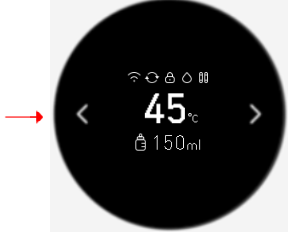
25.Q: Is the Xiaomi Smart Filtered Water Dispenser Pro screen normal for turning itself off?
A: It is normal for the Xiaomi Smart Filtered Water Dispenser Pro screen to turn off without operation. The device's default standby state, which lasts 5 minutes without operation, automatically enters the screen off state. The TFT screen and the left and right button backlights are off. You can wake up by clicking any button to enter the standby state.
Note:
1. The water button indicator will be in a half-bright state after the device is in the screen off state, which is convenient for night operation;
2. The screen-off time can be set to 1/3/5 minutes through the Mi Home App.

26.Q: How many local modes does the Xiaomi Smart Filtered Water Dispenser Pro have and how to set them?
A: The Xiaomi Smart Filtered Water Dispenser Pro comes with 4 modes, they are Room temperature, Milk brewing, Coffee, and Boiling water. You can set each item (Mode, Water Temperature, Default Water Volume), delete or adjust the order, or add up to a maximum of 8 function modes through the Mi Home App.
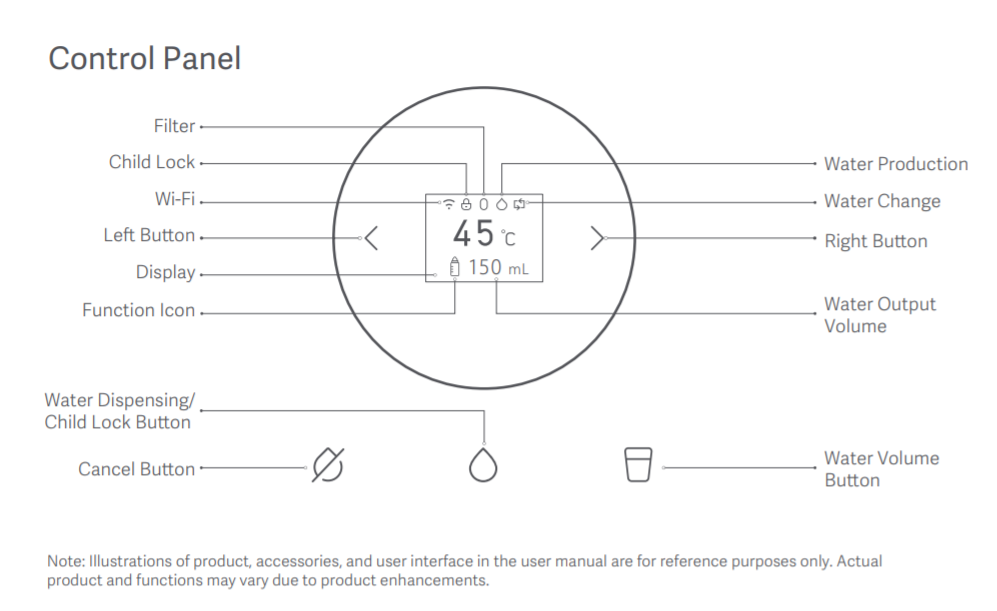
27.Q: How many buttons does the Xiaomi Smart Filtered Water Dispenser Pro have and what are their functions?
A: The Xiaomi Smart Filtered Water Dispenser Pro has five touch buttons. They are [Left Selection Button] and [Right Selection Button] on the left and right side of the display, [Cancel Button], [Water (Confirmation)/Child lock Button] on the bottom of the display, and [Water Volume Button] on the bottom of the display.
Tips:
1. The [Left Selection Button] and [Right Selection Button] are used for left and right selection, digital increase and decrease;
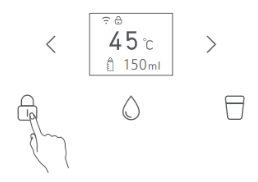
2. [Water (confirm) / Child lock button]: Press 1 second to unlock, press and hold on it for 5 seconds to cancel the Child lock. Press and hold the Child lock button for 5 seconds to unlock the Child lock function. Then, press it for 1 second to control the water, it allows you to confirm the Menu option and access the next level of the menu;
3. Press the [Cancel] button for 1 second to stop the water flow;
4. The [Water volume key] is to select the amount of water volume;
5. By default, each mode has three water quantities to choose from: "150mL", "300mL", and "MAX." Press the water quantity key to cycle through them in sequence;
6. Press any button when picking up water will immediately stop the water flow.
28.Q: Does the Xiaomi Smart Filtered Water Dispenser Pro have ambient lighting?
A: The Xiaomi Smart Filtered Water Dispenser Pro comes with ambient lighting. The ambient light will project light from below the control area onto the front shell for the better visual experience. When taking water below 50℃, the white light will light up, and when taking water above 50℃, the orange light will light up.
29.Q: Does the new Xiaomi Smart Filtered Water Dispenser Pro require professional installation?
A: The Xiaomi Smart Filtered Water Dispenser Pro does not require professional installation, the product is a countertop device that is easy to install.
30.Q: How does the Xiaomi Smart Filtered Water Dispenser Pro work?
A: Please refer to the following procedure for the first use of a new Xiaomi Smart Filtered Water Dispenser Pro:
1. Install two filter cartridges according to their respective installation positions;
2. Remove the water tank and then remove the water tank cover. After cleaning, please fill it with water (not exceeding the maximum water level line). After filling it with water, please place it in the position of the water tank;
3. Please place the cover, water tank cover plate, and the water dispensing tray properly;
4. Please connect the power supply (ensure that the power supply and socket are dry and undamaged);
5. Please perform the new device rinsing mode and place a larger container for receiving water;
6. Please connect the device to the Mi Home App for a better user experience;
7. If the area's altitude exceeds 1000 meters, please adjust the boiling point.
Tips:
1. The phenomenon of water vapor rolling in the water tank during the first use or after replacing the filter element is a normal phenomenon for the filter element to exhaust. Please feel free to use it;
2. After rinsing, please rinse the device with 3 tanks of raw water. Let the device stand for 24 hours, then rinse with 3 tanks of raw water again to enhance the water taste. It's recommended to repeat this process when changing the filter element.
31.Q: What is the boiling point corresponding to the altitude of the Xiaomi Smart Filtered Water Dispenser Pro?
A: Since water's boiling point decreases with increasing altitude, it is recommended to adjust the boiling point at high altitudes to avoid setting the boiling point at a different altitude, which may cause water to not boil or steam to burn when boiling.
32.Q: How to adjust the boiling point of the Xiaomi Smart Filtered Water Dispenser Pro?
A: To adjust the boiling point of the Xiaomi Smart Filtered Water Dispenser Pro, please refer to the following steps:
1. Press and hold on the [Cancel] and the [Water volume] button at the same time;
2. Enter the boiling point temperature interface, you can press the left and right keys to adjust the boiling point;
3. For specific boiling points, please refer to the boiling point reference table for adjustment;
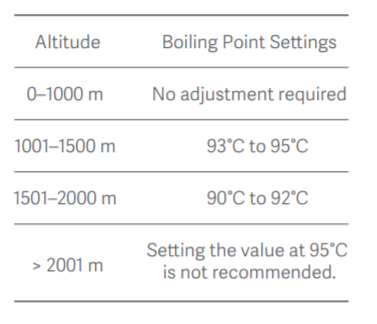
After the adjustment is completed, tap on the [Water collection (confirm)/Child lock button] to complete the boiling point correction.
33.Q: Does the new Xiaomi Smart Filtered Water Dispenser Pro need to be rinsed?
A: The new device and the filter element replacement need to be rinsed before use. Please select the automatic rinsing function of the Xiaomi Smart Filtered Water Dispenser Pro. Please refer to the operating steps as follows:
1. Press the left and right selection keys and select [Rinse];
2. After pressing the [Water collection (confirmation)/Child lock] button, press the left and right selection key to select [Yes];
3. After the screen displays "Please place the water container properly," press any key to start rinsing.
Note:
1. After executing the Rinse mode, the Xiaomi Smart Filtered Water Dispenser Pro can be rinsed with 3 raw water tanks. After the whole device is left to stand for 24 hours, rinse 3 tanks of raw water again to improve the taste of the water. It is also recommended to follow this method after replacing the filter element;
2. During the rinsing process, press any button to enter the selection interface for canceling rinsing;
3. If the water tank reaches a low water level during flushing, the screen will indicate a shortage of water, and the water change icon will flash at the same time;
4. During the rinsing process, it is normal for a small amount of impurities or floating objects to appear. Please feel free to use it.
34.Q: Does the Xiaomi Smart Filtered Water Dispenser Pro have a water change alert?
A: The Xiaomi Smart Filtered Water Dispenser Pro features a water change reminder. The screen will alert you to replace the water when the water quality is low. The device cannot generate water, but water collection is not impacted under the specified conditions:
1. The TDS value is high in tank water;
2. The water level in the water tank is low;
3. The water tank was not installed properly;
4. The pump has accumulated too much working time without the tank being lifted;
5. The concentrate tank has reached its maximum level.
Note:
After the tank water is used up or cannot be produced, please lift the tank to pour out the concentrated water and refill it.
35.Q: How to pick up water with the Xiaomi Smart Filtered Water Dispenser Pro?
A: By tapping the left and right keys to select the corresponding menu, tap on the [Water collection (confirm)/Child lock button] to collect water. Take the "45℃ milk brewing" mode as an example:
1. Press the left or right selection keys to select the "45℃ milk brewing" mode;
2. Press the [Water collection (confirm)/Child lock button] to get water.
Note:
1. Tap any button when picking up water, and the device will immediately stop discharging water;
2. This product defaults to unlocking the Child lock for water above 50℃ to avoid accidental burns.
36.Q: How to choose the water volume when picking up water from the Xiaomi Smart Filtered Water Dispenser Pro?
A: To adjust the water volume of the Xiaomi Smart Filtered Water Dispenser Pro, please refer to the following steps (taking the "45℃ milk brewing" mode as an example:):
1. Press the left and right selection keys to select the "45℃ milk brewing" mode;
2. Press the [Water volume key] to modify the water volume;
3. Press the [Water collection (confirm)/Child lock button] to pick up water.
Note:
1. By default, each mode has three water quantities to choose from: "150mL", "300mL", and "MAX". Press the water quantity key to cycle through them in sequence;
2. Press any button when picking up water will immediately stop the water flow.
37.Q: What is the MAX water collection function in the Xiaomi Smart Filtered Water Dispenser Pro and how to set it up?
A: The "MAX" represents an unlimited water intake mode. When selecting MAX for water intake, the Xiaomi Smart Filtered Water Dispenser Pro will continue to discharge water until the water tank runs out of water and automatically stops. You can also press any key to stop water intake at any time. The setting steps are as follows (Taking the "45℃ milk brewing" mode as an example):
1. Press the left and right selection keys to select the "45℃ milk brewing" mode;
2. Press the [Water volume key] to modify the water intake volume MAX;
3. Press the [Water collection (confirm)/Child lock button] to retrieve water.
38.Q: What is the Child lock mode of the Xiaomi Smart Filtered Water Dispenser Pro and how to set it?
A: To avoid accidental scalding, the default water above 50℃needs to be unlocked by the Child lock.
To set the Child lock mode, please refer to the following steps:
1. Temporary unlocking for water collection: Press the [Water collection (confirm)/Child lock button] to unlock, then press the [Water collection (confirm)/Child lock button] again to retrieve water;
2. Cancel the Child lock function: Press and hold on the [Water collection (confirm)/Child lock button] for 5 seconds. After cancellation, the Child lock function will no longer be automatically activated when the water outlet temperature is ≥ 50℃;
3. To restore the Child lock function: press and hold on the [Water collection (confirm)/Child lock button] for 5 seconds.
Go to Mi Home APP plugin settings >> [Child lock] >> Hot water at 50℃and above needs to be unlocked/ Any temperature of water needs to be unlocked.
39.Q: What is the flow rate of the Xiaomi Smart Filtered Water Dispenser Pro water purification and water production?
A: At room temperature of 25℃, the Xiaomi Smart Filtered Water Dispenser Pro water purification flow rate can reach about 0.25L/min. The Xiaomi Smart Filtered Water Dispenser Pro has a flow rate of about 350mL/min-600mL/min. The heat module is used for heating since the device uses a thick film. To ensure heating, the temperature is high when the water feels slower.
This is a normal phenomenon (The higher the water temperature, the slower the water speed).
Note:
The water flow rates are different to ensure the temperature accuracy of each hot water block. This is a normal phenomenon; please don't worry about using it.
40.Q: How to install the filter of the Xiaomi Smart Filtered Water Dispenser Pro?
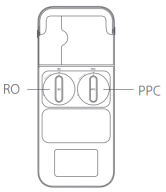
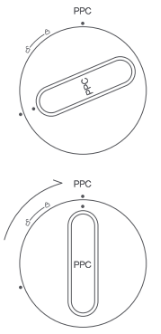
A: To install the filter of the Xiaomi Smart Filtered Water Dispenser Pro, please refer to the following steps:
1. Take out the filter from the packaging and remove the plastic sealing film from the filter element;
2. Align the positioning mark on the filter element with the positioning mark on the body, and gently place it into the corresponding filter barrel;
3. Gently press the filter and rotate the handle of the filter element to the vertical position;
4. When the filter element is in place, its handle points towards the "Lock" direction. Keep the filter's surface flush with the outer surface of the middle frame.
Note:
1. Please refer to the following diagram for installation when installing;
2. Rinse the device and the water tank after replacing the filter.
41.Q: Can the water produced by Xiaomi Smart Filtered Water Dispenser Pro be consumed directly?
A: The Xiaomi Smart Filtered Water Dispenser Pro uses RO reverse osmosis filtration technology to produce drinking water that can be consumed directly.
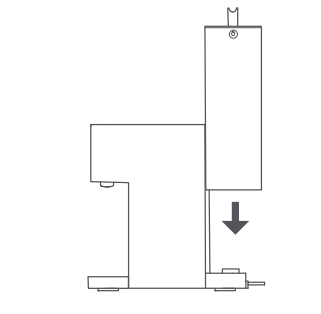
42.Q: How to install the water tank of the Xiaomi Smart Filtered Water Dispenser Pro?
A: To install the water tank of the Xiaomi Smart Filtered Water Dispenser Pro, please refer to the steps as follows:
1. Open the water tank cover and lift the tank upwards;
2. Fill the water tank with tap water and put it back into the back of the Xiaomi Smart Filtered Water Dispenser Pro;
3. Put the water tank cover properly.
Tips:
1. The larger compartment is the original water tank, which is used to collect tap water;
2. The smaller compartment is the concentrated water tank, which is used to discharge concentrated water (concentrated water is not drinkable);
3. Please do not exceed the maximum water level scale when collecting water to avoid overflow.
43.Q: How long does it take to replace the Xiaomi Smart Filtered Water Dispenser Pro filter?
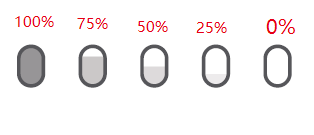
A: The Xiaomi Smart Filtered Water Dispenser Pro's PPC and RO cartridges are designed for a maximum replacement cycle of 365 days. You can also verify if the filter cartridge is expiring by the flashing filter cartridge icon on the device's screen.
Note:
1. The filter life of the Xiaomi Smart Filtered Water Dispenser Pro is calculated based on the filter's overflow, use time, water flow, tap water and direct drinking water quality, and other factors integrated algorithm;
2. The change in filter cartridge life is displayed in five gears: 100%, 75%, 50%, 25%, and 0%.
3. The cartridge icon flashes, indicating the expiration of the filter life;
4. The replacement cycle is the estimated cycle; due to the use of geographic areas, water quality, seasons, and different quantities, the actual replacement cycle will be different.
44.Q: Does the Xiaomi Smart Filtered Water Dispenser Pro need to reset the filter after replacing it?
A: Yes, the Xiaomi Smart Filtered Water Dispenser Pro needs to reset the filter after replacing it. The method to reset the filter element is as follows:
1. Press the left and right selection keys to select the Reset mode;
2. After pressing the [Water collection (confirmation)/Child lock button], press the left and right selection keys to select the "filter reset" mode;
3. After pressing the [Water collection (confirmation)/Child lock button], the rinse selection will be displayed. The setting will be completed by tapping the left and right selection buttons and selecting [Yes], and the filter rinsing will be entered.
Tips:
Be sure to reset the filter after replacing it, or the filter life cannot be calculated.
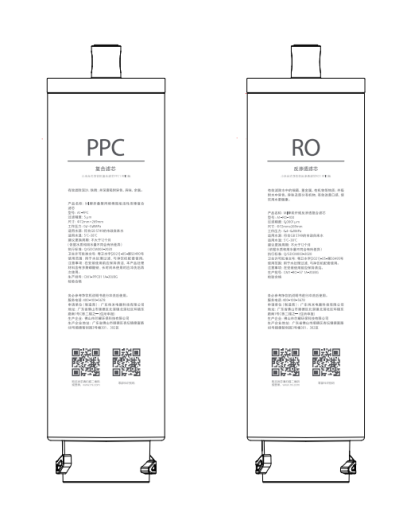
45.Q: What is the function of the QR code for the Xiaomi Smart Filtered Water Dispenser Pro filter element?
A: The QR code on the Xiaomi Smart Filtered Water Dispenser Pro filter cartridge can be scanned to the filter cartridge purchase interface, while the QR code on the right is only used for production management.
46.Q: Can the Xiaomi Smart Filtered Water Dispenser Pro filter still be used after it expires?
A: When the Xiaomi Smart Filtered Water Dispenser Pro filter cartridge expires, it is recommended that it be replaced before use. The device can still produce water and use it normally without replacing the filter cartridge, but there will always be an expiration notice when using it.
Tips:
The Xiaomi Smart Filtered Water Dispenser Pro's PPC and RO filter cartridges are designed to have a maximum replacement cycle of 365 days. Actual replacement intervals may vary depending on geographic location, water quality, season, and usage.
47.Q: How to restore the factory reset and reset the WiFi of the Xiaomi Smart Filtered Water Dispenser Pro to factory settings?
A: To restore the factory reset of the Xiaomi Smart Filtered Water Dispenser Pro to factory settings, please refer to the following steps:
1. Press the left and right selection keys until the screen displays [Settings], then press the [Water collection (confirm)/Child lock button];
2. Press the left and right selection keys until the screen displays [Factory reset], then press the [Water collection (confirm)/Child lock button];
3. Tap on the right part of the button and select [Yes], then press the [Water collection (confirm)/Child lock button];
4. return to the main interface in 2 seconds after restoring the factory settings.
To reset the Wi-Fi of the Xiaomi Smart Filtered Water Dispenser Pro, please refer to the steps as follow:
1. Press the left and right keys to reset the screen, then tap on the [Water collection (confirm)/Child lock button];
2. Press the left and right keys to display "WiFi reset" on the screen, then tap [Water collection (confirm)/Child lock button];
3. Press the right button, select [Yes], and then click [Water collection (confirm)/Child lock button];
4. The device will automatically reset WiFi at this time.
48.Q: How to set the language of the Xiaomi Smart Filtered Water Dispenser Pro?
A: To set or change the language of the Xiaomi Smart Filtered Water Dispenser Pro, please refer to the following steps:
1. Press the left and right selection keys until the screen displays [Settings], then press the [Water collection (confirm)/Child lock button] ;
2. Press the left and right selection keys until the screen displays [Language Settings], then press the [Water collection (confirm)/Child lock button];
3. Press the left and right selection keys to select the desired language, and press the [Water collection (confirm)/Child lock button] key to confirm the selected language;
4. Go back to the main interface in 2 seconds after the language setting is completed.
49.Q: Can Xiaomi Smart Filtered Water Dispenser Pro be used in high-altitude areas?
A: The Xiaomi Smart Filtered Water Dispenser Pro's normal working altitude range is 0-2000 meters. It is not recommended to use 95℃ mode when the altitude is above 2000 meters.
As the Xiaomi Smart Filtered Water Dispenser Pro utilizes a thick film instant heat module for heating. The water temperature varies with air pressure changes during this process. The Heat loss occurs as hot water flows through the pipeline, resulting in a general outlet temperature of 95±2℃.
To maintain outlet water temperature accuracy, Mi Home APP customization allows setting up to a maximum of 95℃, considering variations in boiling points at different altitudes. That’s why the Xiaomi Smart Filtered Water Dispenser Pro hot water be set to 100℃.
50.Q: Does the Xiaomi Smart Filtered Water Dispenser Pro have dry boil protection?
A: The Xiaomi Smart Filtered Water Dispenser Pro supports quadruple anti-dry boiling features (Water tank low-level switch protection, NTC high-temperature protection, self-resetting temperature controller protection, manual resetting temperature controller protection).
51.Q: Why does the Xiaomi Smart Filtered Water Dispenser Pro experience water leakage at the bottom after being filled with water for a period of time?
A: Please confirm if the water tank is installed properly. Water leakage may occur if the tank is inserted diagonally or not pressed in place. The correct way to install the water tank is to insert it vertically into the base from above, and then gently press the water tank. After covering the water tank cover, it will be flush with the main body cover.
The device is designed with anti-leakage holes. In case of internal leakage or overflow of the internal pure water tank, the device will discharge the internal water through the drainage holes. When the machine experiences water leakage, please apply for after-sales service in time.
52.Q: Why is there a sticky substance inside the Xiaomi Smart Filtered Water Dispenser Pro water tank?
A: Due to the different water quality components in different regions, impurities will accumulate in water containers after long-term use. To maintain cleanliness, it is recommended to regularly brush and clean the inside of the water tank during use.
53.Q: What are the storage precautions for the Xiaomi Smart Filtered Water Dispenser Pro?
A: Avoid using and storing products in the following locations:
1. Avoid placing the device exposed to strong sunlight can easily cause aging of product components and microbial growth in the water tank;
2. Avoid placing the device in the ambient environment below 4℃ or above 40℃ as it may damage the product and filter element;
3. Avoid placing the device in high temperatures or strong magnetic instruments nearby, which may cause fire or circuit failure;
4. Avoid placing the device in wet or dusty areas, which may cause circuit damage.
Note:
1. Do not place heavy objects or liquids on the product;
2. Do not place the product sideways or upside down.
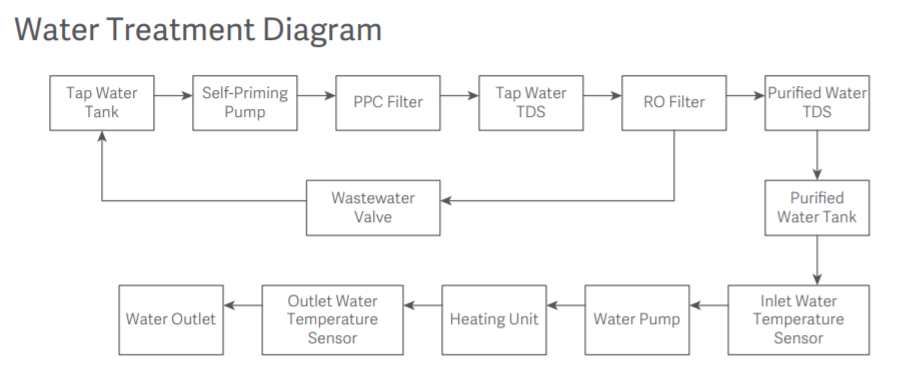
54.Q: What is the water treatment diagram of the Xiaomi Smart Filtered Water Dispenser Pro?
A: The water process flow of the Xiaomi Smart Filtered Water Dispenser Pro is as follows:
55.Q: What is the NFC and how does it work in the Xiaomi Smart Filtered Water Dispenser Pro?
A: NFC stands for Near-Field Communication, a contactless identification and interconnection technology that enables near-field wireless communication between mobile devices, consumer electronics, PCs, and smart control tools.
NFC is not exactly the same as Bluetooth or WiFi. It is not exactly the same as the familiar Bluetooth and WiFi, but it focuses on the word “near.” NFC coils are usually installed on the back of the cell phone, so when using them, please align the back to the induction area.
The usage of the NFC function is as follows:
1. The Xiaomi Smart Filtered Water Dispenser Pro can recognize the standard NFC insulated cup and the ordinary water cup with NFC stickers on the bottom (hereinafter referred to as NFC water cups);
2. Before using NFC water cups, the Mi Home App must first set the water intake information (water temperature and quantity). Then, place the phone close to the NFC cup and perform a write operation using the Mi Home App.
After receiving a successful write prompt in the Mi Home App, you can use the NFC water collection function;
3. While the Xiaomi Smart Filtered Water Dispenser Pro runs normally, place the NFC water cup in the middle of the receiving tray. The Xiaomi Smart Filtered Water Dispenser Pro will automatically read the information inside the NFC chip and discharge water according to the preset water level and quantity. After completing the discharge, it will automatically stop.
Note:
1. The bottom of the new device’s insulation cup already has NFC stickers, and the NFC stickers in the accessory package can be applied to the bottom of other cups for use;
2. The NFC stickers should not be applied to metal cups to prevent NFC from being unable to sense.
3. The default water temperature for NFC water cups is 25℃ (normal temperature), with a water volume of 150ml;
4. When the Child lock function is activated and the water temperature is ≥ 50℃, the Child lock needs to be manually released before the water can be automatically discharged;
5. Once the cup is put on, the display wakes function, which can be used when not connected to the Internet. However, if the NFC-related functions are set without a network, then the NFC automatic water dispensing function cannot be used.
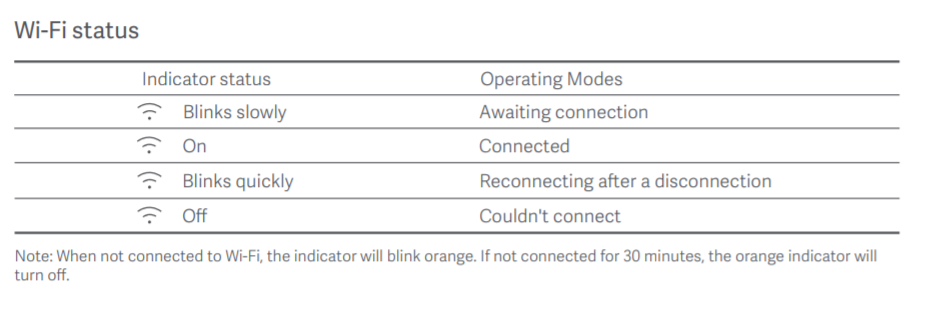
56.Q: What are the Xiaomi Smart Filtered Water Dispenser Pro WiFi indicator states?
A: The WiFi indicator status of the Xiaomi Smart Filtered Water Dispenser Pro is described below:
1. Waiting to connect: The WiFi icon flashes slowly;
2. Successful connection: The WiFi icon is always on;
3. Dropped and reconnected: The WiFi icon flashes fast;
4. Failed to connect: The WiFi icon is off.
Note:
1. When WiFi is not connected, the WiFi icon flashes;
2. If WiFi is not connected within 30 minutes, the WiFi icon will disappear;
3. When you need to connect to the Mi Home App again, tap the left and right buttons to display the WiFi settings on the screen. Then, tap the [Water collection (confirm)/Child lock button] to wake up the WiFi and connect to the Mi Home App.
57.Q: Does the Xiaomi Smart Filtered Water Dispenser Pro make any noise during operation?
A: The Xiaomi Smart Filtered Water Dispenser Pro combines heating and water purification functions. When it is working, the sound of devices working together will be heard.
1. When filtering tap water, the Xiaomi Smart Filtered Water Dispenser Pro needs to be pressurized through a booster pump, and there will be a slight working sound;
2. When the Xiaomi Smart Filtered Water Dispenser Pro is heated, the water emits a slight working sound when it passes through the instant heat hose.
Note:
1. The ambient noise is lower at night, so the sound of water production is relatively obvious, this is a normal phenomenon;
2. The Xiaomi Smart Filtered Water Dispenser Pro's working noise value is far below 65dB, so please rest assured that it is safe to use.
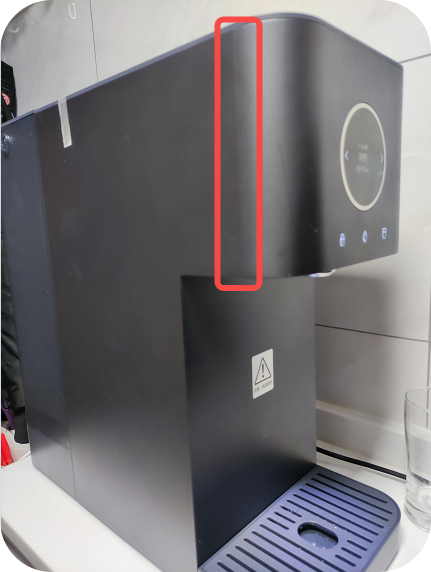
58.Q: Is the Xiaomi Smart Filtered Water Dispenser Pro normal to have a protruding gap on the device body?
A: The Xiaomi Smart Filtered Water Dispenser Pro's body side of the protruding gap for the injection molding when the mold line. This is normal; please feel free to use it.
Tips:
Please pay attention to keeping the device shell clean in daily use. If the shell is dirty, the mold line will appear more pronounced.
APP FAQs
1.Q: Does the Xiaomi Smart Filtered Water Dispenser Pro support network connection?
A: The Xiaomi Smart Filtered Water Dispenser Pro supports network connection via the Mi Home App.
This device contains the radio transmitter module with model approval code: Wi-Fi IEEE 802.11b/g/n 2.4 GHz.
2.Q: How to connect the Xiaomi Smart Filtered Water Dispenser Pro to the Mi Home App?
A: The Xiaomi Smart Filtered Water Dispenser Pro connects to the Mi Home App. It enables you to set up common dispenser mode, customize mode, and monitor filter life. The detailed features can be accessed through the Mi Home App.
To connect the Xiaomi Smart Filtered Water Dispenser Pro to the Mi Home APP, please refer to the operations as follows:
1. Open the Mi Home APP and select the [+] icon in the upper right corner of the interface;
2. Select Xiaomi Smart Filtered Water Dispenser Pro to add the device;
3. Please enter the WiFi SSID and password, wait for the connection, select the room where the device is located, and share to connect successfully.
Please note that if the password contains special characters, the device will not be able to pair with the Wi-Fi network.
3.Q: Does the Xiaomi Smart Filtered Water Dispenser Pro support voice control?
A: The Xiaomi Smart Filtered Water Dispenser Pro doesn’t support voice control.
4.Q: Does the Xiaomi Smart Filtered Water Dispenser Pro support Smart Scene Connection?
A: The Xiaomi Smart Filtered Water Dispenser Pro is a WiFi-connected device that supports smart scene connection.
The filter cartridge that has been run out can be used as a triggering condition; when the filter cartridge is run out, you can set up scenarios such as push notifications to your smartphone.
5.Q: Does the Xiaomi Smart Filtered Water Dispenser Pro mode support customization?
A: The Xiaomi Smart Filtered Water Dispenser Pro supports customization.
The custom method is as follows:
Go to the Mi Home App and navigate to the new mode. Enter the new water pick-up method, set the temperature and volume of the water, and save the settings.
In the Mi Home App, navigate to [Edit] at the bottom of the home screen and tap on it, you can find the new pick-up mode. Tap the [+] icon on the left side to save the new water mode. Select the left and right buttons on the OLED screen of the device to pick up water.
Note:
1. The Custom mode of the Xiaomi Smart Filtered Water Dispenser Pro can be set up to 8 modes, and you can set them according to your drinking or brewing habits;
2. The water temperature can be set to 40-95℃ with an accuracy of 1℃;
3. The water volume can be set to 80ml MAX with an accuracy of 10ml.
6.Q: How to check the filter life of the Xiaomi Smart Filtered Water Dispenser Pro after connecting it to the Mi Home App?
A: The Xiaomi Smart Filtered Water Dispenser Pro Hot and Cold Edition device supports checking the filter life after connecting to the Mi Home App.
7.Q: What is the Winter mode of the Xiaomi Smart Filtered Water Dispenser Pro?
A: The Xiaomi Smart Filtered Water Dispenser Pro addresses the effects of low ambient temperatures in the winter while adding features to compensate for temperature differences. When Winter mode is turned on, the water temperature increases by 3 degrees to heat all but room temperature water and boiling water.
Tips:
1. Winter mode is turned off by default, you can enable this feature in the Mi Home App;
2. You can set the Winter mode by going to Mi Home App >> navigate to the plugin settings >> select the [Winter mode] >> toggle [On/Off].
8.Q: Can the Xiaomi Smart Filtered Water Dispenser Pro view the TDS values in the Mi Home App?
A: The Xiaomi Smart Filtered Water Dispenser Pro has a TDS sensor to monitor the water quality abnormalities. And Mi Home APP adopts a simplified style, which mainly enhances the convenience of function operation and displays the tap water TDS value. However, it does not display the pure water TDS value.
9.Q: Does the Xiaomi Smart Filtered Water Dispenser Pro support firmware upgrades?
A: The Xiaomi Smart Filtered Water Dispenser Pro supports firmware upgrades. The Xiaomi Smart Filtered Water Dispenser Pro screen displays “Upgrading” when firmware upgrades are available. The firmware upgrade method is as follows:
Open Mi Home App >> [Settings] >> [Additional settings] >> [Check for updates].
10.Q: Does the Xiaomi Smart Filtered Water Dispenser Pro support hot water customization?
A: The Xiaomi Smart Filtered Water Dispenser Pro hot water temperature can be customized through the Mi Home App. The temperature is finely set to 1℃. Let the temperature be whatever you want, with a temperature range of 40-95℃.
11.Q: Can the room temperature water of the Xiaomi Smart Filtered Water Dispenser Pro adjust the water temperature?
A: The Xiaomi Smart Filtered Water Dispenser Pro doesn’t support the temperature of room-temperature water. The Ambient water temperature is your local ambient temperature, i.e., tap water temperature.
12.Q: Can the Xiaomi Smart Filtered Water Dispenser Pro turn off key beeps?
A: The key beeps of the Xiaomi Smart Filtered Water Dispenser Pro can be turned off as follows:
Go to the Mi Home App and tap the upper right corner to enter the function setting mode. Select [Do Not Disturb mode] to set the device alert tone. In the operation interface, you can choose to turn it off all day or customize the setting time.
13.Q: How to set the default pick-up water method for the Xiaomi Smart Filtered Water Dispenser Pro when the screen is lit up?
A: The operation method is as follows:
Connect to the Mi Home App, tap on the upper right corner to enter the [Settings] interface, select the default display mode as you prefer, and then tap OK.
14.Q: How to set up the Xiaomi Smart Filtered Water Dispenser Pro to put a cup and take water?
A: After connecting the Xiaomi Smart Filtered Water Dispenser Pro to the Mi Home App, go to [NFC Action Configuration] >> [New Key] >> set your favorite Water Dispenser Pro mode >> [Configuration] >> [Phone NFC Sensor] near the bottom of the water cup's NFC sensor area in the plug-in settings. When the phone pops up to write successfully, you can use the water cup to get water directly.
Note:
1. The default water temperature of the NFC function is 25℃(room temperature), the amount of water is 150ml;
2. When the Child lock function is activated and the water temperature is at or above 50℃, please release the Child lock manually. After unlocking the Child lock, press the water confirmation button to get water.
15.Q: What is the extra white thing on the Xiaomi Smart Filtered Water Dispenser Pro?
A: The Xiaomi Smart Filtered Water Dispenser Pro is a filter for the water tank in the picture below; it may have been dislodged from its mounting position due to bumps during transportation, please reinstall it back into the water tank.
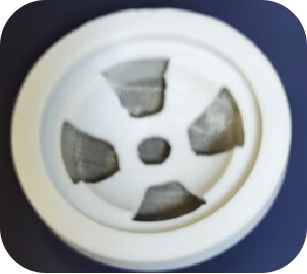
Water tank filter installation method:
1. Locate the tank screen with the screen side facing up;
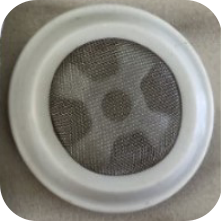
2. Place the strainer into the tank raw water inlet mounting location;
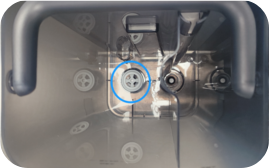
3. Press down hard until the silicone surface of the wire mesh seat is level with the original tank mesh seat groove.

Common issues
1.Q: The Xiaomi Smart Filtered Water Dispenser Pro can’t connect to the Wi-Fi network
A: Please follow the steps below to troubleshoot when the Xiaomi Smart Filtered Water Dispenser Pro cannot connect to WiFi:
1. Check if the selected network is a public network. As of now the public WiFi networks that require web authentication are not currently supported;
2. Confirm that your phone is connected to WiFi and can access the Internet normally;
3. Please check whether Bluetooth on your phone is enabled;
4. Whether the WiFi password you entered when the device is connected is correct;
5. Check if the WiFi being used is a 2.4GHz network, as the 5GHz networks are not currently supported;
6. The distance from the router is too far, signal obstacles, insufficient signal, and other reasons will affect the use of the device. Try connecting with another phone as a hotspot;
7. Check whether the location permission of the phone has been disable;
8. Please use English to name the router WiFi hotspot; the password cannot contain characters other than letters and numbers;
9. Check if the WiFi hotspot uses encryption methods such as WEP or EAP 802.1x. If so, please try using WPA/WPA2 encryption instead;
10. When the device's WiFi is offline after a long period of not being connected to the internet (more than half an hour), please click the left and right keys to display "WiFi Settings" on the screen. Then click "Water Collection (Confirm)/ Child lock" to reset. After the WiFi icon flashes, reconnect to the Xiaomi Smart Filtered Water Dispenser Pro WiFi (Please reset the WiFi before reconnecting each time);
11. Download the Mi Home App from the Google Play store and try again.
If the firmware cannot be updated, please do not hesitate to contact either our local service center or seller for further assistance. They will be more than happy to help you out!
2.Q: The Xiaomi Smart Filtered Water Dispenser Pro can’t update the firmware
A: If your Xiaomi Smart Filtered Water Dispenser Pro can’t update the firmware while there’s an available firmware, please refer to the following methods to troubleshoot:
1. Ensure the water dispenser is connected to a stable Wi-Fi network. Sometimes, a weak or unstable connection can prevent firmware updates. Please do not use the public network;
2. Try restarting the water dispenser by unplugging it, waiting for a few seconds, and then plugging it back in. This can sometimes resolve connectivity issues;
3. Please try replacing the hotspot with another network, such as another cell phone, and check if you can update the firmware after connecting.
4. As a last resort, you can try resetting the water dispenser to its factory settings. This will erase all settings and data, so use this option only if other methods don't work;
If the firmware cannot be updated, please do not hesitate to contact either our local service center or seller for assistance. They will be more than happy to help you out!
3.Q: The Xiaomi Smart Filtered Water Dispenser Pro got stuck during the firmware upgrade
A: If the Xiaomi Smart Filtered Water Dispenser Pro got stuck during the firmware upgrade, please troubleshoot the issue as follows:
1. Ensure that the water dispenser is connected to a stable and reliable internet connection;
2. Try using your phone as a WiFi hotspot again;
3. Please perform a factory reset on the Xiaomi Smart Filtered Water Dispenser Pro. Keep in mind that this will reset all settings and data on the device, please back up data in your Mi Fitness app in advance.
If none of the above steps work, it's best to contact our local official after-sales center for further assistance. They will assist you in this regard.
4.Q: Is it normal for the Xiaomi Smart Filtered Water Dispenser Pro to taste poorly when taking water for the first time the next day?
A: Because a small amount of water remains in the pipeline after each water intake, the taste deteriorates slightly over a long period of time. If the device is not used for more than 8 hours, it is recommended that the first cup of water (150ml) be drained and then used for better taste.
Tips:
1. Please clean the water tank every time changing water;
2. If the device is not used for more than 48 hours, please pour out the water in the water tank; then select room temperature water, and drain the water after selecting MAX. Finally, please unplug the power supply;
3. Please rinse the device before using it again.
5.Q: Why does the TDS value displayed by Xiaomi Smart Filtered Water Dispenser Pro deviate from the value tested with a TDS pen?
A: The TDS pen and the TDS probe of the Xiaomi Smart Filtered Water Dispenser Pro are calibrated using a similar water quality analyzer. Theoretically, the TDS values of the same water should be close to each other, and if there is a deviation, it may have something to do with the testing method.
1. If air bubbles are hanging on the probe when using the TDS pen to measure water, the measured results may have a deviation from the actual value;
2. The TDS pen is generally tested static water, the Xiaomi Smart Filtered Water Dispenser Pro measured water in a flowing state, so there will be some deviation;
3. If the Xiaomi Smart Filtered Water Dispenser Pro measures tap water at the same time, the value measured by the Xiaomi Smart Filtered Water Dispenser is the value filtered by the PPC cartridge, which is generally lower than the TDS value of the tap water measured;
4. If the Xiaomi Smart Filtered Water Dispenser Pro has not been used for a long time, the initial TDS value of the water has changed a lot, and the value displayed by the TDS pen and the device in real-time may be biased;
5. The general deviation of 10% or less is a normal phenomenon.
Tips:
It is recommended to use the method of measurement on the instructions of the test pen when using the TDS pen to measure the TDS value of water.
6.Q: Can the Xiaomi Smart Filtered Water Dispenser Pro be mounted on a wall? Can it be used outdoors?
A: The Xiaomi Smart Filtered Water Dispenser Pro is a countertop model and does not support wall mounting.
7.Q: Can the Xiaomi Smart Filtered Water Dispenser Pro be used outdoors?
A: The Xiaomi Smart Filtered Water Dispenser Pro cannot be used outdoors. The device's water temperature range is 5-38℃, the applicable ambient temperature is 4-40℃, and the humidity is less than 75% RH. However, outdoor use may not meet the requirements, so the device cannot be placed outdoors. Also, please do not place the device next to the radiator to avoid damage.
8.Q: What are the Xiaomi Smart Filtered Water Dispenser Pro ambient temperature placement requirements (Freeze alert)?
A: The Xiaomi Smart Filtered Water Dispenser Pro is suitable for water temperatures ranging from 5 to 38℃. Please do not store or expose the product to an environment of 4℃ or below to avoid freezing inside the product due to temperature effects.
If not thawed promptly before use, frost cracking may cause water leakage in the filter element or other components. If the product is found to have frozen, please confirm whether there is any water leakage while thawing.
9.Q: Why are the TDS values of the Xiaomi Smart Filtered Water Dispenser pro are high?
A: Please refer to the following steps for inspection:
1. Please check if the TDS value of tap water is high and if water replacement is necessary;
2. Please confirm if the product has not been used for a long time, try cleaning it before use;
3. Please confirm if the filter element has reached the replacement cycle.
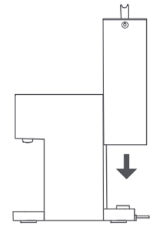
10.Q: Why does the Xiaomi Smart Filtered Water Dispenser Pro have slight water stains on the base of the water tank after changing the water?
A: During removing and installing the water tank, there may be a small section of the sealing part that cannot fully form a seal, resulting in a small amount of water droplets overflowing. This is a normal phenomenon. It is recommended that you clean the product while changing the water.
Note:
Please install the water tank to avoid an incomplete connection at the bottom interface when changing water, which may cause water seepage or leakage (Install the top of the water tank flush with the body cover plate).
11.Q: What is the approximate temperature of room temperature water of the Xiaomi Smart Filtered Water Dispenser Pro?
A: The Xiaomi Smart Filtered Water Dispenser Pro room temperature refers to the local ambient temperature, as the device’s room temperature water outlet is close to the original tank water temperature.
12.Q: Is it normal for the Xiaomi Smart Filtered Water Dispenser Pro to splash water in the cup when taking water?
A: The height of the cup and the size of the mouth of the cup are different, there will be a small amount of water splashing out when taking water. Therefore, it is recommended that you do not hold the cup in your hand when taking water to avoid scalding your hands with hot water.
13.Q: Is it normal for the Xiaomi Smart Filtered Water Dispenser Pro's water tank to gurgle after first use or filter replacement?
A: When using it for the first time or after replacing the new filter cartridge, the water tank may show water gas tumbling, which is a normal phenomenon of the filter exhaust. Please be assured of its use. If the water tank continues to exhibit this behavior after a few uses, please ensure that the filter cartridge is properly installed and that there are no leaks or blockages. Regular maintenance and replacement of the filter cartridge as recommended will help maintain the efficiency of the device. Thank you for choosing our product and please feel free to contact us if you have any further questions or concerns.
14.Q: The Xiaomi Smart Filtered Water Dispenser Pro still has a lot of water left before it prompts for a water change, is this normal?
A: When the water quality is poor, the Xiaomi Smart Filtered Water Dispenser Pro screen will indicate please change the water. Please pour out the water from the original tank and replace it with new water.
Note:
When the water tank runs out of water or when the device can't continue to make water, please lift up the water tank pour out the concentrated water, and refill it with tap water.
15.Q: Does the Xiaomi Smart Filtered Water Dispenser Pro have a sterilization feature?
A: Yes, the Xiaomi Smart Filtered Water Dispenser Pro has a built-in UV light to inhibit bacteria, which prevents secondary contamination. At the same time, there is an independent 1.2L water storage tank inside the device, so there’s no need to wait when you want to drink.
16.Q: What are the two floating parts in the Xiaomi Smart Filtered Water Dispenser Pro tank when adding water?
A: The floating parts in the water tank are the inductive floats, used to detect the water level of the tank to play a role in prompting the water change. These two parts are designed to be removable for easy daily cleaning and maintenance. The white sensor floats in the center, and translucent is a food-grade silicone plug.
After disassembling and cleaning, the sensor float and silicone plug can be installed back to use.
Tips:
Install the sensing float into the tank guide first, then put the plug in place for normal use.
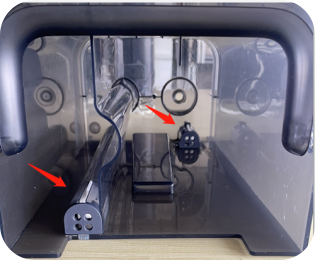
17.Q: How to install the float in the Xiaomi Smart Filtered Water Dispenser Pro raw water tank?
A: To install the float in the Xiaomi Smart Filtered Water Dispenser Pro, please refer to the following steps:
1. Install the float of the raw water tank into the corresponding guide channel;
2. Insert the plug properly (pay attention to the direction).
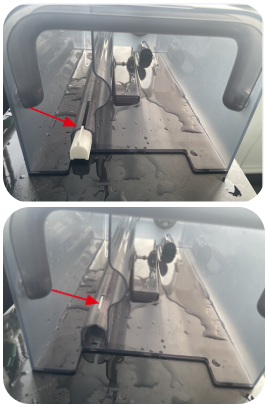
Tips:
Install the float on the other side using the same method.
18.Q: Is the Xiaomi Smart Filtered Water Dispenser Pro still running normally after collecting water?
A: The Xiaomi Smart Filtered Water Dispenser Pro is designed with an independent 1.2L pure water tank. After dispensing water, it will automatically refill the tank to ensure a constant supply of water. This means there's no need to wait for water and it can be directly connected to a water source for continuous use. This is completely normal, so feel free to use it as needed.
19.Q: The buttons of the Xiaomi Smart Filtered Water Dispenser Pro are insensitivity
A: The buttons of the Xiaomi Smart Filtered Water Dispenser Pro are designed as touch buttons with the sensing area in the center of the logo pattern. Due to human body differences, the sensing sensitivity varies. However, the larger the finger contact area, the easier it is to trigger.
Tips:
It is recommended to press on the center of the logo pattern when operating. Therefore, to ensure a more accurate and efficient operation, try to use the entire logo pattern area for better touch sensitivity. This will help prevent any potential issues with button responsiveness and ensure a smooth user experience with your Xiaomi Smart Filtered Water Dispenser Pro.
20.Q: Why does the Xiaomi Smart Filtered Water Dispenser Pro still have a few drops on the spout after picking up water?
A: When the product stops producing water, the residual water in the spout will continue to drip a few drops due to gravity, this is a normal phenomenon, please rest assured that the use.
Tips:
Please pour out the remaining water in the water dispensing tray regularly.
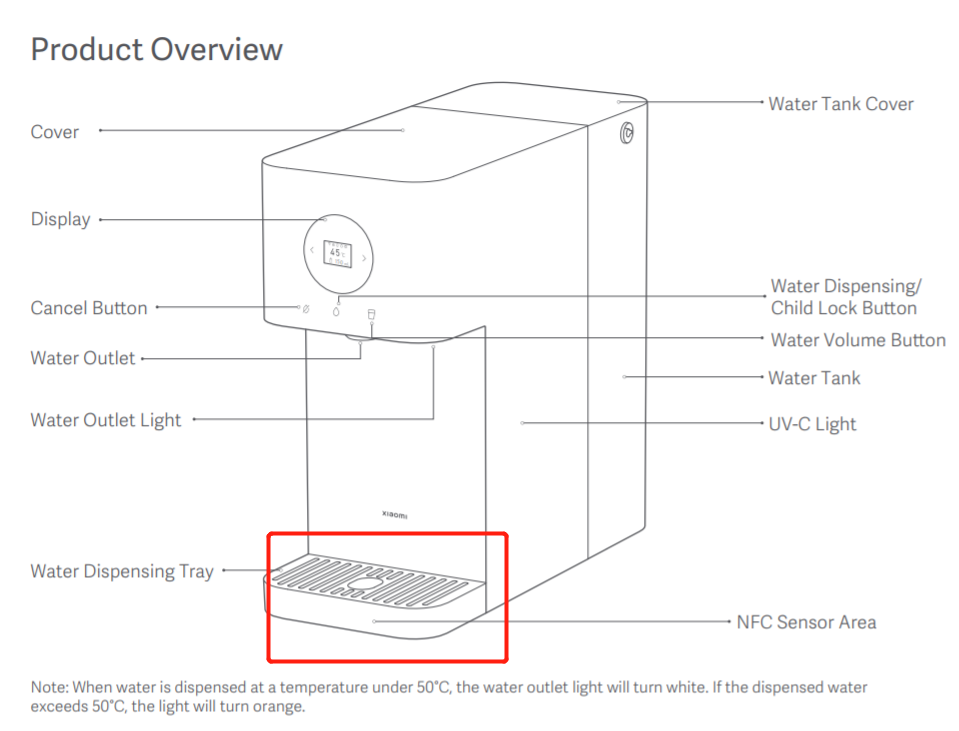
21.Q: Is it normal for the Xiaomi Smart Filtered Water Dispenser Pro to have a faint trace visible on both sides of the light?
A: The Xiaomi Smart Filtered Water Dispenser Pro uses a traditional injection molding process, and there are some process characteristics of the injection molding process.
For example, the high-gloss surface of the body can be seen under the side light, but it is difficult to detect the process traces at a normal angle. This phenomenon belongs to the inherent characteristics of the injection molding process and does not affect the use and appearance, please feel free to use it.
Supplementary notes:
Assembly line, also known as overflow line: Excess plastic flows out at the joint of the mold, leaving visible marks after cutting off the overflow edge. It is the joint seam under the main model of the plastic mold used to indicate that the mold is split in half, and the product design and construction do not affect normal use.
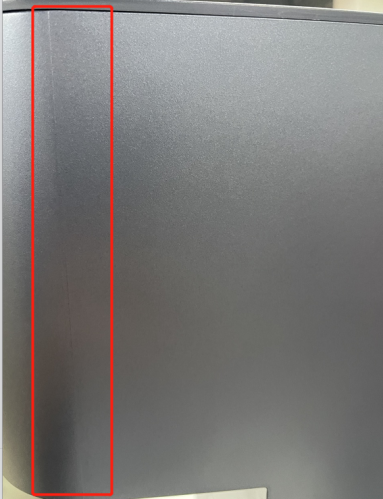
22.Q: Is it normal for the Xiaomi Smart Filtered Water Dispenser Pro to have a deviation in the actual water output?
A: Due to the use of the environment and the impact of the power grid water purifier's actual water output there is a certain deviation.
Note:
In the room temperature (25℃ ± 5℃), AC220V ± 1V voltage environment, the product water deviation is about 12%.
23.Q: Why does the Xiaomi Smart Filtered Water Dispenser Pro get moss on the water tank after a while of use?
A: The Moss has been identified as algae by the relevant testing center, a non-toxic substance that poses no harm to human health.
Daily encounters with green algae in places like water pipes, wells, and streams are common. There is no need for concern. Moss may develop when water is left in a container for an extended period without cleaning. Therefore, when using the Xiaomi Smart Filtered Water Dispenser Pro, please regularly clean and maintain the water tank following the manual instructions and prompts on the device.
Note:
1. It is recommended that the water tank be cleaned with water before using it for the first time. As for the daily cleaning, please thoroughly clean the water tank every 48 hours by using the citric acid soak for about 20 minutes, then pour off the liquids to brush the water tank;
2. It is best to replace the water in the tank once a day to maintain good drinking habits;
3. Avoid placing the Xiaomi Smart Filtered Water Dispenser Pro in direct sunlight. Otherwise, it will encourage the rapid growth of microorganisms and harbor harmful substances.
24.Q: Is the Xiaomi Smart Filtered Water Dispenser Pro normal for reporting a water change even if the raw water tank is about one-third full?
A: The Xiaomi Smart Filtered Water Dispenser Pro will have a water change prompt in the following situations:
1. The water volume in the water tank is too low;
2. The TDS of water quality is too high;
3. The concentrated water tank reaches the highest water level.
Note:
1. When the water tank is prompted to lack water, please lift the water tank in time to clean up the water storage and refill the fresh water. Please do not directly add water to the tank without lifting the tank when prompted to change water;
2. The device uses water level detection to prompt the replacement of raw water, to ensure the quality of the original water tank.
25.Q: Why is there a temperature difference in the water coming out of the Xiaomi Smart Filtered Water Dispenser Pro?
A: The Xiaomi Smart Filtered Water Dispenser Pro uses instant heating technology (filtered water is heated instantly by the thick film heating module). Dual NTC sensors inside and outside the water control the temperature intelligently, providing water at a predefined temperature.
The reasons for the temperature difference in the Xiaomi Smart Filtered Water Dispenser Pro are as follows:
1. The Xiaomi Smart Filtered Water Dispenser Pro will initially store a small amount of water, resulting in a brief cold water discharge. An outlet temperature difference may occur for the first 3-10 seconds, but after this initial period of time, the water temperature will stabilize and reach the set temperature;
2. During winter, the device performance is influenced by ambient temperature, leading to heat loss in the outlet water temperature. Lower temperatures accelerate the cooling of hot water, and heat absorption by the water cup further reduces the water temperature in the cup below the preset level;
3. Thermometers and measurement methods available on the market may have inherent inaccuracies, causing slight discrepancies between the externally measured temperature and the actual outlet water temperature.
Based on the above factors, the Xiaomi Smart Filtered Water Dispenser Pro may have minor inaccuracy when measuring water temperature, which is a normal phenomenon.
26.Q: Is the Xiaomi Smart Filtered Water Dispenser Pro normal for experiencing a flow interruption when hot water is discharged, with higher temperatures becoming more pronounced?
A: The Xiaomi Smart Filtered Water Dispenser Pro adopts an instant heating scheme (filtered pure water is heated instantly through a thick film heating component). When pure water is heated through a thick film, as the temperature rises, a small amount of water vapor will be generated when the pure water boils.
Therefore, there is a slight interruption in the water flow from the boiling water gear.
Tips:
The main filtration element of the Xiaomi Smart Filtered Water Dispenser Pro is the reverse osmosis membrane. In winter, when the water temperature is low, the water's viscosity increases, decreasing the reverse osmosis membrane's water production.
As a result, the water output of the water purifier will decrease, so the hot water flow rate will also be lower than that in summer in low-temperature winter environments. When the flow rate of hot water decreases, there will be a slight change in the type of low-flow rate hot water.
When water flows out, it will show that the diameter of the water flow remains unchanged. The visual inspection of the water flow may result in intermittent insufficient hot water, causing a slight interruption in flow. When the temperature rises, it can significantly improve.
27.Q: What to do if the Xiaomi Smart Filtered Water Dispenser Pro shows the water tank was not installed by mistake?
A: Please check whether there are any abnormalities in the water tank and the tank induction magnet module to troubleshoot the issue:
1. Check that the water tank is in place and that the tank cover is flush with the unit after installation;
2. Check whether the water tank magnet sensor is missing. If there is a missing or omitted installation, don't hesitate to contact the after-sales inspection to replace the water tank.
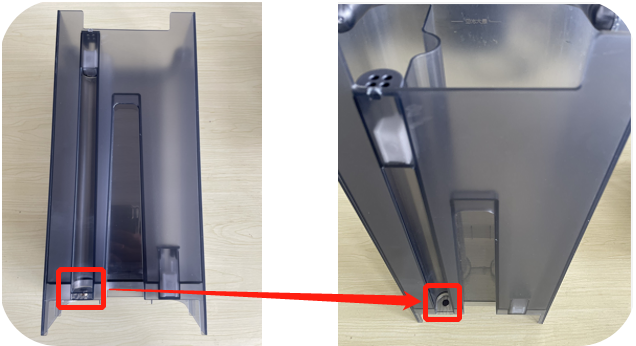
28.Q: Can the Xiaomi Smart Filtered Water Dispenser Pro fill water directly into it without lifting the tank?
A: No. The Xiaomi Smart Filtered Water Dispenser Pro adopts raw water separation technology. When the concentrate tank is full, the device stops making water and prompts you to change the water. Please empty the tank and refill it.
29.Q: Why does the water from the Xiaomi Smart Filtered Water Dispenser Pro have an odor?
A: If the water coming out of the Xiaomi Smart Filtered Water Dispenser Pro has an odor, please refer to the following steps to operate it:
1. After the rinsing mode, please rinse 3 raw water tanks for the Xiaomi Smart Filtered Water Dispenser Pro. Then rinse 3 tanks of raw water after the whole device has stood still for 24 hours;
2. If there’s an odor after a certain period of use, please check whether the filter life has expired, and replace the new filter;
3. If the filter is not used for long, please empty the water inside the tank and perform the rinse mode. After use, please rinse the device with three tanks of raw water.
30.Q: Why there’s an odor of the Xiaomi Smart Filtered Water Dispenser Pro after unboxing?
A: Due to there’s the plastic components in the Xiaomi Smart Filtered Water Dispenser Pro, a slight odor upon initial use is common. Please place it in a cool, well-ventilated area for some time to help the odor dissipate.
31.Q: Why does the Xiaomi Smart Filtered Water Dispenser Pro indicate on the display that water is being made when I pick up water, please pick up water later?
A: The Xiaomi Smart Filtered Water Dispenser Pro has a 1.2L water tank. When you collect water, the internal tank level drops, triggering water production. The display will indicate water production in progress; please wait before taking water. Once water production is complete, you can collect water.
32.Q: Why there’s a tea fragrance bag in the Xiaomi Smart Filtered Water Dispenser Pro water tank?
A: The tea fragrance bag is placed in the Xiaomi Smart Filtered Water Dispenser Pro to absorb the odor.
Note:
The tea fragrance bag is not edible, please discard it before using the Xiaomi Smart Filtered Water Dispenser Pro.
33.Q: The error code descriptions of the Xiaomi Smart Filtered Water Dispenser Pro
A: 1. If the screen displays Absence of water, it indicates the absence of a water tank. Please check and install the water tank properly;
2. If the screen displays Insufficient water, it indicates that the water is insufficient in the water tank. Please add the water to the water tank;
3. If the screen indicates Poor water quality, it means the water quality is insufficient. Please replace the fresh water for better quality to meet the requirements;
4. If the screen displays Full concentrated water tank, please change the water doesn’t exceed the maximum water level of the water tank;
5. If the screen displays E-05, it indicates that the water temperature is too high. The product will automatically resume normal operation when the temperature goes down. If the error persists, please contact the after-sales team for further assistance;
6. If the screen displays E-08, it indicates that there’s a water level error in the purified water tank. Please contact the after-sales team for further assistance;
7. If the screen displays E-09, it indicates that the inlet water temperature sensor is damaged. Please contact the after-sales team for further assistance;
8. If the screen displays E-10, it indicates that the outlet water temperature sensor is damaged. Please contact the after-sales team for further assistance;
9. If the screen displays E-11, it indicates that there’s an communication error. Please contact the after-sales team for further assistance.

34. Q: Why is the Xiaomi Smart Filtered Water Dispenser Pro offline in the Mi Home/Xiaomi Home APP during sleep status?
A: This is a normal phenomenon of the product. Xiaomi's products all comply with safety production and usage standards. Please feel free to use them.
A: This is a normal phenomenon of the product. Xiaomi's products all comply with safety production and usage standards. Please feel free to use them.
Does it help?
Yes
No