

How many buttons does the Xiaomi Smart Filtered Water Dispenser Pro have and what are their functions?
A: The Xiaomi Smart Filtered Water Dispenser Pro has five touch buttons. They are [Left Selection Button] and [Right Selection Button] on the left and right side of the display, [Cancel Button], [Water (Confirmation)/Child lock Button] on the bottom of the display, and [Water Volume Button] on the bottom of the display.
Tips:
1. The [Left Selection Button] and [Right Selection Button] are used for left and right selection, digital increase and decrease;
2. [Water (confirm) / Child lock button]: Press 1 second to unlock, press and hold on it for 5 seconds to cancel the Child lock. Press and hold the Child lock button for 5 seconds to unlock the Child lock function. Then, press it for 1 second to control the water, it allows you to confirm menu option and access the next level of the menu;
3. Press the [Cancel] button for 1 second to stop the water flow;
4. The [Water volume key] is to select the amount of water volume;
5. By default, each mode has three water quantities to choose from: "150mL", "300mL", and "MAX." Press the water quantity key to cycle through them in sequence;
6. Press any button when picking up water will immediately stop the water flow.
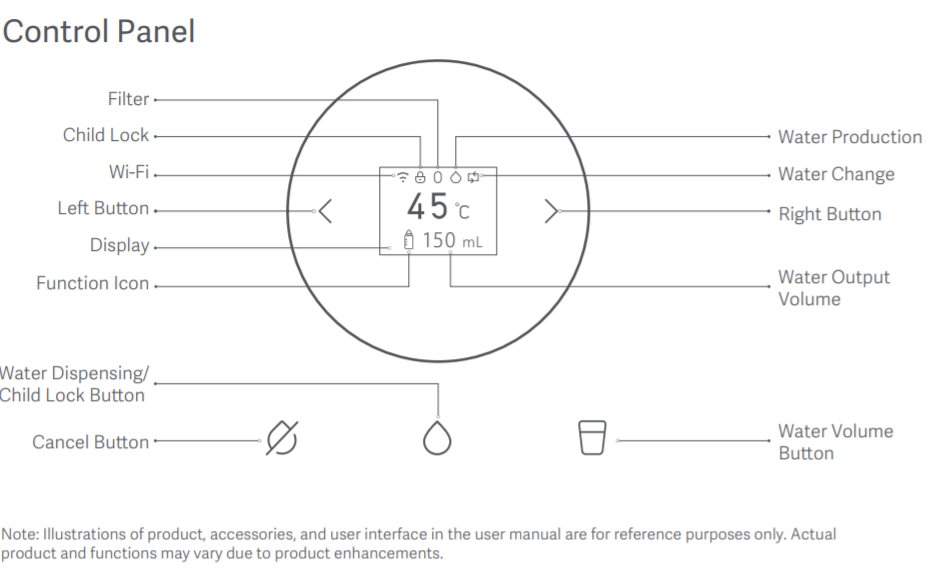
Tips:
1. The [Left Selection Button] and [Right Selection Button] are used for left and right selection, digital increase and decrease;
2. [Water (confirm) / Child lock button]: Press 1 second to unlock, press and hold on it for 5 seconds to cancel the Child lock. Press and hold the Child lock button for 5 seconds to unlock the Child lock function. Then, press it for 1 second to control the water, it allows you to confirm menu option and access the next level of the menu;
3. Press the [Cancel] button for 1 second to stop the water flow;
4. The [Water volume key] is to select the amount of water volume;
5. By default, each mode has three water quantities to choose from: "150mL", "300mL", and "MAX." Press the water quantity key to cycle through them in sequence;
6. Press any button when picking up water will immediately stop the water flow.
Does it help?
Yes
No