

Xiaomi Smart Dehumidifier Lite FAQ
Overview
1. Q: What is the basic introduction of the Xiaomi Smart Dehumidifier Lite?
A: Dehumidifiers are commonly referred to as dehumidifiers, dryers, or dehumidifiers. It can effectively reduce the humidity of the environment, making it moderate and less likely to be affected by moisture and moldy, reducing bacterial growth caused by spring dampness, and lowering the incidence of respiratory and respiratory diseases.
The standard configuration of the Xiaomi Smart Dehumidifier Lite includes a main unit and exhaust pipe.
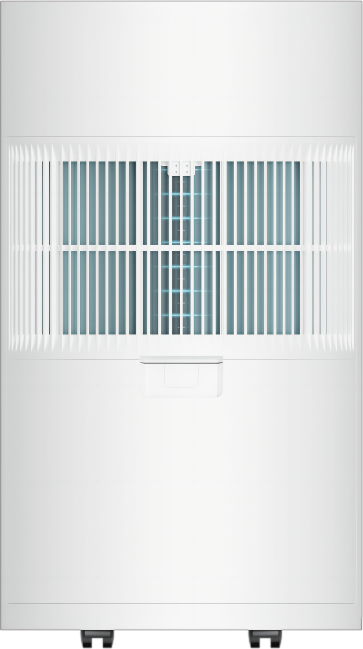
Structure and functions include motor, fan, compressor, evaporator, condenser, water box, filter, display screen, temperature and humidity sensor, feet wheel, power cord, etc.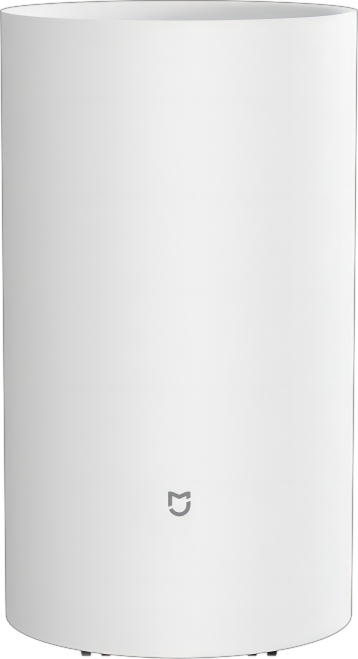
2. Q: What information does the display screen of the Xiaomi Smart Dehumidifier Lite contain?
A: The display screen can display humidity, operating mode, Wi-Fi indicator, timer indicator, temperature status, child lock indicator, and water full indicator.
The buttons include On/Standby button, Mode button, Humidity setting button, and Timer button.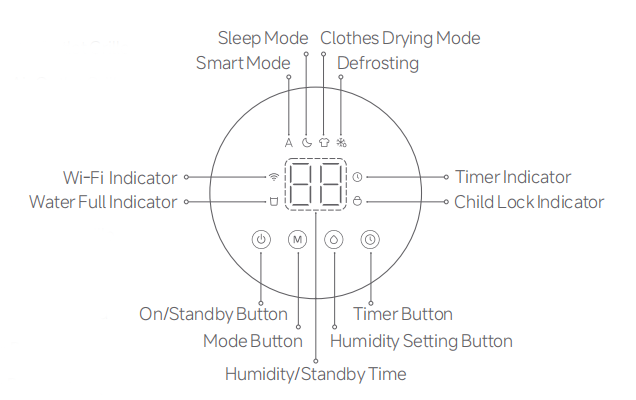
Product Introduction and Usage
1. Q: How to place the Xiaomi Smart Dehumidifier Lite?
A: To better utilize the performance of the dehumidifier, the main unit inlet hole should be kept at a certain distance from walls and other obstructions during use (recommended at above 20 millimeters). Due to it containing a compressor, please allow it to stand for 12 hours before using it.
2. Q: What kind of dehumidification method is used in the Xiaomi Smart Dehumidifier Lite?
A: This Xiaomi Smart Dehumidifier Lite uses a frozen type.
1. Freezing type:
Wet air is sucked into a fan and condensed into liquid through an evaporator. The dry air is then discharged from the machine and continuously circulated to reduce indoor humidity.
2. Rotary wheel dehumidifier:
The rotary wheel dehumidifier is based on the principle of physical adsorption. When the air passes through the rotating dehumidification wheel, the steam is absorbed by the porous honeycomb shaped dehumidification wheel, and the resulting air is dry. When the rotating dehumidification wheel passes through another area, the adsorbed water is heated and converted back into steam, which is discharged through pipelines or condensed into a water tank.
3. Q: What are the differences between the Xiaomi Smart Dehumidifier Lite and an air conditioning dehumidifier?
A: The Xiaomi Smart Dehumidifier Lite and air conditioners both use the principle of refrigeration for dehumidification. When the system is cooling, the evaporator is cold while the condenser is hot.
1. Air conditioning dehumidification:
The air conditioning is divided into two parts: an internal unit and an external unit. The room air is condensed into droplets through the evaporator (low temperature - the internal unit of the air conditioning) to achieve cooling and dehumidification. Air conditioning is a dehumidification function that occurs during the cooling process, resulting in a decrease in room temperature. To avoid excessive temperature drop, air conditioning generally has its own dehumidification function;
2. Dehumidifier dehumidification:
The dehumidifier is only one unit and is placed indoors. After the air is condensed into droplets through the evaporator (low-temperature), the low-temperature dry air is heated by the condenser (low-temperature) to achieve dehumidification without cooling.
4. Q: How to turn on the Xiaomi Smart Dehumidifier Lite?
A: Press the On/Standby button to turn on the device. When turned on, press the On/Standby button to turn off it.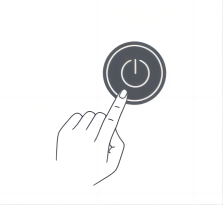
Note:
When connected to the Mi Home APP, tap on the on/off button when accessing the plugin can achieve power on/off.
5. Q: How to switch modes on the Xiaomi Smart Dehumidifier Lite?
A: When turned on, press the Mode button to cycle between Smart/Sleep/Clothes Drying modes.
Note:
When connected to the Mi Home APP, tap Smart mode/Sleep mode/Clothes Drying to switch modes.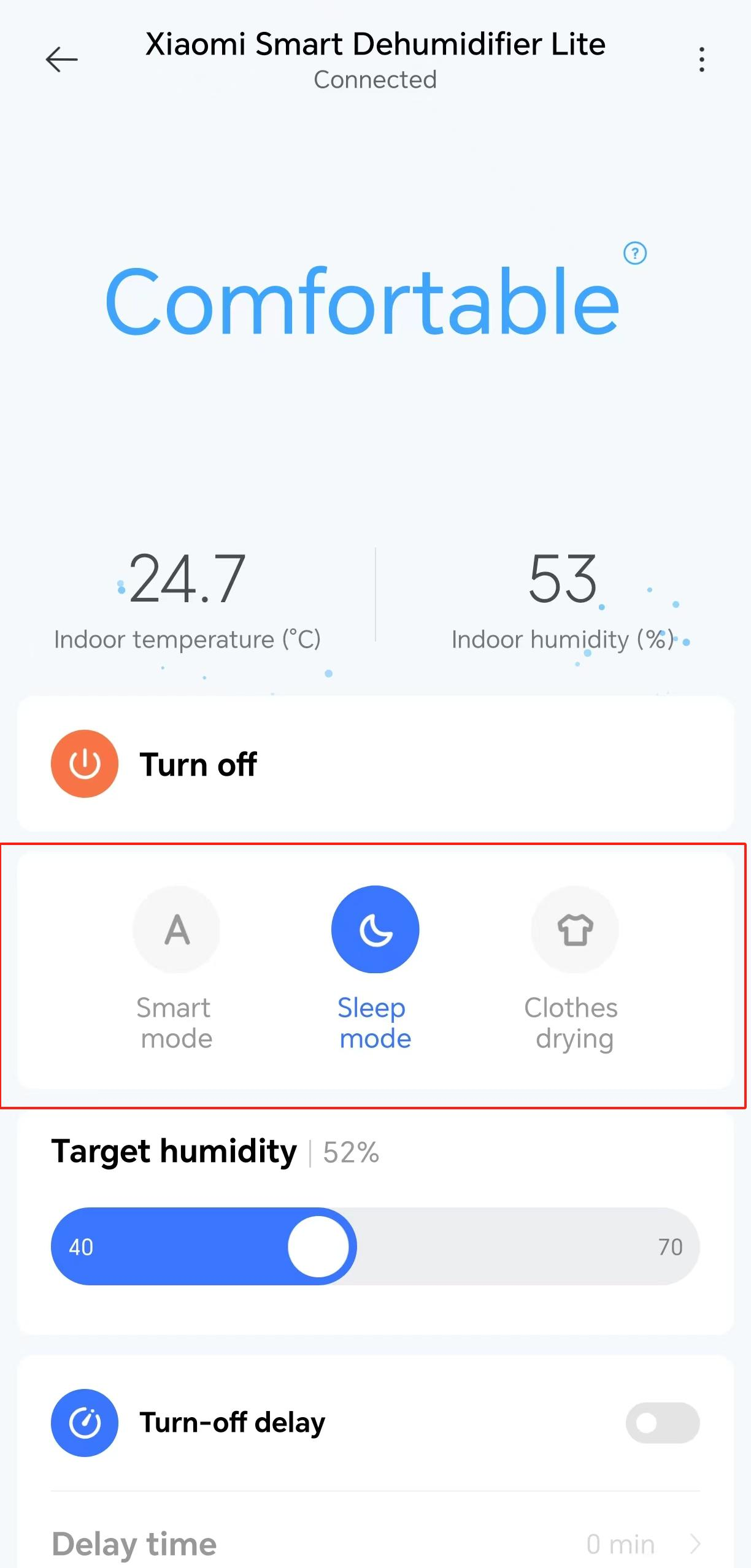
6. Q: How to adjust the brightness of the display on the Xiaomi Smart Dehumidifier Lite?
A: The Xiaomi Smart Dehumidifier Lite doesn’t support adjusting the brightness using the button and it only supports APP adjustment.
When connected to the APP, by accessing the plugin and tapping on [Display brightness], you can adjust the brightness between low light and bright light.
7. Q: How to turn on Child lock on the Xiaomi Smart Dehumidifier Lite?
A: 1. Press the Timer button and Humidity setting button simultaneously for 7 seconds. Once hearing a prompt, the Child lock will be opened or closed;
2. When connected to the Mi Home APP, tapping on the [Child lock] in the plugin can enable and disable the Child lock. After opening, it can only be controlled through the app.
8. Q: How to clean the filter of the Xiaomi Smart Dehumidifier Lite and how to maintain the device?
A: To clean the device body, please soak the cloth at a temperature below 45 ℃, twist it, and gently wipe the dirty part.
1. Grasp the buckle on the outside of the water tank and pull it out horizontally;
2. Remove the intake grille and then remove the inner air filter;
3. When rinsing or using a vacuum cleaner to clean the filter and inlet grille, if the filter is very dirty (such as oil stains), a soluble and neutral detergent with a temperature below 45 ℃ should be used and then place them in a cool place to air;
4. Install the air filter and reset it, then reinstall the inlet grille and water tank.
Note:
1. Do not directly clean the dehumidifier or use it in places that may come into contact with water, otherwise it may cause electric shock or fire;
2. Please place the dehumidifier on a stable and level ground, otherwise it may affect the effectiveness of the machine;
3. Please clean the air filter of the dehumidifier regularly. Dirty and clogged filter may cause a decrease in dehumidification efficiency.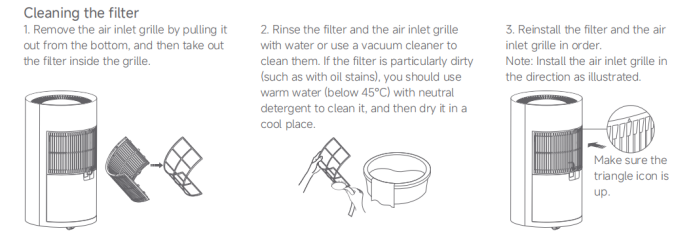
9. Q: How to clean the water tank of the Xiaomi Smart Dehumidifier Lite?
A: Grasp the buckle on the upper part of the container and pull it out flat. Clean it thoroughly and let it air dry before reinstalling it.
Note:
The Xiaomi Smart Dehumidifier Lite does not have a lid or lifting device, so simply remove the water tank and clean it.
10. Q: What should I pay attention to when not using the Xiaomi Smart Dehumidifier Lite?
A: 1. After turning off the machine, leave it for a day;
2. Clean the main unit, water tank, and filter regularly;
3. Store the dehumidifier directly in a dry and ventilated place;
4. Please bend the power cord into a roll and tie it with a power cord tie;
5. It is suggested to place the dehumidifier in the packaging bag.
11. Q: What kind of motor is used in the Xiaomi Smart Dehumidifier Lite?
A: The Xiaomi Smart Dehumidifier Lite uses a DC brushless motor, which has a low noise level and long lifespan, with a maximum noise level of less than 38dB(A), and the sleep mode can be turned on when you are sleeping.
12. Q: Can I place the Xiaomi Smart Dehumidifier Lite horizontally?
A: No, it can not be placed horizontally. Due to transportation restrictions must be placed horizontally, the first time you turn on the power needs to be left for about two hours to turn on the power.
13. Q: Why does the button on the Xiaomi Smart Dehumidifier Lite not work?
A: The Dehumidifier has a Child lock function on the Mi Home APP. If the Child lock is on, then pressing the buttons on the dehumidifier will not work. You need to disengage the Child lock function before you can operate the buttons on the dehumidifier. Disconnecting the power supply and re-powering or resetting the Wi-Fi will also disengage the lock. If the water full indicator blinks continuously, all buttons except the On/Off button are disabled and the operation can continue when the water level returns to normal or the tank assembly is restored to place.
14. Q: How do I turn off/on the Xiaomi Smart Dehumidifier Lite display?
A: The Mi Home APP has a brightness adjustment function, and the screen brightness supports switching between high light, low light, and off.
15. Q: What is the recommended space for the Xiaomi Smart Dehumidifier Lite?
A: It is recommended that the dehumidifier be used in a square space of 5-25 square feet or less.
16. Q: How long does it take for the water tank to fill up when I use the Xiaomi Smart Dehumidifier Lite?
A: Whether or not there is water in the tank depends on the environment you are using and the humidity of the space at the time, and the machine will indicate when the water is full.
If it is convenient, you can also check the condition of the water tank once in a while.
17. Q: How long does it take for the Xiaomi Smart Dehumidifier Lite to pump water?
A: The dehumidifier only regulates the humidity in the air, and does not pump water. During the dehumidification process, you can see the humidity on the display or Mi Home APP to get some details of the dehumidification effect in the space.
18. Q: Does the Xiaomi Smart Dehumidifier Lite support connecting to Wi-Fi and how to connect?
A: Support. Press the On/Standby button and the Mode button on the display for more than 7 seconds to activate Wi-Fi. Install the Mi Home App to scan the QR code on the device. If you have installed the Mi Home App, you will be directed to the device to connect.
19. Q: How do I connect the discharge pipe with the Xiaomi Smart Dehumidifier Lite? How to empty the water tank?
A: 1. Hold the upper part of the tank by the clasp hand and draw the tank outward hydraulically;
2. Remove the baffle on the tank, put the baffle aside and keep it in a safe place. There is no place to store it on the tank in case it is lost;
3. Connect the discharge pipe;
4. Replace the tank and connect the other end of the pipe to the water channel. The dehumidifier will now discharge water automatically.
20. Q: What's the indicator if the water tank of the Xiaomi Smart Dehumidifier Lite is full?
A: In operation, when the water level reaches the upper limit protection scale or the water tank is not in place, the machine turns on the water full protection. At this time, the buzzer will emit a beep sound 5 times, and the Water Full indicator on the screen will continue to flash. All buttons except for the On/Standby button will become invalid. When the water level returns to normal or the water tank returns to its original position, the water full protection signal is eliminated and the Water Full indicator on the screen turns off.
Note:
This is the icon of the Water Full indicator on the display.
21. Q: Does the Xiaomi Smart Dehumidifier Lite have a compressor?
A: Yes, so the machine cannot be inverted. It is recommended to let it stand for 12 hours after receiving the goods before turning it on and using it.
22. Q: What to do if the buttons on the Xiaomi Smart Dehumidifier Lite cannot work, cannot be displayed and the device cannot be turned on/off?
A: You can unplug the power plug, plug it back in, and then power it back on to see if there is any display. If it still cannot be operated, please contact after-sales service.
23. Q: Why is the humidity setting time of the Xiaomi Smart Dehumidifier Lite not enough or is the dehumidification effect not good?
A: The dehumidification effect is greatly affected by the working environment. In a relatively closed and suitable environment for water accumulation, the continuous operation of the dehumidifier for a period of time can reach the set humidity. If it cannot be achieved, it can be considered whether it is due to the accumulation of water or the influence of external humid airflow.
Enabling the Cloth Dry mode or setting the humidity adjustment can also provide better dehumidification effects appropriately.
24. Q: What is the dehumidification capacity of the Xiaomi Smart Dehumidifier Lite?
A: Dehumidification energy is reflected by the amount of dehumidification, which is measured under environmental conditions of 30 ℃ and 80% humidity.
This device is nominal at 13L/day, which means that under temperature and humidity conditions of 30 ℃ and 80% humidity, it can extract 13L of air per day.
The amount of moisture collected during dehumidification may also vary due to environmental differences in daily use.
25. Q: What is the noise level of the Xiaomi Smart Dehumidifier Lite?
A: According to the national standard, the noise level is around 16 dB in a static laboratory, and the average data is measured by professional sampling equipment at a distance of 1 meter from the machine and 1 meter from the ground. The highest noise level detected by this machine is 38 dB.
26. Q: Will the shell of the Xiaomi Smart Dehumidifier Lite generate heat during operation? What is the outlet temperature?
A: Dehumidifier is a kind of small air-conditioner that integrates the air-conditioner inside and outside in one unit. When dehumidifying, the compressor, the copper tube and the radiator will heat up, and when dehumidifying normally, the air discharged will also be hot, which may not be obvious when the temperature is not too high. But when the temperature is high, the feeling will be more obvious, and by the same token. When dehumidifying normally, there will be some vibration and sound similar to that of the outside of the air-conditioner, which is a main indication to judge whether the machine has started to dehumidify or not. This is also a major indication of whether the machine starts to dehumidify.
27. Q: Why won't the Xiaomi Smart Dehumidifier Lite operate after restarting?
A: Products with compressors have a three-minute start/stop protection function to prevent the compressor from starting and stopping frequently within a short period of time, which affects the life of the compressor, and the compressor is not working when it is turned off and turned on again within three minutes.
28. Q: Is the hygrometer or thermometer of the Xiaomi Smart Dehumidifier Lite not accurate? Or the data is not consistent with other devices?
A: The difference in humidity test values of different devices is large and can only be used for comparative reference. In the same home environment, the humidity in different locations will vary greatly under the influence of temperature and humidity fields. Coupled with the fact that the temperature and humidity sensors of different products are located in different inlet and outlet locations. The humidity sensed will also vary, so even if the same specification of the core is used in the same home. The test values will also vary, and it is not possible to achieve the same result.
29. Q: Why there is strange noise or abnormal sound when the Xiaomi Smart Dehumidifier Lite working?
A: What you hear may be the sound of the refrigeration system. This sound is a noise under the difference in system pressure after the compressor starts and the system pressure strength changes from equilibrium to high and low pressure difference instantly AND the noise will disappear after the system pressure strength tends to equilibrate in about 3 minutes, so we recommend you to experience it again.
At the same time, the compressor will have a normal high or low frequency sound during operation, which is a normal operating phenomenon, please be careful.
30. Q: What is the difference in noise level between different modes of the Xiaomi Smart Dehumidifier Lite?
A: The amount of noise is different in the three modes, and the noise difference between Cloth Dry and Sleep modes is 3dB. This product uses a DC motor, and the amount of noise changes gradually when switching gears, and the speed is adjusted in about 15s, so there will be a different amount of noise or a different sound feeling.
31. Q: Does the water tank of the Xiaomi Smart Dehumidifier Lite leak water? Why a small amount of water will still flow out after removing the tank?
A: The water dripping is caused by the condensed water left in the heat exchanger and the water catchment tray that does not flow into the water tank, and some of it drips out when the tank is taken out, which is a phenomenon that exists in all dehumidifiers on the market today. This is not a large amount of dripping, and it is recommended that you wipe the water off with a rag or a piece of paper. When the dehumidifier is removed from the tank and the unit is not dehumidified, a small amount of water will occur as a result of the evaporator taking time to recover.
32. Q: The original humidity of the Xiaomi Smart Dehumidifier Lite 13L is 53% and the target is set to 50%, but after a period of time, it is reduced to 40%+, which is lower than the target set. What happened?
A: In order not to cause frequent switching on and off of the machine, the machine will stop only when the actual humidity is lower than the target humidity.
33. Q: Why does the Xiaomi Smart Dehumidifier Lite still blow air when it is switched off?
A: After the machine is turned off, the dehumidifier will shut down after a 40-minute delay to dry out the water on the fins and prevent odor, mold, and other problems. This feature is called anti-mold drying. If you do not need this feature, you can turn it off in the app. Please note that if you turn off this feature, the humidity data may be high after the unit is turned off. Please be aware that the humidity data may be high after the power is turned off, but the effect is not significant.
34. Q: Is the noise in the Sleep mode of the Xiaomi Smart Dehumidifier Lite noisier than the Smart mode? How much noise is in the sleep mode?
A: The speed of Sleep mode is 750r/min, and the measured noise of sleep mode is 34.1 dB. The actual noise of Sleep mode is lower than that of Smart mode. The speed of Sleep mode keeps the lowest speed, but the frequency of fixed frequency compressor is unchanged, so when switching to smart mode, the speed is raised, which can neutralize the compressor working noise a little bit, and it gives the feeling that the noise of Sleep mode is larger than that of Smart mode. At the same time, the operating sound of the compressor is high-frequency, and ear sensitivity to high-frequency sound is relatively high, so when the fan speed is low, the noise is low and the high-frequency sound cannot be better neutralized, resulting in the perception that the sound in Sleep mode is higher than that in Smart mode. The actual sound heard is mainly from the compressor operation.
35. Q: Why does the Xiaomi Smart Dehumidifier Lite power off when it is below the set humidity level?
A: When the dehumidifier reaches the humidity level and powers off, it needs the actual humidity level to be less than -5% of the set humidity level before. For example, if you set the dehumidifier at 55% humidity, it will take at least 50% for the dehumidifier to shut down. At this time, the dehumidifier operates at a low speed, the compressor keeps working, and it will not continue to dehumidify to maintain constant humidity. The speed of the compressor differs between the Smart mode and the Sleep mode, and the dehumidification effect may differ. If the dehumidification effect in Sleep mode is better than the Smart mode at the time of operation, the unit can be shut down before the humidity level is reached.
36. Q: Will the Xiaomi Smart Dehumidifier Lite turn off automatically when the water tank is full?
A: When the dehumidifier's tank is full, the compressor stops working and the dehumidifier will continue to perform drying without dehumidifying. The machine stops automatically after 30 minutes of operation. If you do not turn off the machine, it will only turn on the power and the screen will light up, but the machine will not operate until the water in the tank has been removed and the machine returns to normal operation.
Mi Home APP related
1. Q: What should I pay attention to when I connect the Xiaomi Smart Dehumidifier Lite to the internet?
A: Xiaomi Smart Dehumidifier Lite supports network control and is compatible with most of the personal routers on the market.
It should be noted that there are the following requirements for the router's wireless network:
1. Xiaomi Smart Dehumidifier Lite can only connect to a 2.4G Wi-Fi network and 5G Wi-Fi is not supported for the time being;
2. The Wi-Fi encryption must be WPA, WPA2, and it does not support WEP;
3. The router needs to enable DHCP. It does not support static IP for the time being, and does not support web authentication and enterprise 802.1X;
4. To control the Xiaomi Smart Dehumidifier Lite, you need to download the Mi Home APP.
2. Q: How do I remotely control the Xiaomi Smart Dehumidifier Lite with my phone?
A: 1. Scan the QR code on the user manual with your phone or install the Mi Home APP through the Google Play Store or Apple Store;
2. Sign into your Xiaomi account and bind the account, and make sure that the Wi-Fi in your home can be connected to the Internet;
3. Turn on the Mi Home APP, which automatically searches for nearby smart devices and displays them, or tap the [+] icon in the upper right corner to manually add a device;
4. Once you add the device according to the instructions, you can use the Mi Home APP to control the power on/off, switch the operation mode, and check the current indoor air quality and temperature/humidity.
3. Q: How to reset the Wi-Fi of the Xiaomi Smart Dehumidifier Lite?
A: When connecting for the first time or unable to connect to the APP, press the On/Standby button and Mode button at the same time for 7 seconds. After hearing the beep, the Wi-Fi reset is successful.
4. Q: After resetting the Wi-Fi of the Xiaomi Smart Dehumidifier Lite, which settings of the device will disappear?
A: After resetting the Wi-Fi, the Child lock and Timer set by the app will disappear.
5. Q: How to solve the problem of the Xiaomi Smart Dehumidifier Lite in the app always showing offline or unable to connect to Wi-Fi?
A: 1. Confirm whether the smart dehumidifier is powered on and running normally;
2. Confirm if Wi-Fi is functioning properly;
3. Please unplug the power cord and power on again after 10 seconds (the power needs to be discharged for a period of time). Try resetting the Wi-Fi of your smart dehumidifier and reconnect the Wi-Fi.
6. Q: What are the modes of the Xiaomi Smart Dehumidifier Lite?
A: 1. Smart mode:
The dehumidifier adjusts its operating status and speed automatically based on indoor humidity and the set standard humidity;
2. Sleep mode:
The dehumidifier turns on or off automatically according to the indoor humidity and the set standard humidity in a low speed state;
3. Cloth Dry mode:
The dehumidifier operates continuously at high speed and with strong dehumidification, and humidity cannot be set. In order to achieve the best drying effect, it is recommended to use the Cloth Dry mode in a closed room after shaking off the clothes.
Note:
When the dehumidifier is powered on for the first time, the default status is Smart mode and the target humidity is set to 50% automatically. The overall noise level of the product is relatively low. With different operation modes, the difference in noise level is not significant, which is a normal phenomenon.
7. Q: How to turn off the notification of the Xiaomi Smart Dehumidifier Lite?
A: When connected to the APP, enter the plugin and tap on [Notification sounds] to turn it on or off.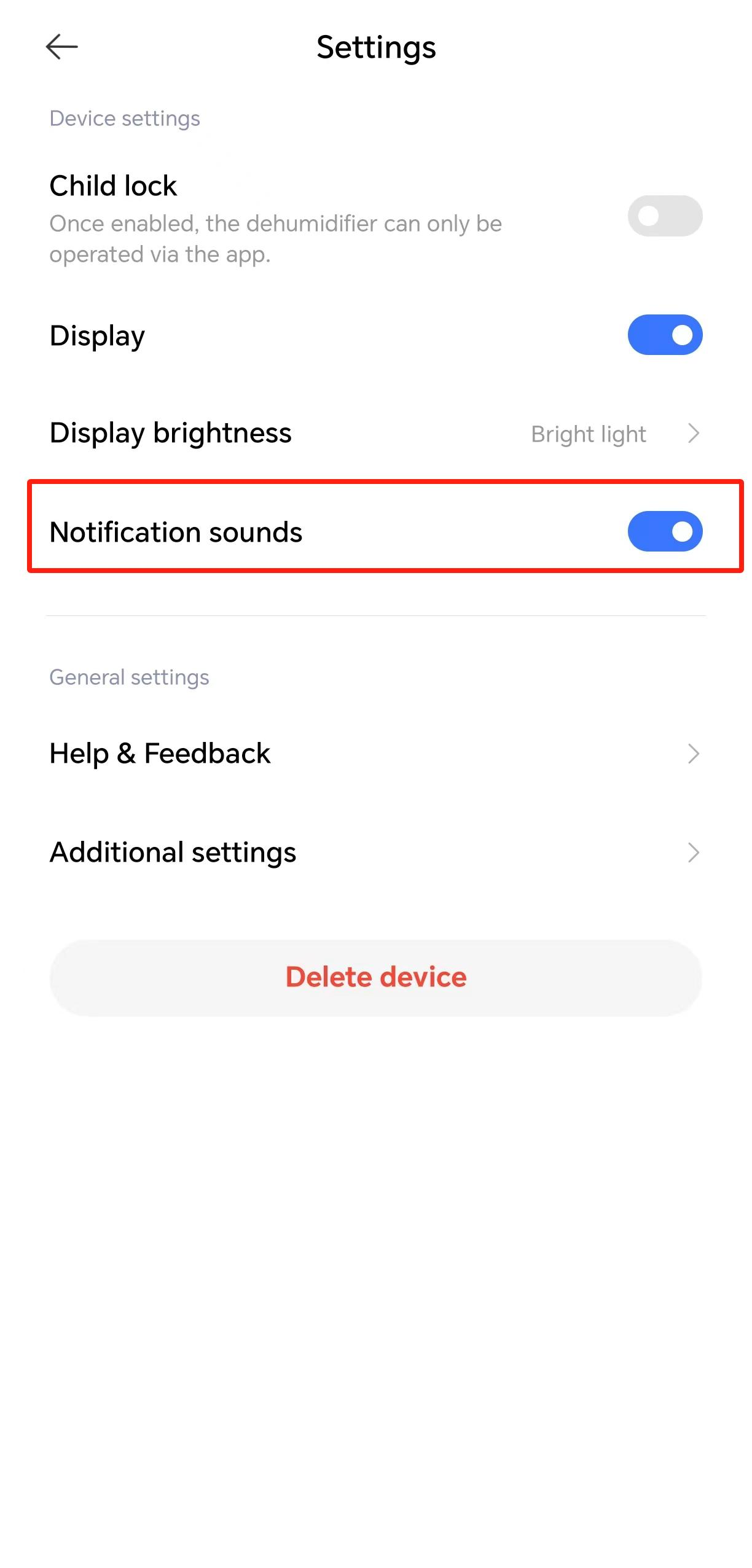
FAQs
1. Q: What to do if the Xiaomi Smart Dehumidifier Lite cannot be turned on?
A: 1. Make sure the socket has power, and then make sure the power cord is plugged in place;
2. After the power cord is energized, the machine will beep, then press the On/Standby button to turn on the machine normally;
3. If the machine has a beeping sound and the screen displays an error code, check the manual or report it to the service center.
2. Q: Why the Xiaomi Smart Dehumidifier Lite cannot achieve the humidity level set?
A: The effect of dehumidification is greatly affected by the environment in which it is used. If the dehumidifier is operated for a period of time in a relatively airtight environment with a suitable surface area, the set humidity level can be achieved. If the set humidity level is not achieved, consider whether the space used is too large or whether the inflow of high humidity from outside is affecting the performance.
3. Q: What should I do if there is a foreign object falling in the top of the Xiaomi Smart Dehumidifier Lite?
A: The internal circuitry is involved, and non-professionals are not recommended to open and clean it. If a very small foreign object falls into the top, it will fall onto the water channel or water catchment tray and may be discharged with the condensate. If a foreign body is stuck in the fan and causes the fan to rattle, please contact the after-sales service.
4. Q: Can I modify the Xiaomi Smart Dehumidifier Lite?
A: Modification is not recommended. Other third-party dehumidifier accessories available on the web that change the way the dehumidifier itself is used are not allowed to be used in combination with the dehumidifier product, and may affect the product experience and warranty.
5. Q: What should I do if I lose power accidentally when upgrading the firmware of my Xiaomi Smart Dehumidifier Lite?
A: Please re-power the dehumidifier. After powering on, the machine will automatically re-upgrade and the screen will remain in black for about 20 seconds. The screen will light up automatically after the upgrade is completed.
6. Q: How long is the power cord of the Xiaomi Smart Dehumidifier Lite?
A: The power cord of the Xiaomi Smart Dehumidifier Lite is 1.6m.
7. Q: Does the Xiaomi Smart Dehumidifier Lite support the power failure memory function?
A: 1. If the machine is turned off by pressing the On/Standby button and then turned on by pressing the On/Standby button again without unplugging the machine, it will memorize the operation mode before turning off the machine and the timer will not be remembered;
2. If the machine is powered off during operation, the machine will not operate automatically when it is powered on again, and the machine will operate in the initial power-on mode when it is powered on again by pressing the On/Standby button.
8. Q: What kind of material is the filter on the Xiaomi Smart Dehumidifier Lite made of and does it have any purifying effect on the air? Is there any antibacterial function?
A: The filter of the Xiaomi Smart Dehumidifier Lite is made of spinning grade polypropylene resin, which can only filter out large objects such as willow flakes and hair in the air, and is not equivalent to the effect of an air purifier. The filter has anti-bacterial and anti-mold effects, with a 99.99% anti-bacterial rate for C. coli and a 99.99% anti-bacterial rate for Staphylococcus aureus, and the dehumidifier's default drying with power-off function effectively prevents mold and mildew from developing inside the unit.
9. Q: How can I deal with the water discharge pipe of the Xiaomi Smart Dehumidifier Lite which is too short and not easy to install?
A: The current design of the water discharge pipe is because the dehumidifier relies on power to discharge water, and a water discharge pipe that is too short will easily lead to water clogging, water clogging and other problems affecting water discharge.
10. Q: What to do if the water discharge pipe connected to the Xiaomi Smart Dehumidifier Lite doesn't work?
A: After connecting the water pipe, the machine needs to be put back into the tank to work properly.
11. Q: Why there is any icing or frosting during the use of the Xiaomi Smart Dehumidifier Lite?
A: When the dehumidifier is at a low temperature, the unit will enter the frosting mode, which is normal, so please be careful when using it.
12. Q: What to do if the Xiaomi Smart Dehumidifier Lite notifies you “Please clean the filter as soon as possible”?
A: Turn off the dehumidifier and disconnect the power, take out the filter to check if it is really dirty and follow the cleaning tutorial. If it is not dirty or is a false alarm, reset the filter in the APP, and the device will beep when resetting to indicate that the reset has been completed.
13. Q: What to do if the Xiaomi Smart Dehumidifier Lite cannot work after being turned on or turns off automatically?
A: There are the following cases in which there is no work:
1. When the set humidity is higher than the current ambient humidity detected by the unit, the compressor operates at a low speed and the compressor does not run;
2. Only the fan operates when the ambient temperature is <5° or >35°, and when the sleep mode is >32° and the compressor will not work;
(The compressor will work after the automatic shutdown only if the shutdown function is turned on in the app, at which time the compressor will not work and there will be no dehumidification effect.)
3. If the tank is not placed in place, the device does not work properly.
14. Q: How to solve the water leakage of the Xiaomi Smart Dehumidifier Lite?
A: First, check whether the device is being used on a level surface. If the surface is sloped, water may not be able to flow out of the device, or water may not be able to flow into the tank.
If you have confirmed that you are using a level surface, check the following usage conditions:
Using the water tank
1. Install the water tank in place;
2. If there are any foreign objects in the outlet, clean it;
3. If you cannot solve the above problems, refer to the after-sales service.
Using the water pipe
1. Check to see if there is any water leakage due to a break in the water pipe;
2. It is recommended to use the standard water drain;
3. If you cannot solve the water leakage problem above, refer to after-sales inspection.
15. Q: What troubleshooting tips are available for the Xiaomi Smart Dehumidifier Lite, and how can they be resolved?
A: Display codes:
1. [C2] Dehumidifier malfunction:
Turn off the machine and turn it on after 5 minutes. If the malfunction code appears several times, please contact an after-sales service center;
2. [C3] Display board and motherboard communication failure: Disconnect the power supply, check the communication wiring and re-power the power supply. If it can not be solved, please contact an after-sales service center;
3. [E1] Tube temperature sensor package failure:
Turn off the power and turn on the power after 5 minutes. If the error code appears repeatedly, please contact service center.
APP reminder:
1. [Motor malfunction]:
Check whether there is any foreign matter at the fan that causes motor blockage or abnormality. Power off for 10 seconds and restart the machine.
Does it help?