

Xiaomi Smart Band 7 Pro FAQ
Overview
1. Q:What are the features of Xiaomi Smart Band 7 Pro?
A:
1.For the first time, the band features a large, full-color rectangular display. The layout of all features on the Band displays is similar to that of a smartphone. Text and icons own more space and become much easier to tap and swipe. Xiaomi Smart Band 7 Pro can be seen as a convenient extension of your smartphone.
2.This is the first Xiaomi smart band to be available in metallics, graphite grey and light gold for a subtle classiness. Coated with NCVM for lightness and comfort. Smooth to the touch, with a high-gloss metal texture
3.With six classic colours, you can be elegantly understated or loud and vibrant — it's up to you. Make a statement, starting from your wrist. The strap has a easy to do clip which is practical for maximum convenience.
4.Built-in GNSS can be synced to your phone or used solo for minimalist workouts Support BeiDou, GPS, GLONASS, Galileo and QZSS systems. Count every step, because every step counts.
5.10 pre-loaded running courses of varying intensity, calculated via time and heart rate. The band can vibrate and light the screen to remind you to meet your heart rate and speed goals, making sure that you get the most out of your workout.
6.Daily health statistics, such as heart rate, fitness, and sleep, are shown in detail to provide a clear picture of your health. Support easy syncing data with Strava and Apple Health.
7.Check the weather, set an alarm, remotely control your home smart appliances, and more. So just ask Alexa.
2. Q:What is the appearance of Xiaomi Smart Band 7 Pro?
A:The appearance of Xiaomi Smart Band 7 Pro series is as follows.
External dimensions: 44.7×28.8×11mm
Weight: about 31g (with band strap) / 20.5g (without band strap)
3.Q:How to install and remove the band strap of Xiaomi Smart Band 7 Pro?
A:
Please adjust the position of the band strap holes according to the circumference of your wrist. If you need to disassemble the band strap, please refer to the diagram. After installing the band strap, please pull and tug the band strap to make sure the band strap is successfully installed.
Removing the band strap.
To remove the band strap, press the removal button with your finger while pulling the band strap outward with your other hand.
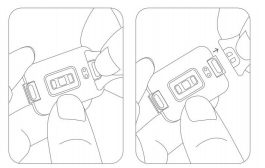
Install the band strap:
Install the band strap by aligning the recessed part of the band strap with the main body of the bracelet, and when you hear a "click", the band strap is successfully installed.
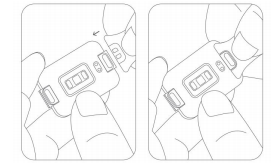
4. Q:What material is the Xiaomi Smart Band 7 Proband strap made of? Is it anti-bacterial?
A: Xiaomi Smart Band 7 Pro comes in 6 antibacterial band straps (Ivory|Olive|Orange|Blue|Black|Pink) which are skin-friendly, waterproof and lightweight.
The band strap is made of thermoplastic elastomer and is skin-friendly, waterproof and lightweight.
Note: The two silicone imitation leather band straps (Pine Green|Moon Gray) do not have antibacterial effect.
5. Q:Does the Xiaomi Smart Band 7 Proband strap work with other Mi bands?
A:No.
6.Q:What is the NCVM process of the middle frame of Xiaomi Smart Band 7 Pro?
A:NCVM surface treatment technology, the surface of the product is not conductive, the surface layer is insulating material, the middle layer is metallic luster material, the bottom surface is color material. NCVM surface non-conductive, so that the bracelet independent GNSS (GPS) in receiving satellite positioning signal, will not be interference and shielding.
Lightweight is one of the characteristic points of the bracelet product, the NCVM process used in the middle frame can ensure the lightness of the bracelet product, but also has a delicate metal texture.
Also, it will not feel cold when worn in a low temperature environment.
7. Q:Does Xiaomi Smart Band 7 Pro support compass?
A:No.
8. Q:Does Xiaomi Smart Band 7 Pro support find band?
A:No.
Function and Use
1. Q:What devices does Xiaomi Smart Band 7 Pro support? What apps need to download?
A:You need to connect the charging cable to activate the device for the first time, and use the Mi Fitness app to bundle the device.
Operating system: Android 6.0 or higher, iOS 12 or higher
2. Q:How to set up the apps of Xiaomi Smart Band 7 Pro?
A:Band application settings means that you can set the order of the first level menu functions on the band. You can customize the apps on the screen according to your personal preference.
First-level menu: refers to the apps that the band can switch between by swiping up and down on the home page, with status, settings, heart rate, blood oxygen, notifications, etc.
Mi Fitness app: Device -> Settings -> app order management, drag to adjust app order.
3. Q:How to set the band shortcut portal of Xiaomi Smart Band 7 Pro?
A:The shortcut entrance of band means the band home page can switch applications by swiping left and right; the app can add or delete the number of shortcut entrances of band or modify the sorting by itself according to the usage preference.
Mi Fitness app: Device-System-Sort apps, hold the Sort button to rearange items or drag it to the bottom to hide the app.
4.Q:How does the Xiaomi Smart Band 7 Pro charge? Does it work with other band adapters?
A:The battery capacity of Xiaomi Smart Band 7 Pro is 235mAh, which takes about 1 hour to charge. The band comes with a special magnetic charging stand as standard, which is not compatible with other Mi band chargers.
You don't need to disassemble the band strap for charging, you need to connect the two ends with metal contacts to the special charging stand. Then, connect the charging cable to the charger with voltage
Then connect the charging cable to a standard USB charging head with a voltage of 5V and an output current of 250mAh or more.
Notes: 1. When charging, please make sure the charging contacts are clean and dry, and check if the charging buckle and charger are in good contact.
2.If the band has not been used for a long time, you need to wait for a while before the charging screen will be displayed when charging again.
3. While the band is charging, you can check the current time, receive call alerts and app notifications.
4. It is recommended to use a 3C certified charging head for charging.
5. Q:How to check the charging status of Xiaomi Smart Band 7 Pro?
A:The band will show the charging icon, current time and specific percentage when inserted into the charging cradle, and the band will vibrate to remind you when it is fully charged, and the power level will show 100%.
Note: If the charging icon is not on this page, you need to check the band firmware version and upgrade to the latest version.
6. Q: How to Start up, Shut down, Reboot, or Factory reset Xiaomi Smart Band 7 Pro?
A:1. Start up/Shut down: the band will automatically shut down when the power is too low, support manual shutdown, low power shutdown state, charge again, the band will automatically turn on when the power reaches the power on (about 3 minutes).
2. Reboot/Factory reset: select Reboot or Factory reset in the "Settings" of the band, binding connection status, unbinding in the App can also Factory reset settings.
Note: After shutdown, you need to connect the charging cable to activate the power on again.
The band will automatically shut down after 10 minutes when not bound.
10. Q:What is the correct way to wear Xiaomi Smart Band 7 Pro?
A:1. Wear the band to about one finger from your wrist bone and adjust the band strap loosely to a comfortable position to ensure that the heart rate sensor can collect data properly.
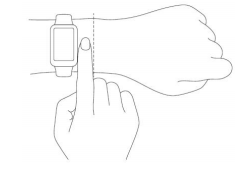
2.For the heart rate sensor to achieve optimal measurement, the back of the band needs to be in contact with the skin. Wear the band correctly, neither too tight nor too loose, while allowing space for the skin to breathe. The band strap can be tightened during exercise and then adjusted appropriately after exercise.
11. Q:How does Xiaomi Smart Band 7 Pro measure and view heart rate?
A:When Xiaomi Smart Band 7 Pro is switched to the Heart Rate app, if you turn on the all-day heart rate detection, click the heart rate icon to view the heart rate data directly. After entering the Heart Rate app, put your arm flat, there will be an animation effect when measuring the heart rate, and the heart rate value will be displayed after the measurement is completed, and you can slide up to view the current heart rate interval.
Heart rate data can also be viewed in the App, view as follows.
Mi Fitness app->Health->Heart rate->You can view the whole day heart rate graph, as well as the highest, lowest, resting heart rate and high/low heart rate, etc.
Note: Non-standard wearing style will affect the measurement of heart rate signal.
12.Q:Does Xiaomi Smart Band 7 Pro support automatic heart rate detection?
A: Yes, you can set it through Mi Fitness app. When you turn on automatic heart rate detection, it will detect heart rate all day long, which will significantly reduce the battery life of the band.
Turn on heart health monitoring mode, the band will automatically measure heart rate in real time, and at the same time will significantly reduce the band battery life.
Setting path:
Mi Fitness app:Device->Health monitoring->Heart rate->Continuous->Frequency
13.Q:Does Xiaomi Smart Band 7 Pro support Heart rate alert?
Xiaomi Smart Band 7 Pro supports Heart rate alert, the band will vibrate to alert when the heart rate reaches Alert value and there is no significant activity in the last 10 minutes. The setting method is as follows.
Mi Fitness app:Device->Health monitoring->Heart rate->Heart rate alert->Alert value
14.Q:How to download/delete Band displays on Xiaomi Smart Band 7 Pro?
A:When the band is connected to your phone, you can download new Band displays through the Mi Fitness app.
1. Mi Fitness app: Device-Online-Band displays, which can be used after downloading and importing.
2. How to delete Band displays:
Band:Band-Settings-Band display-Entering band display editing page... Press&hold to confirm the changes
APP:Device-- Online-Band displays-click the band display you want to delete-delete it
Note: The built-in Band displays do not support deletion.
15.Q:How to change Xiaomi Smart Band 7 Pro Band displays?
A:The Band has built-in system Band displays, more Band displays can be downloaded and used in the Mi Fitness app, Band displays can be changed in the band and App, Band displays Online is divided into dynamic Band displays.
1. Band displays can be changed on the band.
① You can select your favorite Band displays in Band-Settings-Band display, and then click on the screen to confirm to complete the replacement of Band displays.
② You can long press on the Band displays page, it will enter the preview mode, slide up and down to select your favorite Band displays preview image, click the preview image to change the current Band displays.
2. To change the Band displays on the app: You can long press on the Band displays page to enter the preview mode.
Mi Fitness app: Device - Online - Band displays, enter Band displays and download the sync to finish replacing Band displays.
16.Q:How to check PAI on Xiaomi Smart Band 7 Pro?
A: Xiaomi Smart Band 7 Pro does not support PAI.
17. Q:Does Xiaomi Smart Band 7 Pro support sleep monitoring?
A: The band supports high-precision sleep monitoring, which, when turned on, can track the rapid eye movement (REM) phase distribution of sleep, but the device life time will be severely reduced. (Need to check sleep staging in APP)
For long sleep greater than or equal to 3 hours, the device will show the average heart rate and average blood oxygen saturation within the segment based on the available data, and for sleep less than 3 hours, only the time of falling asleep and waking up will be shown.
If the quality of sleep is very poor, too much wrist movement during sleep may lead to bias in sleep heart rate measurement and blood oxygen measurement failure.
Sleep record viewing method: After The band is connected with the phone to synchronize data, you can click Sleep in the App to view historical sleep data, including daily, weekly and monthly; sleep distribution, including total sleep hours, sleep quality, sleep distribution, and average heart rate.
Note: The band is in a relatively quiet state, and there is a similar amplitude of movement as sleep, which may cause the sensor to judge the sleep state, resulting in errors in the time of falling asleep. For example, when watching TV, lying on the bed playing cell phone, reading a book, there is a sleep mismeasurement, probably because the amplitude and frequency of the action is relatively small, and the scene is more similar to sleep.
18.Q:Does Xiaomi Smart Band 7 Pro support Incoming call notification吗?
A: Support, when connected to the phone, the band will vibrate to remind when there is an incoming call to the phone and display the number or name of the caller.
When an incoming call, you can click the red phone icon on the band screen to reject the call, click the mute icon to mute the call, and do not support answering the call.
Turn on method:
APP:Device-- App notification-Phone
19.Q:Does Xiaomi Smart Band 7 Pro support pressure detection?
A: Yes, you can measure the pressure manually or turn on the automatic detection of pressure throughout the day.
1. Manual measurement method: You can measure the current pressure value on the pressure details page of The band, and if the measurement is successful, the current pressure value will be displayed, and if the measurement fails, "Measurement failed" will be displayed. To ensure successful measurement, please wear The band correctly and keep still during the measurement.
2.The band will automatically measure the pressure of your body in a quiet state after you turn on the pressure detection in the APP heart rate detection page. To turn on the pressure detection, you need to turn on the all-day heart rate detection function.
Path to open stress detection: Mi Fitness app-Health monitoring-Stress-Settings
3. Viewing method.
Swipe up to view the pressure status when there is measurement data on the pressure measurement page of The band.
Mi Fitness app to view the history of stress detection.
Stress: Stress here refers specifically to mental stress, not including physical stress due to high-intensity exercise.
Note:
1. Please wear the device correctly and keep quiet when measuring to ensure that the heart rate monitoring data is normal during the stress monitoring process.
2. Strenuous exercise or moderate to high intensity activity is frequent, the accuracy of the assessment of stress data will have a certain impact.
3. The band is not a medical device and the test results and recommendations are for reference only.
20.Q:How to use Xiaomi Smart Band 7 Pro Female health tracking?
A:Female health tracking needs to be set up in the app. After setting up, you can check the current status of your period on the female health page of The band, and there will be a text message indicating when you will have your period.
How to turn on: The initial settings of female health can be set in Mi Fitness app-->Female Health page. You need to select the length of your period, the length of your physiological period, and turn on the intelligent prediction of your physiological period. After the settings are completed, you will jump to the details page, where you can view the status of your selected period and save it.
Physiological intelligent prediction: Based on the length of women's menstrual period, the start date and end date of menstrual period and other personal data, the entire physiological cycle of women can be predicted, and the complete physiological cycle prediction includes: period prediction, easy pregnancy prediction, ovulation day prediction, which helps women understand their body condition, regularize their physiological period and take care of their health. Long-term continuous and complete period record helps to improve the accuracy of physiological period prediction.
Click to adjust the physiological cycle, you can choose the pain level, blood volume situation and mood.
Click on the notification reminder to turn on the period reminder.
21.Q:How to use the breathing training function on Xiaomi Smart Band 7 Pro?
A:Breathing training helps to regulate heart rate, improve stress, relax and soothe, and take deep breaths regularly to help your health.
1. Open the breathing training app on The band and select the length of training (1-5 minutes).
2. Please keep a steady stillness and click start training.
3. The band screen will display a guided animation of exhalation or inhalation, and a progress bar at the bottom of the training page will show the total time required.
4. the number of breaths and heart rate change interval will be displayed after the training is completed.
22.Q:Does Xiaomi Smart Band 7 Pro support power saving mode?
A:Xiaomi Smart Band 7 Pro does not have a special power saving mode switch, but by turning off the automatic heart rate detection, or modifying the heart rate detection frequency, and reducing the brightness of The band display, you can achieve the effect of energy saving and increase the battery life.
Setting method: Mi Fitness app->Device->Health monitoring->Heart rate->Continuous monitoring->Close or edit it
23.Q:Which features enabled on Xiaomi Smart Band 7 Pro will cause the band to consume power fast?
A:Sleep breathing quality detection function, turn on heart health monitoring mode (heart rate detection in real time at this time), turn on screen constant light mode when exercising, frequent message reminders and bright screen, turn on automatic pressure monitoring throughout the day, frequent use of blood oxygen detection, the use of these features may cause The band's battery life to become shorter.
24.Q:How to check the weather on Xiaomi Smart Band 7 Pro?
A:Xiaomi Smart Band 7 Pro can check the current weather by lighting up the screen and clicking on the weather app, which shows: weather icon, current temperature, all-day temperature, air quality, location, and up to 4 days of weather in the future.
Tap the city location icon at the top of the band display to switch to other regions (supports adding up to 5 cities manually in the app) and turn on the weather alert. When the band receives a weather alert notification, it will receive the push.
Mi Fitness app:Device-System-Sort apps-Weather updates, Locations, choose location(automatic location or manual city selection)
Note: To use the band to view real-time weather, you need to keep your phone connected to the band. If the band is not connected to the phone, the weather will show the information that was synced when the phone was last connected.
25.Q:Does Xiaomi Smart Band 7 Pro support Workout notification?
A:Yes, the band can be accessed by clicking on the sports function, selecting Workout, and clicking on the icon at the bottom to enter the settings. You can set whether to enable auto-pause, heart rate reminder, speed reminder, distance reminder during exercise according to your needs. When the reminder is turned on, the band will vibrate when the set value is reached, and when the auto pause is turned on, the band will automatically pause when it detects the band is in a stationary state.
Note: If you turn on the Workout in Mi Fitness APP, you can also set the exercise reminder in the exercise page of the app.
Mi Fitness app:App-Workout-Choose mode-Settings
26.Q:How to use the photo function of Xiaomi Smart Band 7 Pro?
A:The band's photo function allows you to control your phone to take photos through The band. This function needs to be used when The band is connected to your phone.
Before using this function, you need to pair in the App first, the pairing method is organized as follows.
iOS phone: After binding the device, the system will pop up the pairing pop-up box, click to allow pairing.
Android Device-System-Sort apps-Camera-Bluetooth pairing (unpairing)
After the pairing is done, open the camera app on your phone and press the photo button on The band to take photos with The band.
27.Q:How to set and use the Do Not Disturb mode on Xiaomi Smart Band 7 Pro?
A:When The band is in Do Not Disturb mode, you can receive messages but no longer vibrate and light up the screen to remind you, such as Incoming call notification, SMS alert, App notification alert, email alert, and care notification.
Setting: Xiaomi Smart Band 7 Pro-Settings-DND
1.Select "Turn off DND" to disable Do Not Disturb mode.
2.Select "Auto turn on" to automatically turn on Do Not Disturb mode after you fall asleep with The band.
3.Select "Custom", the Do Not Disturb mode will take effect when the scheduled time is reached.
4. Keep DND on can be selected.
38. Q:How can Xiaomi Smart Band 7 Pro check the number of steps, calories, standing activity/medium to high intensity activity hours for the day?
A:There are two ways to view.
1. Click the band and slide up and down to find the vitality indicator, then click into it to display the number of steps, calories (kcal), standing activity/medium-intensity activity hours of the day's exercise.
2. APP view: When the phone is connected to the band, the data will be synchronized and viewed on the health page of Mi Fitness app.
29.Q:How to check notification messages on Xiaomi Smart Band 7 Pro?
A:The band will vibrate to prompt you when you receive a notification, and will automatically display the notification content. If you don't check the notification immediately after receiving it, you can find the history notification by sliding to the notification portal on the dial page.
Delete or clear notifications.
The band can save up to 10 recent notifications, after this limit, each new notification received will automatically delete the oldest one.
If the notification content is beyond one screen, you can continue to swipe to view it
1. Swipe down on the first notification page to enter the clear page, and click it to delete all notifications.
2. In the notification list, swipe up to view the message, and swipe to the bottom to choose to clear all notifications.
30.Q:How does the Xiaomi Smart Band 7 Pro alarm work?
A:You can set, edit, add and delete alarms in the alarm clock app in The band. You can set up to 10 alarm clocks and choose to set only once or set single day or multi-day from Monday to Sunday. click the button next to the time on The band side, you can choose to edit the set alarm clock and support creating, deleting and changing the alarm time.
Xiaomi The band 7Pro can automatically synchronize the alarm clock of MIUI system phones, and when one of the devices is turned off in the connected state, the other one will be turned off as well.
31.Q:Can Xiaomi Smart Band 7 Pro control the phone to play music?
A:No.
32.Q:How to use Xiaomi Smart Band 7 Pro Stopwatch?
A:
Enter Stopwatch, click the start button at the bottom to start timing, keep two decimal places, the screen is always on during timing. Tap to record the time, tap
  to pause the time, then tap
  to continue timing, click
 to stop timing, click "x" to return to the pause interface, click "√" to confirm the end of the stopwatch. The maximum number of punches can be 20.
33.Q:How to use the countdown timer function on Xiaomi Smart Band 7 Pro?
A:Go to the countdown timer function on band and select the countdown time. Click the bottom button to start the countdown. Click
  to pause the countdown, then click
  to continue the countdown, click
  to stop the countdown, click "x" to return to the pause screen, click "√" to exit the countdown.
34.Q:How to set the brightness of the screen of Xiaomi Smart Band 7 Pro?
A: How to set the brightness of Band: Click Band-Settings-Brightness, there are five levels of brightness to adjust.
Xiaomi Smart Band 7 Pro supports auto brightness, which changes according to the ambient brightness.
35.Q:What information can be viewed before the band is bound?
A:The band in the unbound state, there will be please bind and settings, settings have Reboot, Factory reset, regulation, about.
In the settings, there are Reboot, Factory reset, Supervision and About. The Supervision is the radio transmitting equipment type approval code (CMIIT ID) information, click to view; About can view the firmware version and Bluetooth address.
36. Q:How to check the firmware and Bluetooth address of The band?
A: Band click Settings-About to view the firmware and Bluetooth address.
Band connected status, Mi Fitness app to view, view path: App->Devices->About.
37.Q:How to use Find phone?
A: Xiaomi Smart Band 7 Pro supports Find phone, using this feature requires The band to keep the connection with the phone.
Operation method: Device-System-Sort apps-More-Find phone, click on it and the band will show that it is ringing, then the phone will ring, the band can turn off the ringing by clicking the ringing icon.
38.Q:Does Xiaomi Smart Band 7 Pro support Raise to wake?
A:Yes, swipe left on the screen to turn on Raise to wake.
39.Q:Does Xiaomi Smart Band 7 Pro support setting unlock password?
A:Yes. In Mi Fitness app: Device-Security-PIN, enter the 6-digit password.
40.Q:Does Xiaomi Smart Band 7 Pro support standing notification?
A:Yes, The band will vibrate to remind you when it detects 60 minutes of inactivity.
The band will vibrate when it detects 60 minutes of inactivity.
Note: Reminder will pop up if no steps are generated for 60 minutes. (Steps need to be more than 10 to be recorded, so if the number of steps is less than 10 in 60 minutes, a sedentary reminder will be popped up)
Setting method:Mi Fitness app-Health monitoring-Standing-on/off> Set the time period
41.Q: Does Xiaomi Smart Band 7 Pro support phone schedule synchronization?
A:Yes, Mi Fitness app->Devices->Schedule sync, and the schedule on your phone's calendar will be synced to The band after you open it.
Note: At present, only Xiaomi phones and IOS models are confirmed to support the schedule app.
42.Q:Does Xiaomi Smart Band 7 Pro support unlocking the phone?
A:Xiaomi Smart Band 7 Pro supports unlocking the phone. To unlock the phone, you need to enable it in the Mi Fitness app.
The setting method is as follows: Mi Fitness app-Device-Security-PIN-Set PIN
Click on the Settings band to unlock, The band screen shows Allow phone to bind? Click "√" to show that the binding is successful.
To unbind: you need to turn off the Bluetooth device unlocking function in the system settings of your phone.
Settings-Passwords&security-Unlock with Bluetooth device
Note: Currently, band unlock supports MIUI based on Android 6.0 and above.
43. Q:What features are available in the settings of Xiaomi Smart Band 7 Pro?
A:The band provides Online, Brightness, Vibration, DND, Detect activity,PIN, About in the settings page.
44. Q:Does Xiaomi Smart Band 7 Pro support the notification brightness?
A: Yes.
45.Q:How does Xiaomi Smart Band 7 Pro wake up the screen?
A:You can wake up the screen by tapping the screen and Raise to wake.
Tap the screen: Tap the screen to light up the screen when it is off.
Raise to wake:It can be turned on/off by swiping left in the main interface, or set on/off in Settings - Display & Brightness.
46. Q:What notifications does Xiaomi Smart Band 7 Pro support?
A:The band notifications include: Incoming call notification, standing notification, attainment notification, The band alarm notification, schedule, SMS notification, and other mobile app notification (you need to turn on the corresponding permission in message notification).
47. Q:Does Xiaomi Smart Band 7 Pro support blood oxygen monitoring?
A:Support.
1. after waking up the band, swipe up on the dial interface, find the blood oxygen app and open the blood oxygen saturation app to measure the blood oxygen saturation manually.
2. After the measurement is finished, the result of this measurement will be displayed on the band.
3. Noted:
① Wear the band tightly with the screen facing upward and keep it still.
② When the measurement process is too large, there will be a prompt, please operate correctly according to the prompt.
③ During the measurement process, incoming calls, alarms and other alerts will interrupt the measurement.
④ Measurement results are for reference only and are not to be used as a basis for medical diagnosis.
48. Q:How long does it take for The band to complete a single oxygen saturation measurement?
A:Approximately 25-50 seconds.
49. Q:What are the changes in the sensor lights on the lower part of the band during the oxygen saturation measurement?
A:The red and green lights will be on.
50. Q:Can oxygen saturation be measured during exercise?
A:Blood oxygen cannot be measured during exercise.
51. Q:Can blood oxygen saturation be displayed on Band display?
A: Yes, refer to the custom Band display function. (Component Band display supports custom parameter items)
52. Q:Is there any relationship between oximetry and age?
A:Oximetry has nothing to do with age.
53. Q:Is there an abnormal oxygen alert when the oxygen saturation value is at risk?
A:This feature is not currently supported.The SpO₂ feature is not intended for diagnosis, prevention, monitoring, prediction, prognosis of any disease, investigation of physiological processes or any other medical purpose. All data and tracking should be used for well-being and personal reference only. If you feel uncomfortable, please rely on professional medical devices or consult a doctor for assistance.
54. Q:Is it possible to measure blood oxygen saturation when the band is disconnected from the phone?
A:Yes, you can measure blood oxygen while disconnected, the band will show the last measurement record; when the measurement is finished, you can connect the app to sync the blood oxygen value to the app.
55. Q:How to view the blood oxygen measurement record?
A:You can view the last record of oxygen saturation measurement on the band, the history and detailed information need to be synced to the App to view.
Setting method: Mi Fitness app-Health-Blood oxygen
56. Q:Does blood oxygen saturation testing cause human damage?
A: The device uses an optical sensor to measure blood oxygen saturation, which will not cause human damage.
57.Q: Does the band support blood oxygen data export?
A:You can view the history by syncing the data to the App, but the data export function is not supported at the moment.
58.Q: Does Xiaomi Smart Band 7 Pro support abnormal heart rate notification?
A:Yes. It supports high heart rate alert and low heart rate alert.
59. Q:How to calibrate the time of Xiaomi Smart Band 7 Pro? Does it support 24-hour format?
A:Xiaomi Smart Band 7 Pro will automatically synchronize the time on your phone when you connect the app.
60. Q:Does Xiaomi Smart Band 7 Pro support automatic motion monitoring?
A:Xiaomi Smart Band 7 Pro supports automatic motion monitoring.
Setting method:Band-Settings-Detect activity-on/off
61.Q:Does Xiaomi Smart Band 7 Pro support Flashlight?
A:Smart Band 7 Pro support supports Flashlight.
App Connection and Usage Related
1. Q:How to pair and unpair the Xiaomi Smart Band 7 Pro with the phone?
A:Xiaomi Smart Band 7 Pro supports Mi Fitness app binding. After binding, you need to lock the app in the background to avoid being shut down by the system and disconnected from the phone, which will affect the normal use of the band.
Open the Mi Fitness app, log in to your Xiaomi account, and follow the pop-up box to open the app-related permissions. Click on the device - add new device - band - stick the phone and band together to search for binding, after the band is searched for, the band will show the check mark key, click the check mark key to confirm the binding.
Unpair: When the band and the phone are connected, open Mi Fitness app
- Devices - Unpair, click "Unpair" to Unpair. After Unpairing, the band will be Factory reset.
Note: ① If you can't find the band in the process of adding devices, or can't connect to the band in the process of using, please try to slide up and down on the band to be bound page, select Factory reset in the system operation interface, and then add the bound devices again.
② When band is not bound, the screen will show "Please bind first", you need to bind before you can use the band function. After sliding, it will show "Regulatory" regulatory for radio transmitting equipment type approval code (CMIIT ID) information, click to view.
2. Q:How to set App notification on Xiaomi Smart Band 7 Pro?
A:Band supports App notification, if you want to receive mobile App notifications, such as SMS, Incoming call notification, etc., you need to turn on the App message notification in the App.
Open method:
Mi Fitness app:Device-App notifications-Choose which apps can send notifications
Note: For apps that enable notification messages in the app, you need to enable the notification permission of your phone at the same time.
3. Q:When using Xiaomi Smart Band 7 Pro, should the Bluetooth of the phone be turned on all the time?
A:When Xiaomi Smart Band 7 Pro is used: pedometer, sleep monitoring, heart rate/pressure/oxygen detection, alarm clock and other functions do not need to open Bluetooth all the time, you only need to wear the band when you work out, and connect the band and the phone to synchronize the data after the workout is finished; when you want to achieve: Incoming call notification, App notification, find the phone and other functions because the phone needs to communicate with the band all the time, so you need to open the phone Bluetooth, keep the band connected to the phone.
FAQs
1.Q:How long can Xiaomi Smart Band 7 Pro data be saved independently
A: Xiaomi Smart Band 7 Pro can keep up to about 10 sports records. The data that has been synced to the App will be automatically uploaded to the cloud and saved. If you change to a new phone, you can sync your previous data from the cloud to the new phone by using your previous Xiaomi account on the new phone to bind to the band.
Note: The number of saved strips will change with the size of the sports record, whichever is actual.
2.Q:Does Xiaomi Smart Band 7 Pro support cover off screen? Does it support custom screen off time?
A:Xiaomi Smart Band 7 Pro turns on the cover off screen by default and supports turning it off.
Band can customize the screen off time.
Setting method: Band-Settings-Brightness-Lock screen-Sleep
3.Q:What data will be cleared when Xiaomi Smart Band 7 Pro Factory reset is set?
A:Xiaomi Smart Band 7 Pro: bandFactory reset will clear all the data of the band (but the data that has been synced to the App on the account side will remain in the cloud).
4.Q:Does Xiaomi Smart Band 7 Pro support connecting to a heart rate band?
A:No.
5.Q:Does Xiaomi Smart Band 7 Pro support Alexa voice assistant?
A:The Xiaomi Smart Band 7 Pro has a built-in Alexa voice assistant.
6.Q:What are the other FAQs of Xiaomi Smart Band 7 Pro?
A:As follows.
7.Q: How can Xiaomi Smart Band 7 Pro not be positioned in underground garages and other locations?
A:Hello, GPS positioning relies on the ability to search for satellites, in underground warehouses most of the time, the satellite can not be searched for, resulting in the inability to locate is a normal situation. It is recommended to go to a place with wide space for positioning, or to realize positioning with a joint cell phone (connect the band to a cell phone that can locate normally through the GPS of the cell phone).
Remark 1: Common factors that affect star search, such as between dense buildings, in tunnels, underground parking lots, under elevated bridges, and rainy weather, etc.
Remark 2: When there is no GPS signal, the movement track of band will not be displayed, such as entering indoor or underground garage after running one kilometer, and the GPS signal is lost.
8.Q:Is it normal for Xiaomi Smart Band 7 Pro to shake and rattle?
A:This product supports band strap quick replacement, which requires quick release button activity to achieve band strap removable and replaceable; it is normal for the quick release button to rattle occasionally when the band is shaking or the motor is vibrating, in order to ensure a better feel of the quick release band strap, please feel free to wear and use it normally.
9.Q:How many words can the Xiaomi Smart Band 7 Pro screen display?
A:Xiaomi Smart Band 7 Pro can only display up to one screen of message content.
10.Q:Where are the Band displays of Xiaomi Smart Band 7 Pro and how to customize them?
A:The Band displays of Xiaomi Smart Band 7 Pro are preset Band displays, which can be viewed in APP--Devices-Online-Band displays--Local.
At the Band displays, long press on the Band displays interface to enter the Band displays replacement, and slide up and down the small dot position on the right to replace the Band displays, at the component Band displays, click on the Band displays interface setting button to enter the custom parameter display, which supports replacing the Band The parameters in the lower right corner of the displays are supported.
11.Q:ow to turn on the rest screen Band displays on Xiaomi Smart Band 7 Pro and can I change the rest screen style?
A:In Band--Settings--Brightness--on display is turned on.
You can change Band displays to replace the corresponding resting screen Band displays, the specific resting screen style after connecting the band in APP--Devices-Online--Band displays--Online
Click Band displays to view the rest screen style of each Band displays.
Note: When AOD is on all day, the typical model lasts 3.2 days and the heavy model lasts 2.63 days.
12.Q:Does Xiaomi Smart Band 7 Pro support Bluetooth disconnection reminder?
A:No, Xiaomi Smart Band 7 Pro shortcut interface will show band connected and not connected status.
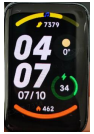
13.Q:What does the small icon in the middle above the band displays of Xiaomi Smart Band 7 Pro mean?
A:The small icons on the top of Xiaomi Smart Band 7 Pro Band displays can show the band status parameters, which are organized as follows.
1.Moon: indicates that Do Not Disturb mode is on.
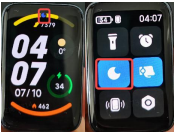
2.music symbol: indicates that the phone is playing music.
14.Q:How many characters can be displayed on Xiaomi Smart Band 7 Pro Band displays messages?
A:Update the firmware version to 1.2.50 and above. The latest version of the firmware supports single message access 2 screen character message alerts, more content needs to be accessed on the phone.
15.Q:Are there dark spots/high spots/dirty spots on the screen of Xiaomi Smart Band 7 Pro?
A:Please confirm whether the abnormal screen is dirty on the outer surface of the screen. If the abnormal spot cannot be eliminated after wiping, and the abnormal spot is on the inner side of the screen, please conduct an after-sales inspection.
16.Q:How to solve Xiaomi Smart Band 7 Pro Bluetooth disconnection frequently?
A: If the Bluetooth connection is often disconnected, please follow the steps below to check.
Check whether the band and APP have been upgraded to the latest version.
Lock the Mi Fitness app in the multitasking window of your Android phone to avoid closing the APP in the background. (Take Xiaomi phone as an example.
Phone-Settings - Apps - Manage apps, find Mi Fitness app, turn on self-start, and turn on lock screen display for permission management)
The problem still exists after APP background locking (after APP successfully background locking, tap APP again should be directly to the last exit interface, if re-enter APP home page, it means APP has been background cleaned), submit user feedback.
Note: Due to different cell phones and systems, please refer to the background running permission guide on Mi Fitness app page for detailed operation steps.
17.Q:How to solve the problem that Xiaomi Smart Band 7 Pro doesn't prompt for messages in motion?
A:Xiaomi Smart Band 7 Pro does not support message alerts during sports.
18.Q:How to hide the Xiaomi Smart Band 7 Pro app?
A:Xiaomi Smart Band 7 Pro does not support this feature at the moment, and we are evaluating the subsequent optimization to improve it.
Troubleshooting
1. Q:Will Xiaomi Smart Band 7 Pro be allergic to wear?
A: Xiaomi Smart Band 7 Pro comes standard with a band strap made of professional health antibacterial material, which meets the limits set by the national standard GB/T 26572. Due to individual differences, there may be a small number of people who have uncomfortable reactions to specific materials and have suspected allergic symptoms.
1. wearing too tight, not breathable, repeatedly rubbing after pressing out the marks resulting in redness and itching.
2. shower wear and not cleaned for a long time, the residue buildup leads to suspected allergy symptoms.
① If you have severe allergies, it is recommended to stop wearing and consult a physician in time.
② If there is only a slight redness and itchiness, it is recommended to follow the following guidelines for wearing: when exercising, do not wear the band too loose or too tight to ensure that the band does not slide up and down on the wrist; for daily use, relax the band slightly to ensure a comfortable experience of skin ventilation. Take off the band after a long period of continuous wear and let your wrist rest for about half an hour. Wash and wipe the sweat from your arm and band strap after exercise, clean and dry before wearing.
2. Q:When is the Xiaomi Smart Band 7 Pro infrared heart rate sensor enabled?
A:The introduction is as follows.
1. Xiaomi Smart Band 7 Pro's PPG sensor uses green light and infrared light detection, when the band is worn at night to fall asleep, the band will automatically activate the infrared sensor to measure heart rate without green light only in auto heart rate detection mode, when you fall asleep at night.
2. If assisted sleep or stress monitoring is on, the infrared heart rate sensor will not be enabled, and there will still be a green light display for night sleep.
3. Q:What about Xiaomi Smart Band 7 Pro prompting "Connect App to re-upgrade"?
A:When Xiaomi Smart Band 7 Pro is in the process of upgrading, if the connection is disconnected (lost), the band will show "Connect App to re-upgrade".
There are 2 ways to do this:
1. Open Mi Fitness app, the app will automatically search for the band connection, and after successful connection, the band will be re-upgraded until the upgrade is successful (the band will be automatically Rebooted after success).
2. Because the band cannot be reset directly at this time, you can apply for after-sales service.
4. Q:What if the Xiaomi Smart Band 7 Pro is slow to upgrade or takes an unusually long time to upgrade?
A:If the band upgrade is particularly slow, and you still have to wait a long time for your device to Reboot after the App shows that the transfer is complete, please do the following checks or actions.
1. In general, the time required to upgrade is related to the version download and Bluetooth transmission rate. Usually, Android upgrade is about 15 minutes, IOS upgrade is about 20 minutes, please wait patiently.
2. check whether the power of the wearable device is sufficient, the remaining power will affect the upgrade speed of the wearable device, please ensure that the power of the wearable device is above 20% when upgrading; you can connect the band to the power supply and then upgrade.
3. check whether the network status environment is good, the time required for upgrade is closely related to the network status, please make sure the network environment (
Please make sure the network environment (/4G/5G, WLAN) is in good condition.
4. Check the phone system version, Android users are recommended to upgrade the phone system to Android 6.0 or above before trying to upgrade the band.
Do not operate the band and App frequently during the upgrade process, frequent operation of the band or App during the upgrade process may cause the system to take longer time to complete the upgrade for the band.
5. Q:What if the Mi band cannot be turned on for the first time?
A:If the band cannot be turned on, it may be because the band is running out of power and is in a shutdown state.
Note: The band needs to be connected to the charging cable to activate the power on for the first time.
6. Q:What if Xiaomi Smart Band 7 Pro cannot be charged or is not fully charged?
A:Please follow the following methods to troubleshoot.
1. it is recommended to use the standard charging cable for charging.
2. if charging with mobile power, you need to replace the standard USB adapter for charging.
3. check whether the metal contacts of the band body and the metal contacts of the charging cable are stained, you can try to wipe them with paper towels, etc. to ensure that the band body and the charging cable do not have poor contact.
4. whether the charging adapter is normal, try replacing it with another adapter to connect the band charging cable for charging.
5. if there is a spare charging cable (or charging cable of the same band) try to replace one charging cable to try.
6. try to charge at a temperature of 10℃ or above.
7. If there is no response to charging for a long time, you can apply for after-sales testing.
8. Xiaomi Smart Band 7 Pro takes about 1 hour to charge, when it is not fully charged, please check the charging time to see if it is not fully charged due to the short charging time.
Note: Please check whether the ambient temperature of the band is too low or too high when charging. band is too high or too low, the system will prohibit charging, and the charging function will resume automatically when the temperature is normal.
7. Q:What if Xiaomi Smart Band 7 Pro can't get music?
A:Please check the following methods.
1. Check whether the app has obtained the notification right and whether the notification permission of the app is turned on. Check whether the app has correctly opened the notification reading permission (notification right); if it is the latest system of Xiaomi phone, you need to open the permission: Settings-Privacy-Permission manager-Select Mi Fitness app, try to close it and reopen it.
2. Please check whether the music player is open and whether the app is connected to the band.
3. If a music player can not be controlled, but other players in the phone can, we suggest to uninstall and reinstall the player and try again.
8. Q:Why doesn't Xiaomi Smart Band 7 Pro have heart rate monitoring record?
A:Please check the following methods.
1. first check whether there is a green light flashing when the back of the band touches the skin, if there is a green light flashing, the band heart rate monitoring function is normal.
2. please wear it in the correct way, the band should not be too loose, adjust the wearing style, then re-enter the heart rate function of the band to check.
3. the skin is too dry, skin scars will affect the heart rate measurement; winter temperature is too low will also affect the heart rate measurement.
4. no above problems, you can Reboot band, replace the arm to wear and try to measure again.
9. Q:What if Xiaomi Smart Band 7 Pro experiences fast power consumption and short battery life?
A:Please check as below. (Turn on the AOD rest screen display, typical model lasts 3.2 days, heavy model lasts 2.63 days)
1. it takes about 1 hour to charge, please make sure the charge is full first.
2. check if the sleep breathing quality monitoring function is on, this function will seriously affect the band's range, it is recommended to turn off this function and check the usage.
3. check whether the heart health monitoring function, all-day pressure detection, and automatic motion detection function are turned on, the opening of these functions will also affect the band's battery life and can be turned off and then used for observation.
4. if the function of fast power consumption is not turned on, still have the problem of fast power consumption, submit user feedback in the App.
10. Q:What if the Bluetooth address of Xiaomi Smart Band 7 Pro is not searched when pairing?
A:It may be that the band Bluetooth was bound by another phone during the process of pairing the phone; or the band was bound before and the binding relationship was not cleared in the phone.
The steps to troubleshoot are as follows.
1. Reboot App, close the phone Bluetooth reopen, re-add the device.
2. Check whether there is a Bluetooth address of the band in the Bluetooth list of the phone system, if there is, delete the pairing information and then re-scan to add the device.
3. In the "Please bind first" prompt page of the band, slide into the settings page, set the band Factory reset and then rescan to add the device.
4. Reboot the band and the phone, and try with another phone.
11. Q:What if the phone prompts that the device has been bound by other accounts or APPs when pairing?
A: If the App searches for the band and sees that the device is bound, another possible scenario is that the App searches for someone else's band instead of your own.
When the App searches for a band that has not been initialized, the band will vibrate and display "Allow binding? prompt. So, if there is a prompt but the band is not responding, the App is not searching for the device, so search for the band in the App again.
The steps to troubleshoot are as follows.
1.If the band is used for the first time, please check whether the band is pending to be bound, and the prompt is "Please bind first".
2. If the band is not prompted, the band is not connected to your own device, please check if there are other band devices around.
3. After the band vibrates normally and prompts, click √ to bind. After the band is successfully bound, the Mi Fitness app will show that the band has been successfully added and the band will be displayed on the Band displays homepage.
12. Q:Why is the black band of Xiaomi Smart Band 7 Pro easy to get dusty?
A:It is inevitable that Xiaomi Smart Band 7 Pro will come into contact with dust when worn and used. In fact, whether it is easy to absorb dust or not has nothing to do with the color, except that the black band strap may have a stronger contrast and be more visible to the eye after absorbing foreign objects.
13. Q: Not wearing it at night and see the red light of band flashing?
A:Introduction is as follows.
1. Xiaomi Smart Band 7 Pro turns on high-precision sleep monitoring, which will automatically measure blood oxygen after falling asleep, and the band red light will flash. If there is no wearing device to find the red light blinking, it may be a mismeasurement of the wearing detection function; Xiaomi Smart Band 7 Pro takes infrared + green light + red light high-precision PPG heart rate sensor, compared with the traditional wearing detection, the detection accuracy has been greatly improved. However, when the band is placed in an environment similar to the wrist, there may be false detections.
2. band is not worn when placed, you need to pay attention to the heart rate light behind the object not to block (common mismeasurement scenarios: band in the bag, placed in the bed / table, etc.).
3. if you do not wear the band when sleeping, it is recommended to turn off the high-precision sleep monitoring, which can greatly save the band power.
14. Q:Why is there no monitoring record or score in the App after turning on sleep breathing quality monitoring?
A:1.First of all, check whether the sleep breathing quality detection is turned on in the App, the path to turn on: Devices-Sleep-Advanced monitoring, click to turn on.
2. if the sleep time is too short, the effective monitoring time is too short, it will not show the sleep breathing quality score or detection data (generally the night sleep time is more than 3 hours).
3. Improper wearing style may lead to failure to monitor sleep breathing quality. It is recommended that the device is not worn too loosely, and that the device is placed one finger away from the wrist bone.
4. insufficient band power may lead to the inability to monitor, so you need to keep the band power sufficient, (it is recommended to keep the power above 20%).
5. if there is no above reason, verify whether the App and firmware version is the latest; suggest Reboot band or unbind the band to try again.
15. Q:Xiaomi Smart Band 7 Pro IOS binding failed/connection failed?
A:If the binding of Xiaomi Smart Band 7 Pro and IOS device fails, check as follows.
Reason 1: The phone network connection is abnormal.
Solution: Please check the network connection of your phone. If the Wi-Fi connection of the phone is disconnected, please try to reconnect; if the Wi-Fi connection is normal but still cannot be connected, please use traffic.
Cause 2: The Bluetooth connection between the device and the phone may be abnormal.
Solution: Please try to turn off the Bluetooth switch of your phone system, then turn it on again and click Retry to continue the pairing process.
If the above operation is still not resolved, please try.
1. reset the band, Factory reset.
2.Clear the Bluetooth information of the device in the Bluetooth list of the phone system (if there is no Bluetooth address of the device in the Bluetooth list, then skip this step).
3. Turn off the Bluetooth switch on the phone system and then turn it back on.
4. Open the Mi Fitness app and re-add the device.
16. Q:What is the black screen of Xiaomi Smart Band 7 Pro when it is exposed to water/swimming?
A:When the band is turned on, the screen will be automatically blacked out when it encounters water.
1. under swimming scenario, the screen will be recognized as black screen in cover mode when swimming.
2. do not support touch screen bright screen after underwater & swimming screen with water stains.
3. the "Raise to wake" function can be turned on in swimming scenarios to trigger the bright screen, but it may increase power consumption and reduce battery life.
17.Q:The Xiaomi Smart Band 7 Pro remote control can't be used for taking photos?
A:Please verify if the band is connected and follow the instructions on the band screen to open the relevant settings.
Note: Restricted by Android permission, some new Android models cannot support this function for the time being, and need to be optimized and improved later.
18.Q:Xiaomi Smart Band 7 Pro can't connect when replacing the phone?
A:Sort out the following.
1. make sure the Bluetooth of the previously connected phone has been turned off.
2. verify that the cell phone Bluetooth list binding information is cleared.
3.Reboot the band try to connect again.
4. Factory reset the band to re-bind
1. Q:What are the features of Xiaomi Smart Band 7 Pro?
A:
1.For the first time, the band features a large, full-color rectangular display. The layout of all features on the Band displays is similar to that of a smartphone. Text and icons own more space and become much easier to tap and swipe. Xiaomi Smart Band 7 Pro can be seen as a convenient extension of your smartphone.
2.This is the first Xiaomi smart band to be available in metallics, graphite grey and light gold for a subtle classiness. Coated with NCVM for lightness and comfort. Smooth to the touch, with a high-gloss metal texture
3.With six classic colours, you can be elegantly understated or loud and vibrant — it's up to you. Make a statement, starting from your wrist. The strap has a easy to do clip which is practical for maximum convenience.
4.Built-in GNSS can be synced to your phone or used solo for minimalist workouts Support BeiDou, GPS, GLONASS, Galileo and QZSS systems. Count every step, because every step counts.
5.10 pre-loaded running courses of varying intensity, calculated via time and heart rate. The band can vibrate and light the screen to remind you to meet your heart rate and speed goals, making sure that you get the most out of your workout.
6.Daily health statistics, such as heart rate, fitness, and sleep, are shown in detail to provide a clear picture of your health. Support easy syncing data with Strava and Apple Health.
7.Check the weather, set an alarm, remotely control your home smart appliances, and more. So just ask Alexa.
2. Q:What is the appearance of Xiaomi Smart Band 7 Pro?
A:The appearance of Xiaomi Smart Band 7 Pro series is as follows.
External dimensions: 44.7×28.8×11mm
Weight: about 31g (with band strap) / 20.5g (without band strap)
3.Q:How to install and remove the band strap of Xiaomi Smart Band 7 Pro?
A:
Please adjust the position of the band strap holes according to the circumference of your wrist. If you need to disassemble the band strap, please refer to the diagram. After installing the band strap, please pull and tug the band strap to make sure the band strap is successfully installed.
Removing the band strap.
To remove the band strap, press the removal button with your finger while pulling the band strap outward with your other hand.
Install the band strap:
Install the band strap by aligning the recessed part of the band strap with the main body of the bracelet, and when you hear a "click", the band strap is successfully installed.
4. Q:What material is the Xiaomi Smart Band 7 Proband strap made of? Is it anti-bacterial?
A: Xiaomi Smart Band 7 Pro comes in 6 antibacterial band straps (Ivory|Olive|Orange|Blue|Black|Pink) which are skin-friendly, waterproof and lightweight.
The band strap is made of thermoplastic elastomer and is skin-friendly, waterproof and lightweight.
Note: The two silicone imitation leather band straps (Pine Green|Moon Gray) do not have antibacterial effect.
5. Q:Does the Xiaomi Smart Band 7 Proband strap work with other Mi bands?
A:No.
6.Q:What is the NCVM process of the middle frame of Xiaomi Smart Band 7 Pro?
A:NCVM surface treatment technology, the surface of the product is not conductive, the surface layer is insulating material, the middle layer is metallic luster material, the bottom surface is color material. NCVM surface non-conductive, so that the bracelet independent GNSS (GPS) in receiving satellite positioning signal, will not be interference and shielding.
Lightweight is one of the characteristic points of the bracelet product, the NCVM process used in the middle frame can ensure the lightness of the bracelet product, but also has a delicate metal texture.
Also, it will not feel cold when worn in a low temperature environment.
7. Q:Does Xiaomi Smart Band 7 Pro support compass?
A:No.
8. Q:Does Xiaomi Smart Band 7 Pro support find band?
A:No.
Function and Use
1. Q:What devices does Xiaomi Smart Band 7 Pro support? What apps need to download?
A:You need to connect the charging cable to activate the device for the first time, and use the Mi Fitness app to bundle the device.
Operating system: Android 6.0 or higher, iOS 12 or higher
2. Q:How to set up the apps of Xiaomi Smart Band 7 Pro?
A:Band application settings means that you can set the order of the first level menu functions on the band. You can customize the apps on the screen according to your personal preference.
First-level menu: refers to the apps that the band can switch between by swiping up and down on the home page, with status, settings, heart rate, blood oxygen, notifications, etc.
Mi Fitness app: Device -> Settings -> app order management, drag to adjust app order.
3. Q:How to set the band shortcut portal of Xiaomi Smart Band 7 Pro?
A:The shortcut entrance of band means the band home page can switch applications by swiping left and right; the app can add or delete the number of shortcut entrances of band or modify the sorting by itself according to the usage preference.
Mi Fitness app: Device-System-Sort apps, hold the Sort button to rearange items or drag it to the bottom to hide the app.
4.Q:How does the Xiaomi Smart Band 7 Pro charge? Does it work with other band adapters?
A:The battery capacity of Xiaomi Smart Band 7 Pro is 235mAh, which takes about 1 hour to charge. The band comes with a special magnetic charging stand as standard, which is not compatible with other Mi band chargers.
You don't need to disassemble the band strap for charging, you need to connect the two ends with metal contacts to the special charging stand. Then, connect the charging cable to the charger with voltage
Then connect the charging cable to a standard USB charging head with a voltage of 5V and an output current of 250mAh or more.
Notes: 1. When charging, please make sure the charging contacts are clean and dry, and check if the charging buckle and charger are in good contact.
2.If the band has not been used for a long time, you need to wait for a while before the charging screen will be displayed when charging again.
3. While the band is charging, you can check the current time, receive call alerts and app notifications.
4. It is recommended to use a 3C certified charging head for charging.
5. Q:How to check the charging status of Xiaomi Smart Band 7 Pro?
A:The band will show the charging icon, current time and specific percentage when inserted into the charging cradle, and the band will vibrate to remind you when it is fully charged, and the power level will show 100%.
Note: If the charging icon is not on this page, you need to check the band firmware version and upgrade to the latest version.
6. Q: How to Start up, Shut down, Reboot, or Factory reset Xiaomi Smart Band 7 Pro?
A:1. Start up/Shut down: the band will automatically shut down when the power is too low, support manual shutdown, low power shutdown state, charge again, the band will automatically turn on when the power reaches the power on (about 3 minutes).
2. Reboot/Factory reset: select Reboot or Factory reset in the "Settings" of the band, binding connection status, unbinding in the App can also Factory reset settings.
Note: After shutdown, you need to connect the charging cable to activate the power on again.
The band will automatically shut down after 10 minutes when not bound.
10. Q:What is the correct way to wear Xiaomi Smart Band 7 Pro?
A:1. Wear the band to about one finger from your wrist bone and adjust the band strap loosely to a comfortable position to ensure that the heart rate sensor can collect data properly.
2.For the heart rate sensor to achieve optimal measurement, the back of the band needs to be in contact with the skin. Wear the band correctly, neither too tight nor too loose, while allowing space for the skin to breathe. The band strap can be tightened during exercise and then adjusted appropriately after exercise.
11. Q:How does Xiaomi Smart Band 7 Pro measure and view heart rate?
A:When Xiaomi Smart Band 7 Pro is switched to the Heart Rate app, if you turn on the all-day heart rate detection, click the heart rate icon to view the heart rate data directly. After entering the Heart Rate app, put your arm flat, there will be an animation effect when measuring the heart rate, and the heart rate value will be displayed after the measurement is completed, and you can slide up to view the current heart rate interval.
Heart rate data can also be viewed in the App, view as follows.
Mi Fitness app->Health->Heart rate->You can view the whole day heart rate graph, as well as the highest, lowest, resting heart rate and high/low heart rate, etc.
Note: Non-standard wearing style will affect the measurement of heart rate signal.
12.Q:Does Xiaomi Smart Band 7 Pro support automatic heart rate detection?
A: Yes, you can set it through Mi Fitness app. When you turn on automatic heart rate detection, it will detect heart rate all day long, which will significantly reduce the battery life of the band.
Turn on heart health monitoring mode, the band will automatically measure heart rate in real time, and at the same time will significantly reduce the band battery life.
Setting path:
Mi Fitness app:Device->Health monitoring->Heart rate->Continuous->Frequency
13.Q:Does Xiaomi Smart Band 7 Pro support Heart rate alert?
Xiaomi Smart Band 7 Pro supports Heart rate alert, the band will vibrate to alert when the heart rate reaches Alert value and there is no significant activity in the last 10 minutes. The setting method is as follows.
Mi Fitness app:Device->Health monitoring->Heart rate->Heart rate alert->Alert value
14.Q:How to download/delete Band displays on Xiaomi Smart Band 7 Pro?
A:When the band is connected to your phone, you can download new Band displays through the Mi Fitness app.
1. Mi Fitness app: Device-Online-Band displays, which can be used after downloading and importing.
2. How to delete Band displays:
Band:Band-Settings-Band display-Entering band display editing page... Press&hold to confirm the changes
APP:Device-- Online-Band displays-click the band display you want to delete-delete it
Note: The built-in Band displays do not support deletion.
15.Q:How to change Xiaomi Smart Band 7 Pro Band displays?
A:The Band has built-in system Band displays, more Band displays can be downloaded and used in the Mi Fitness app, Band displays can be changed in the band and App, Band displays Online is divided into dynamic Band displays.
1. Band displays can be changed on the band.
① You can select your favorite Band displays in Band-Settings-Band display, and then click on the screen to confirm to complete the replacement of Band displays.
② You can long press on the Band displays page, it will enter the preview mode, slide up and down to select your favorite Band displays preview image, click the preview image to change the current Band displays.
2. To change the Band displays on the app: You can long press on the Band displays page to enter the preview mode.
Mi Fitness app: Device - Online - Band displays, enter Band displays and download the sync to finish replacing Band displays.
16.Q:How to check PAI on Xiaomi Smart Band 7 Pro?
A: Xiaomi Smart Band 7 Pro does not support PAI.
17. Q:Does Xiaomi Smart Band 7 Pro support sleep monitoring?
A: The band supports high-precision sleep monitoring, which, when turned on, can track the rapid eye movement (REM) phase distribution of sleep, but the device life time will be severely reduced. (Need to check sleep staging in APP)
For long sleep greater than or equal to 3 hours, the device will show the average heart rate and average blood oxygen saturation within the segment based on the available data, and for sleep less than 3 hours, only the time of falling asleep and waking up will be shown.
If the quality of sleep is very poor, too much wrist movement during sleep may lead to bias in sleep heart rate measurement and blood oxygen measurement failure.
Sleep record viewing method: After The band is connected with the phone to synchronize data, you can click Sleep in the App to view historical sleep data, including daily, weekly and monthly; sleep distribution, including total sleep hours, sleep quality, sleep distribution, and average heart rate.
Note: The band is in a relatively quiet state, and there is a similar amplitude of movement as sleep, which may cause the sensor to judge the sleep state, resulting in errors in the time of falling asleep. For example, when watching TV, lying on the bed playing cell phone, reading a book, there is a sleep mismeasurement, probably because the amplitude and frequency of the action is relatively small, and the scene is more similar to sleep.
18.Q:Does Xiaomi Smart Band 7 Pro support Incoming call notification吗?
A: Support, when connected to the phone, the band will vibrate to remind when there is an incoming call to the phone and display the number or name of the caller.
When an incoming call, you can click the red phone icon on the band screen to reject the call, click the mute icon to mute the call, and do not support answering the call.
Turn on method:
APP:Device-- App notification-Phone
19.Q:Does Xiaomi Smart Band 7 Pro support pressure detection?
A: Yes, you can measure the pressure manually or turn on the automatic detection of pressure throughout the day.
1. Manual measurement method: You can measure the current pressure value on the pressure details page of The band, and if the measurement is successful, the current pressure value will be displayed, and if the measurement fails, "Measurement failed" will be displayed. To ensure successful measurement, please wear The band correctly and keep still during the measurement.
2.The band will automatically measure the pressure of your body in a quiet state after you turn on the pressure detection in the APP heart rate detection page. To turn on the pressure detection, you need to turn on the all-day heart rate detection function.
Path to open stress detection: Mi Fitness app-Health monitoring-Stress-Settings
3. Viewing method.
Swipe up to view the pressure status when there is measurement data on the pressure measurement page of The band.
Mi Fitness app to view the history of stress detection.
Stress: Stress here refers specifically to mental stress, not including physical stress due to high-intensity exercise.
Note:
1. Please wear the device correctly and keep quiet when measuring to ensure that the heart rate monitoring data is normal during the stress monitoring process.
2. Strenuous exercise or moderate to high intensity activity is frequent, the accuracy of the assessment of stress data will have a certain impact.
3. The band is not a medical device and the test results and recommendations are for reference only.
20.Q:How to use Xiaomi Smart Band 7 Pro Female health tracking?
A:Female health tracking needs to be set up in the app. After setting up, you can check the current status of your period on the female health page of The band, and there will be a text message indicating when you will have your period.
How to turn on: The initial settings of female health can be set in Mi Fitness app-->Female Health page. You need to select the length of your period, the length of your physiological period, and turn on the intelligent prediction of your physiological period. After the settings are completed, you will jump to the details page, where you can view the status of your selected period and save it.
Physiological intelligent prediction: Based on the length of women's menstrual period, the start date and end date of menstrual period and other personal data, the entire physiological cycle of women can be predicted, and the complete physiological cycle prediction includes: period prediction, easy pregnancy prediction, ovulation day prediction, which helps women understand their body condition, regularize their physiological period and take care of their health. Long-term continuous and complete period record helps to improve the accuracy of physiological period prediction.
Click to adjust the physiological cycle, you can choose the pain level, blood volume situation and mood.
Click on the notification reminder to turn on the period reminder.
21.Q:How to use the breathing training function on Xiaomi Smart Band 7 Pro?
A:Breathing training helps to regulate heart rate, improve stress, relax and soothe, and take deep breaths regularly to help your health.
1. Open the breathing training app on The band and select the length of training (1-5 minutes).
2. Please keep a steady stillness and click start training.
3. The band screen will display a guided animation of exhalation or inhalation, and a progress bar at the bottom of the training page will show the total time required.
4. the number of breaths and heart rate change interval will be displayed after the training is completed.
22.Q:Does Xiaomi Smart Band 7 Pro support power saving mode?
A:Xiaomi Smart Band 7 Pro does not have a special power saving mode switch, but by turning off the automatic heart rate detection, or modifying the heart rate detection frequency, and reducing the brightness of The band display, you can achieve the effect of energy saving and increase the battery life.
Setting method: Mi Fitness app->Device->Health monitoring->Heart rate->Continuous monitoring->Close or edit it
23.Q:Which features enabled on Xiaomi Smart Band 7 Pro will cause the band to consume power fast?
A:Sleep breathing quality detection function, turn on heart health monitoring mode (heart rate detection in real time at this time), turn on screen constant light mode when exercising, frequent message reminders and bright screen, turn on automatic pressure monitoring throughout the day, frequent use of blood oxygen detection, the use of these features may cause The band's battery life to become shorter.
24.Q:How to check the weather on Xiaomi Smart Band 7 Pro?
A:Xiaomi Smart Band 7 Pro can check the current weather by lighting up the screen and clicking on the weather app, which shows: weather icon, current temperature, all-day temperature, air quality, location, and up to 4 days of weather in the future.
Tap the city location icon at the top of the band display to switch to other regions (supports adding up to 5 cities manually in the app) and turn on the weather alert. When the band receives a weather alert notification, it will receive the push.
Mi Fitness app:Device-System-Sort apps-Weather updates, Locations, choose location(automatic location or manual city selection)
Note: To use the band to view real-time weather, you need to keep your phone connected to the band. If the band is not connected to the phone, the weather will show the information that was synced when the phone was last connected.
25.Q:Does Xiaomi Smart Band 7 Pro support Workout notification?
A:Yes, the band can be accessed by clicking on the sports function, selecting Workout, and clicking on the icon at the bottom to enter the settings. You can set whether to enable auto-pause, heart rate reminder, speed reminder, distance reminder during exercise according to your needs. When the reminder is turned on, the band will vibrate when the set value is reached, and when the auto pause is turned on, the band will automatically pause when it detects the band is in a stationary state.
Note: If you turn on the Workout in Mi Fitness APP, you can also set the exercise reminder in the exercise page of the app.
Mi Fitness app:App-Workout-Choose mode-Settings
26.Q:How to use the photo function of Xiaomi Smart Band 7 Pro?
A:The band's photo function allows you to control your phone to take photos through The band. This function needs to be used when The band is connected to your phone.
Before using this function, you need to pair in the App first, the pairing method is organized as follows.
iOS phone: After binding the device, the system will pop up the pairing pop-up box, click to allow pairing.
Android Device-System-Sort apps-Camera-Bluetooth pairing (unpairing)
After the pairing is done, open the camera app on your phone and press the photo button on The band to take photos with The band.
27.Q:How to set and use the Do Not Disturb mode on Xiaomi Smart Band 7 Pro?
A:When The band is in Do Not Disturb mode, you can receive messages but no longer vibrate and light up the screen to remind you, such as Incoming call notification, SMS alert, App notification alert, email alert, and care notification.
Setting: Xiaomi Smart Band 7 Pro-Settings-DND
1.Select "Turn off DND" to disable Do Not Disturb mode.
2.Select "Auto turn on" to automatically turn on Do Not Disturb mode after you fall asleep with The band.
3.Select "Custom", the Do Not Disturb mode will take effect when the scheduled time is reached.
4. Keep DND on can be selected.
38. Q:How can Xiaomi Smart Band 7 Pro check the number of steps, calories, standing activity/medium to high intensity activity hours for the day?
A:There are two ways to view.
1. Click the band and slide up and down to find the vitality indicator, then click into it to display the number of steps, calories (kcal), standing activity/medium-intensity activity hours of the day's exercise.
2. APP view: When the phone is connected to the band, the data will be synchronized and viewed on the health page of Mi Fitness app.
29.Q:How to check notification messages on Xiaomi Smart Band 7 Pro?
A:The band will vibrate to prompt you when you receive a notification, and will automatically display the notification content. If you don't check the notification immediately after receiving it, you can find the history notification by sliding to the notification portal on the dial page.
Delete or clear notifications.
The band can save up to 10 recent notifications, after this limit, each new notification received will automatically delete the oldest one.
If the notification content is beyond one screen, you can continue to swipe to view it
1. Swipe down on the first notification page to enter the clear page, and click it to delete all notifications.
2. In the notification list, swipe up to view the message, and swipe to the bottom to choose to clear all notifications.
30.Q:How does the Xiaomi Smart Band 7 Pro alarm work?
A:You can set, edit, add and delete alarms in the alarm clock app in The band. You can set up to 10 alarm clocks and choose to set only once or set single day or multi-day from Monday to Sunday. click the button next to the time on The band side, you can choose to edit the set alarm clock and support creating, deleting and changing the alarm time.
Xiaomi The band 7Pro can automatically synchronize the alarm clock of MIUI system phones, and when one of the devices is turned off in the connected state, the other one will be turned off as well.
31.Q:Can Xiaomi Smart Band 7 Pro control the phone to play music?
A:No.
32.Q:How to use Xiaomi Smart Band 7 Pro Stopwatch?
A:
Enter Stopwatch, click the start button at the bottom to start timing, keep two decimal places, the screen is always on during timing. Tap
to record the time, tap to pause the time, then tap to continue timing, click to stop timing, click "x" to return to the pause interface, click "√" to confirm the end of the stopwatch. The maximum number of punches can be 20.33.Q:How to use the countdown timer function on Xiaomi Smart Band 7 Pro?
A:Go to the countdown timer function on band and select the countdown time. Click the bottom
button to start the countdown. Click to pause the countdown, then click to continue the countdown, click to stop the countdown, click "x" to return to the pause screen, click "√" to exit the countdown.34.Q:How to set the brightness of the screen of Xiaomi Smart Band 7 Pro?
A: How to set the brightness of Band: Click Band-Settings-Brightness, there are five levels of brightness to adjust.
Xiaomi Smart Band 7 Pro supports auto brightness, which changes according to the ambient brightness.
35.Q:What information can be viewed before the band is bound?
A:The band in the unbound state, there will be please bind and settings, settings have Reboot, Factory reset, regulation, about.
In the settings, there are Reboot, Factory reset, Supervision and About. The Supervision is the radio transmitting equipment type approval code (CMIIT ID) information, click to view; About can view the firmware version and Bluetooth address.
36. Q:How to check the firmware and Bluetooth address of The band?
A: Band click Settings-About to view the firmware and Bluetooth address.
Band connected status, Mi Fitness app to view, view path: App->Devices->About.
37.Q:How to use Find phone?
A: Xiaomi Smart Band 7 Pro supports Find phone, using this feature requires The band to keep the connection with the phone.
Operation method: Device-System-Sort apps-More-Find phone, click on it and the band will show that it is ringing, then the phone will ring, the band can turn off the ringing by clicking the ringing icon.
38.Q:Does Xiaomi Smart Band 7 Pro support Raise to wake?
A:Yes, swipe left on the screen to turn on Raise to wake.
39.Q:Does Xiaomi Smart Band 7 Pro support setting unlock password?
A:Yes. In Mi Fitness app: Device-Security-PIN, enter the 6-digit password.
40.Q:Does Xiaomi Smart Band 7 Pro support standing notification?
A:Yes, The band will vibrate to remind you when it detects 60 minutes of inactivity.
The band will vibrate when it detects 60 minutes of inactivity.
Note: Reminder will pop up if no steps are generated for 60 minutes. (Steps need to be more than 10 to be recorded, so if the number of steps is less than 10 in 60 minutes, a sedentary reminder will be popped up)
Setting method:Mi Fitness app-Health monitoring-Standing-on/off> Set the time period
41.Q: Does Xiaomi Smart Band 7 Pro support phone schedule synchronization?
A:Yes, Mi Fitness app->Devices->Schedule sync, and the schedule on your phone's calendar will be synced to The band after you open it.
Note: At present, only Xiaomi phones and IOS models are confirmed to support the schedule app.
42.Q:Does Xiaomi Smart Band 7 Pro support unlocking the phone?
A:Xiaomi Smart Band 7 Pro supports unlocking the phone. To unlock the phone, you need to enable it in the Mi Fitness app.
The setting method is as follows: Mi Fitness app-Device-Security-PIN-Set PIN
Click on the Settings band to unlock, The band screen shows Allow phone to bind? Click "√" to show that the binding is successful.
To unbind: you need to turn off the Bluetooth device unlocking function in the system settings of your phone.
Settings-Passwords&security-Unlock with Bluetooth device
Note: Currently, band unlock supports MIUI based on Android 6.0 and above.
43. Q:What features are available in the settings of Xiaomi Smart Band 7 Pro?
A:The band provides Online, Brightness, Vibration, DND, Detect activity,PIN, About in the settings page.
44. Q:Does Xiaomi Smart Band 7 Pro support the notification brightness?
A: Yes.
45.Q:How does Xiaomi Smart Band 7 Pro wake up the screen?
A:You can wake up the screen by tapping the screen and Raise to wake.
Tap the screen: Tap the screen to light up the screen when it is off.
Raise to wake:It can be turned on/off by swiping left in the main interface, or set on/off in Settings - Display & Brightness.
46. Q:What notifications does Xiaomi Smart Band 7 Pro support?
A:The band notifications include: Incoming call notification, standing notification, attainment notification, The band alarm notification, schedule, SMS notification, and other mobile app notification (you need to turn on the corresponding permission in message notification).
47. Q:Does Xiaomi Smart Band 7 Pro support blood oxygen monitoring?
A:Support.
1. after waking up the band, swipe up on the dial interface, find the blood oxygen app and open the blood oxygen saturation app to measure the blood oxygen saturation manually.
2. After the measurement is finished, the result of this measurement will be displayed on the band.
3. Noted:
① Wear the band tightly with the screen facing upward and keep it still.
② When the measurement process is too large, there will be a prompt, please operate correctly according to the prompt.
③ During the measurement process, incoming calls, alarms and other alerts will interrupt the measurement.
④ Measurement results are for reference only and are not to be used as a basis for medical diagnosis.
48. Q:How long does it take for The band to complete a single oxygen saturation measurement?
A:Approximately 25-50 seconds.
49. Q:What are the changes in the sensor lights on the lower part of the band during the oxygen saturation measurement?
A:The red and green lights will be on.
50. Q:Can oxygen saturation be measured during exercise?
A:Blood oxygen cannot be measured during exercise.
51. Q:Can blood oxygen saturation be displayed on Band display?
A: Yes, refer to the custom Band display function. (Component Band display supports custom parameter items)
52. Q:Is there any relationship between oximetry and age?
A:Oximetry has nothing to do with age.
53. Q:Is there an abnormal oxygen alert when the oxygen saturation value is at risk?
A:This feature is not currently supported.The SpO₂ feature is not intended for diagnosis, prevention, monitoring, prediction, prognosis of any disease, investigation of physiological processes or any other medical purpose. All data and tracking should be used for well-being and personal reference only. If you feel uncomfortable, please rely on professional medical devices or consult a doctor for assistance.
54. Q:Is it possible to measure blood oxygen saturation when the band is disconnected from the phone?
A:Yes, you can measure blood oxygen while disconnected, the band will show the last measurement record; when the measurement is finished, you can connect the app to sync the blood oxygen value to the app.
55. Q:How to view the blood oxygen measurement record?
A:You can view the last record of oxygen saturation measurement on the band, the history and detailed information need to be synced to the App to view.
Setting method: Mi Fitness app-Health-Blood oxygen
56. Q:Does blood oxygen saturation testing cause human damage?
A: The device uses an optical sensor to measure blood oxygen saturation, which will not cause human damage.
57.Q: Does the band support blood oxygen data export?
A:You can view the history by syncing the data to the App, but the data export function is not supported at the moment.
58.Q: Does Xiaomi Smart Band 7 Pro support abnormal heart rate notification?
A:Yes. It supports high heart rate alert and low heart rate alert.
59. Q:How to calibrate the time of Xiaomi Smart Band 7 Pro? Does it support 24-hour format?
A:Xiaomi Smart Band 7 Pro will automatically synchronize the time on your phone when you connect the app.
60. Q:Does Xiaomi Smart Band 7 Pro support automatic motion monitoring?
A:Xiaomi Smart Band 7 Pro supports automatic motion monitoring.
Setting method:Band-Settings-Detect activity-on/off
61.Q:Does Xiaomi Smart Band 7 Pro support Flashlight?
A:Smart Band 7 Pro support supports Flashlight.
App Connection and Usage Related
1. Q:How to pair and unpair the Xiaomi Smart Band 7 Pro with the phone?
A:Xiaomi Smart Band 7 Pro supports Mi Fitness app binding. After binding, you need to lock the app in the background to avoid being shut down by the system and disconnected from the phone, which will affect the normal use of the band.
Open the Mi Fitness app, log in to your Xiaomi account, and follow the pop-up box to open the app-related permissions. Click on the device - add new device - band - stick the phone and band together to search for binding, after the band is searched for, the band will show the check mark key, click the check mark key to confirm the binding.
Unpair: When the band and the phone are connected, open Mi Fitness app
- Devices - Unpair, click "Unpair" to Unpair. After Unpairing, the band will be Factory reset.
Note: ① If you can't find the band in the process of adding devices, or can't connect to the band in the process of using, please try to slide up and down on the band to be bound page, select Factory reset in the system operation interface, and then add the bound devices again.
② When band is not bound, the screen will show "Please bind first", you need to bind before you can use the band function. After sliding, it will show "Regulatory" regulatory for radio transmitting equipment type approval code (CMIIT ID) information, click to view.
2. Q:How to set App notification on Xiaomi Smart Band 7 Pro?
A:Band supports App notification, if you want to receive mobile App notifications, such as SMS, Incoming call notification, etc., you need to turn on the App message notification in the App.
Open method:
Mi Fitness app:Device-App notifications-Choose which apps can send notifications
Note: For apps that enable notification messages in the app, you need to enable the notification permission of your phone at the same time.
3. Q:When using Xiaomi Smart Band 7 Pro, should the Bluetooth of the phone be turned on all the time?
A:When Xiaomi Smart Band 7 Pro is used: pedometer, sleep monitoring, heart rate/pressure/oxygen detection, alarm clock and other functions do not need to open Bluetooth all the time, you only need to wear the band when you work out, and connect the band and the phone to synchronize the data after the workout is finished; when you want to achieve: Incoming call notification, App notification, find the phone and other functions because the phone needs to communicate with the band all the time, so you need to open the phone Bluetooth, keep the band connected to the phone.
FAQs
1.Q:How long can Xiaomi Smart Band 7 Pro data be saved independently
A: Xiaomi Smart Band 7 Pro can keep up to about 10 sports records. The data that has been synced to the App will be automatically uploaded to the cloud and saved. If you change to a new phone, you can sync your previous data from the cloud to the new phone by using your previous Xiaomi account on the new phone to bind to the band.
Note: The number of saved strips will change with the size of the sports record, whichever is actual.
2.Q:Does Xiaomi Smart Band 7 Pro support cover off screen? Does it support custom screen off time?
A:Xiaomi Smart Band 7 Pro turns on the cover off screen by default and supports turning it off.
Band can customize the screen off time.
Setting method: Band-Settings-Brightness-Lock screen-Sleep
3.Q:What data will be cleared when Xiaomi Smart Band 7 Pro Factory reset is set?
A:Xiaomi Smart Band 7 Pro: bandFactory reset will clear all the data of the band (but the data that has been synced to the App on the account side will remain in the cloud).
4.Q:Does Xiaomi Smart Band 7 Pro support connecting to a heart rate band?
A:No.
5.Q:Does Xiaomi Smart Band 7 Pro support Alexa voice assistant?
A:The Xiaomi Smart Band 7 Pro has a built-in Alexa voice assistant.
6.Q:What are the other FAQs of Xiaomi Smart Band 7 Pro?
A:As follows.
| Module | Problem | Solution |
| Pairing and connection | iOS old version can be tied to Mi band 7 Pro | Upgrade the latest version of APP |
| Bluetooth occupies screen notification | Upgrade the latest version of firmware | |
| Data synchronization | Slow synchronization | Upgrade the latest version of firmware |
| GPS | Abnormal lap track | There are many factors that affect the GPS, such as tall buildings, complex terrain, complex electrical environment, and bad weather conditions such as sandstorms, rainstorms, and other bad weather. |
| More than 10km will lose part of the track behind | Upgrade the latest version of firmware | |
| GPS Experience | Make sure that the band searches for a star and locates it successfully before setting off, as the track may be abnormal if the signal is poor. | |
| Calories | High calorie count | Total calories include static and dynamic calories |
| Sleep Oximetry | Sleep hypoxia | Wearing status, skin characteristics, environment and other factors may affect the accuracy of the test, or even measurement failure. During sleep, the device is tilted due to different sleep positions, which may lead to the appearance of low pseudo-oxygen. This product is not a medical device and the results are for reference only. |
| Band displays | Band displays are slow to download | Some Band displays are large and take a long time to download, please be patient |
| Band displays are too large to affect the number of downloads | Limited band memory, can only download some Band displays for use | |
| Battery life | Short battery life | With AOD on, typical model lasts 3.2 days, heavy model lasts 2.63 days |
| Message notification | Disconnected push all messages back to back | Upgrade the latest version of firmware |
| Raise to wake | Raise to wake may not light up continuously | Continuous wrist lift may be recognized as some kind of movement, not the normal wrist lift process, it is recommended that the rest screen over 1S after the wrist lift |
| Smart Raise to wake may not light up | Need to recognize the exact human movement |
7.Q: How can Xiaomi Smart Band 7 Pro not be positioned in underground garages and other locations?
A:Hello, GPS positioning relies on the ability to search for satellites, in underground warehouses most of the time, the satellite can not be searched for, resulting in the inability to locate is a normal situation. It is recommended to go to a place with wide space for positioning, or to realize positioning with a joint cell phone (connect the band to a cell phone that can locate normally through the GPS of the cell phone).
Remark 1: Common factors that affect star search, such as between dense buildings, in tunnels, underground parking lots, under elevated bridges, and rainy weather, etc.
Remark 2: When there is no GPS signal, the movement track of band will not be displayed, such as entering indoor or underground garage after running one kilometer, and the GPS signal is lost.
8.Q:Is it normal for Xiaomi Smart Band 7 Pro to shake and rattle?
A:This product supports band strap quick replacement, which requires quick release button activity to achieve band strap removable and replaceable; it is normal for the quick release button to rattle occasionally when the band is shaking or the motor is vibrating, in order to ensure a better feel of the quick release band strap, please feel free to wear and use it normally.
9.Q:How many words can the Xiaomi Smart Band 7 Pro screen display?
A:Xiaomi Smart Band 7 Pro can only display up to one screen of message content.
10.Q:Where are the Band displays of Xiaomi Smart Band 7 Pro and how to customize them?
A:The Band displays of Xiaomi Smart Band 7 Pro are preset Band displays, which can be viewed in APP--Devices-Online-Band displays--Local.
At the Band displays, long press on the Band displays interface to enter the Band displays replacement, and slide up and down the small dot position on the right to replace the Band displays, at the component Band displays, click on the Band displays interface setting button to enter the custom parameter display, which supports replacing the Band The parameters in the lower right corner of the displays are supported.
11.Q:ow to turn on the rest screen Band displays on Xiaomi Smart Band 7 Pro and can I change the rest screen style?
A:In Band--Settings--Brightness--on display is turned on.
You can change Band displays to replace the corresponding resting screen Band displays, the specific resting screen style after connecting the band in APP--Devices-Online--Band displays--Online
Click Band displays to view the rest screen style of each Band displays.
Note: When AOD is on all day, the typical model lasts 3.2 days and the heavy model lasts 2.63 days.
12.Q:Does Xiaomi Smart Band 7 Pro support Bluetooth disconnection reminder?
A:No, Xiaomi Smart Band 7 Pro shortcut interface will show band connected and not connected status.
13.Q:What does the small icon in the middle above the band displays of Xiaomi Smart Band 7 Pro mean?
A:The small icons on the top of Xiaomi Smart Band 7 Pro Band displays can show the band status parameters, which are organized as follows.
1.Moon: indicates that Do Not Disturb mode is on.
2.music symbol: indicates that the phone is playing music.
14.Q:How many characters can be displayed on Xiaomi Smart Band 7 Pro Band displays messages?
A:Update the firmware version to 1.2.50 and above. The latest version of the firmware supports single message access 2 screen character message alerts, more content needs to be accessed on the phone.
15.Q:Are there dark spots/high spots/dirty spots on the screen of Xiaomi Smart Band 7 Pro?
A:Please confirm whether the abnormal screen is dirty on the outer surface of the screen. If the abnormal spot cannot be eliminated after wiping, and the abnormal spot is on the inner side of the screen, please conduct an after-sales inspection.
16.Q:How to solve Xiaomi Smart Band 7 Pro Bluetooth disconnection frequently?
A: If the Bluetooth connection is often disconnected, please follow the steps below to check.
Check whether the band and APP have been upgraded to the latest version.
Lock the Mi Fitness app in the multitasking window of your Android phone to avoid closing the APP in the background. (Take Xiaomi phone as an example.
Phone-Settings - Apps - Manage apps, find Mi Fitness app, turn on self-start, and turn on lock screen display for permission management)
The problem still exists after APP background locking (after APP successfully background locking, tap APP again should be directly to the last exit interface, if re-enter APP home page, it means APP has been background cleaned), submit user feedback.
Note: Due to different cell phones and systems, please refer to the background running permission guide on Mi Fitness app page for detailed operation steps.
17.Q:How to solve the problem that Xiaomi Smart Band 7 Pro doesn't prompt for messages in motion?
A:Xiaomi Smart Band 7 Pro does not support message alerts during sports.
18.Q:How to hide the Xiaomi Smart Band 7 Pro app?
A:Xiaomi Smart Band 7 Pro does not support this feature at the moment, and we are evaluating the subsequent optimization to improve it.
Troubleshooting
1. Q:Will Xiaomi Smart Band 7 Pro be allergic to wear?
A: Xiaomi Smart Band 7 Pro comes standard with a band strap made of professional health antibacterial material, which meets the limits set by the national standard GB/T 26572. Due to individual differences, there may be a small number of people who have uncomfortable reactions to specific materials and have suspected allergic symptoms.
1. wearing too tight, not breathable, repeatedly rubbing after pressing out the marks resulting in redness and itching.
2. shower wear and not cleaned for a long time, the residue buildup leads to suspected allergy symptoms.
① If you have severe allergies, it is recommended to stop wearing and consult a physician in time.
② If there is only a slight redness and itchiness, it is recommended to follow the following guidelines for wearing: when exercising, do not wear the band too loose or too tight to ensure that the band does not slide up and down on the wrist; for daily use, relax the band slightly to ensure a comfortable experience of skin ventilation. Take off the band after a long period of continuous wear and let your wrist rest for about half an hour. Wash and wipe the sweat from your arm and band strap after exercise, clean and dry before wearing.
2. Q:When is the Xiaomi Smart Band 7 Pro infrared heart rate sensor enabled?
A:The introduction is as follows.
1. Xiaomi Smart Band 7 Pro's PPG sensor uses green light and infrared light detection, when the band is worn at night to fall asleep, the band will automatically activate the infrared sensor to measure heart rate without green light only in auto heart rate detection mode, when you fall asleep at night.
2. If assisted sleep or stress monitoring is on, the infrared heart rate sensor will not be enabled, and there will still be a green light display for night sleep.
3. Q:What about Xiaomi Smart Band 7 Pro prompting "Connect App to re-upgrade"?
A:When Xiaomi Smart Band 7 Pro is in the process of upgrading, if the connection is disconnected (lost), the band will show "Connect App to re-upgrade".
There are 2 ways to do this:
1. Open Mi Fitness app, the app will automatically search for the band connection, and after successful connection, the band will be re-upgraded until the upgrade is successful (the band will be automatically Rebooted after success).
2. Because the band cannot be reset directly at this time, you can apply for after-sales service.
4. Q:What if the Xiaomi Smart Band 7 Pro is slow to upgrade or takes an unusually long time to upgrade?
A:If the band upgrade is particularly slow, and you still have to wait a long time for your device to Reboot after the App shows that the transfer is complete, please do the following checks or actions.
1. In general, the time required to upgrade is related to the version download and Bluetooth transmission rate. Usually, Android upgrade is about 15 minutes, IOS upgrade is about 20 minutes, please wait patiently.
2. check whether the power of the wearable device is sufficient, the remaining power will affect the upgrade speed of the wearable device, please ensure that the power of the wearable device is above 20% when upgrading; you can connect the band to the power supply and then upgrade.
3. check whether the network status environment is good, the time required for upgrade is closely related to the network status, please make sure the network environment (
Please make sure the network environment (/4G/5G, WLAN) is in good condition.
4. Check the phone system version, Android users are recommended to upgrade the phone system to Android 6.0 or above before trying to upgrade the band.
Do not operate the band and App frequently during the upgrade process, frequent operation of the band or App during the upgrade process may cause the system to take longer time to complete the upgrade for the band.
5. Q:What if the Mi band cannot be turned on for the first time?
A:If the band cannot be turned on, it may be because the band is running out of power and is in a shutdown state.
Note: The band needs to be connected to the charging cable to activate the power on for the first time.
6. Q:What if Xiaomi Smart Band 7 Pro cannot be charged or is not fully charged?
A:Please follow the following methods to troubleshoot.
1. it is recommended to use the standard charging cable for charging.
2. if charging with mobile power, you need to replace the standard USB adapter for charging.
3. check whether the metal contacts of the band body and the metal contacts of the charging cable are stained, you can try to wipe them with paper towels, etc. to ensure that the band body and the charging cable do not have poor contact.
4. whether the charging adapter is normal, try replacing it with another adapter to connect the band charging cable for charging.
5. if there is a spare charging cable (or charging cable of the same band) try to replace one charging cable to try.
6. try to charge at a temperature of 10℃ or above.
7. If there is no response to charging for a long time, you can apply for after-sales testing.
8. Xiaomi Smart Band 7 Pro takes about 1 hour to charge, when it is not fully charged, please check the charging time to see if it is not fully charged due to the short charging time.
Note: Please check whether the ambient temperature of the band is too low or too high when charging. band is too high or too low, the system will prohibit charging, and the charging function will resume automatically when the temperature is normal.
7. Q:What if Xiaomi Smart Band 7 Pro can't get music?
A:Please check the following methods.
1. Check whether the app has obtained the notification right and whether the notification permission of the app is turned on. Check whether the app has correctly opened the notification reading permission (notification right); if it is the latest system of Xiaomi phone, you need to open the permission: Settings-Privacy-Permission manager-Select Mi Fitness app, try to close it and reopen it.
2. Please check whether the music player is open and whether the app is connected to the band.
3. If a music player can not be controlled, but other players in the phone can, we suggest to uninstall and reinstall the player and try again.
8. Q:Why doesn't Xiaomi Smart Band 7 Pro have heart rate monitoring record?
A:Please check the following methods.
1. first check whether there is a green light flashing when the back of the band touches the skin, if there is a green light flashing, the band heart rate monitoring function is normal.
2. please wear it in the correct way, the band should not be too loose, adjust the wearing style, then re-enter the heart rate function of the band to check.
3. the skin is too dry, skin scars will affect the heart rate measurement; winter temperature is too low will also affect the heart rate measurement.
4. no above problems, you can Reboot band, replace the arm to wear and try to measure again.
9. Q:What if Xiaomi Smart Band 7 Pro experiences fast power consumption and short battery life?
A:Please check as below. (Turn on the AOD rest screen display, typical model lasts 3.2 days, heavy model lasts 2.63 days)
1. it takes about 1 hour to charge, please make sure the charge is full first.
2. check if the sleep breathing quality monitoring function is on, this function will seriously affect the band's range, it is recommended to turn off this function and check the usage.
3. check whether the heart health monitoring function, all-day pressure detection, and automatic motion detection function are turned on, the opening of these functions will also affect the band's battery life and can be turned off and then used for observation.
4. if the function of fast power consumption is not turned on, still have the problem of fast power consumption, submit user feedback in the App.
10. Q:What if the Bluetooth address of Xiaomi Smart Band 7 Pro is not searched when pairing?
A:It may be that the band Bluetooth was bound by another phone during the process of pairing the phone; or the band was bound before and the binding relationship was not cleared in the phone.
The steps to troubleshoot are as follows.
1. Reboot App, close the phone Bluetooth reopen, re-add the device.
2. Check whether there is a Bluetooth address of the band in the Bluetooth list of the phone system, if there is, delete the pairing information and then re-scan to add the device.
3. In the "Please bind first" prompt page of the band, slide into the settings page, set the band Factory reset and then rescan to add the device.
4. Reboot the band and the phone, and try with another phone.
11. Q:What if the phone prompts that the device has been bound by other accounts or APPs when pairing?
A: If the App searches for the band and sees that the device is bound, another possible scenario is that the App searches for someone else's band instead of your own.
When the App searches for a band that has not been initialized, the band will vibrate and display "Allow binding? prompt. So, if there is a prompt but the band is not responding, the App is not searching for the device, so search for the band in the App again.
The steps to troubleshoot are as follows.
1.If the band is used for the first time, please check whether the band is pending to be bound, and the prompt is "Please bind first".
2. If the band is not prompted, the band is not connected to your own device, please check if there are other band devices around.
3. After the band vibrates normally and prompts, click √ to bind. After the band is successfully bound, the Mi Fitness app will show that the band has been successfully added and the band will be displayed on the Band displays homepage.
12. Q:Why is the black band of Xiaomi Smart Band 7 Pro easy to get dusty?
A:It is inevitable that Xiaomi Smart Band 7 Pro will come into contact with dust when worn and used. In fact, whether it is easy to absorb dust or not has nothing to do with the color, except that the black band strap may have a stronger contrast and be more visible to the eye after absorbing foreign objects.
13. Q: Not wearing it at night and see the red light of band flashing?
A:Introduction is as follows.
1. Xiaomi Smart Band 7 Pro turns on high-precision sleep monitoring, which will automatically measure blood oxygen after falling asleep, and the band red light will flash. If there is no wearing device to find the red light blinking, it may be a mismeasurement of the wearing detection function; Xiaomi Smart Band 7 Pro takes infrared + green light + red light high-precision PPG heart rate sensor, compared with the traditional wearing detection, the detection accuracy has been greatly improved. However, when the band is placed in an environment similar to the wrist, there may be false detections.
2. band is not worn when placed, you need to pay attention to the heart rate light behind the object not to block (common mismeasurement scenarios: band in the bag, placed in the bed / table, etc.).
3. if you do not wear the band when sleeping, it is recommended to turn off the high-precision sleep monitoring, which can greatly save the band power.
14. Q:Why is there no monitoring record or score in the App after turning on sleep breathing quality monitoring?
A:1.First of all, check whether the sleep breathing quality detection is turned on in the App, the path to turn on: Devices-Sleep-Advanced monitoring, click to turn on.
2. if the sleep time is too short, the effective monitoring time is too short, it will not show the sleep breathing quality score or detection data (generally the night sleep time is more than 3 hours).
3. Improper wearing style may lead to failure to monitor sleep breathing quality. It is recommended that the device is not worn too loosely, and that the device is placed one finger away from the wrist bone.
4. insufficient band power may lead to the inability to monitor, so you need to keep the band power sufficient, (it is recommended to keep the power above 20%).
5. if there is no above reason, verify whether the App and firmware version is the latest; suggest Reboot band or unbind the band to try again.
15. Q:Xiaomi Smart Band 7 Pro IOS binding failed/connection failed?
A:If the binding of Xiaomi Smart Band 7 Pro and IOS device fails, check as follows.
Reason 1: The phone network connection is abnormal.
Solution: Please check the network connection of your phone. If the Wi-Fi connection of the phone is disconnected, please try to reconnect; if the Wi-Fi connection is normal but still cannot be connected, please use traffic.
Cause 2: The Bluetooth connection between the device and the phone may be abnormal.
Solution: Please try to turn off the Bluetooth switch of your phone system, then turn it on again and click Retry to continue the pairing process.
If the above operation is still not resolved, please try.
1. reset the band, Factory reset.
2.Clear the Bluetooth information of the device in the Bluetooth list of the phone system (if there is no Bluetooth address of the device in the Bluetooth list, then skip this step).
3. Turn off the Bluetooth switch on the phone system and then turn it back on.
4. Open the Mi Fitness app and re-add the device.
16. Q:What is the black screen of Xiaomi Smart Band 7 Pro when it is exposed to water/swimming?
A:When the band is turned on, the screen will be automatically blacked out when it encounters water.
1. under swimming scenario, the screen will be recognized as black screen in cover mode when swimming.
2. do not support touch screen bright screen after underwater & swimming screen with water stains.
3. the "Raise to wake" function can be turned on in swimming scenarios to trigger the bright screen, but it may increase power consumption and reduce battery life.
17.Q:The Xiaomi Smart Band 7 Pro remote control can't be used for taking photos?
A:Please verify if the band is connected and follow the instructions on the band screen to open the relevant settings.
Note: Restricted by Android permission, some new Android models cannot support this function for the time being, and need to be optimized and improved later.
18.Q:Xiaomi Smart Band 7 Pro can't connect when replacing the phone?
A:Sort out the following.
1. make sure the Bluetooth of the previously connected phone has been turned off.
2. verify that the cell phone Bluetooth list binding information is cleared.
3.Reboot the band try to connect again.
4. Factory reset the band to re-bind
Does it help?
Yes
No