

Xiaomi LCD Writing Tablet 13.5" (Color Edition) FAQ
Overview
1. Q:What are the features of Xiaomi LCD Writing Tablet 13.5" (Color Edition)?
A:Draw on the move, capture moments with a full pallette
Color gradient partition for true color brushstrokes
Use the pen cap to clear the screen effortlessly
Lightweight, portable, and easy to carry
LCD screen with eye care feature, dust-free, ink-free, and filters blue light
Low energy consumption for longer battery life
2. Q:How to store the Stylus on Xiaomi LCD Writing Tablet 13.5" (Color Edition)?
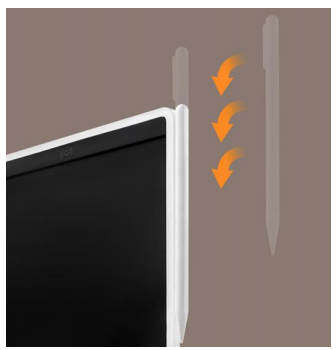
A: There are magnetic slots on the side of the tablet, into which the raised prongs on the Stylus cap can be slid. Both the tablet and the pen have built-in magnets that work with the slots to attach and snap to each other for secure storage.
3.Q: What do I need to pay attention to when storing Xiaomi LCD Writing Tablet 13.5" (Color Edition)?
A: Please keep the product in a cool and dry place, and do not allow direct sunlight.
4. Q:What are the precautions for using the battery of Xiaomi LCD Writing Tablet 13.5" (Color Edition)?
A: This product consumes very little power only when erasing content, writing does not consume power. The device can be used for about 12 months with a fresh battery. The specific length of use may fluctuate depending on the frequency of use and the temperature and humidity environment. The battery type is Button cell battery (CR2025).
5. Q:Is the pre-installed battery in Xiaomi LCD Writing Tablet 13.5" (Color Edition) rechargeable?
A: No. The pre-installed battery is single-use, and when the power is exhausted, the disused battery should be disposed of in a special trash can.
6. Q:Is the Xiaomi LCD Writing Tablet 13.5" (Color Edition) washable?
A: No.This product contains electronic components, so wipe the surface with a soft, dry cloth when cleaning.
7. Q:Can the Xiaomi LCD Writing Tablet 13.5" (Color Edition) Stylus be replaced with other items?
A: No. The material of the writing area of this product is polymer solid LCD soft film, using other material items to scratch the writing area may cause damage to the product. In addition, only the original Stylus supports the Hall sensor screen clearing function.
8. Q:How to use the Hall Clear function on Xiaomi LCD Writing Tablet 13.5" (Color Edition)?
A: Use the pen cap to gently touch the Hall sensor area with the icon on the Writing Tablet to clear the screen. This operation is only available for Xiaomi LCD Writing Tablet 13.5" (Color Edition) with Stylus, other non-original or previous generation tablets do not support this function.
Note: Due to the Hall sensor, any magnetic objects touching this area will trigger the screen clearing function.
9. Q:How to turn on/off the Xiaomi LCD Writing Tablet 13.5" (Color Edition)?
A: The LCD display of Xiaomi LCD Writing Tablet is not self-luminous and consumes very little power only when the screen is cleared, so there is no need to turn the device on and off.
10.Q: How hard is the screen of Xiaomi LCD Writing Tablet 13.5" (Color Edition)?
A: The surface hardness of the product is 2H, but it is still highly recommended to use only the original writing pen for writing operations to avoid writing area damage to the writing area.
11. Q:Is the thickness of the writing on the Xiaomi LCD Writing Tablet 13.5" (Color Edition) adjustable?
A: It does not support adjustment, but can be indirectly changed by adjusting the speed of the pen tip movement when drawing, faster movement is fine, slower movement is coarse.
12.Q: Can I switch the handwriting color of Xiaomi LCD Writing Tablet 13.5" (Color Edition)?
A: No, different colors for different areas are the default.
13.Q: Can I use Xiaomi LCD Writing Tablet 13.5" (Color Edition) in low light?
A: The product screen itself is not light-emitting, so it needs to be illuminated by a light source in a dark environment.
14. Q:Xiaomi LCD Writing Tablet 13.5" (Color Edition) Is there any damage to my eyesight from long-term use?
A: The product screen is different from cell phones, TVs and other screens that emit light and do not actively emit harmful light.
The effect of drawing on glasses is the same, pay attention to the use of distance, ambient light and dark and other daily eye habits.
15.Q:Can I store the screen on Xiaomi LCD Writing Tablet 13.5" (Color Edition)?
A: It can be cleared temporarily by screen lock to prevent accidental key touch, and does not support storage function.
16.Q: Can Xiaomi LCD Writing Tablet 13.5" (Color Edition) clear only some areas?
A: It only cleans full screen, not partial erase.
17.Q: How to use the lock switch of Xiaomi LCD Writing Tablet 13.5" (Color Edition)?
A: When the lock switch is pushed to the lock state, the key clear function and sensor clear function of Writing Tablet will be locked to avoid erasing the drawing content by mistake.
Note: Drawing can still be done in the locked state, only the content clearing function is locked.
FAQ
1. Q:I just received Xiaomi LCD Writing Tablet 13.5" (Color Edition), why are there traces of use or patterns on the screen?
A: The Writing Tablet is a pen-sensitive screen, so it is normal to see patterns or marks on the screen due to external pressure during transportation. Just turn off the lock button and use Stylus to clear the screen or press the button to clear the screen.
2. Q:Is it normal for the Xiaomi LCD Writing Tablet 13.5" (Color Edition) to leave traces of my hand on the screen when I draw with the pen?
A: Yes, Writing Tablet is a pen-sensitive drawing device, and the screen will leave a pattern when it feels the pressure of the object. You can try to avoid your fingers and sleeves touching the screen when you write or draw.
3. Q:Why can't the screen content be cleared by pressing the key or NFC on Xiaomi LCD Writing Tablet 13.5" (Color Edition)?
A: Please make sure that Clear Lock is turned on. If it is not turned on, the possible reasons are that the built-in battery is too low, or The battery polarity is reversed, or please refer to the instruction manual to replace the corresponding type (CR2025) of button battery.
4. Q:What should I do if I can't take out the battery cover when replacing the battery of Xiaomi LCD Writing Tablet 13.5" (Color Edition)?
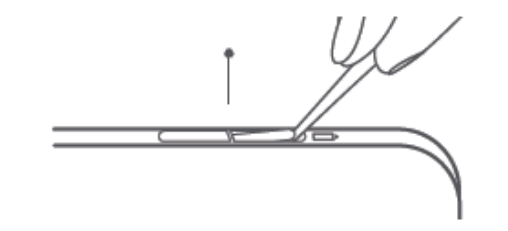
A: The battery cover of this product is designed to be removed with one hand to avoid the danger of easy removal by young children. Therefore, you need to use a tool to pry up the Therefore, you need to use a tool to pry up the side to remove the battery cover, as shown in the figure below.
1. Q:What are the features of Xiaomi LCD Writing Tablet 13.5" (Color Edition)?
A:Draw on the move, capture moments with a full pallette
Color gradient partition for true color brushstrokes
Use the pen cap to clear the screen effortlessly
Lightweight, portable, and easy to carry
LCD screen with eye care feature, dust-free, ink-free, and filters blue light
Low energy consumption for longer battery life
2. Q:How to store the Stylus on Xiaomi LCD Writing Tablet 13.5" (Color Edition)?
A: There are magnetic slots on the side of the tablet, into which the raised prongs on the Stylus cap can be slid. Both the tablet and the pen have built-in magnets that work with the slots to attach and snap to each other for secure storage.
3.Q: What do I need to pay attention to when storing Xiaomi LCD Writing Tablet 13.5" (Color Edition)?
A: Please keep the product in a cool and dry place, and do not allow direct sunlight.
4. Q:What are the precautions for using the battery of Xiaomi LCD Writing Tablet 13.5" (Color Edition)?
A: This product consumes very little power only when erasing content, writing does not consume power. The device can be used for about 12 months with a fresh battery. The specific length of use may fluctuate depending on the frequency of use and the temperature and humidity environment. The battery type is Button cell battery (CR2025).
5. Q:Is the pre-installed battery in Xiaomi LCD Writing Tablet 13.5" (Color Edition) rechargeable?
A: No. The pre-installed battery is single-use, and when the power is exhausted, the disused battery should be disposed of in a special trash can.
6. Q:Is the Xiaomi LCD Writing Tablet 13.5" (Color Edition) washable?
A: No.This product contains electronic components, so wipe the surface with a soft, dry cloth when cleaning.
7. Q:Can the Xiaomi LCD Writing Tablet 13.5" (Color Edition) Stylus be replaced with other items?
A: No. The material of the writing area of this product is polymer solid LCD soft film, using other material items to scratch the writing area may cause damage to the product. In addition, only the original Stylus supports the Hall sensor screen clearing function.
8. Q:How to use the Hall Clear function on Xiaomi LCD Writing Tablet 13.5" (Color Edition)?
A: Use the pen cap to gently touch the Hall sensor area with the icon on the Writing Tablet to clear the screen. This operation is only available for Xiaomi LCD Writing Tablet 13.5" (Color Edition) with Stylus, other non-original or previous generation tablets do not support this function.
Note: Due to the Hall sensor, any magnetic objects touching this area will trigger the screen clearing function.
9. Q:How to turn on/off the Xiaomi LCD Writing Tablet 13.5" (Color Edition)?
A: The LCD display of Xiaomi LCD Writing Tablet is not self-luminous and consumes very little power only when the screen is cleared, so there is no need to turn the device on and off.
10.Q: How hard is the screen of Xiaomi LCD Writing Tablet 13.5" (Color Edition)?
A: The surface hardness of the product is 2H, but it is still highly recommended to use only the original writing pen for writing operations to avoid writing area damage to the writing area.
11. Q:Is the thickness of the writing on the Xiaomi LCD Writing Tablet 13.5" (Color Edition) adjustable?
A: It does not support adjustment, but can be indirectly changed by adjusting the speed of the pen tip movement when drawing, faster movement is fine, slower movement is coarse.
12.Q: Can I switch the handwriting color of Xiaomi LCD Writing Tablet 13.5" (Color Edition)?
A: No, different colors for different areas are the default.
13.Q: Can I use Xiaomi LCD Writing Tablet 13.5" (Color Edition) in low light?
A: The product screen itself is not light-emitting, so it needs to be illuminated by a light source in a dark environment.
14. Q:Xiaomi LCD Writing Tablet 13.5" (Color Edition) Is there any damage to my eyesight from long-term use?
A: The product screen is different from cell phones, TVs and other screens that emit light and do not actively emit harmful light.
The effect of drawing on glasses is the same, pay attention to the use of distance, ambient light and dark and other daily eye habits.
15.Q:Can I store the screen on Xiaomi LCD Writing Tablet 13.5" (Color Edition)?
A: It can be cleared temporarily by screen lock to prevent accidental key touch, and does not support storage function.
16.Q: Can Xiaomi LCD Writing Tablet 13.5" (Color Edition) clear only some areas?
A: It only cleans full screen, not partial erase.
17.Q: How to use the lock switch of Xiaomi LCD Writing Tablet 13.5" (Color Edition)?
A: When the lock switch is pushed to the lock state, the key clear function and sensor clear function of Writing Tablet will be locked to avoid erasing the drawing content by mistake.
Note: Drawing can still be done in the locked state, only the content clearing function is locked.
FAQ
1. Q:I just received Xiaomi LCD Writing Tablet 13.5" (Color Edition), why are there traces of use or patterns on the screen?
A: The Writing Tablet is a pen-sensitive screen, so it is normal to see patterns or marks on the screen due to external pressure during transportation. Just turn off the lock button and use Stylus to clear the screen or press the button to clear the screen.
2. Q:Is it normal for the Xiaomi LCD Writing Tablet 13.5" (Color Edition) to leave traces of my hand on the screen when I draw with the pen?
A: Yes, Writing Tablet is a pen-sensitive drawing device, and the screen will leave a pattern when it feels the pressure of the object. You can try to avoid your fingers and sleeves touching the screen when you write or draw.
3. Q:Why can't the screen content be cleared by pressing the key or NFC on Xiaomi LCD Writing Tablet 13.5" (Color Edition)?
A: Please make sure that Clear Lock is turned on. If it is not turned on, the possible reasons are that the built-in battery is too low, or The battery polarity is reversed, or please refer to the instruction manual to replace the corresponding type (CR2025) of button battery.
4. Q:What should I do if I can't take out the battery cover when replacing the battery of Xiaomi LCD Writing Tablet 13.5" (Color Edition)?
A: The battery cover of this product is designed to be removed with one hand to avoid the danger of easy removal by young children. Therefore, you need to use a tool to pry up the Therefore, you need to use a tool to pry up the side to remove the battery cover, as shown in the figure below.
Does it help?
Yes
No